
Secure Your PDFs: Permanently Remove Hidden Data and Protect Sensitive Information
Last month, we shared a PDF containing a new partnership contract with a client, only to realize later that it still contained hidden metadata and personal informationputting our company at risk of a serious GDPR violation. The thought of confidential names, emails, and financial details potentially being exposed to unauthorized parties was unsettling. If you’ve ever faced this scenario, you know how quickly a seemingly minor oversight can escalate into a compliance headache, a legal risk, or even a costly data breach.
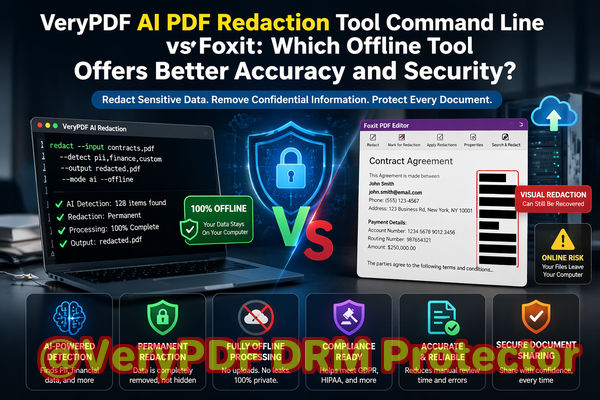
Businesses today handle a flood of digital documentscontracts, HR files, financial reports, medical recordsand all of them carry sensitive information. One small mistake, like sharing an unredacted PDF or relying on an online redaction tool, can result in confidential data leaking to unintended recipients. Even a blacked-out section in a PDF isn’t always safe; metadata, hidden layers, or improperly applied redactions can allow data to be recovered.
This is where VeryPDF AI PDF Redaction Tool Command Line comes ina practical solution designed for business professionals who need to share documents securely, comply with regulations, and protect their organization’s reputation.
Businesses face real risks when handling sensitive documents:
-
Accidental exposure of sensitive data: Names, email addresses, phone numbers, social security numbers, or contract terms can remain hidden in PDFs and become accessible to anyone who opens the file. A single shared PDF could inadvertently expose personal data or internal business secrets, leading to compliance violations under GDPR or similar data protection laws.
-
Manual redaction errors: Traditional methods of blacking out or covering text are often ineffective. The underlying data may still be recoverable, meaning confidential information isn’t truly removed. Legal teams and HR departments risk breaches of privacy policies and may face serious penalties.
-
Unsafe online tools: Many employees turn to online PDF redaction services, unknowingly uploading sensitive documents to third-party servers. This creates an additional layer of riskyour company’s confidential data may now exist outside of your secure environment, vulnerable to leaks, misuse, or cyberattacks.
VeryPDF AI PDF Redaction Tool Command Line addresses these issues directly. It’s an offline, AI-powered solution that permanently removes sensitive data from PDFs before sharing. Here’s how it protects your business:
-
Automatic detection of sensitive information: Using advanced AI, the tool identifies personal data, financial details, business secrets, and legal clauses. It can detect names, emails, phone numbers, social security or ID numbers, account numbers, and more, ensuring nothing slips through unnoticed.
-
Permanent removal of confidential data: Unlike simple visual redaction, this tool completely eliminates the underlying data, leaving no recoverable information. Once redacted, sensitive details are gone for good.
-
Fully offline processing: All work is done locally on your computer, eliminating the risk of uploading confidential files to unknown servers. Your documents remain private, secure, and compliant with data protection regulations.
Consider a scenario where a law firm needed to share court documents with external partners. Previously, they relied on employees to manually redact sensitive sections, which was time-consuming and prone to mistakes. By adopting VeryPDF AI PDF Redaction Tool Command Line, the firm could automatically scan documents for sensitive information, review suggested redactions, and export clean PDFs ready for sharingall without sending files to any online service. This not only saved time but prevented potential compliance violations.
Another example involves a healthcare provider handling patient records. Sharing unredacted files with external labs could have exposed confidential patient data. Using the offline AI PDF redaction tool, the provider ensured that personal identifiers, medical IDs, and financial information were permanently removed before sharing. The outcome: secure communication with partners and full regulatory compliance.
Step-by-step workflow for secure PDF redaction:
-
Load PDF: Open your document in VeryPDF AI PDF Redaction Tool Command Line.
-
Detect sensitive data: The AI scans for personal, financial, and business-sensitive information.
-
Review: Confirm the detected items and make any manual adjustments if necessary.
-
Apply redaction: Permanently remove the identified data with one command.
-
Export clean PDF: Share the document confidently, knowing it’s safe and compliant.
Common types of sensitive data to redact include:
-
Personal identifiable information (PII) such as names, addresses, emails, phone numbers, and IDs
-
Financial data like bank account numbers, invoices, and transaction details
-
Business secrets, proprietary formulas, or internal strategies
-
Legal clauses and confidential contract information
With this approach, businesses minimize the risk of accidental data leaks, legal exposure, and compliance penalties. The AI ensures nothing is missed, while the offline functionality guarantees complete privacy.
I highly recommend this tool to any business professional, compliance officer, or legal team who regularly handles sensitive documents. Using VeryPDF AI PDF Redaction Tool Command Line, you can confidently share PDFs without worrying about hidden metadata, recoverable redactions, or inadvertent exposure of confidential information.
Try it now and securely redact your PDFs: https://veryutils.com/smart-redact-server-ai-powered-pdf-redaction-software
Start your free trial today and ensure your sensitive data is permanently removed before sharing.
Frequently Asked Questions (FAQs)
-
How can I permanently remove sensitive data from a PDF instead of just hiding it?
VeryPDF AI PDF Redaction Tool Command Line deletes the underlying data rather than simply masking it, making it unrecoverable.
-
Can others recover redacted information from my PDF?
No, when properly redacted with this tool, the information is permanently removed and cannot be recovered.
-
Is it safe to use online PDF redaction tools?
Online tools pose risks because documents are uploaded to external servers, which can expose sensitive data. Offline tools like VeryPDF provide complete privacy.
-
Does this tool work completely offline?
Yes, all processing occurs locally on your computer, ensuring your documents never leave your secure environment.
-
What types of sensitive data can be automatically detected and removed?
The AI can detect PII, financial details, business secrets, legal clauses, IDs, emails, phone numbers, and more.
-
How does this tool help with GDPR compliance?
By permanently removing personal data before sharing, it reduces the risk of accidental exposure and ensures adherence to data protection regulations.
-
Can I review what will be redacted before applying changes?
Yes, the tool allows you to review suggested redactions and make adjustments before finalizing.
-
Is it suitable for large batches of documents?
Absolutely. The command line interface allows efficient processing of multiple PDFs, saving time for teams handling large volumes.
-
What industries benefit most from this tool?
Legal, HR, finance, healthcare, and any organization handling sensitive contracts, reports, or client information.
-
Can it detect hidden metadata in PDFs?
Yes, it identifies and removes hidden metadata, embedded objects, and layers that could expose sensitive information.
-
Does it require technical expertise to use?
No, the workflow is designed to be user-friendly while providing powerful AI capabilities behind the scenes.
Keywords:
redact sensitive data, remove confidential information, PDF redaction tool, protect privacy in PDFs, prevent data leaks, offline PDF redaction, secure document sharing, GDPR compliance, AI PDF redaction, permanent data removal