
Why Permanent PDF Redaction Is Essential for Protecting Sensitive Business Data
Last month, we shared a PDF contract with a partner, only to realize later that it still contained unredacted personal dataputting us at risk of a serious GDPR violation. The sinking feeling of knowing confidential information might have been exposed is something every manager, legal team, or compliance officer dreads. In today’s digital workplace, sharing documents is unavoidable, but the risk of inadvertently leaking sensitive information is real and potentially costly.
Many businesses assume that simply blacking out information in a PDF is enough. Unfortunately, that’s rarely the case. Even if text is visually hidden, it can often be copied or recovered, leaving your company vulnerable to data breaches, compliance penalties, and legal exposure. The consequences aren’t hypotheticalcompanies have faced fines, lawsuits, and reputational damage because confidential data was shared carelessly.
This is where a reliable, AI-powered PDF redaction tool becomes crucial. Tools like the VeryPDF AI PDF Redaction Tool Command Line are designed not just to obscure sensitive content, but to permanently remove it, ensuring your documents are safe to share with clients, partners, or employees.
Many businesses face recurring pain points when it comes to handling sensitive documents. Here are a few of the most common risks we encounter:
1. Accidental exposure of sensitive data
Imagine sending an internal HR report or financial statement to an external partner, only to discover it contains names, email addresses, phone numbers, or Social Security numbers. This scenario isn’t rare. Exposing personal identifiable information (PII) or financial data can lead to GDPR violations, hefty fines, and severe reputational damage.
2. Inadequate manual redaction
Some companies still rely on manual methodshighlighting text and covering it with black boxes or using generic PDF editors. While it looks secure, these methods often fail to remove the underlying data. Text may remain in the document, invisible to the eye but fully recoverable by anyone with basic PDF tools.
3. Unsafe online redaction tools
Employees sometimes turn to free online PDF redactors without realizing that uploading confidential files to a third-party server is a major security risk. Even if the site promises deletion, there’s no guarantee that your sensitive data won’t be stored or misused.
To tackle these challenges effectively, I started using the VeryPDF AI PDF Redaction Tool Command Line. The benefits are immediate and tangible:
Automated detection of sensitive information
Rather than manually hunting through documents, the tool uses AI to detect PII, financial data, legal clauses, and confidential business information. It identifies what needs to be redacted, allowing you to focus on reviewing rather than searching.
Permanent removal, not just visual masking
Unlike traditional methods, VeryPDF ensures that redacted information is permanently removed. There’s no risk of hidden text being copied or recovered. Once it’s redacted, it’s gone.
Fully offline processing for maximum security
All redaction happens locally on your computer. Documents never leave your environment, which eliminates the risk of accidental exposure via cloud uploads or third-party servers. This is particularly critical for organizations handling sensitive contracts, HR records, financial reports, or medical data.
The practical benefits of permanent, AI-powered PDF redaction are clear:
-
Prevent accidental data leaks that could trigger fines or legal exposure.
-
Eliminate risks associated with online redaction tools.
-
Ensure compliance with GDPR, HIPAA, and other data protection regulations.
Let me illustrate with a real example: A mid-sized consulting firm needed to share project reports containing client contact information and financial projections. Previously, staff had redacted information manually. On one occasion, a document was accidentally emailed with visible email addresses and client notes. After switching to the VeryPDF AI PDF Redaction Tool Command Line, the firm could automatically detect and permanently remove sensitive content before sending files externally. The team eliminated risk entirely, saving time and avoiding potential regulatory fines.
Another scenario involved a legal department preparing contracts for multiple stakeholders. Using manual methods, lawyers occasionally missed clauses containing confidential negotiation details. By integrating VeryPDF’s AI tool into their workflow, they could systematically redact every sensitive clause, ensuring nothing confidential slipped through, while also creating a clear audit trail for compliance purposes.
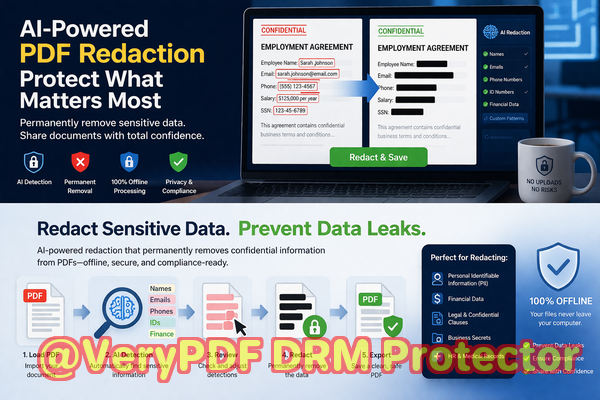
Here’s a practical workflow for using the tool effectively:
-
Load your PDF Open the document you want to redact.
-
Detect sensitive data AI identifies PII, financial info, legal clauses, and business secrets.
-
Review suggested redactions You control what gets permanently removed.
-
Apply redaction The tool permanently deletes sensitive content.
-
Export clean PDF Share the document confidently, knowing it’s safe.
Common types of sensitive data to redact include:
-
Personal identifiable information (PII) names, emails, phone numbers, addresses, IDs
-
Financial data bank account numbers, payment details, salary info
-
Business secrets strategy documents, product development plans, R&D data
-
Legal/confidential clauses non-disclosure terms, settlement agreements, contractual details
The impact of proper PDF redaction extends beyond compliance. It reduces stress for employees, protects your brand reputation, and establishes trust with clients and partners. Knowing that your documents are permanently sanitized allows your team to collaborate freely without worrying about accidental leaks.
I’ve seen organizations transition from risky manual or online redaction methods to a fully secure, offline AI solution. One HR department, for instance, moved all employee records through VeryPDF’s tool before sharing with external auditors. The result: zero exposure incidents and a significant boost in audit confidence. Another company used it to securely share financial statements with investors, eliminating the risk of leaking sensitive shareholder information.
I highly recommend the VeryPDF AI PDF Redaction Tool Command Line to anyone who handles sensitive documents regularly. Its AI-driven detection, permanent redaction, and offline processing provide peace of mind for businesses that cannot afford leaks or compliance mistakes.
Try it now and securely redact your PDFs: https://veryutils.com/smart-redact-server-ai-powered-pdf-redaction-software
Start your free trial today and ensure your sensitive data is permanently removed before sharing.
Frequently Asked Questions
Q: How can I permanently remove sensitive data from a PDF instead of just hiding it?
A: The VeryPDF AI PDF Redaction Tool Command Line permanently deletes selected information, ensuring it cannot be recovered or copied.
Q: Can others recover redacted information from my PDF?
A: No. Redactions are permanent and remove the underlying data entirely, not just the visible text.
Q: Is it safe to use online PDF redaction tools?
A: Online tools pose a risk because files are uploaded to external servers. Offline AI tools like VeryPDF ensure your documents never leave your environment.
Q: Does this tool work completely offline?
A: Yes. All processing happens locally on your computer for 100% privacy and security.
Q: What types of sensitive data can be automatically detected and removed?
A: The tool can detect PII, financial information, business secrets, legal clauses, and other confidential content.
Q: How does this help with GDPR compliance?
A: By permanently removing personal data before sharing documents, you minimize the risk of accidental exposure and ensure compliance with data protection regulations.
Q: Can I review what will be redacted before applying changes?
A: Yes. The tool allows you to review suggested redactions to ensure accuracy.
Q: Can it handle large PDF files with hundreds of pages?
A: Absolutely. The tool is designed to process large documents efficiently without compromising security.
Q: Is it suitable for HR, legal, and financial documents?
A: Yes. It is ideal for any document containing sensitive personal, financial, or contractual information.
Q: How easy is it to integrate into existing workflows?
A: Very easy. Its command-line interface allows automation, batch processing, and integration with document management systems.
Q: What makes AI redaction better than manual methods?
A: AI detects hidden patterns and sensitive data that human reviewers might miss, reducing errors and ensuring complete protection.
Tags/Keywords
redact sensitive data, remove confidential information, PDF redaction tool, protect privacy in PDFs, prevent data leaks, offline PDF redaction, secure document sharing, AI PDF redaction, GDPR compliance, permanent redaction