How to Password Protect a PDF Before You Share It Using VeryPDF DRM Protector Web Application

Sending PDF email attachments has become second nature for most of us. Whether it’s a business contract, a report, a presentation, or any other type of document, PDFs are often the preferred format. However, have you ever stopped to think about whether the PDF file you’re sending is secure? Once shared, your document could end up in the wrong hands. That’s where password protection comes in.

In this article, we’ll show you how to easily password protect a PDF using VeryPDF DRM Protector Web Application before you share it with others, ensuring your sensitive content stays secure.

The Importance of PDF Security

Since its creation in the 1990s, the PDF format has grown into one of the most popular file types for sharing information. PDFs are used across industries by professionals, students, and even casual users. They provide a reliable, platform-independent way to share documents that preserves formatting. However, as with any file format, PDFs can be vulnerable if they are shared without the right protections in place.

By default, PDFs are not encrypted or password-protected, which means anyone with access to the file can open and view its content. To protect sensitive information—be it a confidential report or a financial statement—adding a password layer can keep your documents secure.
How to Password Protect a PDF Before You Share It Using VeryPDF DRM Protector Web Application

How to Password Protect a PDF Using VeryPDF DRM Protector?

If you’re looking to password protect a PDF before sending it out, VeryPDF DRM Protector provides an excellent solution. This web application offers robust security features for business professionals and anyone who needs to ensure that only the right people can view their PDFs. Here’s how you can easily password protect a PDF using this tool:

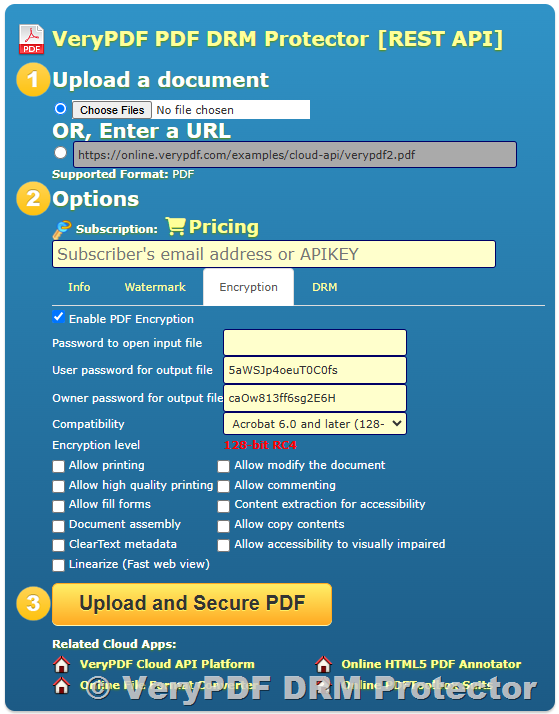
  1. Upload Your PDF to VeryPDF DRM Protector:
    Begin by logging into your VeryPDF DRM Protector account. Once you’re logged in, click on the “Upload PDF” option. Select the PDF file you wish to protect from your device.
  2. Set Up Your Password:
    After uploading the PDF, you’ll be prompted to set a password. This will be required for anyone to open and view the document, ensuring that unauthorized users can’t access its contents. Choose a strong password that combines letters, numbers, and special characters to maximize security.
  3. Configure Additional Protection Options (Optional):
    VeryPDF DRM Protector allows you to customize additional security settings such as limiting the number of views, preventing printing, or setting expiration dates for access. You can also track who views the PDF and when, giving you complete control over how the document is accessed.
  4. Download the Protected PDF:
    Once your settings are complete, click the “Protect” button. Your PDF will now be encrypted with the password and any additional protection settings you’ve chosen. You can then download the protected PDF to your device.
  5. Send Your PDF Securely:
    Now that your PDF is password protected, you can confidently send it through email. You can use Gmail or Outlook with the VeryPDF DRM Protector Gmail/Outlook Plugin for even further protection. These plugins allow you to send PDFs securely directly from your email client while tracking who views the document and when.

Track Your PDF Engagement

One of the standout features of VeryPDF DRM Protector is its ability to track PDF engagement. After sending your password-protected PDF, you can monitor its usage through the application’s detailed tracking dashboard. You can see who opened the document, when they opened it, how many times they viewed it, and whether they attempted to share or print the document.

This level of tracking is particularly valuable for business leaders and anyone dealing with confidential information. It ensures that your document is not only secure but also that you can keep tabs on its distribution and usage.

Why Choose VeryPDF DRM Protector?

  • Advanced Security Features: Protect your PDFs with strong encryption and password protection, and prevent unauthorized access.
  • Customizable Settings: Tailor access permissions to suit your needs, including view limits, expiration dates, and more.
  • Easy Integration with Email Clients: With the Gmail and Outlook plugins, you can send protected PDFs directly from your email client.
  • Engagement Tracking: Monitor how recipients interact with your PDF, giving you valuable insights into who is accessing your document.

Conclusion

When sending sensitive PDF documents, it’s crucial to ensure that they are adequately protected from unauthorized access. VeryPDF DRM Protector offers a simple yet powerful solution to password protect your PDFs and even track their usage after they’ve been sent. With customizable security features and seamless email integration, you can send your PDFs with confidence, knowing that they’re secure and under your control.

Next time you need to send a PDF attachment, take the extra step to protect it. With VeryPDF DRM Protector, you’ll have peace of mind knowing that your sensitive documents are safe and secure.

[Solution] Comprehensive Anti-Piracy Solutions for PDF E-books

In the digital era, e-books have revolutionized the way we read and consume information. The convenience of accessing a vast library of books on various devices has made e-books a popular choice for both readers and publishers. However, this convenience also brings challenges, especially when it comes to protecting e-books from piracy and unauthorized distribution. Piracy is a significant issue in the e-book industry, as it threatens authors, publishers, and content creators by undermining revenue and intellectual property rights.

To address this challenge, PDF e-books, in particular, require specialized anti-piracy solutions to protect them from unauthorized access, copying, and sharing. In this article, we will explore effective anti-piracy measures designed to secure PDF e-books and ensure that they remain protected against illegal distribution.

[Solution] Comprehensive Anti-Piracy Solutions for PDF E-books

The Problem of E-book Piracy

E-book piracy involves the illegal distribution, copying, and downloading of e-books without proper authorization. This can occur in many ways, such as through peer-to-peer sharing, illegal file-sharing websites, and torrent platforms. The impact of piracy can be severe for authors and publishers. It diminishes their ability to profit from their work, leading to a loss of revenue. Furthermore, widespread piracy can harm the reputation of legitimate e-book sellers and make it harder for new authors to gain recognition.

PDF e-books, while offering many advantages such as easy distribution and a consistent reading experience, are also susceptible to piracy. Unlike physical books, which cannot be easily duplicated, digital files can be reproduced and shared with a simple click of a button. Thus, it’s essential to implement strong anti-piracy solutions to safeguard PDF e-books.

Key Anti-Piracy Solutions for PDF E-books

1. Digital Rights Management (DRM)

One of the most effective ways to protect PDF e-books from piracy is by using Digital Rights Management (DRM) technologies. DRM refers to a set of technologies used to restrict unauthorized access and distribution of digital content. When applied to PDF e-books, DRM enables publishers to set specific usage restrictions on the document, including preventing copying, printing, and sharing of the file.

DRM systems often require users to authenticate their identity before accessing the e-book, such as through passwords, licenses, or user accounts. Some advanced DRM solutions even allow publishers to apply watermarks to e-books, which can trace the source of any leaked copies back to the original purchaser, acting as a deterrent for piracy.

Common DRM tools for PDFs include Adobe Digital Editions, LockLizard, and VeryPDF DRM Protector, each offering a range of features to protect e-books from unauthorized distribution and copying.

2. Password Protection and Encryption

Password protection is one of the most straightforward and effective ways to restrict access to PDF e-books. By requiring a password to open the PDF, publishers ensure that only authorized individuals can access the file. The password can be assigned on an individual basis, making it easier to manage and control who can read the content.

Another critical method of securing PDF e-books is encryption. Encryption involves converting the content of the PDF into a scrambled format, which can only be decrypted by authorized users with the correct password or key. Encryption ensures that even if a PDF e-book is intercepted during distribution, it cannot be accessed without the decryption key, adding an additional layer of security against piracy.

3. Watermarking

Watermarking involves embedding a visible or invisible mark within the e-book to identify the owner of the file. This mark can include user-specific information such as the buyer’s name, email address, or purchase ID. Watermarks help track the origin of pirated copies, as they can be used to trace the source of any leaked content.

Unlike other forms of protection, watermarks do not prevent users from accessing or reading the e-book. However, they serve as a deterrent to unauthorized sharing, as anyone who tries to distribute a PDF e-book with a watermark will be easily identifiable. Both visible and invisible watermarks can be applied to PDF e-books, and some advanced DRM solutions allow dynamic watermarking, where each copy of the file gets a unique watermark.

4. Device/Platform Restriction

Restricting the device or platform on which the PDF e-book can be accessed is another effective anti-piracy measure. This solution ensures that the e-book can only be viewed on specific devices or applications that are authorized by the publisher or seller.

For example, some e-book platforms allow publishers to lock PDF files to specific devices, such as an individual’s computer or e-reader. This prevents the file from being transferred and opened on other unauthorized devices. Such restrictions can be enforced through DRM software that ensures the PDF is only readable on authorized devices or applications, reducing the risk of piracy.

5. Time-limited Access (Expiring PDFs)

Offering time-limited access to PDF e-books can be a useful way to prevent piracy. By setting an expiration date for the file, publishers can ensure that the e-book is no longer accessible after a certain period. This is especially effective for short-term promotions or rental services, where users are granted access to the file only for a limited time.

Once the time limit expires, the PDF e-book automatically becomes inaccessible, preventing unauthorized distribution after the access period ends. This approach helps control the availability of the e-book and reduces the window of opportunity for piracy.

6. Secure Distribution Channels

A secure distribution channel is essential to prevent e-book piracy at the source. Instead of relying on open or unsecured platforms for distribution, publishers should use secure, encrypted platforms that ensure safe file delivery. Using a secure website, platform, or cloud service for e-book distribution can help reduce the risk of piracy.

Platforms that offer secure authentication and purchase verification, such as Amazon Kindle, Google Play Books, or Apple Books, can help prevent unauthorized access to the PDF e-books. Secure payment systems also reduce the chances of unauthorized access by ensuring that only paying customers can download the e-book.

Conclusion

E-book piracy is a significant threat to authors, publishers, and content creators in the digital age. PDF e-books, while offering convenience and portability, are vulnerable to unauthorized access and distribution. To protect valuable intellectual property, publishers must implement comprehensive anti-piracy solutions, including DRM, encryption, password protection, watermarking, device restrictions, time-limited access, and secure distribution channels.

By adopting a combination of these security measures, publishers can safeguard their PDF e-books from piracy and ensure that they continue to profit from their work. Investing in robust anti-piracy solutions is a necessary step to preserve the value of digital content and protect the rights of creators in an increasingly interconnected digital world.

How to Prevent PDF Screenshots: VeryPDF DRM Protector’s Screenshot Protection Feature

In the digital age, PDF files are one of the most commonly used formats for sharing and storing documents. However, as these files are increasingly shared across various platforms and devices, protecting them from unauthorized access or manipulation has become a top priority for many businesses and individuals. One of the most common concerns is the ability for users to take screenshots of PDFs, potentially leaking sensitive information.

In this article, we will explore how to prevent PDF screenshots and introduce the powerful Screenshot Protection Feature of VeryPDF DRM Protector, which can effectively block users from taking screenshots of PDF files while viewing them in browsers on Windows and Mac operating systems.

How to Prevent PDF Screenshots: VeryPDF DRM Protector's Screenshot Protection Feature

Why Do You Need to Prevent PDF Screenshots?

Taking screenshots is a common and easy method for users to capture the content displayed on their screens. On both Windows and Mac operating systems, users can easily use built-in screenshot tools or third-party applications to capture and save images of any document, including PDFs. Unfortunately, this feature presents a security risk when dealing with confidential or sensitive documents. For instance, a sensitive contract, financial report, or proprietary data could be leaked if someone screenshots the PDF and shares it without permission.

Preventing screenshots is crucial for organizations that want to maintain the confidentiality of their intellectual property, legal documents, and other sensitive files. Without proper protection, unauthorized screenshots could lead to data breaches, privacy violations, and the dissemination of confidential information.

How to Prevent PDF Screenshots?

Using VeryPDF DRM Protector’s Screenshot Protection Feature

VeryPDF DRM Protector is an advanced PDF protection tool that helps users secure their PDF files against unauthorized access, copying, and distribution. One of its most significant features is the Screenshot Protection, which prevents users from taking screenshots of PDFs while they are being viewed in browsers on both Windows and Mac operating systems. Let’s take a closer look at this feature:

  1. Disabling Screenshot Tools: Many operating systems, such as Windows and Mac, come with built-in screenshot tools like the Snipping Tool (Windows) and the Screenshot feature (Mac). These tools allow users to quickly capture parts of their screen and save them as image files. With VeryPDF DRM Protector, this functionality is disabled when users try to open a protected PDF file. The tool actively blocks standard screenshot shortcuts such as “PrtSc” (Print Screen) or “Cmd + Shift + 4” (Mac), making it impossible for users to capture the content of the PDF using conventional screenshot methods.
  2. Blocking Screen Recording and Sharing: In addition to taking static screenshots, many users may attempt to record their screens or share their screens using browser-based or third-party tools. However, VeryPDF DRM Protector not only disables screenshots but also prevents screen recording and sharing during PDF viewing. Whether users are using a browser-based PDF reader or a third-party PDF tool, the protection feature ensures that no screen capture software or screen-sharing applications can record or share the PDF content in real-time.
  3. Browser-Specific Protection for Windows and Mac: One of the most impressive aspects of VeryPDF DRM Protector is its ability to target browser-based PDF viewing environments. Whether users are viewing PDFs in popular browsers like Google Chrome, Mozilla Firefox, Safari, or Microsoft Edge on Windows or Mac, the Screenshot Protection feature works seamlessly across all platforms. When a user attempts to take a screenshot of a PDF viewed in a browser, the protective mechanisms of VeryPDF DRM Protector immediately intervene to block the action, ensuring that no unauthorized screenshots are captured.
  4. Prevention of Copying and Sharing: Apart from blocking screenshots, VeryPDF DRM Protector also provides comprehensive security features that prevent unauthorized copying, printing, and sharing of PDF files. Users cannot easily copy text or images from the document, ensuring that the content is protected against illegal duplication and dissemination.

Why Use VeryPDF DRM Protector for Screenshot Prevention?

  1. Enhanced Document Security: VeryPDF DRM Protector provides an advanced layer of security, protecting sensitive documents from unauthorized access and sharing. Preventing screenshots is just one aspect of the protection, but it ensures that the most common method of information theft—capturing screen images—remains impossible.
  2. User-Friendly Interface: Despite its powerful features, VeryPDF DRM Protector is easy to use. Setting up PDF protection is straightforward, and no advanced technical skills are required. You can apply screenshot protection to your PDF files with just a few clicks.
  3. Protection Across Platforms: The ability to prevent screenshots on both Windows and Mac browsers is particularly useful in today’s cross-platform environment. Users on different operating systems will be equally restricted from taking screenshots of your protected PDFs, providing a consistent level of security.
  4. Compliance with Data Security Regulations: Many industries are required to follow strict data protection regulations, such as HIPAA, GDPR, or PCI DSS. Using VeryPDF DRM Protector to prevent screenshots and control access to sensitive PDFs helps ensure compliance with these legal and regulatory requirements.

Conclusion

Protecting your PDF documents from unauthorized screenshots is essential in ensuring the confidentiality of sensitive information. VeryPDF DRM Protector provides a powerful and efficient way to prevent users from taking screenshots of your PDFs while viewing them in browsers on both Windows and Mac. By disabling screenshot tools, blocking screen recording and sharing, and offering comprehensive PDF protection, VeryPDF DRM Protector ensures that your documents remain secure, even in an increasingly digital and connected world.

Investing in tools like VeryPDF DRM Protector is an essential step for businesses and individuals who want to safeguard their intellectual property, sensitive data, and valuable content from unauthorized distribution and leakage.

The Importance of PDF DRM Tools for Securing Your Documents

In today’s digital world, protecting sensitive documents has become more critical than ever. As businesses, professionals, and individuals rely on digital files, it’s essential to implement measures that ensure these documents remain secure and protected from unauthorized access or distribution. One effective solution is PDF DRM (Digital Rights Management) tools, which are designed to safeguard PDF files and control their usage.

The Importance of PDF DRM Tools for Securing Your Documents

What Are PDF DRM Tools?

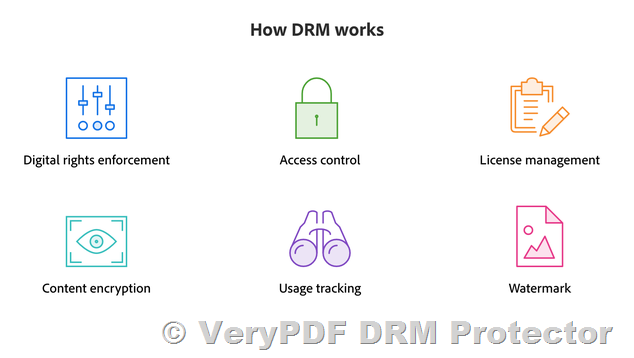
PDF DRM tools are specialized software solutions that allow document creators and organizations to set various restrictions and permissions on PDF files. These tools enable users to encrypt, password-protect, and restrict actions like printing, copying, editing, and sharing. The goal of PDF DRM tools is to prevent unauthorized access, distribution, or modification of sensitive information.

Key Features of PDF DRM Tools

  • Encryption: PDF DRM tools provide robust encryption algorithms to protect PDF documents from unauthorized access. This ensures that only authorized users with the correct password or decryption key can open and view the content.
  • Watermarking: Adding visible or invisible watermarks to PDF documents helps deter unauthorized sharing and distribution. Watermarks can include user-specific information, such as the recipient’s name or email address, making it easier to track the source of leaks.
  • Access Control: PDF DRM tools allow creators to set permissions for document access, such as restricting who can open, read, or modify the document. This level of control helps ensure that only authorized individuals can interact with the content.
  • Expiration Dates: Some PDF DRM tools allow users to set expiration dates for their documents. After the expiration date, the document becomes inaccessible, preventing unauthorized use after the intended viewing period.
  • Tracking and Reporting: Advanced PDF DRM tools offer real-time tracking and reporting, providing insights into who accessed the document, when, and for how long. This helps document owners monitor usage and take necessary actions if there are any signs of unauthorized access.

Why Use PDF DRM Tools?

  • Preventing Unauthorized Sharing: One of the main reasons businesses and individuals use PDF DRM tools is to prevent unauthorized sharing. Without DRM protection, anyone with access to a PDF file can easily distribute it without the document creator’s consent.
  • Protecting Intellectual Property: For creators, such as authors, designers, and content producers, protecting intellectual property is paramount. PDF DRM tools help ensure that their creations are not copied, distributed, or altered without permission, safeguarding their work.
  • Ensuring Compliance with Legal and Regulatory Requirements: In some industries, such as healthcare, finance, and law, strict regulatory requirements govern the handling and sharing of sensitive documents. PDF DRM tools can help organizations comply with these regulations by preventing unauthorized access and maintaining a detailed audit trail.
  • Minimizing the Risk of Data Breaches: Data breaches are a significant concern for organizations. By using PDF DRM tools, businesses can reduce the risk of sensitive documents being leaked or exposed due to human error or cyberattacks.

Choosing the Right PDF DRM Tool

When selecting a PDF DRM tool, it’s essential to consider several factors:

  • Ease of Use: The tool should be user-friendly and easy to integrate into your workflow without requiring significant technical expertise.
  • Security Features: Look for a tool with robust encryption, watermarking, and access control features to ensure maximum protection for your documents.
  • Customization Options: Choose a PDF DRM tool that offers customization options to tailor the document protection features according to your specific needs.
  • Compatibility: Ensure that the tool is compatible with various platforms and devices to guarantee that your PDF files remain secure across all environments.

Conclusion

PDF DRM tools play a crucial role in safeguarding digital documents and protecting intellectual property. Whether you’re a business owner, content creator, or professional, investing in reliable PDF DRM tools is essential for ensuring that your documents remain secure and your sensitive information stays protected. With features like encryption, watermarking, and access control, these tools offer peace of mind in an increasingly digital world.

By utilizing PDF DRM tools, you can maintain full control over your documents and reduce the risk of unauthorized access or distribution, helping you preserve the integrity of your valuable content.