Protecting Online Machinery Manuals from AI Web Scraping & Copying: How to Safeguard Your Digital Assets

The EU’s new machinery regulation (2023/1230) introduces a significant change for businesses by enabling manufacturers to deliver machinery manuals digitally. While this presents a more cost-effective and convenient way to provide essential documentation, it also introduces new challenges, primarily in safeguarding intellectual property (IP) and protecting against unauthorized access, sharing, and misuse of digital manuals. To address these challenges, businesses must take proactive steps to protect their online machinery manuals from threats such as AI web scraping and copying.

Protecting Online Machinery Manuals from AI Web Scraping & Copying: How to Safeguard Your Digital Assets

What the EU Machinery Directive Means for Businesses

The EU Machinery Regulation (2023/1230), which came into force in June 2023, is designed to enhance safety and simplify compliance across the European Economic Area (EEA). One of its key provisions allows manufacturers to provide user manuals digitally, which can help reduce costs for both businesses and consumers. However, this shift brings additional responsibilities for businesses, including compliance with new regulations and the need to protect digital assets from unauthorized access and distribution.

The main requirements for digital machinery manuals under the new directive include:

  • Users must be able to download and print the instructions.
  • The manual must be accessible offline for the lifetime of the machinery and at least ten years after the first sale.
  • Publishers must provide paper copies of the manuals upon request within a month.
  • Specific safety information must be included, especially for non-professional machinery, even if the manual is digital.
  • The instructions must be available in a language understandable to the target market.

While businesses are encouraged to deliver these manuals digitally, the risk of unauthorized access, copying, and AI scraping requires them to take extra steps in protecting their intellectual property.

The Risks of Publishing Manuals Online

Publishing manuals online can expose businesses to several risks:

  • AI Web Scraping: AI tools can scrape large amounts of data from online documents indiscriminately, including copyrighted manuals, and use it to train bots that could provide inaccurate or outdated information.
  • IP Theft: Unauthorized sharing and redistribution of manuals can lead to a loss of competitive advantage.
  • Unauthorized Modifications: Manuals can be altered or modified, which may lead to safety and compliance issues.
  • Legal Liabilities: If manuals are not adequately protected, businesses may find it difficult to remove outdated or incorrect versions from circulation.

Why AI Web Scraping Threatens Manual Publishers

Generative AI has become a major threat to businesses that rely on digital content, especially those providing PDF-based documents such as machinery manuals. AI bots can scrape vast amounts of data from publicly available PDFs and incorporate it into their datasets without the consent of the copyright holders. This can result in AI-driven tools providing inaccurate information, which could lead to improper usage of machinery and safety risks.

Additionally, scraping data from PDFs is relatively simple for bots using tools such as PDFminer, which automatically extract text, images, and other content. This makes PDFs a prime target for scraping.

Popular Methods to Protect Digital Manuals from Web Scraping

To protect manuals from unauthorized access and theft, businesses can employ several strategies:

  1. Protecting Web PDFs: Hosting manuals on a secure website or cloud portal can provide some protection, but this method has limitations. PDFs embedded in web pages are vulnerable to scraping, and even if protection measures are in place, determined hackers or AI bots can often bypass them.
  2. Embedding Protection in PDF Files: The most effective way to protect PDFs is by embedding restrictions within the files themselves. Traditional PDF protections, such as passwords or encryption, are not sufficient to prevent copying, editing, or unauthorized sharing. Instead, businesses need a more robust solution such as Digital Rights Management (DRM) software.

What to Look for in a Machinery Manual DRM

A comprehensive DRM solution for machinery manuals should meet the following criteria:

  • Restricted Access: The DRM should limit access to only authorized users, preventing competitors or unauthorized parties from reverse engineering or stealing the content.
  • AI Scraping Prevention: The DRM should block AI bots from scraping the manual’s contents and using it to train inaccurate models.
  • Prevent Modification and Redistribution: The DRM should stop unauthorized modifications and redistribution of manuals, which could lead to safety or legal issues.
  • Offline Access Control: DRM solutions should allow offline access to manuals but still maintain robust protection from unauthorized access and distribution.

How VeryPDF DRM Protector Can Protect Your Machine Manuals?

VeryPDF DRM Protector offers a powerful solution for securing your machinery manuals, ensuring compliance with EU regulations while preventing unauthorized access and misuse. Key features of VeryPDF DRM Protector include:

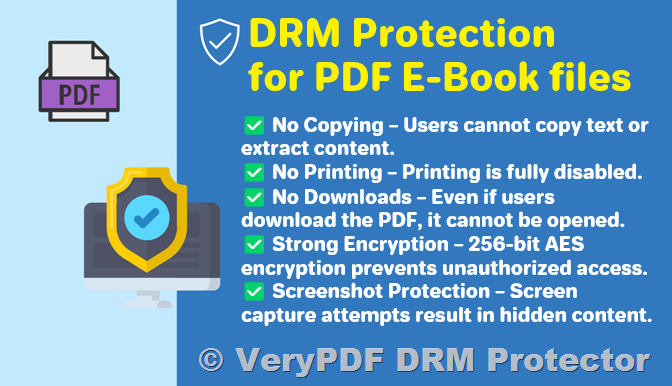
  • AES 256-bit Encryption: Protects your PDFs with industry-standard encryption, ensuring that only authorized users can open and view the manual.
  • Editing and Copying Restrictions: The DRM solution prevents users from editing or copying content, protecting your intellectual property.
  • Screenshot Prevention: VeryPDF DRM Protector can block screenshots or blank the viewer window when it is not active, ensuring your manual is not captured in an unauthorized way.
  • Offline Access: Allows users to access manuals offline, but still protects them from being shared or copied.
  • Expiration and Revocation: You can set expiration dates for manuals and revoke access remotely if needed, ensuring outdated or incorrect manuals cannot be used.
  • Watermarking: Add dynamic, irremovable watermarks to your manuals that include user information (e.g., usernames, company name) for additional protection.
  • USB Distribution: VeryPDF DRM Protector can be used to distribute secure manuals on USB drives, allowing you to provide offline access while maintaining strict control over access and sharing.

By using VeryPDF DRM Protector, businesses can effectively protect their digital machinery manuals from AI scraping and unauthorized copying, while still ensuring compliance with the EU Machinery Directive.

Try VeryPDF DRM Protector Today

To see how VeryPDF DRM Protector can help you protect your online machinery manuals, try the software with a free trial at https://drm.verypdf.com/online/. With its powerful features, this DRM solution ensures that your manuals remain secure, compliant, and protected from the growing threat of AI scraping and unauthorized distribution.


By utilizing advanced DRM technology like VeryPDF DRM Protector, you can safeguard your valuable machinery manuals and comply with regulatory requirements while maintaining control over your digital content.

[Solution] Secure Cloud Document Storage and Encryption: How to Safeguard Your Files from Leaks

With the increasing reliance on cloud storage, it is essential to ensure that sensitive documents and files remain secure. As businesses and individuals move towards remote work and file sharing, securing these files has become paramount. This article explores the effectiveness of secure cloud document storage for encrypted file sharing and offers recommendations to enhance security, particularly through the use of VeryPDF DRM Protector.

[Solution] Secure Cloud Document Storage and Encryption: How to Safeguard Your Files from Leaks

The Importance of Secure Cloud Document Storage

The growing trend of remote and flexible work has heightened the demand for cloud storage solutions. Many service providers tout “secure” cloud storage that complies with regulatory requirements. While these providers promote security, the real question is: how secure are these services in reality?

At its core, secure cloud storage shares similarities with traditional cloud storage—users upload their files to remote servers and share links for access. The primary difference lies in the added layers of security designed to protect sensitive data from unauthorized access and potential leaks. But are these security measures effective in safeguarding your documents?

What Makes Cloud Storage “Secure”?

  1. End-to-End Encryption:

    Most cloud storage services use encryption to protect files during transit and while at rest. This typically involves encrypting the file on the sender’s device and decrypting it only on the recipient’s device. However, many cloud providers, such as Google and Dropbox, retain the ability to decrypt your files.

  2. Zero-Knowledge Encryption:

    More advanced secure storage services offer “zero-knowledge” encryption. This means users control their encryption keys, and even the cloud provider cannot access the files. Zero-knowledge encryption offers an added layer of privacy and security that is superior to the encryption methods employed by standard cloud providers.

  3. Access Control:

    Secure cloud providers offer multi-factor authentication (MFA) and role-based access controls (RBAC), ensuring that only authorized users can access specific files. Enhanced access management features, such as Identity and Access Management (IAM), streamline permissions and bolster security.

  4. Document Controls:

    In addition to encryption, secure cloud storage often includes additional document controls such as download prevention, dynamic watermarks, file expiry dates, and password protection. These features help prevent unauthorized sharing and further enhance file security.

  5. Compliance and Certification:

    Many secure cloud providers meet industry regulations like GDPR, ISO/IEC 27001, and HIPAA. While certifications are beneficial, they do not guarantee complete security, and breaches can still occur.

Security Concerns with Cloud Storage

Despite the various security features offered by cloud storage providers, they are not without their vulnerabilities. Secure cloud storage can prevent unauthorized access to files, but it cannot always prevent leaks or misuse once files are in the hands of authorized users.

Common cloud storage security issues include:

  • User Leaks: Files can still be shared with unauthorized individuals, leading to data breaches.
  • Limited Monitoring: While cloud providers may log user activities, this data may not fully track who accessed a file or when it was shared outside of approved channels.
  • Watermark Inefficiencies: Dynamic watermarks are often used as a deterrent but can be bypassed by users who download and edit the document.

The Need for Enhanced File Sharing Security

When it comes to preventing leaks, no cloud storage provider can offer foolproof security. Standard cloud storage services do not prevent users from making unauthorized copies of files, sharing them, or editing them. The only way to protect files beyond cloud storage capabilities is by using a Digital Rights Management (DRM) solution.

How DRM Solutions Enhance Secure File Sharing

DRM software offers a robust method for securing files during their entire lifecycle—while at rest, in transit, and in use. Unlike traditional file encryption tools, DRM solutions restrict what users can do with the files after they receive them. They ensure that files remain protected and can’t be copied, printed, or shared without proper authorization.

Introducing VeryPDF DRM Protector

VeryPDF DRM Protector is an advanced DRM solution designed to provide end-to-end protection for PDF files. It ensures that documents remain encrypted and protected, even during sharing and offline use. By encrypting files with AES (Advanced Encryption Standard) encryption and controlling access via a dedicated desktop viewer app, VeryPDF DRM Protector offers comprehensive protection.

Key Features of VeryPDF DRM Protector:

  • Strong Encryption: Files are encrypted in memory, ensuring that decryption keys are not exposed to users.
  • Access Control: Only authorized devices can decrypt and view protected files, ensuring secure file sharing and preventing unauthorized access.
  • User Restrictions: DRM software prevents actions such as saving, printing, copying, and taking screenshots.
  • Document Expiry: Set expiration dates for files based on specific conditions like time elapsed since opening or number of downloads.
  • Dynamic Watermarks: Add irremovable watermarks to discourage sharing and enhance tracking.
  • Offline Protection: Files remain secure even when accessed offline.

With DRM software like VeryPDF DRM Protector, you can enforce file security regardless of where the files are stored or shared. By protecting your files before uploading them to the cloud, you ensure that they remain secure even if cloud servers or accounts are compromised.

How VeryPDF DRM Protector Works?

VeryPDF DRM Protector encrypts files with AES encryption and applies DRM controls to restrict file usage. When you share a file, users receive a license file granting access, and the content is only viewable through the DRM viewer app. The app ensures that files are opened on authorized devices and prevents unauthorized actions such as printing, editing, or copying.

You can easily manage user permissions through the Safeguard Admin System and track who accessed your files, when, and from which location. By locking down file access and usage, you significantly reduce the risk of leaks and unauthorized distribution.

Take Control of Your Documents with VeryPDF DRM Protector

For businesses or individuals who need to protect sensitive documents from leaks or misuse, VeryPDF DRM Protector is an essential tool. With its advanced security features, DRM software offers the most comprehensive file protection available. You can take a 15-day free trial of VeryPDF DRM Protector by visiting https://drm.verypdf.com/online and see for yourself how it can safeguard your files.

FAQs

  • Is cloud storage safe for storing documents?

    Cloud storage can be secure, but it depends on the provider, encryption methods, and your additional precautions. However, to prevent leaks and misuse, DRM solutions are often necessary.

  • How can I improve cloud file security?

    Encrypt files before uploading them to the cloud and consider using DRM software for added protection against unauthorized access and misuse.

  • Can VeryPDF DRM Protector protect files in the cloud?

    Yes, by protecting PDF files with DRM before uploading them to the cloud, you ensure that they remain secure even if cloud servers are compromised.

  • Does VeryPDF DRM Protector allow users to view protected files in a browser?

    Yes, you can use the Safeguard Web Viewer to view protected files in a browser, offering a simple yet secure file-sharing solution.

In conclusion, while secure cloud storage can offer some protection for your files, it is not foolproof against leaks and misuse. By using a DRM solution like VeryPDF DRM Protector, you can take full control over your documents and ensure they remain protected throughout their entire lifecycle.

How to Expire Links for File Sharing and Downloads with VeryPDF DRM Protector?

In today’s digital landscape, sharing files securely is a significant concern for many businesses and content creators. Expiring links have been promoted as a tool for limiting access to shared files after a specific period, with the idea that once the link expires, the file will no longer be accessible. But does this method truly protect your content from unauthorized sharing and piracy? In this article, we will explore how to create expiring download links using various platforms such as WordPress, PHP/JS, and cloud storage services, and why relying on expiration links may not be the best approach for securing digital files.

How to Expire Links for File Sharing and Downloads with VeryPDF DRM Protector?

What are Expiry Links and What Are They Used For?

An expiry link is essentially a URL that allows access to a digital file only for a specific period. These links are often used for file sharing and are designed to expire after a set time, reducing the likelihood that files will be shared or accessed after their intended use.

Businesses typically implement these links to manage access to products like documents, eBooks, videos, and other digital content. However, while expiring download links may seem like an effective way to limit access, they do not offer foolproof protection against file sharing and piracy. Let’s explore the pros and cons of using expiring links for file distribution.

Why Expire Links or File Share Downloads?

While expiring download links are often touted as a solution to reduce unauthorized sharing, they can serve several additional purposes:

  • Reducing the Time a Product is Available: Expiring links are ideal when you want to ensure that content is not available indefinitely. If your product or document is time-sensitive or likely to become outdated, expiring links ensure that users cannot access outdated information once the expiration date has passed.
  • Free Trials and Subscriptions: Expiring links are commonly used to grant temporary access to content during a free trial or subscription period. After the trial ends, access to the download link automatically expires, preventing further use of the content.
  • Resource Management: For websites or servers hosting downloadable resources, expiring download links can reduce bandwidth usage. By limiting the time window in which a file can be accessed, these links help free up server resources.

How to Expire Links or Create Download Links that Expire?

There are several ways to implement expiring download links, each with its own advantages and limitations. Below, we discuss three common methods: using WordPress plugins, coding with PHP/JS, and utilizing cloud storage services.

1. How to Create Expiring Links in WordPress

WordPress is a popular platform for content sharing, and several plugins enable the creation of expiring download links. Here are some plugins that can help:

  • Download Manager (Paid): A robust plugin that allows you to set expiration dates on download links.
  • Secure Downloads (Free): A plugin that provides time-based expiry options.
  • Easy Digital Downloads (Free): Allows limiting the number of downloads before the link expires.

To create an expiring link in WordPress:

  1. Install the plugin of your choice.
  2. Add your file and choose the expiration settings (e.g., time-based or number of downloads).
  3. Generate the link and share it with your users.

However, using WordPress plugins to handle expiring links is not the most secure way to limit access to digital files, particularly for PDF documents.

2. Creating Expiring Download Links with PHP/HTML/JS

For web developers, a custom solution using PHP, HTML, and JavaScript offers more flexibility in creating expiring links. Typically, the process works as follows:

  • Generate a unique token associated with a set expiration time.
  • Store the token securely on the server.
  • When a user clicks the download link, the token is verified via a PHP script.
  • If the token is valid and the expiration time hasn’t passed, the file is served; otherwise, access is denied.

This method requires some coding knowledge but offers more control over how and when links expire.

3. How to Create Expiring Download Links Using Cloud Storage Providers

Several cloud storage services also offer the option to expire links. These services usually require a paid subscription and are more suitable for business users. Some cloud services that support expiring download links include:

  • Google Drive: With a Google Workspace subscription, users can set expiration dates for shared links.
  • OneDrive: Premium users can set expiration dates for shared files.
  • Dropbox: Paid Dropbox accounts can set expiration dates for file links.

While cloud storage is an option, it may not be the most scalable solution, especially if you need unique expiry dates for individual users or files.

How Effective Are Expiring Download Links?

Although expiring download links can serve certain functions (e.g., reducing server load, managing free trials), they are not foolproof when it comes to protecting digital content from unauthorized sharing or piracy. Here are some key limitations of expiring links:

  • Files Can Still Be Shared: Once a file is downloaded, it can be shared with others even after the link expires.
  • Circumventing Expiry: Users can retain files beyond the expiration date by keeping a copy of the file. Expiry dates are mainly useful if the content is meant to be updated regularly, but they don’t offer real protection against piracy.
  • Limited Use in Preventing Unauthorized Sharing: Expiry links don’t prevent users from sharing or distributing the files beyond the expiration period. If you need to protect your content from mass sharing, more robust protection is required.

Protecting Digital Downloads Without Expiring Links

Given the limitations of expiring download links, businesses and content creators may want to explore more secure methods of protecting their digital content. VeryPDF DRM Protector offers a solution to safeguard PDF files with built-in rights controls, eliminating the need for expiry links.

VeryPDF DRM Protector works by embedding protection directly into the PDF file itself. Instead of relying on external link expiration, the software ensures that the file cannot be opened, edited, or shared beyond the set expiration period.

Here’s how it works:

  • Open your PDF in the VeryPDF DRM Protector Maker app and select your desired security controls (e.g., preventing printing, screenshots, etc.).
  • Choose your expiration options, such as a specific date, number of days since the first open, or after a certain number of views or prints.
  • Once the document is published, it is encrypted, and users are required to use the VeryPDF DRM Viewer to access it.
  • Each user receives a license tied to their device, ensuring the document cannot be shared with others.

This approach provides robust protection, ensuring that your content remains secure even if it is shared or downloaded by the user.

Why Choose VeryPDF DRM Protector?

  • Eliminates the Need for Expiry Links: Protect your content without relying on external link expiration.
  • Comprehensive Security: Prevents unauthorized printing, copying, or sharing of your PDFs.
  • Detailed Access Control: Set specific expiration conditions like time limits or usage limits (e.g., number of views).
  • Free Trial: You can try VeryPDF DRM Protector for free for 15 days to see how it fits your needs.

If you’re serious about protecting your digital files, VeryPDF DRM Protector is a far more secure solution than relying on expiring download links. Protect your intellectual property today by visiting VeryPDF DRM Protector for your free trial.


FAQs

1. What happens when a download link expires?
When a download link expires, users will no longer be able to access the file. Typically, they will see a page indicating that the link has expired.

2. How do I renew a link when it expires?
Most services require you to create a new link once the previous one has expired.

3. Are expiring link generators secure?
Not necessarily. Many link generator services lack the security measures of more established platforms like Microsoft or Google.

4. How do I protect my files from piracy?
For robust protection, use VeryPDF DRM Protector, which locks your files with encryption and access controls, preventing unauthorized sharing or modification.

By adopting VeryPDF DRM Protector, you can provide secure and controlled access to your files, ensuring that only authorized users can view and download them.

ISO 9001 and Document Security: How VeryPDF DRM Protector Ensures Compliance

ISO 9001 is an internationally recognized standard that defines requirements for quality management systems (QMS). Complying with ISO 9001 demonstrates an organization’s commitment to delivering consistent, high-quality products and services while meeting customer and regulatory expectations. Document security is a critical component of ISO 9001 compliance, ensuring that documented information is adequately controlled and protected.

This guide provides an overview of ISO 9001 requirements for document control and explains how VeryPDF DRM Protector can help organizations meet these requirements while enhancing document security.

ISO 9001 and Document Security: How VeryPDF DRM Protector Ensures Compliance


What is ISO 9001?

ISO 9001 outlines general requirements for establishing and maintaining a QMS. It ensures global consistency while enabling organizations to tailor their QMS to their specific context and the needs of stakeholders.

The five main elements of ISO 9001 are:

  • Leadership: Commitment from top management.
  • Planning: Identifying risks, opportunities, and objectives.
  • Support: Allocating resources and providing training.
  • Operation: Implementing processes to meet quality objectives.
  • Performance Evaluation: Monitoring and improving performance.

Organizations compliant with ISO 9001 benefit from:

  • Increased customer satisfaction.
  • Operational efficiency.
  • Enhanced credibility.
  • Better risk management.
  • Competitive advantages.

Steps to ISO 9001 Certification

Achieving ISO 9001 certification involves these steps:

  1. Learn the Standard: Acquire the latest version of ISO 9001 and study its requirements.
  2. Gap Analysis: Compare current processes with ISO 9001 requirements.
  3. Implementation: Develop and secure the necessary processes.
  4. Employee Training: Educate staff on new requirements and processes.
  5. Internal Audit: Identify and address non-conformities in your QMS.
  6. Third-Party Audit: Engage an accredited certifier for assessment.
  7. Certification: Upon meeting requirements, receive a certificate valid for three years.

ISO 9001 certification requires ongoing improvements and periodic surveillance audits to maintain compliance.


ISO 9001 Document Control Requirements

Document control is a cornerstone of ISO 9001. Key requirements include:

  • Document Identification: Assign unique identifiers (e.g., title, number, and date).
  • Approval and Review: Approve documents before use and review them periodically.
  • Controlled Distribution: Limit access to authorized personnel and manage outdated versions.
  • Secure Storage: Protect against damage, loss, and unauthorized access.
  • Version Control: Track revisions and ensure changes are documented.
  • Document Management: Establish procedures for retention, access control, and disposal.

Why Document Control Matters

Document control ensures:

  • Communication of Information: Clear guidance on processes and tasks.
  • Evidence of Conformity: Proof that actions align with plans.
  • Knowledge Sharing: Preservation of institutional knowledge.
  • Accuracy and Reliability: Prevention of unauthorized changes or leaks.

Effective document control also supports traceability and auditability, reducing the risk of compliance violations.


Ensuring Adequate Protection

To meet ISO 9001 standards, organizations must:

  • Control document distribution and retrieval.
  • Maintain version histories.
  • Protect against unauthorized use or alterations.
  • Enable secure retention and disposition.

Traditional solutions like password-protected PDFs and cloud-based sharing platforms often fall short due to vulnerabilities such as login sharing, screen grabs, and unauthorized distribution.


How VeryPDF DRM Protector Can Help?

VeryPDF DRM Protector is a robust Digital Rights Management (DRM) solution designed to safeguard your documents and help achieve ISO 9001 compliance. Key features include:

  • Irremovable Controls: Restrict saving, copying, printing, and screenshots.
  • Dynamic Watermarks: Embed user-specific details for traceability.
  • Flexible Expiry Settings: Set expiration dates or limits based on views or prints.
  • Remote Revocation: Revoke access to documents or users instantly.
  • Secure Encryption: AES encryption with secure licensing to control access.
  • Audit Trails: Track document usage for accountability and compliance.
  • Custom Integration: API and command-line tools for seamless QMS integration.

Why Choose VeryPDF DRM Protector?

Unlike traditional document protection solutions, VeryPDF DRM Protector ensures that documents remain secure even after distribution. It locks access to authorized devices and prevents unauthorized copying or sharing, meeting ISO 9001’s stringent requirements for document control.


Take a Free Trial

Discover how VeryPDF DRM Protector can enhance your document security and help your organization achieve ISO 9001 compliance. Start your free trial today.


FAQs

What does ISO 9001 stand for?

ISO 9001 is the international standard for quality management systems.

What naming convention should I use for ISO 9001 documents?

Use unique identifiers, such as a reference number or prefix, to ensure documents are easily identifiable.

Is ISO 9001 mandatory?

No, it is voluntary but highly beneficial for organizations seeking to improve quality and operational efficiency.

Can a cloud-based system ensure ISO 9001 compliance?

While cloud solutions offer basic security, they are vulnerable to sharing and screen capturing. DRM solutions like VeryPDF DRM Protector provide a more robust and ISO-compliant approach.

PDF Protection with PDF DRM Security to Protect PDF Files, PDF document protection with PDF DRM Controls

In a world where digital content can be easily shared, copied, or modified without authorization, protecting sensitive documents is a growing concern for businesses, educators, and content creators. PDFs, being a widely used document format, are especially vulnerable to unauthorized access and misuse. To address these challenges, VeryPDF DRM Protector offers a comprehensive solution to secure your PDF files with advanced Digital Rights Management (DRM) security.

This article explores the critical features of PDF DRM security and demonstrates how VeryPDF DRM Protector can safeguard your documents, ensuring they remain accessible only to authorized users. A free trial is available at VeryPDF DRM Protector.

PDF Protection with PDF DRM Security to Protect PDF Files, PDF document protection with PDF DRM Controls


Why Choose PDF DRM Security?

Conventional PDF security measures, like passwords and basic encryption, often fall short in providing adequate protection. Passwords can be shared, encryption can be bypassed, and users may still find ways to misuse the content. PDF DRM security offers a more robust approach, allowing document owners to control access, usage, and distribution with precision.

With VeryPDF DRM Protector, you can:

  • Stop unauthorized copying, modifying, and printing.
  • Prevent screenshots and unauthorized sharing.
  • Control document access with expiry dates, print limits, and device locks.
  • Apply permanent and dynamic watermarks for added accountability.

Key Features of VeryPDF DRM Protector

1. Prevent Unauthorized Access and Use

Protect your PDF files from:

  • Viewing and Printing: Restrict access to authorized users and manage print permissions.
  • Copying and Modifying: Disable content copying and editing to maintain the integrity of your documents.
  • Saving and Sharing: Prevent files from being saved or distributed to unauthorized individuals.
  • Screenshots: Block attempts to capture screen images using third-party tools.

2. Granular Control Over Document Access

VeryPDF DRM Protector gives you the flexibility to control how your documents are accessed and used:

  • Set Expiry Dates: Define when a document can no longer be viewed.
  • User Account Management: Specify user access duration and permissions.
  • Offline and Online Access: Decide if users can view documents offline or only with an active internet connection.
  • Usage Restrictions: Limit the number of views, prints, or days a document remains accessible.

3. Device Locking for Maximum Security

Lock PDFs to specific devices or platforms to prevent unauthorized access. Options include:

  • Device Locking: Restrict access to designated computers, tablets, or mobile devices.
  • USB Stick Access: Enable instant offline access without requiring installation.
  • Web Viewer: Allow secure viewing on any operating system without additional software.

4. Dynamic Watermarking

Watermarks are a vital tool for deterring unauthorized sharing. VeryPDF DRM Protector enables:

  • Dynamic Watermarks: Display user-specific information, such as names, email addresses, and timestamps, on viewed or printed documents.
  • Permanent Protection: Unlike watermarks from Adobe or other tools, these watermarks are permanent and cannot be removed.

5. Secure Document Distribution

Protect your PDFs locally, eliminating the risk of unprotected files being uploaded to external servers. Securely distribute your documents like any other file while maintaining complete control over their usage.


Advantages of VeryPDF DRM Protector

1. No Password Hassles

With VeryPDF DRM Protector, you don’t need to rely on passwords or certificates that can be easily shared or forgotten. The DRM controls ensure that your files are only accessible to intended recipients.

2. Superior Encryption

Using NIST-approved AES encryption, your documents are protected with government-level security.

3. Flexible Licensing and Monitoring

Automated license delivery and detailed tracking ensure you know who has accessed your files and when.

4. Customizable Permissions

Tailor document access settings for each user, including view limits, print restrictions, and expiry dates.

5. Cost-Effective Solution

With no limit on the number of documents or users, VeryPDF DRM Protector offers a fixed-price model that is both affordable and scalable.


Use Cases for VeryPDF DRM Protector

1. Corporate Document Security

Ensure sensitive business documents like financial reports, contracts, and internal policies are accessible only to authorized personnel.

2. Educational Material Protection

Safeguard digital textbooks, exam papers, and training materials from unauthorized distribution and sharing.

3. Content Publishing

Secure eBooks, research papers, and other intellectual property to prevent piracy and unauthorized duplication.


How VeryPDF DRM Protector Outshines Competitors?

  • No Cloud Dependency: Your documents remain secure on your local system, reducing exposure to external threats.
  • Dynamic Access Management: Update or revoke access permissions even after the document has been distributed.
  • All-in-One Administration: Manage user accounts, monitor document usage, and generate detailed reports using a single platform.
  • Comprehensive Security Features: From preventing screenshots to applying dynamic watermarks, VeryPDF DRM Protector provides a holistic approach to document security.

Get Started with VeryPDF DRM Protector

Protecting your PDF files has never been easier. With VeryPDF DRM Protector, you can secure your documents in just a few minutes. Whether you’re a business, educator, or publisher, this tool provides the ultimate solution for PDF security and distribution.

Try it for free today at VeryPDF DRM Protector.


Conclusion

PDF DRM security is a vital tool for safeguarding your documents in today’s digital landscape. With advanced features like dynamic watermarks, device locking, and granular access controls, VeryPDF DRM Protector ensures your PDFs remain secure, no matter where they are stored or shared.

Don’t leave your valuable content vulnerable to misuse. Start your free trial today and experience the unparalleled protection of VeryPDF DRM Protector. Visit VeryPDF DRM Protector to learn more.