How to Create, Share, and View DRM-Protected PDF Files with VeryPDF

In today’s digital age, organizations frequently share sensitive documents — training manuals, reports, contracts, and eBooks. But how do you ensure these documents aren’t copied, downloaded, or distributed without your permission? VeryPDF’s Web-based DRM Protector gives you full control over access and sharing of PDF files. This guide explains how to create, share, and manage protected PDFs effectively.

✅ Customer Scenario

“We tried your web-based DRM Protector to secure a PDF with date and time limits. However, we were unable to download or share the PDF using our email ID. We also want the option to view the file in any standard PDF application.” – Customer

Let’s walk through how VeryPDF’s DRM system works and how to properly share, manage, and view your protected PDF documents.

How to Create, Share, and View DRM-Protected PDF Files with VeryPDF


✅ Step 1: Creating a DRM-Protected PDF

Follow these steps to generate a protected PDF document:

  1. Visit the DRM Protector App:
    Go to: https://drm.verypdf.com/ 
  2. Upload Your PDF:
    Select your PDF from your local device. Large files and multi-page PDFs are supported.
  3. Apply DRM Restrictions:
    Set the following options:

    • ✔ Start and expiration date/time (e.g., view from May 8–May 10)
    • ✔ Password login (to control viewer access)
    • ✔ View-only mode (disable print/download/copy)
    • ✔ Add watermark text (e.g., user email or IP address)
  4. Generate a Secure Viewing Link:
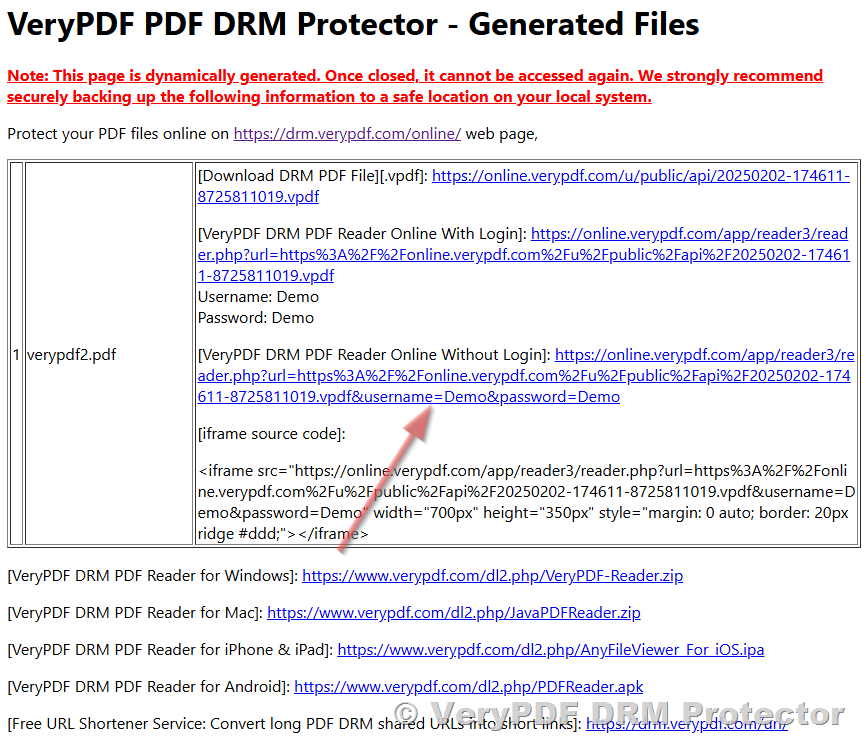
    Once processed, you receive a secure web viewer link. Example:

    https://online.verypdf.com/app/reader3/reader.php?url=...&username=Demo&password=Demo
     
Note: You will not receive a physical PDF file for download. Instead, users view the PDF via the secure web link, where all restrictions are enforced.

✅ Step 2: Sharing the Protected PDF with Others

You can share the generated viewing link with anyone you trust. Simply provide:

  • The secure link URL
  • The correct username and password

Example login credentials:

Username: Demo
Password: Demo

All DRM rules (like expiration date and view-only restrictions) apply to anyone using the link. Even if shared, the file cannot be copied, downloaded, or printed — protecting your original content.

Can Users Download the Protected PDF?

By default, downloads are disabled. This ensures:

  • ❌ No access to raw PDF files
  • ❌ No bypassing of expiration dates or viewing limits
  • ✅ Full enforcement of security policies

If you require downloadable PDF files (e.g., for offline access), we can provide a customized version that allows secure downloads with embedded encryption.


✅ Step 3: Viewing the DRM-Protected PDF
Option 1: Web Viewer (Recommended)

The secure PDF can be viewed in any modern browser (Chrome, Firefox, Safari, Edge) without additional software. DRM policies like watermarking, access time, and copy protection are enforced automatically.

Option 2: Standard PDF Viewers (Not Supported by Default)

Because downloaded PDF files can be edited or cracked using third-party tools, VeryPDF prevents opening these files in apps like Adobe Acrobat or Foxit by default.

However, if your team requires native desktop viewing, we can offer a custom solution with a desktop DRM PDF viewer that respects restrictions even offline.


✅ How VeryPDF DRM Technology Works

Here’s a breakdown of how our protection engine secures your documents:

  • Link-based access: No file is stored locally, preventing unauthorized saving.
  • Time limits: Set exact start and end times for viewing (down to the second).
  • Password control: Requires username and password for access.
  • Watermarks: Display dynamic text like “Confidential – john@example.com” to deter leaks.
  • Browser-only rendering: Prevents screen readers, bots, or print-to-PDF tools from capturing the content.

✅ Advanced Features Available on Request

For organizations with advanced needs, we offer enterprise-grade features including:

  • Secure download with auto-expiry
  • Mobile access control (iOS/Android compatible)
  • ️ Custom desktop DRM viewer (offline access)
  • Device/IP binding
  • Integration with Single Sign-On (SSO) or corporate login portals
  • API access for automation and bulk processing

✅ Use Cases
  • Educational Institutions: Secure distribution of teaching materials to students with expiration dates.
  • Corporate Teams: Share confidential project documents across departments without data leaks.
  • Freelancers: Deliver project drafts to clients with temporary view access.
  • Publishers: Offer limited previews of eBooks or reports.

✅ Need Help or a Custom Solution?

Our team is ready to help you deploy the best PDF protection solution for your use case.

Support: http://support.verypdf.com
Website: https://drm.verypdf.com


Protect your PDFs the smart way — with security you control, wherever your documents go.

Secure Your Amazon eBooks Like a Pro – Stop Copying, Screenshotting, and Limit Printing with VeryPDF DRM Protector

In today’s digital marketplace, selling eBooks and digital PDFs on Amazon has never been easier—but protecting your intellectual property has never been more important.

If you’re an Amazon KDP or digital product seller, you’ve likely faced the nightmare of content theft: customers copying your work, sharing it without permission, taking screenshots, or even printing multiple unauthorized copies. These seemingly small breaches can cause massive revenue loss, reduce your product’s perceived value, and erode trust in your brand.

But what if you could protect your PDF like a digital fortress?

Introducing VeryPDF DRM Protector — the powerful tool designed specifically for independent authors, content creators, and Amazon sellers who want to secure their digital products with professional-level protection.

Secure Your Amazon eBooks Like a Pro – Stop Copying, Screenshotting, and Limit Printing with VeryPDF DRM Protector

✅ Why DRM Protection Is No Longer Optional for Amazon PDF Sellers

Let’s face it: digital content is easy to share. That’s both the blessing and the curse of selling online. While Amazon handles distribution, Amazon does not protect PDFs sold outside of Kindle formats (e.g., downloadable bonus guides, workbooks, checklists, digital handouts, etc.).

If your PDF isn’t protected, it can be:

  • Copied and pasted
  • Printed unlimited times
  • Shared on pirate websites
  • Screenshot and reposted

For serious sellers, that’s unacceptable.

That’s where VeryPDF DRM Protector steps in—to help you keep full control over your content, no matter where or how it’s delivered.

✅ What Is VeryPDF DRM Protector?

VeryPDF DRM Protector is a cloud-based digital rights management (DRM) solution that allows you to encrypt your PDF files and control how they are accessed, viewed, and used—without requiring special PDF readers.

It gives you the tools to lock down your PDFs with the same technology used by big publishers and corporations—except it’s tailored for small businesses, startup authors, and digital sellers like you.

✅ Key Features Amazon Sellers Will Love

Here are 3 killer DRM features every Amazon seller needs—and VeryPDF delivers them all:

1. Prevent Screenshotting

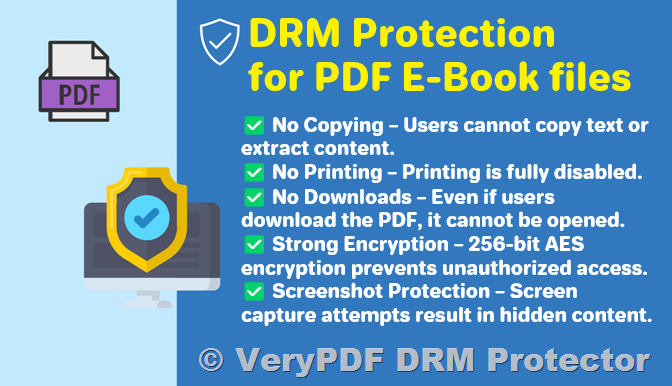
Say goodbye to customers taking screen captures of your content and sharing it on social media or pirate forums. VeryPDF DRM Protector detects and blocks screen capture tools on supported platforms. If a customer tries to take a screenshot, it simply won’t work.

2. Disable Copying, Editing & Sharing

Your content should stay exactly how you designed it. With DRM protection:

  • No one can copy or paste text from your PDF.
  • No editing tools or plugins will work.
  • The file cannot be shared with others—it’s locked to a specific user or device.

This ensures your intellectual property can’t be reused or stolen.

3. One-Time Print Control

Want to allow your buyers to print only one copy of your PDF? VeryPDF makes that simple. Each user is allowed to print only once—tracked and enforced by the system.

No more customers printing 100 copies of your workbook or selling them offline.

✅ Who Should Use This?

VeryPDF DRM Protector is perfect for:

  • Amazon sellers offering PDF bonuses, guides, or digital add-ons
  • Authors selling downloadable workbooks or self-help books
  • Coaches & consultants providing protected resources
  • Course creators offering worksheets, quizzes, or handouts
  • Printable sellers who want to limit misuse or illegal redistribution

If you’re distributing PDF files in any form and you care about copyright or user limits—this tool is for you.

✅ How It Works in 3 Simple Steps
  1. Upload Your PDF to the VeryPDF DRM dashboard.
  2. Set Permissions – block screenshotting, disable copying, limit printing, and more.
  3. Distribute Secure Links to your customers (or deliver via Amazon, email, or your website).

Your file is encrypted and cannot be opened or shared without your permission. No coding required.

✅ Free Trial – Perfect for Small Business Owners

We know how tight budgets can be when you’re just starting out. That’s why VeryPDF offers a free trial of our DRM Starter Kit — so you can test it out before committing.

During your trial, you’ll be able to:

  • Protect your PDF documents with real DRM encryption
  • Set access policies and printing limitations
  • Try all core features with real-world files
  • Receive personalized support to get up and running

Try it today at https://drm.verypdf.com/

✅ Why Choose VeryPDF Over Other DRM Tools?

There are a few DRM solutions out there, but here’s why VeryPDF DRM Protector stands out:

  • No Hidden Fees – Simple, good pricing options after trial
  • No Third-Party Apps Needed – Works in the browser or existing PDF viewers
  • Designed for Individual Sellers – Not bloated with enterprise-only features
  • Cross-Platform Support – Works on Windows, macOS, iOS, Android
  • Live Support – You’re not left on your own, we guide you through
✅ What Other Sellers Are Saying…

“Since switching to VeryPDF, our course PDFs are no longer leaked or copied. The print-once feature is a game changer!” – Amazon Seller, USA

“Exactly what we needed for our printable worksheet business. Easy setup and the DRM actually works.” – Online Store Owner, UK

“I used to see my PDF checklist all over Reddit. After using VeryPDF DRM, piracy has dropped to zero. Worth every penny!” – Mia, KDP Seller

“The one-time print feature is a game-changer. Now I don’t worry about resellers printing 50 copies of my product.” – Jake, Etsy & Amazon Seller

✅ Boost Your Professionalism, Protect Your Work

When your digital product is protected, it looks more professional, builds customer trust, and increases your perceived value. Buyers feel safer knowing they’re purchasing a secure, exclusive product—not just another freebie floating around online.


✅ Final Thoughts

If you’re selling any kind of PDF on Amazon—whether it’s an eBook, workbook, digital planner, or course material—you can’t afford to leave it unprotected.

VeryPDF DRM Protector gives you enterprise-level protection with small business pricing and ease-of-use. With just a few clicks, you can lock down your content, enforce print limits, and stop piracy.

Try it free today at: https://drm.verypdf.com/


Tags for SEO: Amazon ebook security, PDF DRM, protect ebook from copying, prevent PDF screenshot, one-time print PDF, Amazon seller tools, digital product security, VeryPDF DRM Protector, PDF encryption, how to protect PDF on Amazon, anti-piracy for PDF

How to Encrypt PDF Files Without Losing Control After Distribution

How to Encrypt PDF Files Without Losing Control After Distribution

Meta Description:

Encrypt your PDFs and stay in control even after sharing themsee how I locked down my files using VeryPDF DRM Protector.


Every time I sent a client proposal, I felt a little sick

You spend hours putting together a killer proposal or a confidential report. You attach the PDF, hit “Send”and boom, it’s out of your hands.

How to Encrypt PDF Files Without Losing Control After Distribution

No clue who forwards it.

No idea if it gets printed, downloaded, or copied.

You just hope no one leaks it to a competitor.

That’s not a good strategy.

I got burned once. One of my training manuals ended up floating around forums weeks before the official launch. That’s when I started hunting for a way to encrypt PDF files without losing control after distribution.


Found: The One Tool That Doesn’t Just EncryptIt Enforces Control

I wasn’t looking for a generic “add a password” kind of tool. Been there, done that. Passwords get cracked, or worse, shared.

What I found was VeryPDF DRM Protector. This isn’t your average lock-and-key PDF software.

This thing lets you track, restrict, revoke, and watermark your files on the flyeven after they’ve been sent out.

It’s all cloud-based. No installs. No credit cards. No drama.

I was using it five minutes after landing on this page.


What VeryPDF DRM Protector Actually Does (And Why It Works)

If you’re like me, you want specifics. Here’s what sold me.

Full Control After Sending

You can:

  • Block downloads, prints, and copies

  • Set expiry dates for files (or even expire after a number of views)

  • Revoke access any time, from anywhere

That’s the big one. You keep the keys. Not the recipient.

See Who’s Doing What With Your Files

Every view. Every print attempt. You get:

  • IP addresses

  • Time stamps

  • Duration viewed

  • Location data

This was huge for me. I could finally see which clients were actually engaging with the content.

Watermarking That Sticks

Automatically adds a dynamic watermarklike the recipient’s name or emailto every page.

Try screenshotting a file when your name is plastered across it.

I used this on a regulatory audit docnobody dared leak it. It was like writing “You’re Being Watched” in invisible ink.


Real-World Scenarios Where It’s a No-Brainer

I’ve used this thing in multiple ways. Some of my clients now swear by it too.

  • Legal teams protecting confidential contracts

  • Trainers sending out paid course materials

  • Authors distributing pre-release eBooks

  • Consultants like me sending sensitive strategy docs

  • Compliance officers sharing regulatory files that must not be altered or leaked

You get the point. If your doc matters, this thing is worth it.


Why I Dropped Other Tools

I tried a few options before landing on VeryPDF DRM Protector:

  • Adobe’s security tools? Too bloated, and people could still copy-paste if they found workarounds.

  • Watermark-only tools? Meh. People just cropped them out.

  • Password protection? Like locking your front door but leaving the key under the mat.

VeryPDF wins because it doesn’t just lock the door.

It sets rules, watches who walks in, and kicks out anyone misbehaving.


Bottom Line: This Solves a Problem You Can’t Ignore

If you’re sending out PDFs, videos, images, or anything valuableyou’re gambling every time you hit “Send”.

I used to roll the dice too.

Now? I control every file. I know who opens it. I know where. I know for how long.

And I can yank back access if things go sideways.

I’d recommend this to anyone sharing important documents and wanting real control.

Click here to try it out for yourself

Start your free trial now and stop worrying about file leaks for good.


VeryPDF Custom Development Services

Got something more complex in mind?

VeryPDF does more than just protect PDFs. Their dev team can build custom tools for just about any document processing challenge.

They’ve built solutions using:

  • C/C++, Python, PHP, .NET, JavaScript

  • Linux, Windows, macOS, iOS, Android

  • Virtual printer drivers that output to PDF, TIFF, PCL, Postscript

  • OCR engines, barcode tools, file access interceptors, and DRM wrappers

They can even integrate with your CRM, LMS, or member portal.

If you’re stuck with a PDF problem no one else can solve, hit them up at http://support.verypdf.com/. I’ve worked with their team on a custom DRM hook for an LMS, and they delivered way faster than expected.


FAQ

Q: Can I stop people from printing or copying my PDFs?

Yes. VeryPDF DRM Protector gives you full control to block printing, copying, and downloading.

Q: Can I revoke access after someone opens the file?

Absolutely. You can revoke access instantly, even after the file’s been viewed.

Q: Does it require my clients to install anything?

Nope. It’s all online. No plugins, downloads, or accounts needed on their side.

Q: What file types can I protect?

Not just PDFs. You can also secure videos, images, audio files, and more.

Q: Is this tool compliant with security standards?

Yes. VeryPDF is ISO 27001 compliant and uses 256-bit AES encryptionthe same used by the NSA.


Tags / Keywords

PDF DRM software, encrypt PDF after sending, secure PDF sharing, DRM for documents, VeryPDF DRM Protector

Why Government Agencies Choose DRM Over Encryption for Secure Document Sharing

Why Government Agencies Choose DRM Over Encryption for Secure Document Sharing

Meta Description:

Discover why agencies prefer DRM over encryption to protect documentsand how VeryPDF DRM Protector makes it dead simple.


Every time we sent out a sensitive document, I held my breath

Government work isn’t glamorous. It’s a maze of red tape, protocols, and confidentiality.

Why Government Agencies Choose DRM Over Encryption for Secure Document Sharing

And trust meconfidentiality is everything.

You don’t want classified reports showing up in someone’s inbox who shouldn’t have them. Or worse, leaked to the press. Been there, dealt with that firestorm.

We tried password-protected PDFs. We tried encryption. But let’s be realonce someone has the file, what’s stopping them from forwarding it? Printing it? Screenshotting it?

Exactly. Nothing.

We needed something stronger. Not just lock-and-key encryption. We needed control.

And that’s when we found VeryPDF DRM Protector.


Why DRM beats encryption for government agencies

I stumbled across VeryPDF DRM Protector after yet another late-night email from IT about a potential document leak.

Encryption scrambles your data, surebut it doesn’t control what users can do with it once they have access. With DRM (Digital Rights Management), it’s a whole different game.

Let me break it down:

What makes VeryPDF DRM Protector different?

This isn’t your typical document lock. This is a digital bouncerdeciding who gets in, what they see, and what they’re allowed to do.

Some standout features that changed the game for us:

  • Granular access control

    I can decide who views a file, how many times, on which device, and for how long. I even revoked access mid-week after a contractor left early.

  • No downloads, no installations

    We didn’t need to roll out complex installations across teams. You upload your document, apply restrictions, and boomit’s ready to send securely.

  • Real-time user tracking

    Want to know who opened the file, from where, and how long they spent reading it? Yeah, it tells you all that. Total visibility.

  • Dynamic watermarking

    We watermark every file with the user’s name and email. Makes it real awkward to leak something when your name’s plastered all over it.

  • Screenshot protection

    This blew my mind. It shrinks the viewable area and blocks print screensso even screen captures are hard to pull off.


Real-life example: Stopping document leaks before they happen

We were rolling out new cybersecurity training material. Sensitive stuff.

Before VeryPDF, we’d send a PDF via email with a disclaimer: “Do not share externally.”

Guess what? It got shared. Within hours.

Post-DRM? I uploaded the file to VeryPDF DRM Protector, set it to expire after 3 views, and blocked printing/downloading.

One team member tried forwarding it to a buddy. Didn’t work.

Another tried opening it on a personal laptopdenied.

I even tracked that one user spent 47 seconds on the first page, probably skimmed, then logged off. Insanely useful insight.


Who needs this?

If you’re in:

  • Government

  • Legal

  • Finance

  • Education

  • Healthcare

  • Publishing

And you’re sending out confidential files?

You need this.

Because passwords get shared.

Encrypted files get decrypted.

But DRM controls stay in placeeven after someone opens the document.


What DRM solves that encryption doesn’t

Let me simplify:

Encryption DRM
Scrambles content Controls access & behaviour
Once unlocked, it’s free to share You stay in controlalways
No activity insights You see who did what, when, and where

DRM isn’t just protection. It’s proactive prevention.


My verdict?

After using VeryPDF DRM Protector for 6 months, here’s my take:

  • It’s easy.

  • It’s powerful.

  • It actually stops document leaks.

I’d highly recommend this to any agency or organisation dealing with sensitive documents.

Try it out yourself. No install. No sign-up. Just upload and protect:

https://drm.verypdf.com/


Looking for custom development?

VeryPDF isn’t just a one-trick pony. They offer custom DRM and PDF development services tailored to your tech stack.

Need something built for Windows, Linux, macOS, mobile, or the cloud?

Want custom virtual printer drivers, document converters, or even API-level control over document security?

They’ve got it.

From PDF encryption, barcode recognition, OCR, document viewers, to secure digital signaturesVeryPDF’s engineering team has been doing this for decades.

Reach out and tell them what you need:

http://support.verypdf.com/


FAQs

1. What’s the difference between DRM and encryption?

Encryption protects files from being accessed by unauthorised users. DRM goes further by controlling what users can do even after access is granted.

2. Can I track who viewed my files and from where?

Yes. VeryPDF DRM Protector shows detailed analytics like user location, viewing time, and activity.

3. Does it require installation or account creation?

Nope. You can use it directly onlineno software to install or accounts to set up.

4. Can I revoke access to a document after sending it?

Absolutely. You can revoke or adjust access in real-time.

5. Does it work with non-PDF files too?

Yes. It supports images, videos, audio files, and more.


Tags / Keywords

document security, DRM vs encryption, VeryPDF DRM Protector, how to protect sensitive PDFs, government document sharing solution

Prevent Unauthorized Reuse of Academic PDFs and Educational Research

Prevent Unauthorized Reuse of Academic PDFs and Educational Research

Meta Description

Tired of your academic work getting shared without permission? Here’s how I used VeryPDF DRM Protector to lock down research PDFs securely.


Every time I shared my academic PDFs, they ended up in the wild

I remember the exact moment I realised I needed help.

Prevent Unauthorized Reuse of Academic PDFs and Educational Research

It was late Sunday night, and I stumbled upon one of my unpublished research papers on a random forumdownloadable, unprotected, stripped of any watermark or author info.

No one had stolen it maliciously, not really. It had just been shared too freely. A colleague passed it to a student, who forwarded it to a study group, and boommy hard work was floating around untracked, uncredited, and definitely unprotected.

That’s when I went looking for a solutionand landed on VeryPDF DRM Protector.


How I locked down my PDFs without going full paranoia mode

Look, I’m not anti-sharing.

But when you’re working on years-long research, submitting papers for journals, or sharing training materials, you need to control who sees whatand for how long.

I tried a few tools. Most were either too clunky, too expensive, or made me download yet another bloated app. Then I found VeryPDF DRM Protector.

No downloads. No weird plugins. No jumping through hoops.

I uploaded my PDF and in under five minutes, it was:

  • Encrypted with 256-bit AES security (same standard the NSA uses),

  • Watermarked with the recipient’s email address,

  • Restricted to view-only access with no printing or downloading allowed,

  • And protected with an auto-expiry timer.

Here’s what stood out:

Real-time control over who sees what

Once the document was sent, I could:

  • Revoke access instantly,

  • Limit how many times it could be opened,

  • Block entire countries or IP ranges (super useful when publishing region-specific work),

  • Set expiry based on date, number of views, or time opened.

I even ran a test by sharing the document with two of my team members under different settings. One had 3 days of access and view-only rights, the other had full access but no downloads. The control was tight and exactly what I needed.

Built-in analytics for total visibility

This was a game changer.

Most PDF tools end at password protection. VeryPDF goes furtheryou get full user tracking.

I could see:

  • Who opened the document,

  • Where they were located,

  • How long they spent reading it,

  • If they printed or attempted to download it.

It’s not just securityit’s transparency. I knew exactly where my content was going.

Screen shield to stop screenshots

This is next-level.

Their Screen Shield feature reduces the viewable area, discouraging screenshots and screen recordings. When I shared sensitive training PDFs to a third-party reviewer, this gave me serious peace of mind.


Why this matters if you’re in education or research

Let’s be real.

If you’re:

  • A university lecturer sharing internal notes,

  • A PhD student protecting a thesis,

  • A publisher distributing paid ebooks,

  • A course creator monetising learning materials

Then you know the pain of your content slipping through the cracks.

VeryPDF DRM Protector gives you all the control without the headaches. It’s built for busy people who don’t want to mess with complicated setups.


My honest take

I’ve tested the waters with a bunch of DRM tools. Most feel like duct-taping a security system together.

This one? It just works.

I’d highly recommend VeryPDF DRM Protector to anyone who creates valuable contentespecially in academia, publishing, or education.

Protect your research and course materials the smart way.
Click here to try it out for yourself


Custom Development Services by VeryPDF

Need something even more tailored?

VeryPDF doesn’t just offer tools off the shelf. They can build exactly what you needwhether it’s secure document delivery systems for Windows, virtual printer drivers for automated PDF generation, or custom hooks into Windows APIs for document monitoring.

They support:

  • Development in Python, C++, PHP, C#, JavaScript, HTML5, and more,

  • Integration across macOS, Linux, Windows, Android, and iOS,

  • Tools for OCR, barcode processing, print job capture, and digital signatures,

  • Enterprise-grade cloud solutions for viewing, converting, and securing content.

If you’ve got a technical challenge involving documents, images, or digital rightsthey can solve it.

Reach out to them here: http://support.verypdf.com/


FAQs

How do I stop students from forwarding my PDFs?

Use the access control features in VeryPDF DRM Protector. You can restrict forwarding, set viewer limits, and add user-specific watermarks.

Can I revoke access after sharing the document?

Yesinstantly. You can pull access anytime, even if the recipient has the document link.

What file formats does VeryPDF DRM Protector support?

It supports PDFs, images, videos, audio, and other popular file types.

Is this suitable for teams or just individuals?

Both. You can manage permissions at scale and even integrate it with LMS, CRM, or intranet platforms.

Do recipients need to install anything to view protected files?

Nope. Everything works through the browser. No plugins, no downloads, no fuss.


Tags / Keywords

  • DRM for academic PDFs

  • Prevent PDF sharing in education

  • Secure course materials

  • Protect research PDFs

  • Digital rights management for universities