
Annotation is an essential part of document review, education, collaboration, and compliance workflows. VeryPDF DRM Protector integrates powerful PDF Annotation capabilities directly into its secure web-based viewer, allowing users to annotate DRM-protected PDF documents without compromising document security.
Unlike traditional PDF annotation tools that require local software installation and may expose documents to copying or redistribution risks, VeryPDF DRM Protector enables annotation entirely within a browser using JavaScript technology. This ensures both usability and strict DRM protection.
✅ What Is PDF Annotation in VeryPDF DRM Protector?
PDF Annotation in VeryPDF DRM Protector provides a simple, intuitive browser-based interface that allows users to:
- Add annotations directly to DRM-protected PDF files
- Save annotations securely to their user account
- Reopen documents later and continue working with previously saved annotations
- Export or import annotations when necessary
All annotations are tightly integrated with the DRM system, ensuring that document protection remains intact.
At its core, the annotation feature in VeryPDF DRM Protector allows end-users to mark up and comment on DRM-protected PDF files directly within a web browser. Unlike standard PDF readers where annotations are saved locally, VeryPDF’s solution ensures that every mark, note, or drawing is tied specifically to the individual user and the specific protected document.
This creates a private, persistent, and secure annotation layer over your secure PDFs. Whether for academic study, legal document review, or collaborative project management, this feature transforms static, protected documents into dynamic workspaces.
✅ Key Security Advantages
User-Specific Annotation Storage (Per User, Per Book)
One of the most critical features for DRM security is the isolation of user data. Annotations added by one user are visible only to that user. When User A highlights a paragraph, User B viewing the same protected document will see a clean version. This ensures that personal notes remain private.
Furthermore, these annotations are saved directly into the user’s account. If the user closes the browser and reopens the file days later, all their highlights, drawings, and stamps are exactly where they left them.
Annotations are:
- Saved into the user’s account
- Only visible to the specific user
- Bound to the specific protected PDF book
This means:
- No other users can see someone else’s notes.
- Annotations remain private even in shared educational or corporate environments.
- Each protected document maintains isolated annotation layers per user.
This is particularly valuable for:
- Universities and schools
- Corporate compliance teams
- Legal document review
- Internal training materials
✅ Core Annotation Features
VeryPDF DRM Protector supports a comprehensive set of annotation tools:
Text Markup Tools
- Highlight
- Underline
- Squiggly
- Strikeout
Drawing and Shape Tools
- Ink (freehand drawing)
- Rectangle
- Circle
- Square
- Arrow
- Line
- Polygon
- Polyline
- Star shapes
- Cloud line annotations
- Connecting lines between annotations and shapes
Text and Comment Tools
- FreeText annotation with inline editing
- Sticky notes for quick comments
- Point (comment) annotations
- Text box annotations
Signature Support
- Create signature via:
- Text input (with font selection)
- Image upload
- Fully integrated signature annotation tool
Stamping Features
- Default stamps
- Custom stamp creation
- Image-based stamp uploads
- Custom stamp configuration:
- Text color
- Font
- Style
- Background
- Border
- Timestamp support:
- Username
- Date
- Custom text
Annotation Status Management
Annotations can be assigned status values:
- Accepted
- Rejected
- Canceled
- Completed
- Closed
- None
This makes it ideal for workflow and document review processes.
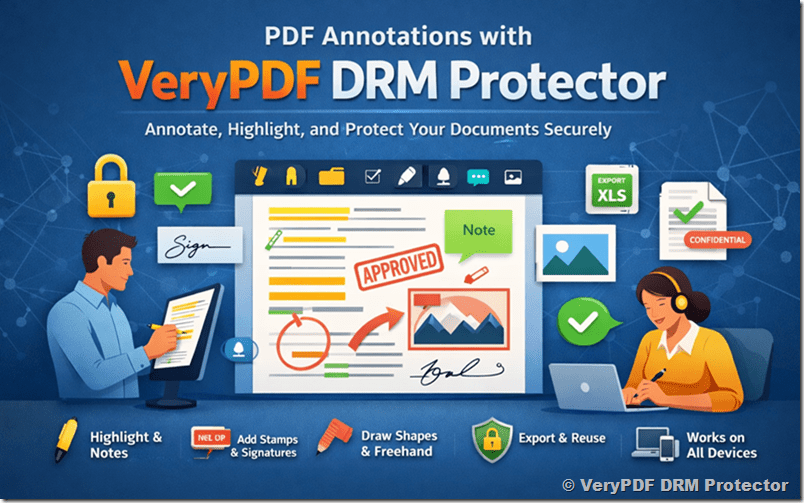
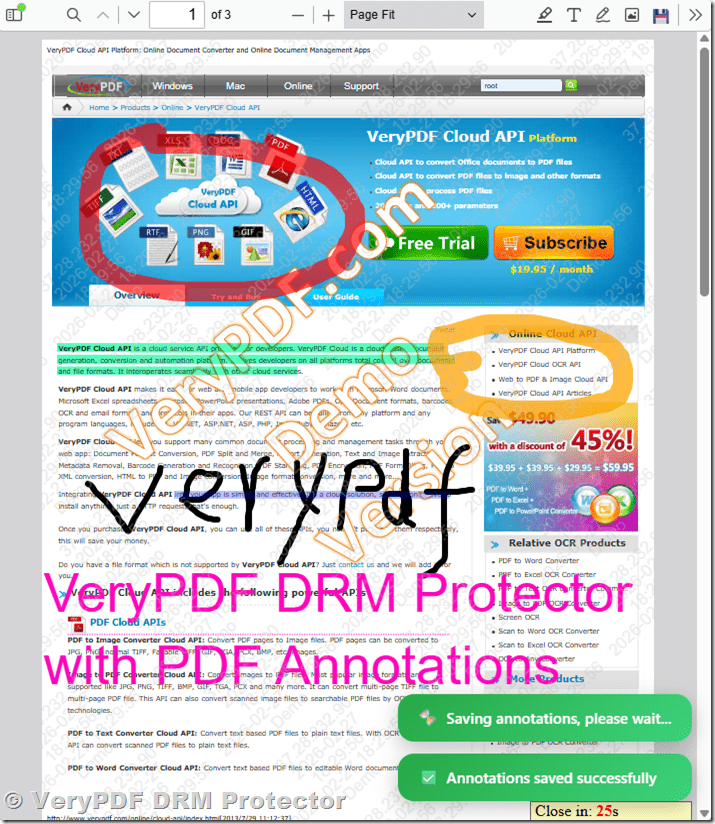
VeryPDF DRM Protector allows you to securely annotate PDF documents without risking your content. You can highlight text, add comments or notes, draw freehand, insert shapes, stamps, or signatures, and save your annotations to your account for later use.
Each annotation is user-specific, so only you can see your notes on a protected PDF, ensuring that sensitive information stays safe. You can also export annotations, import them later, or reuse them when you view the same PDF again, which makes reviewing and collaborating on documents faster and more organized.
The tool works on both desktop and touch devices, with simple controls for selecting, editing, undoing, or clearing annotations. Whether you are reviewing reports, educational materials, or professional documents, VeryPDF DRM Protector helps you manage your PDFs efficiently while keeping full control over your content.
✅ Advanced Annotation Controls
Style Customization
Each annotation type supports:
- Color
- Stroke width
- Opacity
- Thickness
- Blending modes
Cursor Tools
- Annotation selection
- Text selection
- Annotation eraser
- Double-click to delete selected object
Drawing Features
- Freehand pencil tool
- Highlighter tool
- Adjustable thickness and opacity
Image & Screenshot Insertion
Users can:
- Insert image stamps
- Upload custom images
- Insert screenshots into the document
Scaling and Editing
- Zoom/Scale support
- Undo
- Redo
- Clear all annotations
Touch Device Support
VeryPDF DRM Protector fully supports touch devices (iPhone, iPad, Android, etc.), enabling smooth annotation using:
- Tablets
- Touchscreen laptops
- Stylus pens
This is especially useful for:
- Students using tablets
- Field inspectors
- Remote workers
Export and Import Capabilities
VeryPDF DRM Protector provides:
- Export to PDF: Users can permanently “flatten” their annotations onto a copy of the PDF, merging the marks with the original document for sharing outside the secure environment.
- Export to Excel: For data analysis, annotation data (like comments and statuses) can be exported to an Excel spreadsheet.
- Import Annotations: Users can import previously saved annotation sets, allowing for different layers of review on the same document.
- Save and reload annotations from user account
This allows flexible workflow integration while maintaining DRM protection.
Security and Reusability
Because VeryPDF DRM Protector integrates DRM protection, all annotated PDFs remain secure. Users can reuse saved annotations the next time they view the same document, making it perfect for study materials, professional reports, or collaborative review.
Cross-Platform Compatibility
The system is built on VeryPDF DRM Protector and works entirely in a browser, meaning it is inherently compatible with touch devices. Users on tablets can draw and annotate naturally using a stylus or their finger, just as they would on a desktop.
✅ How to Activate PDF Annotations in VeryPDF DRM Protector
Follow these steps to enable annotation features:
Step 1: Open the DRM File Management Page
Visit:
https://drm.verypdf.com/wp-admin/admin.php?page=VeryPDFDRMFiles
Step 2: Edit PDF Settings
- Locate your protected PDF file.
- Click “Actions” → “Edit Settings”.
Step 3: Configure Advanced Settings
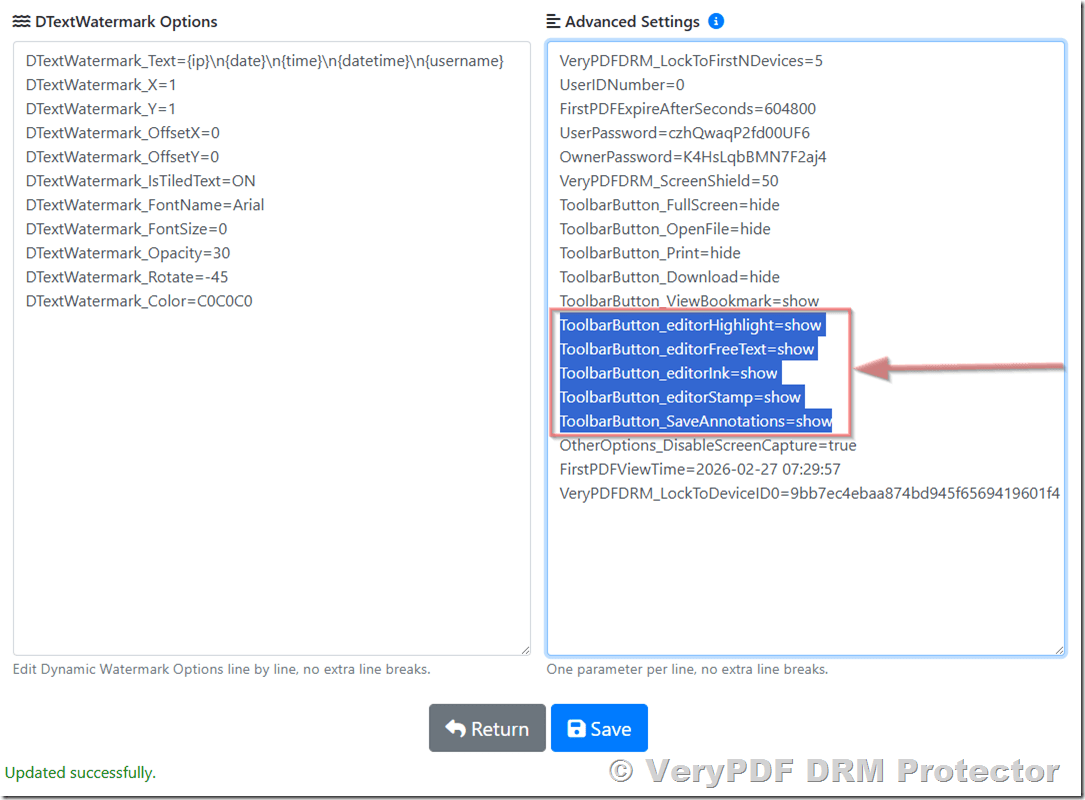
In the Advanced Settings field, enable the annotation toolbar buttons by adding:
ToolbarButton_Download=show
ToolbarButton_editorHighlight=show
ToolbarButton_editorFreeText=show
ToolbarButton_editorInk=show
ToolbarButton_editorStamp=show
ToolbarButton_SaveAnnotations=show
Step 4: Save Settings
Click the “Save” button.
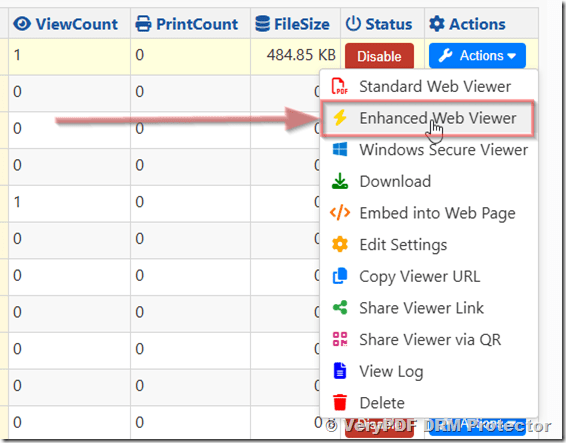
Step 5: Open in Enhanced Web Viewer
- Return to the book list page.
- Click “Actions” → “Enhanced Web Viewer”.
- The protected PDF will open with full annotation capabilities enabled.
✅ Ideal Use Cases
VeryPDF DRM Protector with annotation support is perfect for:
- Educational institutions distributing textbooks
- Teachers marking assignments
- Students taking private notes
- Corporate training documentation
- Legal contract review
- Technical manual markup
- Compliance and audit workflows
- and more…
Because annotations are user-specific and securely stored, organizations can confidently distribute sensitive materials without losing control.
✅ Custom Development for DRM & Annotation Solutions
VeryPDF offers professional custom development services based on VeryPDF DRM Protector and PDF Annotations. This service allows businesses and organizations to create tailored solutions for document protection and annotation, ensuring that sensitive content remains secure while supporting efficient workflows.
Our custom solutions include:
- Customizing user permissions and access controls.
- Defining annotation types, styles, and display settings.
- Batch document protection and workflow optimization.
- Extending import/export functionality for annotations.
- Supporting multi-device compatibility for desktops, tablets, and touch devices.
Additional capabilities for enterprises:
- Enabling specific features for selected users only.
- Automatic saving and reuse of annotations across documents.
- Secure annotation sharing within teams.
- Designing custom interfaces and automating review workflows.
- Integration with existing systems such as ERP or LMS.
With these custom development services, organizations can protect sensitive documents, improve team collaboration, streamline review processes, and gain full control over their digital content.
✅ Conclusion
VeryPDF DRM Protector’s PDF Annotation feature combines a robust set of capabilities designed for secure, professional document interaction:
- Full-featured annotation tools: Users can highlight text, add comments, draw freehand, insert shapes, stamps, and signatures, or leave sticky notes, giving them complete control over how they interact with a document.
- Secure DRM protection: All documents remain protected with strong DRM, ensuring that sensitive content cannot be copied, shared, or altered by unauthorized users.
- Browser-based convenience: Annotations are applied directly in the browser, eliminating the need for software installation while maintaining a smooth, responsive experience across desktop and touch devices.
- User-specific storage: Each user’s annotations are saved securely in their account, visible only to them, and can be reused or exported for workflow purposes.
- Export and workflow integration: Annotations can be exported to PDF or Excel, imported back into other documents, and integrated into existing review or approval workflows, supporting efficient collaboration and documentation management.
This feature provides a professional-grade annotation environment that balances usability with security. Organizations can distribute sensitive PDF content, enable rich user interaction, track feedback, and maintain complete control over document access, all without compromising confidentiality.
For businesses, educational institutions, or any organization that relies on secure document distribution, VeryPDF DRM Protector delivers a flexible, reliable solution, combining rich annotation capabilities with uncompromising document protection and workflow support.