
The VeryPDF PDF DRM system provides a secure API for managing PDF files and users, allowing enterprises to protect sensitive documents from unauthorized access, printing, copying, or sharing. This API supports both GET and POST requests, enabling seamless integration with existing systems such as enterprise portals, intranet applications, and web services.
Authentication is handled via VeryPDF DRM Protector Application Passwords. Each API request must include an email parameter (VeryPDF DRM Protector user email) and an app_password parameter (generated in VeryPDF DRM Protector under the user’s profile). This ensures that only authorized users can access, update, or delete PDF files and user accounts.
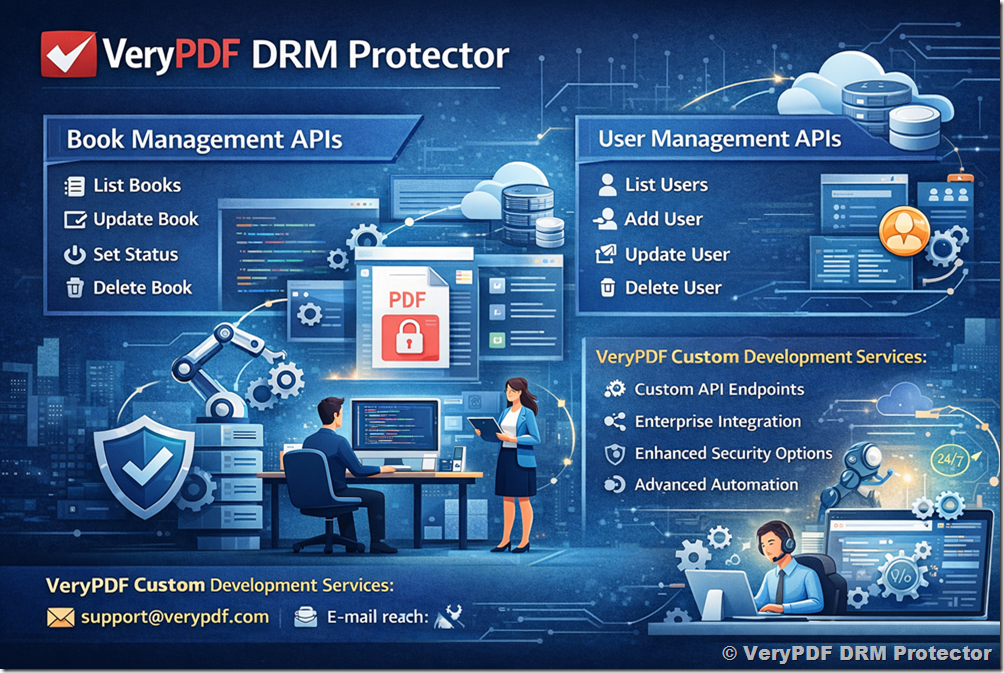
The API is organized into two main categories:
- Book Management APIs – Manage PDF files, including listing, updating, setting status, and deletion.
- User Management APIs – Manage users, including adding, updating, enabling/disabling, querying expiration, and deletion.
The VeryPDF PDF DRM API provides a secure, App Password Authenticated, enterprise-ready REST API for:
- Managing DRM-protected PDF files
- Controlling user access
- Enforcing expiration policies
- Integrating with SaaS platforms
- Automating enterprise workflows
Using VeryPDF DRM Protector Application Password authentication ensures:
- Secure separation from primary credentials
- Easy revocation
- Compatibility with REST standards
- Enterprise-grade security
Integrate VeryPDF Security Enterprise DRM with your other business systems using industry-standard REST APIs and provide single sign-on (SSO) access for your end users. VeryPDF can be integrated with:
- University LMS systems
- Corporate training platforms
- SaaS subscription systems
- ERP workflows
- Custom web applications
- Learning management systems (LMS)
- Association management systems (AMS)
- Customer relationship management systems (CRM)
- eCommerce systems
- Member systems
- Intranets or websites
Below, we provide a detailed breakdown of all endpoints, parameters, and example URLs for testing.
✅ Authentication Using VeryPDF DRM Protector App Passwords
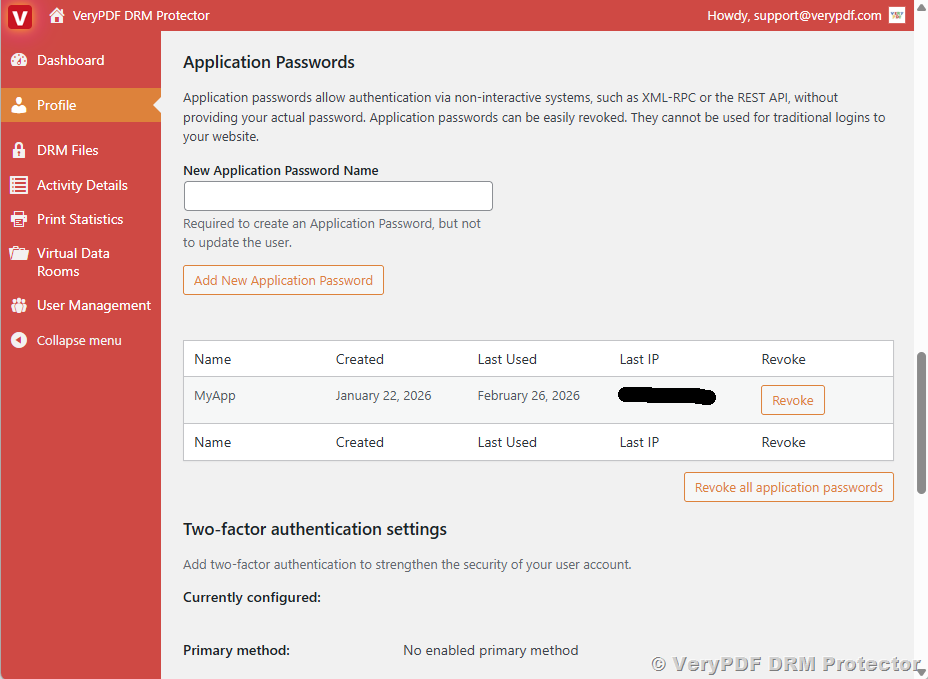
VeryPDF DRM Protector app passwords are required for all API calls. They are generated per user under:
VeryPDF DRM Protector Dashboard → Profile → Application Passwords
https://drm.verypdf.com/wp-admin/profile.php
Parameters:
|
Parameter |
Type |
Required |
Description |
|
|
|
Yes |
VeryPDF DRM Protector user email associated with the app password. |
|
app_password |
string |
Yes |
VeryPDF DRM Protector app password used for authentication. |
Example Test URL for Verification:
https://drm.verypdf.com/wp-json/wp/v2/users/me
When used with the HTTP header:
Authorization: Basic base64_encode(email:app_password)
- HTTP 200 indicates successful authentication.
- Any other status indicates an invalid email or app password.
✅ Upload PDF to VeryPDF DRM Protector Platform Using PHP Source Code
This PHP example demonstrates how to upload a PDF file to the VeryPDF DRM Protector system and apply DRM protection directly from your PHP application or website.
Key functionalities of this PHP script include:
1. PDF Upload
Upload a local PDF file to the VeryPDF DRM server.
2. PDF Encryption
Enable PDF encryption with both user and owner passwords to prevent unauthorized access.
3. DRM Restrictions
Apply protection rules, including:
- PDF Expiration: The PDF can expire after a specific date, a set number of views, or a limited number of prints.
- Access Control: Printing, copying, and saving of the PDF can be disabled to prevent unauthorized distribution.
- Automatic Closure: The PDF can automatically close after a period of inactivity or a fixed time.
- Watermarking: Text, image, or PDF watermarks can be added to track usage and discourage sharing.
- Account & Security: Access can be restricted to a specific account, password, or IP address for additional protection.
- and more…
4. URL Extraction
Automatically extract the URLs of DRM-protected PDFs from the server response, so you can use or share them immediately.
Usage Scenario:
This script is designed for a web-friendly PHP environment (e.g., XAMPP, LAMP, or any PHP-enabled hosting) and can be run without any command-line input. You just need to set your email associated with your VeryPDF account and the path to the PDF file.
Benefits:
- Quickly integrate PDF DRM protection into your website or application.
- Protect sensitive PDF files from unauthorized distribution.
- Easily manage and distribute DRM-protected PDF content.
For more PHP code examples and downloads, please visit:
https://drm.verypdf.com/downloads/
https://drm.verypdf.com/verypdf-pdfdrm-cloud-api-include-c-curl-java-javascript-php-vb-net-examples/
<?php
/**
 * ============================================================
 * Example: Upload PDF to VeryPDF DRM Protector using PHP
 * ============================================================
 *
 * This PHP script demonstrates how to upload a PDF file
 * to the VeryPDF DRM Protector system and apply DRM protection
 * directly from your PHP application or website.
 *
 * Main functionalities of this script:
 * 1. Upload a local PDF file to the VeryPDF DRM server.
 * 2. Enable PDF encryption with user and owner passwords.
 * 3. Apply DRM restrictions, such as:
 *      - Expiring the PDF after a certain number of views
 *      - Preventing printing
 * 4. Add a text watermark to track usage and discourage unauthorized sharing.
 * 5. Extract the URLs of the DRM-protected PDF files from the server response.
 *
 * This example is designed to be simple and web-friendly, so you
 * can run it directly in a PHP-enabled environment (XAMPP, LAMP, or web hosting)
 * without using the command line.
 *
 * Usage:
 *   - Set your email associated with your VeryPDF account
 *   - Specify the local PDF file path
 *   - Run the script in a web browser or PHP environment
 * ============================================================
 */

// Set your email associated with the DRM account
$email = 'your-email@example.com';

// Path to your local PDF file
$pdfFilePath = '/path/to/your/file.pdf';

// Validate file exists
if (!file_exists($pdfFilePath)) {
    die("Error: PDF file does not exist.\n");
}

// Ensure PHP cURL extension is loaded
if (!extension_loaded('curl')) {
    die("Error: PHP cURL extension is not enabled.\n");
}

// Prepare DRM protection settings
$postFields = [
	'InputFileType' => 'LocalFile',
	'Email' => $email,
	'EnablePDFEncryption' => 'on',
	'PasswordForInputPDFFile' => '',
	'UserPassword' => 'd58mG8bX0r8AsgiH',
	'OwnerPassword' => 'Z88hgBQ5esfP5eC7',
	'PDFCompatibility' => '6',
	'EnableDRMProtection' => 'on',
	'VeryPDFDRM_IsNeedInternet' => 'ON',
	'VeryPDFDRM_ClientTimeZone' => 'UTC',
	'Check_VeryPDFDRM_LogonID_01' => 'ON',
	'VeryPDFDRM_LogonID_01' => 'Demo',
	'Check_VeryPDFDRM_Password_01' => 'ON',
	'VeryPDFDRM_Password_01' => 'Demo',
	'Check_VeryPDFDRM_ExpireAfterDate' => 'ON',
	'VeryPDFDRM_ExpireAfterDate' => $expiryDate,
	'VeryPDFDRM_DenyPrint' => 'ON',
	'VeryPDFDRM_DenyClipCopy' => 'ON',
	'VeryPDFDRM_DenySave' => 'ON',
	'VeryPDFDRM_DenySaveAs' => 'ON',
	'Check_VeryPDFDRM_SetIdleTime' => 'ON',
	'VeryPDFDRM_SetIdleTime' => '300',
	'Check_VeryPDFDRM_CloseAfterSeconds' => 'ON',
	'VeryPDFDRM_CloseAfterSeconds' => '300',
	'Check_VeryPDFDRM_TitleOfMessage' => 'ON',
	'VeryPDFDRM_TitleOfMessage' => 'VeryPDF DRM Reader',
	'Check_VeryPDFDRM_DescriptionOfMessage' => 'ON',
	'VeryPDFDRM_DescriptionOfMessage' => 'Welcome to use VeryPDF DRM Reader...',
	'Check_VeryPDFDRM_ExpireAfterViews' => 'ON',
	'VeryPDFDRM_ExpireAfterViews' => '10',
	'Check_VeryPDFDRM_ExpirePrintCount' => 'ON',
	'VeryPDFDRM_ExpirePrintCount' => '10',
	'Check_VeryPDFDRM_SetInvalidPWCount' => 'ON',
	'VeryPDFDRM_SetInvalidPWCount' => '10',
	'Check_VeryPDFDRM_PDFExpiryDelete' => 'ON',
	'VeryPDFDRM_LimitIP' => '78.137.214.118',
	'TextWatermark_Text' => 'VeryPDF',
	'TextWatermark_Color' => 'C0C0C0',
	'TextWatermark_X' => '1',
	'TextWatermark_Y' => '1',
	'TextWatermark_OffsetX' => '0',
	'TextWatermark_OffsetY' => '0',
	'TextWatermark_IsTiledText' => 'ON',
	'TextWatermark_FontName' => 'Arial',
	'TextWatermark_FontSize' => '0',
	'TextWatermark_Opacity' => '30',
	'TextWatermark_Rotate' => '-45',
	'ImageWatermark_File' => "https://www.verypdf.com/images/coffee.jpg",
	'ImageWatermark_X' => '1',
	'ImageWatermark_Y' => '1',
	'ImageWatermark_OffsetX' => '0',
	'ImageWatermark_OffsetY' => '0',
	'ImageWatermark_Width' => '0',
	'ImageWatermark_Height' => '0',
	'ImageWatermark_Scale' => '100',
	'ImageWatermark_Opacity' => '10',
	'ImageWatermark_Rotate' => '0',
	'PDFWatermark_File' => "https://www.verypdf.com/images/pdf/StandardBusiness.pdf",
	'PDFWatermark_PDFPage' => '1',
	'PDFWatermark_X' => '1',
	'PDFWatermark_Y' => '1',
	'PDFWatermark_OffsetX' => '0',
	'PDFWatermark_OffsetY' => '0',
	'PDFWatermark_Width' => '100',
	'PDFWatermark_Height' => '100',
	'PDFWatermark_Scale' => '100',
	'PDFWatermark_Opacity' => '50',
	'PDFWatermark_Rotate' => '0',
	'LineWatermark_X1' => '0',
	'LineWatermark_Y1' => '100',
	'LineWatermark_X2' => '1000',
	'LineWatermark_Y2' => '100',
	'LineWatermark_Opacity' => '50',
	'LineWatermark_Rotate' => '0',
	'LineWatermark_Width' => '1',
	'LineWatermark_Color' => 'FF0000',
	'LocalFile[]' => new CURLFile($pdfFilePath)
];

// VeryPDF DRM upload URL
$url = 'https://online.verypdf.com/app/pdfdrm/web/upload.php';

// Initialize cURL
$ch = curl_init($url);
curl_setopt($ch, CURLOPT_POST, true);
curl_setopt($ch, CURLOPT_POSTFIELDS, $postFields);
curl_setopt($ch, CURLOPT_RETURNTRANSFER, true);
curl_setopt($ch, CURLOPT_SSL_VERIFYPEER, false);
curl_setopt($ch, CURLOPT_SSL_VERIFYHOST, 0);

// Execute upload
$response = curl_exec($ch);
if ($response === false) {
    die("cURL error: " . curl_error($ch) . "\n");
}
curl_close($ch);

// Save full server response for reference
file_put_contents('drm_upload_response.html', $response);

// Extract URLs of protected PDF files
preg_match_all('/https:\/\/online\.verypdf\.com\/u\/[^\s"\'<>]+/i', $response, $matches);

if (!empty($matches[0])) {
    echo "Protected PDF URLs:\n";
    foreach (array_unique($matches[0]) as $url) {
        echo $url . "\n";
    }
} else {
    echo "No PDF URLs found in the response.\n";
}
Explanation
- Purpose:
This code shows how to upload a PDF to VeryPDF DRM Protector, set DRM restrictions, and add a text watermark. - Key Features:
- Uploads a local PDF file.
- Sets user and owner passwords for PDF encryption.
- Enables DRM protection: limits views, disables printing.
- Adds a text watermark to track the PDF.
- Extracts URLs of the DRM-protected PDF from the server response.
- Usage:
Save this code as upload-drm.php and run it in a web server environment (e.g., XAMPP, LAMP, or any PHP-enabled hosting). Make sure the PDF file path is correct. - Output:
- Saves the full server response to drm_upload_response.html.
- Prints the URLs of the DRM-protected PDFs to the browser or console.
✅ Book Management APIs
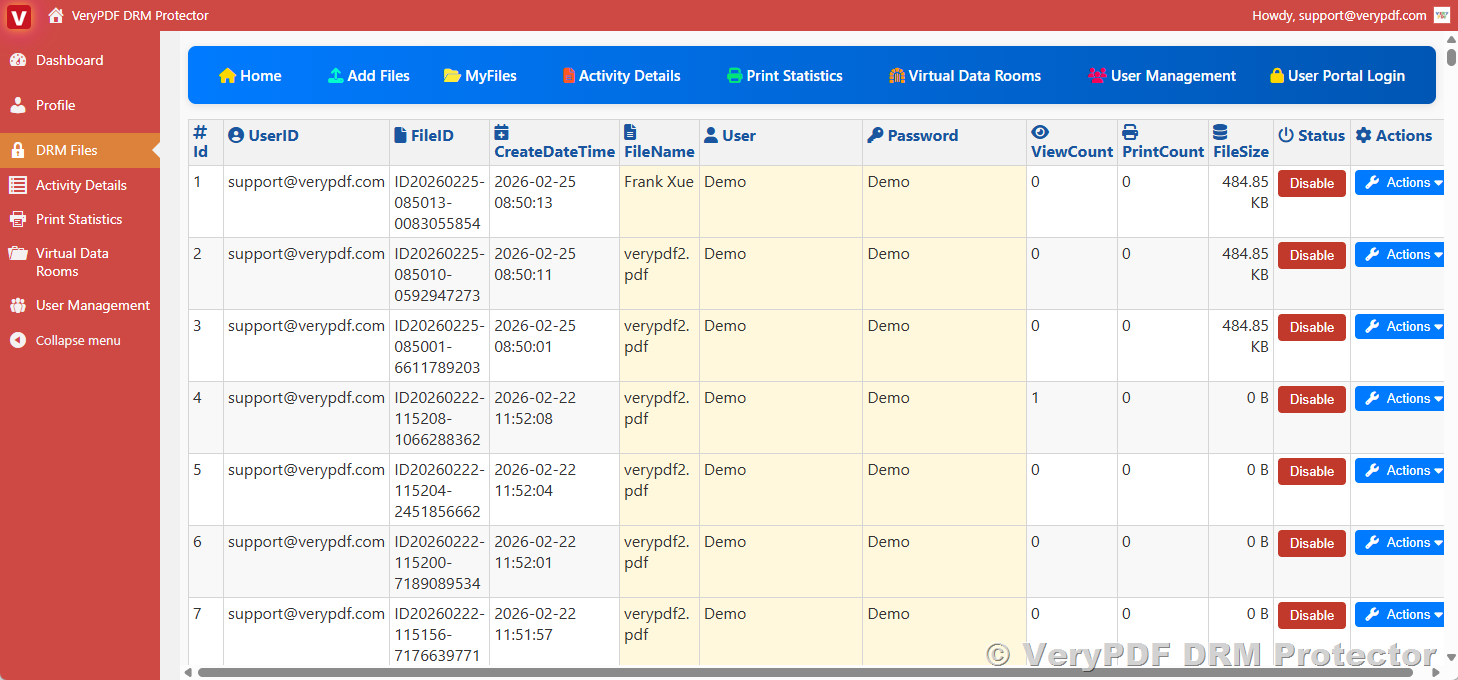
Book APIs provide comprehensive management of PDF documents within the VeryPDF DRM system. They enable administrators and authorized users to retrieve detailed lists of PDF files, update document attributes such as file name, view limits, print permissions, copy restrictions, and expiration dates. Additionally, Book APIs allow precise control over document access, including enabling or disabling specific files, applying usage restrictions, and enforcing security policies. They also support the safe deletion of PDF documents, ensuring that sensitive content can be securely removed from the system while maintaining audit logs and traceability for compliance purposes.
https://drm.verypdf.com/wp-admin/admin.php?page=VeryPDFDRMFiles
1. List Books (book_list)
Fetch all PDF files associated with the admin email.
Parameters:
|
Parameter |
Type |
Required |
Default |
Description |
|
|
|
Yes |
— |
Admin email for authentication. |
|
app_password |
string |
Yes |
— |
VeryPDF DRM Protector app password for authentication. |
|
Status |
bool |
No |
All |
Filter by active (1) or inactive (0) books. |
|
offset |
int |
No |
0 |
Pagination offset. |
|
limit |
int |
No |
20 |
Number of records to return (max 200). |
Test URLs:
|
Description |
URL |
|
List all books |
https://online.verypdf.com/app/pdfdrm/api.php?action=book_list&email=support@verypdf.com&app_password=lh6v7lo71yh5cGhKv6Rywejd |
|
List active books |
https://online.verypdf.com/app/pdfdrm/api.php?action=book_list&email=support@verypdf.com&app_password=lh6v7lo71yh5cGhKv6Rywejd&Status=1 |
|
List inactive books |
https://online.verypdf.com/app/pdfdrm/api.php?action=book_list&email=support@verypdf.com&app_password=lh6v7lo71yh5cGhKv6Rywejd&Status=0 |
|
List books with offset & limit |
https://online.verypdf.com/app/pdfdrm/api.php?action=book_list&email=support@verypdf.com&app_password=lh6v7lo71yh5cGhKv6Rywejd&offset=10&limit=50 |
2. Update Book Status (book_set_status)
Enable or disable a book.
Parameters:
|
Parameter |
Type |
Required |
Description |
|
|
|
Yes |
Admin email for authentication. |
|
app_password |
string |
Yes |
VeryPDF DRM Protector app password. |
|
book_id |
int |
Yes |
Unique book ID to modify. |
|
status |
bool |
Yes |
1 = active, 0 = inactive. |
Test URLs:
|
Description |
URL |
|
Disable book 5201 |
https://online.verypdf.com/app/pdfdrm/api.php?action=book_set_status&email=support@verypdf.com&app_password=lh6v7lo71yh5cGhKv6Rywejd&book_id=5201&status=0 |
|
Enable book 5201 |
https://online.verypdf.com/app/pdfdrm/api.php?action=book_set_status&email=support@verypdf.com&app_password=lh6v7lo71yh5cGhKv6Rywejd&book_id=5201&status=1 |
3. Delete Book (book_delete)
Remove a PDF from the system.
Parameters:
|
Parameter |
Type |
Required |
Description |
|
|
|
Yes |
Admin email for authentication. |
|
app_password |
string |
Yes |
VeryPDF DRM Protector app password. |
|
book_id |
int |
Yes |
Book ID to delete. |
Test URL Example:
https://online.verypdf.com/app/pdfdrm/api.php?action=book_delete&email=support@verypdf.com&app_password=lh6v7lo71yh5cGhKv6Rywejd&book_id=5201
4. Update Book (book_update)
Modify book attributes, including file name, permissions, expiry, and access restrictions.
Parameters:
|
Parameter |
Type |
Required |
Description |
|
|
|
Yes |
Admin email for authentication |
|
app_password |
string |
Yes |
VeryPDF DRM Protector app password |
|
book_id |
int |
Yes |
Book ID to update |
|
FileName |
string |
No |
New file name |
|
ExpireAfterViews |
int |
No |
Number of views before expiration |
|
DenyPrint |
bool |
No |
Deny printing: 1 = yes, 0 = no |
|
DenyClipCopy |
bool |
No |
Deny clipboard copying |
|
DenySave |
bool |
No |
Deny save action |
|
DenySaveAs |
bool |
No |
Deny Save As |
|
IsNeedInternet |
bool |
No |
Require internet to open |
|
ExpireAfterDate |
datetime |
No |
Expiration date/time |
|
Status |
bool |
No |
1 = active, 0 = inactive |
Test URL Example:
https://online.verypdf.com/app/pdfdrm/api.php?action=book_update&email=support@verypdf.com&app_password=lh6v7lo71yh5cGhKv6Rywejd&book_id=5201&FileName=Frank%20Xue&ExpireAfterViews=10&DenyPrint=1&DenyClipCopy=0&Status=1
✅ User Management APIs
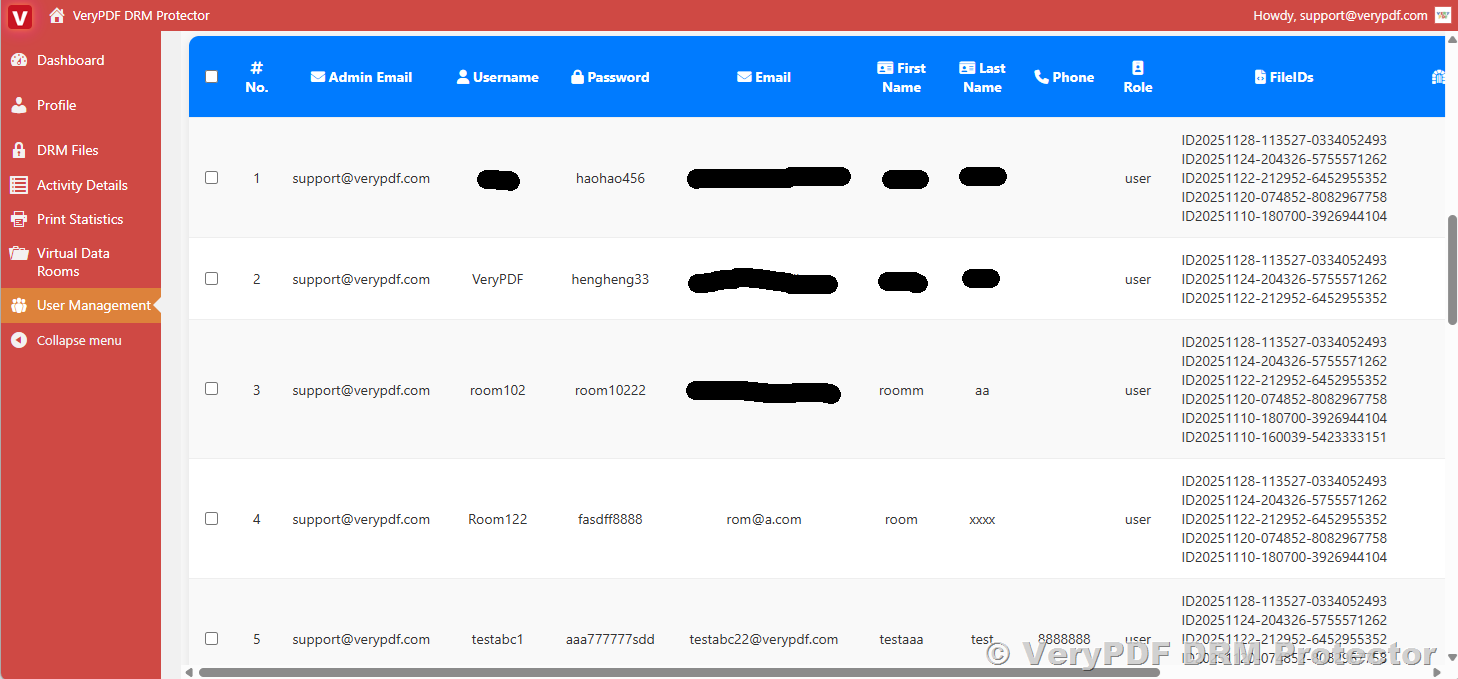
The User Management APIs provide administrators with comprehensive control over user accounts within the VeryPDF DRM Protector system. Using these APIs, administrators can add new users, update existing user information and permissions, query the status of individual accounts, monitor user activity, and securely delete users when necessary. These capabilities ensure precise access control, maintain security compliance, and allow seamless integration with enterprise authentication systems.
https://drm.verypdf.com/wp-admin/admin.php?page=VeryPDFDRMUserManagement
1. List Users (user_list)
Retrieve a list of users created by a specific admin.
Parameters:
|
Parameter |
Type |
Required |
Default |
Description |
|
|
|
Yes |
— |
Admin email for authentication |
|
app_password |
string |
Yes |
— |
VeryPDF DRM Protector app password |
|
Status |
bool |
No |
All |
Filter by active (1) or inactive (0) users |
|
role |
string |
No |
All |
Filter by role: user or admin |
|
keyword |
string |
No |
— |
Search keyword for username or email |
|
offset |
int |
No |
0 |
Pagination offset |
|
limit |
int |
No |
50 |
Max records to return (max 200) |
Test URLs:
|
Description |
URL |
|
List all users |
https://online.verypdf.com/app/pdfdrm/api.php?action=user_list&email=support@verypdf.com&app_password=lh6v7lo71yh5cGhKv6Rywejd |
|
List users with status |
https://online.verypdf.com/app/pdfdrm/api.php?action=user_list&email=support@verypdf.com&app_password=lh6v7lo71yh5cGhKv6Rywejd&Status=0 https://online.verypdf.com/app/pdfdrm/api.php?action=user_list&email=support@verypdf.com&app_password=lh6v7lo71yh5cGhKv6Rywejd&Status=1 |
|
List by role |
https://online.verypdf.com/app/pdfdrm/api.php?action=user_list&email=support@verypdf.com&app_password=lh6v7lo71yh5cGhKv6Rywejd&role=user https://online.verypdf.com/app/pdfdrm/api.php?action=user_list&email=support@verypdf.com&app_password=lh6v7lo71yh5cGhKv6Rywejd&role=admin |
|
List with keyword in username or email |
https://online.verypdf.com/app/pdfdrm/api.php?action=user_list&email=support@verypdf.com&app_password=lh6v7lo71yh5cGhKv6Rywejd&keyword=test |
2. Add User (user_add)
Create a new user account.
Parameters:
|
Parameter |
Type |
Required |
Description |
|
|
|
Yes |
Admin email |
|
app_password |
string |
Yes |
VeryPDF DRM Protector app password |
|
username |
string |
Yes |
New user username |
|
password |
string |
Yes |
User password |
|
useremail |
|
Yes |
User email |
|
role |
string |
No |
Role: user or admin, default user |
|
phone |
string |
No |
Optional phone number |
|
firstname |
string |
No |
First name |
|
lastname |
string |
No |
Last name |
|
FileID |
string |
No |
Optional file ID |
|
VDR_IDs |
string |
No |
Optional VDR IDs |
|
Status |
bool |
No |
1 = active, 0 = inactive, default 1 |
Test URL Example:
https://online.verypdf.com/app/pdfdrm/api.php?action=user_add&email=support@verypdf.com&app_password=lh6v7lo71yh5cGhKv6Rywejd&username=TestUser1&password=123456&useremail=test1@example.com&role=user&phone=88889999&firstname=firstname&lastname=lastname
3. Update User (user_update)
Modify an existing user’s attributes.
Parameters: Same as user_add, plus user_id (int, required) to specify which user to update.
Test URL Example:
https://online.verypdf.com/app/pdfdrm/api.php?action=user_update&email=support@verypdf.com&app_password=lh6v7lo71yh5cGhKv6Rywejd&username=TestUser122&password=123456&useremail=test1@example.com&role=user&phone=88889999&firstname=firstname&lastname=lastname&user_id=182
4. Set User Status (user_set_status)
Enable or disable a user account.
|
Parameter |
Type |
Required |
Description |
|
|
|
Yes |
Admin email |
|
app_password |
string |
Yes |
VeryPDF DRM Protector app password |
|
user_id |
int |
Yes |
User ID to modify |
|
status |
bool |
Yes |
1 = active, 0 = inactive |
Test URLs:
|
Description |
URL |
|
Enable user 172 |
https://online.verypdf.com/app/pdfdrm/api.php?action=user_set_status&email=support@verypdf.com&app_password=lh6v7lo71yh5cGhKv6Rywejd&user_id=172&status=1 |
|
Disable user 172 |
https://online.verypdf.com/app/pdfdrm/api.php?action=user_set_status&email=support@verypdf.com&app_password=lh6v7lo71yh5cGhKv6Rywejd&user_id=172&status=0 |
5. Delete User (user_delete)
Remove a user account.
|
Parameter |
Type |
Required |
Description |
|
|
|
Yes |
Admin email |
|
app_password |
string |
Yes |
VeryPDF DRM Protector app password |
|
user_id |
int |
Yes |
User ID to delete |
Test URL Example:
https://online.verypdf.com/app/pdfdrm/api.php?action=user_delete&email=support@verypdf.com&app_password=lh6v7lo71yh5cGhKv6Rywejd&user_id=180
6. Query User Expiration (user_query_expiration) (Not yet implemented*)
Fetch the expiration information for a user (1-year validity by default).
|
Parameter |
Type |
Required |
Description |
|
|
|
Yes |
Admin email |
|
app_password |
string |
Yes |
VeryPDF DRM Protector app password |
|
user_id |
int |
Yes |
User ID to query |
Test URL Example:
https://online.verypdf.com/app/pdfdrm/api.php?action=user_query_expiration&email=support@verypdf.com&app_password=lh6v7lo71yh5cGhKv6Rywejd&user_id=182
✅ Notes on Security
- All API endpoints require both email and app_password. Without them, the request will fail.
- Status and permission flags (Status, DenyPrint, DenyClipCopy, etc.) are validated strictly as integers 0/1.
- Only the owner admin email associated with a book or user can modify or delete it.
- Optional filters allow for pagination and role/status searches, helping manage large datasets.
This documentation provides a complete set of:
- Test URLs for all actions.
- Detailed parameter descriptions.
- Security and authentication guidelines.
- Pagination, filtering, and permission handling explanations.
Administrators can fully integrate these APIs into enterprise systems, enabling secure, automated management of PDF DRM files and users.
PHP Example for API Integration
To help developers quickly integrate VeryPDF PDF DRM APIs into their systems, we provide a sample PHP script. This script demonstrates how to call the Book Management and User Management APIs using cURL, with detailed English comments explaining each step. It covers common actions such as listing books, adding new users, updating book status, and querying user expiration. The code also handles authentication, JSON response parsing, and basic error checking, making it easy to adapt for any custom PDF DRM workflow or system integration.
<?php
// ---------------------------------------------
// VeryPDF PDF DRM API Example
// This script demonstrates how to call the Book and User Management APIs
// ---------------------------------------------

// Your admin email and VeryPDF DRM Protector App Password
$admin_email   = 'support@verypdf.com';
$app_password  = 'lh6v7lo71yh5cGhKv6Rywejd';

// Base API URL
$api_base = 'https://online.verypdf.com/app/pdfdrm/api.php';

/**
 * Helper function to send GET requests to the API
 */
function call_api($params) {
    global $api_base, $admin_email, $app_password;

    // Add authentication parameters
    $params['email'] = $admin_email;
    $params['app_password'] = $app_password;

    // Build the query string
    $query = http_build_query($params);

    // Complete URL
    $url = $api_base . '?' . $query;

    // Initialize cURL
    $ch = curl_init($url);
    curl_setopt($ch, CURLOPT_RETURNTRANSFER, true);
    curl_setopt($ch, CURLOPT_TIMEOUT, 30);

    // Execute API request
    $response = curl_exec($ch);
    $http_code = curl_getinfo($ch, CURLINFO_HTTP_CODE);

    if ($response === false) {
        echo "cURL Error: " . curl_error($ch);
        curl_close($ch);
        return false;
    }

    curl_close($ch);

    // Parse JSON response
    $data = json_decode($response, true);

    if ($http_code !== 200 || !$data) {
        echo "API call failed. HTTP Code: $http_code\n";
        echo "Response: $response\n";
        return false;
    }

    return $data;
}

// ---------------------------------------------
// Example 1: List all books
// ---------------------------------------------
$book_list = call_api([
    'action' => 'book_list',
    'limit'  => 50,
    'offset' => 0
]);

echo "Books:\n";
print_r($book_list);

// ---------------------------------------------
// Example 2: Add a new user
// ---------------------------------------------
$new_user = call_api([
    'action'    => 'user_add',
    'username'  => 'TestUser123',
    'password'  => '123456',
    'useremail' => 'testuser123@example.com',
    'role'      => 'user',
    'phone'     => '1234567890',
    'firstname' => 'Test',
    'lastname'  => 'User'
]);

echo "New User Response:\n";
print_r($new_user);

// ---------------------------------------------
// Example 3: Update a book status
// ---------------------------------------------
$update_status = call_api([
    'action'  => 'book_set_status',
    'book_id' => 5201,
    'status'  => 1 // 1 = enable, 0 = disable
]);

echo "Update Book Status Response:\n";
print_r($update_status);

// ---------------------------------------------
// Example 4: Query user expiration
// ---------------------------------------------
$user_expiration = call_api([
    'action'  => 'user_query_expiration',
    'user_id' => 182
]);

echo "User Expiration Info:\n";
print_r($user_expiration);
?>
✅ Features of this PHP example:
- Authentication: Uses admin email + VeryPDF DRM Protector App Password.
- GET Requests: Supports any action (book_list, user_add, book_set_status, etc.).
- JSON Parsing: Automatically decodes API responses into arrays.
- Error Handling: Prints cURL and HTTP errors.
- Customizable: Easily extendable to call any other API URL by changing the action and parameters.
✅ Custom Development and Enterprise Integration Support
If your organization requires any custom development or has specific needs for integrating our PDF DRM APIs into your existing systems, our team is ready to assist. We can provide tailored solutions such as:
- Custom API Endpoints: Extend or modify API functionality to fit unique business workflows.
- Advanced Automation: Automate document distribution, user management, or permissions based on your organizational rules.
- System Integration: Seamlessly connect PDF DRM management with your ERP, CRM, LMS, or other enterprise systems.
- Security Enhancements: Implement additional security measures, logging, or auditing features according to your internal policies.
- UI/UX Customization: Create web interfaces or dashboards for managing PDF DRM files and users in ways that match your company’s branding and workflow.
Our team is experienced in working closely with clients to deliver solutions that are secure, scalable, and fully aligned with your operational needs. If you have any requirements for custom development or integration into your existing systems, please do not hesitate to contact us. We will provide professional guidance, a detailed development plan, and full implementation support to ensure your PDF DRM workflows are efficient, automated, and secure.