How to Prevent Your Premium Reports from Being Leaked on Telegram and Reddit

How to Prevent Your Premium Reports from Being Leaked on Telegram and Reddit

A Complete Guide for Companies Selling High-Value PDF Reports


Introduction: The Silent Crisis Facing Report Sellers

If you sell premium reports online — market research reports, investment insights, industry intelligence, consulting whitepapers, trading strategies, or proprietary data analysis — you already know one uncomfortable truth:

Your biggest competitor isn’t another company.

It’s piracy.

Across Telegram channels, Reddit communities, private Discord servers, and file-sharing forums, thousands of paid reports are redistributed every single day. Reports that took months of research, expert interviews, data acquisition, and analysis to produce suddenly appear online for free — sometimes within hours after release.

For companies selling PDF reports priced at $49, $299, $999, or even $5,000+, a single leak can destroy months of revenue.

Many report publishers assume piracy is unavoidable.

It isn’t.

This article explains:

  • Why premium reports are heavily targeted
  • How leaks actually happen
  • Why traditional PDF protection fails
  • The real business damage caused by Telegram/Reddit piracy
  • And how modern DRM technology — including VeryPDF DRM Protector — can prevent leaks and protect your profits

This is not theory. These are the real problems report-selling businesses face today.


How to Prevent Your Premium Reports from Being Leaked on Telegram and Reddit


The Real Value of High-Price Reports

Before understanding piracy, we need to understand why premium reports exist.

Companies sell high-value reports because they contain information asymmetry — insights others don’t have.

Typical examples include:

  • Market research reports
  • Industry forecasts
  • Investment analysis
  • Startup intelligence
  • Supply chain data
  • Competitive intelligence
  • Consulting frameworks
  • Trading or crypto research
  • Academic datasets
  • Government policy analysis

Unlike ebooks or entertainment content, these reports often:

  • Require months of research
  • Depend on proprietary data sources
  • Involve domain experts
  • Cost tens or hundreds of thousands of dollars to produce

Your business model depends on controlled distribution.

Once control disappears, so does profit.


Why Telegram and Reddit Are the Biggest Threat Today

Ten years ago, piracy mostly happened on torrent sites.

Today, the ecosystem has changed.

1. Telegram Channels

Telegram has become the largest underground distribution platform for premium documents.

Why?

  • Massive group sizes
  • Anonymous accounts
  • Instant file sharing
  • Encrypted communication
  • Hard-to-track administrators

A single buyer purchases your report and uploads it into a Telegram channel with 20,000 members.

Within minutes:

  • Your report spreads globally
  • Resellers repackage it
  • Competitors download it
  • Secondary leaks begin

Your pricing model collapses overnight.


2. Reddit Communities

Reddit piracy operates differently.

Instead of hosting files directly, users share:

  • Download links
  • Google Drive mirrors
  • Mega links
  • Telegram invitations
  • Archive copies

Even worse, Reddit posts rank highly in Google search results.

Potential customers searching for your report may see:

“[FREE DOWNLOAD] Premium Industry Report 2026 PDF”

Before they ever reach your sales page.


3. Private Sharing Networks

After the first leak, redistribution becomes unstoppable:

  • Discord groups
  • Slack communities
  • Paid piracy memberships
  • Corporate internal sharing
  • University databases

One leaked copy can reach tens of thousands of readers.


The Pain Points Faced by PDF Report Companies

Let’s talk about the real business problems.

Revenue Loss

A company selling a $499 report needs only a few hundred customers to succeed.

But if a leaked version spreads:

  • Sales drop immediately
  • Conversion rates fall
  • Marketing ROI collapses

Customers who would have paid simply download it elsewhere.


Brand Devaluation

Premium pricing depends on exclusivity.

If your report is freely available:

  • Perceived value decreases
  • Clients question pricing
  • Future releases sell worse

Your brand shifts from premium intelligence provider to easily pirated content.


Enterprise Client Concerns

Corporate buyers expect confidentiality.

If clients discover reports publicly shared:

  • Trust erodes
  • Renewal contracts disappear
  • Licensing negotiations fail

Security becomes a sales requirement.


Competitor Advantage

Your competitors gain:

  • Your research
  • Your analysis
  • Your data models
  • Your strategic insights

Without paying.

You funded their intelligence.


How Reports Actually Leak

Most companies assume hackers break into systems.

In reality, leaks usually happen through authorized buyers.

Common scenarios:

  1. A buyer downloads the PDF.
  2. They remove restrictions.
  3. They upload it to Telegram.
  4. Others redistribute endlessly.

No hacking required.

Just one customer.


Why Traditional PDF Protection Fails

Many report sellers rely on basic PDF security methods.

Unfortunately, these methods were designed decades ago.

Password Protection

Problems:

  • Passwords are shared easily.
  • Files can be unlocked.
  • Screenshots bypass protection.

Result: ineffective.


Watermarks Alone

Watermarks help identification but do not prevent sharing.

Pirates simply ignore them.


Download Restrictions

Once a user downloads the file:

You lose control.

Forever.


Secure Portals Without DRM

Even secure websites fail because users can:

  • Save local copies
  • Print to PDF
  • Capture screens
  • Share files externally

The core issue remains:

Standard PDFs cannot enforce usage rules after delivery.


The Shift Toward DRM Protection

To truly stop leaks, companies must move beyond traditional PDFs.

The solution is Digital Rights Management (DRM).

DRM changes one fundamental rule:

The file no longer belongs to the downloader.

Instead, access is continuously controlled.


What DRM Protection Really Means

Modern DRM protection allows report publishers to control:

  • Who opens the report
  • Where it opens
  • On which device
  • For how long
  • Whether printing is allowed
  • Whether copying is allowed
  • Whether screenshots are blocked
  • Whether sharing works at all

Even after delivery.


Introducing VeryPDF DRM Protector

VeryPDF DRM Protector is designed specifically for organizations distributing valuable PDF content.

Instead of sending a normal PDF, you distribute a DRM-protected document that remains under your control.

This directly addresses the Telegram and Reddit leak problem.


How VeryPDF DRM Protector Prevents Telegram Leaks

1. Device Binding

Each purchased report is locked to authorized devices.

If a buyer uploads the file to Telegram:

Other users cannot open it.

The leak becomes useless.


2. User Authentication

Only verified customers can access the report.

Shared files fail authentication instantly.


3. No Password Sharing

Unlike passwords, authentication cannot be forwarded.

Access stays tied to the licensed user.


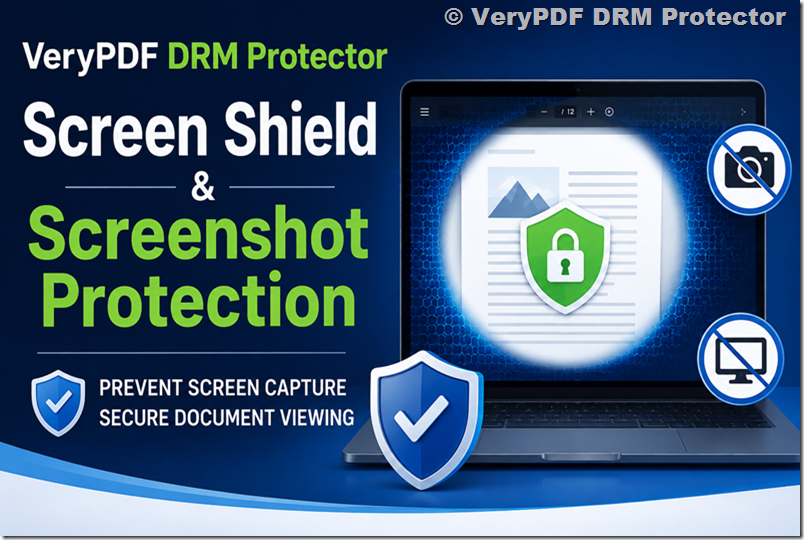
4. Screenshot Protection

Many Telegram leaks originate from screenshots.

DRM protection can block screen capture attempts, preventing visual copying.


5. Disable Copy & Print

Pirates often copy text or print to new PDFs.

DRM restrictions stop:

  • Copying
  • Printing
  • Saving alternative versions

6. Dynamic Watermarking

Each viewer can display personalized watermarks such as:

  • User name
  • Email
  • Company
  • IP address
  • Date/time

If someone attempts sharing, the source becomes traceable.

This alone discourages internal leaks.


7. Expiration Control

You can set reports to:

  • Expire after days
  • Expire after subscription ends
  • Revoke access instantly

Leaked files stop working automatically.


How DRM Stops Reddit Distribution

Reddit pirates rely on shareable files.

DRM breaks this model.

When someone uploads a protected report:

  • Downloaders cannot open it.
  • Authentication fails.
  • Access rights are denied.

The leaked file becomes worthless.

Piracy communities quickly stop distributing content that doesn’t work.


Protecting Your Business Model

Implementing DRM protection is not just about security.

It protects your entire revenue structure.

Preserve Premium Pricing

When sharing becomes impossible:

  • Customers must purchase legitimately.
  • Discounts become unnecessary.
  • Value perception remains high.

Increase Enterprise Sales

Corporate clients prefer vendors with strong IP protection.

DRM demonstrates professionalism and security maturity.


Enable Subscription Revenue

With DRM, you can sell:

  • Monthly access
  • Annual research subscriptions
  • Time-limited licenses

Instead of one-time downloads.


Reduce Customer Abuse

Common abuse patterns disappear:

  • Team sharing
  • Internal redistribution
  • Unauthorized reselling

Each license stays individual.


Real-World Example

Imagine a consulting company selling a $1,200 annual industry report.

Before DRM:

  • 300 buyers
  • Report leaked on Telegram
  • Sales drop by 60%
  • Competitors obtain insights

After DRM protection:

  • Shared files cannot open
  • Telegram users abandon distribution
  • Sales stabilize
  • Enterprise clients increase

The difference isn’t marketing.

It’s control.


Why Prevention Is Better Than Takedowns

Many companies attempt DMCA takedowns.

Problems:

  • Links reappear instantly.
  • Telegram ignores requests.
  • Reddit mirrors multiply.
  • Legal costs rise.

Takedowns fight symptoms.

DRM eliminates the cause.


Common Objections About DRM

“Will DRM hurt user experience?”

Modern DRM solutions are seamless.

Authorized users open reports normally after authentication.

Most readers never notice additional protection.


“Is DRM only for big companies?”

No.

Independent analysts, research startups, and niche publishers benefit the most because every sale matters.


“Can pirates still bypass DRM?”

No protection is theoretically perfect, but strong DRM dramatically raises the barrier.

Pirates target easy content.

When your report becomes difficult to redistribute, they move on.


Implementation Strategy for Report Sellers

Step 1 — Identify High-Risk Content

Protect:

  • Premium reports
  • Annual research
  • Proprietary datasets
  • Client deliverables

Step 2 — Convert PDFs to DRM-Protected Files

Upload your report into a DRM protection platform.

Apply security policies.


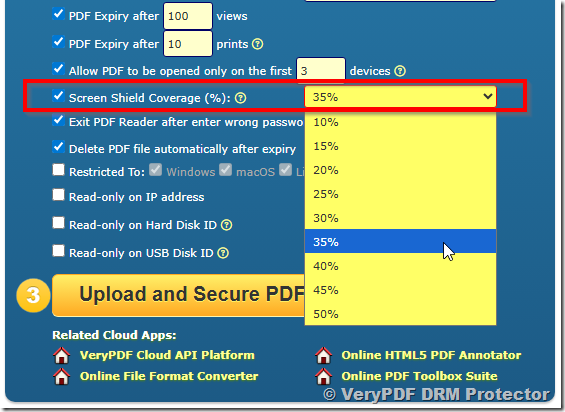
Step 3 — Define Access Rules

Decide:

  • Device limits
  • Viewing duration
  • Printing permissions
  • Screenshot rules

Step 4 — Distribute Securely

Send licensed access instead of raw PDFs.


Step 5 — Monitor Usage

Track:

  • Access logs
  • Suspicious activity
  • Unauthorized attempts

The Psychological Effect of DRM

An overlooked benefit is deterrence.

When users see:

  • Personalized watermarks
  • Restricted controls
  • Licensed access

They think twice before sharing.

Most leaks are casual, not malicious.

DRM stops casual piracy — which represents the majority of leaks.


Protecting Long-Term Profitability

Companies that ignore piracy often experience:

  • Gradual revenue decline
  • Lower pricing pressure
  • Increasing marketing costs
  • Loss of exclusivity

Companies that adopt DRM early maintain:

  • Stable pricing
  • Controlled distribution
  • Strong brand authority
  • Sustainable growth

The Future of Premium Digital Reports

The industry is shifting from:

Selling files → Selling controlled access

Just as Netflix transformed video distribution, report publishers must transition away from unrestricted PDFs.

Your report is not just a document.

It is intellectual property.

And intellectual property requires enforceable protection.


Final Thoughts

If your premium report appears on Telegram or Reddit even once, the financial damage can be significant and long-lasting.

The reality is simple:

  • Passwords don’t work.
  • Watermarks alone aren’t enough.
  • Legal takedowns are reactive.
  • Traditional PDFs cannot protect revenue.

Modern report businesses need modern protection.

By implementing a DRM solution such as VeryPDF DRM Protector, companies selling high-value PDF reports can prevent unauthorized sharing, stop Telegram redistribution, block Reddit piracy, and maintain the exclusivity that premium pricing depends on.

Protecting your reports is not merely a technical decision.

It is a business strategy.

Because in the knowledge economy, control over distribution equals control over profit.

And the companies that protect their intellectual assets today will be the ones still profitable tomorrow.

How Teachers Can Prevent Their Course Materials from Being Leaked on Telegram or Reddit

In today’s digital learning environment, educators face an unprecedented challenge: protecting their intellectual property while still providing students with accessible and engaging learning materials. PDFs, PowerPoint presentations, Word documents, and other educational resources are increasingly shared online, and once distributed, they can quickly find their way onto public platforms such as Telegram, Reddit, and other file-sharing channels. For teachers, this represents not only a loss of control over their content but also potential damage to their reputation, professional integrity, and the educational process itself.

How Teachers Can Prevent Their Course Materials from Being Leaked on Telegram or RedditThe Rising Challenge of Digital Content Leakage

The transition to digital classrooms has brought immense benefits: students can access learning materials anytime, anywhere, and teachers can deliver content more effectively. However, this convenience comes with a significant risk. Once a file is distributed electronically, it can be copied, forwarded, and uploaded with minimal effort. Even a single student sharing a lecture PDF on Telegram or Reddit can lead to widespread dissemination in just hours.

Many teachers report discovering their course materials being shared on public forums without their consent. These leaks can occur for various reasons:

  1. Unauthorized sharing by students: Some students may intentionally share files to help peers who are not enrolled in the course.
  2. Accidental forwarding: Students may unknowingly send a copy of the material to the wrong group or person.
  3. Lack of access control: Traditional PDF files or PowerPoint presentations often rely on simple passwords or unsecured email attachments, which are easily bypassed.

The consequences of such leaks are serious:

  • Loss of Intellectual Property: Teachers invest hours of research and preparation into their materials. Once leaked, this work can be freely copied and reused without credit or compensation.
  • Academic Integrity Issues: Leaked materials give some students unfair advantages, potentially compromising exams, assignments, and classroom evaluations.
  • Professional Reputation: Publicly available course content might reflect outdated information or errors that the teacher intended to revise, potentially affecting their professional image.
  • Financial Impact: For teachers who sell or license educational content, leaks can directly reduce revenue.

Understanding Teacher Pain Points

To fully appreciate the need for protection, it’s important to understand the specific pain points educators face:

1. Fear of Unauthorized Distribution

Teachers often worry that sharing materials digitally could lead to their work being posted online. Unlike a physical textbook that is harder to duplicate without cost, digital materials are easily copied. Platforms like Telegram and Reddit enable anonymous sharing, making it nearly impossible to track the source once content is leaked.

2. Difficulty Controlling Student Access

Even with classroom management software or LMS systems, controlling who can access files outside the school environment is challenging. Students can download PDFs, screenshots, or convert materials into other formats, bypassing simple restrictions.

3. Loss of Student Engagement and Value of Learning

When course materials are widely available online, students may skip attending classes or completing assignments, assuming they can access all necessary resources elsewhere. This not only reduces engagement but also undermines the teacher’s role in guiding learning.

4. Time and Effort Wasted on Repeated Work

Teachers often need to revise materials each semester to prevent unauthorized reuse. Leaked files make it necessary to recreate or heavily modify content frequently, consuming valuable time that could be spent on instruction or research.

5. Risk of Misuse and Misrepresentation

Leaked content may be edited or misinterpreted, potentially misrepresenting the teacher’s ideas or course objectives. Once material circulates publicly, it is nearly impossible to remove it entirely from the internet.

Traditional Methods and Their Limitations

Many teachers attempt to protect their materials using standard methods:

  • Password-protected PDFs: While adding a password may prevent casual access, passwords can be shared easily among students.
  • Email attachments: Sending files via email provides no control once the student downloads the document.
  • LMS restrictions: Some learning management systems allow limited access to files, but students can still take screenshots or use other devices to copy content.

These methods provide minimal protection and cannot prevent determined students from distributing materials online. This is where Digital Rights Management (DRM) solutions become critical.

How VeryPDF DRM Protector Solves the Problem

VeryPDF DRM Protector is designed specifically to address the challenges faced by educators in the digital age. This powerful tool allows teachers to protect PDF documents and other course materials with advanced security features that go far beyond simple passwords.

Key Features for Educators

  1. Access Control

With VeryPDF DRM Protector, teachers can define exactly who can open a document. Each file can be assigned to individual students or groups, ensuring that unauthorized users cannot access the content.

  1. Copy and Print Restrictions

The software can prevent students from copying text, taking screenshots, or printing materials. Even if a file is shared with others, its content remains protected, limiting the possibility of redistribution.

  1. Dynamic Watermarking

One of the most effective deterrents against leaks is dynamic watermarking. Each document can be stamped with the student’s name, email, or other identifying information. If a file is leaked online, it is possible to trace it back to the source.

  1. Expiration and Revocation

Teachers can set expiration dates for documents or revoke access at any time. This ensures that materials are only available for the duration of the course and cannot be reused indefinitely.

  1. Cross-Platform Protection

VeryPDF DRM Protector works across multiple devices and platforms. Whether students use Windows, Mac, or mobile devices, the protection remains intact, preventing unauthorized access regardless of the device used.

How It Works

Using VeryPDF DRM Protector is simple:

  1. Upload your course materials (PDFs, presentations, or other files) to the platform.
  2. Configure the security settings according to your needs—decide who can view the document, apply watermarks, and set expiration dates.
  3. Distribute the secured files to students.

Once the files are protected, they cannot be forwarded, copied, or printed without your authorization. Even if a student attempts to share the document on Telegram, Reddit, or other platforms, the content remains secure.

Real-Life Scenario

Imagine a professor preparing a set of lecture notes for a graduate course. Without DRM protection, a student could easily upload the notes to a Telegram group, where hundreds of others could access them instantly. This could lead to a loss of control over the course, complaints from the administration, and even reputational damage if the materials are misused.

With VeryPDF DRM Protector, the same notes can be distributed securely. Each student receives a copy with a personalized watermark and restrictions that prevent printing or sharing. If the notes appear online, the professor can identify the source and take action immediately.

Benefits Beyond Security

While preventing leaks is the primary goal, using VeryPDF DRM Protector also offers additional advantages:

  • Peace of Mind: Teachers can focus on teaching instead of worrying about unauthorized distribution.
  • Maintaining Academic Integrity: Ensures that all students access materials fairly, reducing cheating and plagiarism.
  • Efficiency: No need to constantly revise materials to prevent leaks; secure files can be reused semester after semester.
  • Professional Credibility: Demonstrates that the teacher takes intellectual property seriously, enhancing reputation and authority.

Implementation Tips for Teachers

To maximize the effectiveness of DRM protection, teachers should consider the following:

  1. Personalize Watermarks: Include student-specific information to discourage sharing.
  2. Set Expiration Dates: Ensure materials are only available during the active period of the course.
  3. Monitor Access: Keep track of who opens documents to identify unusual activity.
  4. Combine with LMS: Use DRM protection alongside your Learning Management System for an added layer of security.
  5. Educate Students: Inform students about the importance of respecting digital materials and the consequences of unauthorized sharing.

Conclusion

Digital course materials are invaluable, but without proper protection, they are vulnerable to unauthorized distribution. Teachers face significant challenges when their hard work is leaked online, from loss of intellectual property to compromised academic integrity. Traditional methods like passwords and LMS restrictions provide limited security and are easily bypassed.

VeryPDF DRM Protector offers a robust solution. With features such as access control, copy and print restrictions, dynamic watermarking, and expiration management, educators can distribute materials safely, knowing that their content remains protected. By using DRM protection, teachers regain control over their work, maintain fairness in the classroom, and ensure their efforts are respected.

If you want to try VeryPDF DRM Protector for free and see how it can safeguard your teaching materials, visit https://drm.verypdf.com/. Protect your intellectual property, preserve academic integrity, and take control of your course materials today.

How I Learned to Stop My Udemy Course from Being Pirated , A Story Every Course Creator Should Read

There is a moment every online course creator remembers clearly.

It’s the moment you press Publish.

After months of recording lessons, rewriting scripts, fixing audio problems, re-editing slides, and doubting whether anyone will even care about your topic, your course finally goes live on Udemy. You feel relief more than excitement. The hard work is done. Now the platform will handle distribution, students will start enrolling, and your knowledge will finally reach the people you created it for.

At least, that’s what most of us believe.

I want to tell you a story, not about marketing success, viral growth, or passive income, but about something far more common and far less discussed: what happens when your course stops belonging to you almost immediately after you publish it.


The Beginning: A Course Built with Care

The creator whose story inspired this article wasn’t trying to become famous. He wasn’t launching a mass-market productivity course or chasing trends. His topic was deeply personal: piano training designed specifically for musicians who already understood music but wanted to refine technique and interpretation.

It was a niche course, the kind created out of passion rather than financial ambition. Weeks turned into months while recording demonstrations, correcting mistakes, and explaining concepts that took years of experience to understand. Every lesson represented accumulated knowledge, practice, and identity.

When he uploaded the course to Udemy, he assumed the biggest challenge would be visibility. Like most instructors, he worried about reviews, pricing strategies, and whether students would actually find the course among thousands of others.

Piracy never crossed his mind.


How I Learned to Stop My Udemy Course from Being Pirated , A Story Every Course Creator Should Read


The Discovery Nobody Prepares You For

Only days after uploading the course, before he had even started promoting it publicly, a student sent him a message asking a strange question: “Is this your course on another website?”

He clicked the link.

There it was.

His entire course, videos, materials, structure, uploaded to multiple pirate platforms. Not one site. Several. Each offering free downloads to anyone who wanted them.

The shock wasn’t just that the course had been stolen. It was how fast it happened. The course had barely existed online long enough to gain legitimate students, yet pirates had already copied and redistributed it.

The realization hit hard: publishing online meant losing control almost instantly.


The Natural Reaction: Trust the System

Like most creators, he believed there must be a process to fix this. After all, modern internet platforms talk constantly about supporting creators and protecting intellectual property.

He began doing everything correctly.

He contacted search engines.
He filed copyright complaints.
He reported hosting providers.
He emailed piracy reporting services.
He contacted Udemy support repeatedly.

Each message was written carefully, politely, and professionally. Evidence was attached. Ownership was explained. Links were documented.

He wasn’t angry. He simply expected help.

What followed was not hostility, but something arguably worse: indifference.


The Maze of Responsibility

Responses arrived slowly, often automated, sometimes contradictory. One organization redirected him to another. A hosting company suggested contacting a search engine. A search engine requested stronger proof of ownership. Another platform provided a generic copyright form that led nowhere.

At one point, he received feedback implying authorship could not be fully verified, despite being the creator himself.

The experience felt surreal. Instead of being treated as someone whose work had been stolen, he felt like a person creating inconvenience for large systems designed to avoid liability.

No one explicitly refused to help, yet nothing meaningful happened.

The pirate copies remained online.

New mirrors appeared faster than old ones disappeared.

He realized something uncomfortable: modern platforms excel at distributing content, but they rarely prevent its theft.


The Emotional Turning Point

The financial loss wasn’t the main issue. He already knew his course was unlikely to become a bestseller. The deeper impact came from feeling invisible within systems that relied on creators but offered limited protection once problems emerged.

He began questioning whether continuing on the platform was worth it.

Eventually, he removed the course entirely and moved it elsewhere. The decision wasn’t driven by revenue calculations but by dignity. He didn’t want to feel like a troublemaker for defending his own work.

His final question to fellow educators was simple and honest:

Is there any real way to prevent this from happening?


Why This Story Matters

Almost every experienced course creator eventually faces the same situation. Some discover pirated copies months later; others find them within days. Many never even realize how widely their materials circulate outside legitimate platforms.

The uncomfortable truth is that piracy is not rare, it is predictable.

Online education has become one of the fastest-growing digital industries. Wherever valuable digital content exists, unauthorized distribution follows. Pirates do not evaluate whether a course is famous or profitable. Automated systems scan platforms continuously, capturing new content as soon as it appears.

The problem is structural rather than personal.

Creators rely on platforms designed for reach, not protection.


The Misunderstanding About Learning Platforms

Platforms like Udemy serve an important purpose. They provide infrastructure, audiences, payment processing, and discoverability. For many instructors, they are the easiest way to begin teaching online.

However, they are marketplaces, not security systems.

Their primary responsibility is enabling transactions between students and instructors, not enforcing strict digital rights management at the level required to stop determined piracy groups.

Once a student can view a lesson, technical opportunities for copying usually exist. Screen recording software, browser capture tools, shared accounts, and automated extraction scripts make unauthorized duplication surprisingly simple.

The creator in our story did nothing wrong. He followed the expected workflow. The issue was not platform failure alone but the absence of dedicated content protection.


Understanding the Difference Between Reaction and Prevention

Most anti-piracy efforts operate after theft occurs. Reporting mechanisms, DMCA notices, and takedown requests are reactive tools. They remove copies one by one, often slowly, while new versions appear elsewhere.

This creates an exhausting cycle: identify piracy, report it, wait for removal, discover new copies, and repeat indefinitely.

Creators often assume this endless battle is unavoidable.

Yet large media companies rarely rely solely on takedowns. Streaming services, corporate training providers, and premium educational institutions focus on prevention through Digital Rights Management, or DRM.

Instead of chasing pirates, they make copying technically difficult from the beginning.


Discovering DRM Protection

Imagine if the creator’s course had been encrypted so that videos could not be downloaded, screen recordings failed, and access remained tied to authorized devices. Even if someone attempted to redistribute the material, the files would remain unusable outside controlled environments.

This is precisely the role of VeryPDF DRM Protector, developed by VeryPDF.

Rather than relying on platform policies or external reporting systems, DRM protection embeds security directly into the course content itself.

The philosophy shifts from asking platforms to defend creators toward giving creators their own defensive tools.


How DRM Would Have Changed the Story

If the piano course had been protected using DRM technology, the outcome might have unfolded differently.

When pirates attempted to capture videos, they would have encountered encrypted playback streams resistant to download tools. Screen recording attempts could have been blocked or detected automatically. Access permissions tied to specific users and devices would prevent widespread account sharing.

Even if someone tried leaking material, dynamic watermarking would reveal the source of the breach, discouraging unauthorized redistribution.

Instead of discovering pirated copies days after publishing, the creator might never have encountered them at all.

The difference lies not in fighting harder but in designing distribution more securely from the start.


Why Prevention Changes Creator Psychology

Creators who adopt strong protection often describe an unexpected emotional shift. They stop viewing piracy as an unavoidable consequence of teaching online and begin treating their courses as professional intellectual property assets.

This change influences creative decisions. Instructors feel comfortable sharing deeper expertise, proprietary methods, and advanced techniques because they know their materials are not easily extracted and redistributed.

Security becomes a foundation for creativity rather than a reaction to loss.


Integrating DRM Without Abandoning Platforms

An important misconception is that adopting DRM means leaving marketplaces entirely. In reality, many successful educators use a hybrid approach.

Platforms like Udemy remain valuable discovery channels where introductory material attracts students and builds reputation. Premium lessons, certifications, or advanced training modules can then be delivered through protected environments secured by DRM technology.

This approach balances reach and ownership.

The platform introduces students; DRM preserves value.


The Broader Lesson for Online Educators

The creator’s story resonates because it highlights a moment of disillusionment familiar to many professionals entering digital education. The internet promises global distribution but rarely explains the risks accompanying that exposure.

Piracy is not merely theft of revenue. It undermines confidence, motivation, and trust in digital ecosystems. Some instructors quietly stop creating new courses after their first experience with widespread unauthorized sharing.

Yet the solution is not silence or withdrawal. It is preparation.


What VeryPDF DRM Protector Actually Provides

VeryPDF DRM Protector applies enterprise-grade protection previously available mainly to large corporations. Course creators can enforce restrictions that define how, where, and by whom content is accessed.

Videos remain encrypted even when delivered online or offline. Viewing permissions can expire automatically. Playback can be restricted to approved devices. Personalized watermarks identify viewers uniquely, discouraging leaks before they occur.

Instead of relying on external enforcement, creators maintain direct control over their materials.

For instructors who invest significant time producing high-quality courses, this level of control transforms online teaching from a vulnerable activity into a sustainable professional practice.


Rewriting the Ending of the Story

When the creator removed his course from Udemy, he felt he had reached the only available conclusion. Without meaningful protection, continuing seemed pointless.

But his experience raises a different possibility. What if creators no longer needed to choose between confrontation and silence? What if piracy prevention became part of the course creation process itself, just as recording equipment and editing software already are?

With DRM protection in place, publishing a course would no longer mean surrendering ownership. Creators could focus on teaching rather than monitoring piracy forums or composing endless takedown requests.

The story would not end with withdrawal but with confidence.


A Reflection for Every Course Creator

If you are building or planning an online course, consider the moment immediately after publication. Imagine your content spreading rapidly, not only to paying students but also to unauthorized websites beyond your control.

Now imagine launching with protection already embedded, ensuring that access remains legitimate and traceable from the beginning.

The difference between those two scenarios defines the future experience of many educators.

The creator who shared his story asked whether any platform truly takes creator protection seriously. The deeper answer may be that protection cannot rely solely on platforms. It must become part of the creator’s own strategy.

By using tools like VeryPDF DRM Protector, instructors move from reacting to piracy toward preventing it, preserving not only revenue but also the respect and dignity that motivated them to teach in the first place.

Online education thrives when creators feel safe sharing knowledge. Strong DRM protection ensures that the effort invested in teaching continues to belong to those who created it.

And perhaps that is the real lesson behind the story, not how piracy happens, but how creators can finally stop it before it begins.

[Solution] VeryPDF DRM Protector Custom Development Service. Hardware-Level DRM Protection for Images, Videos, and PDFs Using Widevine, PlayReady, and FairPlay

VeryPDF DRM Protector Custom Development Service

Hardware-Level DRM Protection for Images, Videos, and PDFs Using Widevine, PlayReady, and FairPlay

If you’ve ever tried to share valuable content online, training materials, premium videos, internal documents, you already know the problem:

You send a file…
And then you lose control.

People download it.
Forward it.
Screenshot it.
Record it.
Upload it somewhere else.

And suddenly, something you created is everywhere.

That’s exactly the gap VeryPDF DRM Protector is built to close.

But beyond the standard product, there’s something much more powerful available:

Custom DRM development based on hardware-backed technologies like Widevine, PlayReady, and FairPlay.

This isn’t a one-size-fits-all tool.
It’s a tailored security system built around your exact use case.


[Solution] VeryPDF DRM Protector Custom Development Service. Hardware-Level DRM Protection for Images, Videos, and PDFs Using Widevine, PlayReady, and FairPlay


What This Custom DRM Service Actually Means

VeryPDF DRM Protector’s custom development service is designed for organisations that need more than basic protection.

You’re not just applying restrictions.
You’re building a controlled viewing environment.

At the core, this service integrates:

  • Google Widevine
  • Microsoft PlayReady
  • Apple FairPlay

These are the same DRM technologies used by major streaming platforms.

But instead of protecting movies or TV shows, they’re applied to:

  • Images
  • Videos
  • PDFs
  • Training materials
  • Internal documentation
  • Commercial content

And more importantly:

They’re tied to hardware-level security, not just software restrictions.


Why Hardware-Based DRM Matters

Most “protection tools” rely on software rules.

That means:

  • Disable right-click
  • Block downloads
  • Hide UI buttons

But here’s the reality:

Anyone determined enough can bypass those.

Hardware DRM changes the game completely.

Instead of trusting the browser or app, it relies on secure execution environments built into the device itself.

So even if someone tries to:

  • Inspect the page
  • Modify scripts
  • Record streams
  • Extract files

They hit a wall.

Because the content is never exposed in a usable form.


Turning “Please don’t share” Into “You CAN’T share”

This is the core philosophy behind VeryPDF DRM Protector.

Not asking nicely.
Not hoping users behave.

Enforcing control.

With features like:

  • Locking content to a single browser
  • Binding access to a verified identity
  • Preventing screenshots and recordings
  • Blocking downloads completely

You move from:

“Please don’t share”

To:

“You CAN’T share.”


What Makes This Service Different From Typical DRM Tools

Let’s break it down simply.

Most tools:

  • Add passwords
  • Encrypt files
  • Maybe track downloads

But once the file is opened…
Control is gone.

VeryPDF DRM Protector does things differently.

It doesn’t just protect files.

It controls how they are viewed, where, and under what conditions.

And with custom development, you can go even further:

  • Integrate DRM into your own platform
  • Build custom workflows
  • Apply different policies per user or content type
  • Connect with your authentication systems
  • Automate access rules at scale

Zero Software Installation: Why This Matters More Than You Think

One of the biggest barriers to secure sharing is friction.

If users need to:

  • Install software
  • Add extensions
  • Configure settings

They either:

  • Don’t do it
  • Do it incorrectly
  • Or find workarounds

VeryPDF DRM Protector removes that completely.

Everything runs directly in the browser.

No plugins.
No installations.
No IT headaches.

Users just click and view.

But behind the scenes, everything is locked down.


A Real-World Scenario

Let’s say you run an online training business.

You sell premium video courses and downloadable materials.

Without protection:

  • Users download videos
  • Share them on forums
  • Upload them to other platforms
  • Resell your content

Revenue drops.
Your brand gets diluted.

Now apply VeryPDF DRM Protector with custom DRM:

  • Videos are streamed with hardware DRM (Widevine / FairPlay / PlayReady)
  • PDFs are protected with browser-based controls
  • Access is tied to user identity
  • Screenshots and recording are blocked
  • Content expires after a set time
  • Access is limited to one device

Now:

Users can watch your content.
But they cannot extract it, copy it, or redistribute it.


Full Protection Feature Breakdown (And What They Actually Do)

Let’s go through the features, not as a list, but in practical terms.

Screenshot Prevention

Users cannot capture your content using:

  • Built-in screenshot tools
  • Screen capture software

Even if they try, they get:

  • Blank screens
  • Masked content

Scanning Prevention

Prevents:

  • Automated scraping tools
  • Bots scanning your content

AI Prevention

Stops:

  • AI tools from reading and extracting your data
  • Automated content harvesting

This is becoming more important every day.

Download Neutralization

Even if someone “downloads” something:

It’s useless.

The file stays encrypted and cannot be opened outside the secure environment.

Dynamic Watermark

Every viewer sees:

  • Their email
  • IP address
  • Phone number

Right on the content.

So if something leaks, you know exactly who did it.

Viewing Timeout

Leave the screen open?

It locks automatically after a set time (e.g., 10 minutes).

Screen Masking

Switch tabs or minimise the browser?

Content disappears instantly.

Camera Shield

Prevents people from using another device to take photos.

It does this by:

  • Requiring interaction
  • Disrupting static capture

Verification (SMS / Email / Contact Match)

Only the intended user can access the content.

Even if someone shares the link, it won’t work.

Lock to First Browser

This is a big one.

Once opened:

That file is tied to that browser.

No sharing. No switching devices.

Password Protection

Add an extra layer when needed.

Access Lock

You can:

  • Instantly revoke access
  • Even after the file is sent

Print Control

Allow printing… or block it entirely.

Expiry Control

Set a time limit.

After that:

Access is gone.

View Count Limit

Limit how many times a file can be opened.

VPN & Proxy Blocking

Stops anonymous access attempts.

Human Check

Prevents bots from accessing content.

Security Level Setting

Different files = different protection levels.

Device Type Control

Allow only:

  • Mobile
  • Desktop
  • Or specific devices

Geo-Blocking & IP Control

Restrict access to:

  • Specific countries
  • Specific IP addresses

What Are VeryPDF DRM Protected Files?

This is important to understand.

When you protect a file with VeryPDF DRM Protector:

It’s not just encrypted.

It’s converted into a format that can only be accessed through a secure viewing environment.

That environment enforces:

  • Access rules
  • Viewing restrictions
  • Security policies

And everything is backed by a robust infrastructure.

Your data remains yours.

Your copyright remains yours.

But now:

Your control stays intact—even after sharing.


Why Traditional File Sharing Fails

Most platforms focus on convenience.

Upload → Share link → Done.

But they don’t solve:

  • Downloading
  • Screen recording
  • Printing
  • Forwarding

Which means:

Once access is granted…
Control is gone.

VeryPDF DRM Protector flips that model.

You don’t just share files.

You share controlled access.


Remote Control: After Sending the File

This is where things get powerful.

With traditional sharing:

Once sent = permanent access.

With VeryPDF DRM Protector:

You can:

  • Revoke access instantly
  • Change permissions
  • Lock files remotely

Even after users have opened them.


Granular Tracking: Knowing Exactly What Happens

You’re not guessing anymore.

You can track:

  • Who accessed the file
  • When they accessed it
  • How many times
  • From where

This gives you:

  • Visibility
  • Accountability
  • Proof

Built for Real Businesses (Not Just Enterprises)

A lot of DRM solutions are:

  • Expensive
  • Complex
  • Over-engineered

VeryPDF DRM Protector is different.

It’s designed to be:

  • Simple to use
  • Quick to deploy
  • Scalable

Even small teams can use it effectively.


Custom Development: When You Need More

The standard platform is powerful.

But sometimes, you need something specific.

That’s where custom development comes in.

You can build:

  • Custom DRM workflows
  • Integration with your systems
  • API-driven automation
  • Custom authentication logic
  • Industry-specific protections

For example:

  • E-learning platforms
  • Corporate training systems
  • Content marketplaces
  • Internal document systems

Everything can be tailored.


Universal Compatibility

Your users might be on:

  • Windows
  • macOS
  • iOS
  • Android

Doesn’t matter.

Protection stays consistent.


Zero Compromises: Secure or Not Accessible

This is a key principle.

VeryPDF DRM Protector does not allow “partial security”.

It’s either:

  • Fully secure viewing

Or:

  • No access at all

No weak points.
No fallback loopholes.


They Can View It, But They Can Never Own It

That’s the real outcome.

Users can:

  • Read
  • Watch
  • Learn

But they cannot:

  • Copy
  • Download usable versions
  • Redistribute
  • Extract content

Ownership stays with you.


Who Should Use This?

This isn’t for casual file sharing.

It’s for people who care about their content.

Typical use cases:

  • Online course creators
  • Training organisations
  • Corporate teams
  • Publishers
  • Media companies
  • Legal and financial firms

If your content has value, this matters.


Getting Started

You don’t need to build everything from scratch.

You can start with:

  • The standard platform
  • Apply protection features immediately

Then scale into:

  • Custom DRM development
  • Hardware-level integrations
  • Advanced workflows

Final Thoughts

Most people only realise the value of protection after something goes wrong.

After:

  • Content leaks
  • Revenue drops
  • Intellectual property is copied

By then, it’s too late.

VeryPDF DRM Protector changes that.

It gives you control from the start.

Not just over files.

But over how they’re used.


Call to Action

Want to prevent unauthorized copying and sharing of your images and PDFs?
No software or extensions required.

Stop unauthorized screenshots, downloads, sharing, photography, and AI scraping.

VeryPDF DRM Protector provides seamless, high-level protection directly in your web browser.

Zero compromises: a secure environment, or no viewing at all.

They can view your work, but they can never own it.

Get started with VeryPDF DRM Protector for free today.

https://drm.verypdf.com/purchase/

If you need custom DRM development based on Widevine, PlayReady, and FairPlay, contact VeryPDF to discuss your requirements and get a tailored quote.