Why VeryPDFs DRM-Enabled Virtual Data Room Outperforms Adobe and Smallpdf for Secure Document Sharing, Offline Access Protection, and Multi-Device Restriction Management

Why VeryPDF’s DRM-Enabled Virtual Data Room Outperforms Adobe and Smallpdf for Secure Document Sharing, Offline Access Protection, and Multi-Device Restriction Management

Every time I had to send confidential documents to clients or partners, I felt a knot in my stomach. Even when using well-known platforms like Adobe or Smallpdf, I constantly worried about someone forwarding files, sharing screenshots, or accessing my documents offline without permission. The idea of losing control over sensitive business data was stressful, to say the least. That’s when I discovered VeryPDF DRM Protector, and it completely changed the way I manage secure documents.

Why VeryPDFs DRM-Enabled Virtual Data Room Outperforms Adobe and Smallpdf for Secure Document Sharing, Offline Access Protection, and Multi-Device Restriction Management

From the moment I started using VeryPDF DRM Protector, I realized this wasn’t just another file-sharing tool. It’s a full-fledged Virtual Data Room (VDR) solution with built-in Digital Rights Management (DRM) controls. What makes it stand out is that it doesn’t just store files securely in the cloudit actively enforces who can see them, on how many devices, and for how long. If you’re handling high-stakes documents like M&A reports, legal contracts, or sensitive financial records, this is a game-changer.

I set up my first data room with VeryPDF for a client due diligence project. The onboarding process was incredibly simpleway easier than Adobe’s clunky interface. Once the documents were uploaded, I could instantly set file-level protections, including limits on offline access, number of devices, and even geographic restrictions. The peace of mind knowing that even if someone downloaded a file, they couldn’t freely distribute or view it outside my control was priceless.

Here’s what I loved most about VeryPDF DRM Protector:

  • Secure Web Viewer and Secure Document Viewer: I can share files directly through a web browser without forcing recipients to download a heavy client, thanks to the lightweight Secure Web Viewer. But for highly sensitive files, the Secure Document Viewer adds a second layer of protection, preventing screenshots, screen sharing, and printing. I remember sending a confidential investor pitch and feeling completely safe knowing recipients could interact with the content but couldn’t leak it.

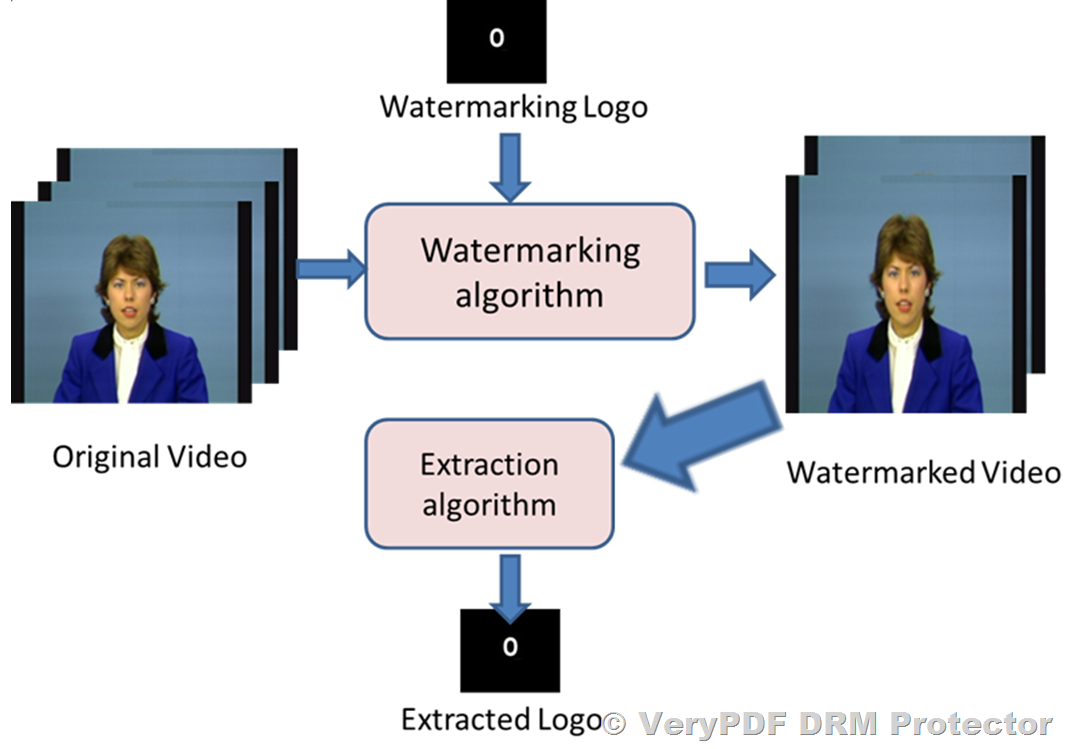
  • Dynamic Watermarking and Access Revocation: One of the standout features is the ability to revoke access to documents at any time, even after they’ve been shared. Plus, every file can carry dynamic watermarks tied to the user’s identity. I ran a test sharing some internal financial documents with my team, and seeing the watermarks update in real-time reassured me that unauthorized sharing would be immediately traceable.

  • Granular Multi-Device Restrictions: Unlike other platforms where a user could log in from multiple devices freely, VeryPDF lets you define exactly how many devices a user can use. This was a lifesaver during a recent project where contractors needed temporary access but I didn’t want the files floating around on personal devices indefinitely.

Another feature that really separates VeryPDF from Adobe or Smallpdf is its real-time analytics and notifications. I can track who’s opening files, where they’re viewing them, and how long they spend on each document. During one project, I noticed a visitor accessing sensitive material from an unusual location and was able to immediately revoke access, which could have prevented a potential leak.

VeryPDF DRM Protector also excels in ease-of-use. I was concerned that my clients, some of whom aren’t very tech-savvy, would struggle with DRM protections. But the interface is clean, intuitive, and doesn’t require complex logins. Users just click a link, and the DRM protections work seamlessly in the background. This simplicity means I spend less time explaining access issues and more time focusing on actual work.

Compared to other VDR solutions I’ve tried, VeryPDF also offers full-text search, unlimited visitors, local file uploads, and audit logs, which makes managing large volumes of documents much easier. I remember handling a merger where dozens of folders with hundreds of documents had to be shared securely. With VeryPDF, everything was indexed and searchable, and I could monitor each visitor’s activity effortlessly. Adobe and Smallpdf simply didn’t offer this level of control and visibility.

What I find most impressive is that VeryPDF DRM Protector protects content even offline. This was a big concern for me because some of my collaborators often work on planes or in areas with limited internet. Traditional platforms fail here, but with VeryPDF, files downloaded to authorized devices remain encrypted and controlled. I had a team member access documents during a flight, and knowing that the DRM still enforced restrictions made me completely confident in the system.

The product also supports multi-format files, including PDFs, images, videos, and audio files, which is essential for my projects that often include a mix of media. I can consolidate everything in one VDR rather than juggling multiple platforms, which saves a ton of time and reduces the risk of errors.

For businesses, law firms, financial institutions, or any organization that handles sensitive information, VeryPDF DRM Protector is a must-have. It’s not just about file storageit’s about total control and peace of mind. I’ve switched all my secure document workflows to VeryPDF and can confidently say it outperforms both Adobe and Smallpdf in DRM capabilities, offline access protection, and multi-device management.

If you’re tired of worrying whether your confidential documents are truly secure, I highly recommend giving VeryPDF DRM Protector a try. You can start your free trial here: https://drm.verypdf.com/. Seriously, it changed the way I think about document security, and I know it can do the same for you.

VeryPDF also offers custom development services to meet unique technical needs. Whether you require specialized PDF processing solutions for Linux, macOS, Windows, or server environments, their team can build utilities with Python, PHP, C/C++, Windows API, Linux, Mac, iOS, Android, JavaScript, C#, .NET, and HTML5. They create virtual printer drivers for PDF, EMF, and image formats, capture and monitor printer jobs, and develop tools for document analytics, OCR, barcode recognition, secure document viewing, and DRM enforcement. For tailored solutions, contact VeryPDF at https://support.verypdf.com/.

FAQ

1. Can VeryPDF DRM Protector prevent screenshots and screen sharing?

Yes, the Secure Document Viewer prevents screenshots, screen sharing, and printing while enforcing access limits.

2. Does it support offline document access?

Yes, authorized devices can access files offline while maintaining DRM protections.

3. Can I revoke access after sharing a document?

Absolutely. You can revoke access anytime, even after files are downloaded.

4. What types of files are supported?

VeryPDF supports PDFs, images, audio, video, and most basic file types used in business workflows.

5. Can I track who viewed my documents and for how long?

Yes, real-time analytics provide detailed insights into document visits, location, engagement, and more.

Tags or keywords:

Virtual Data Room, DRM Protector, Secure Document Sharing, Offline Access Protection, Multi-Device Restrictions, Document Security, File-Level Encryption, Data Room Analytics, Confidential Document Management, Digital Rights Management

Complete Guide to Setting Up a Hyper-Secure Virtual Data Room with VeryPDF DRM Protector to Control File Access, Printing, Copying, and Screenshots Across All Devices

Complete Guide to Setting Up a Hyper-Secure Virtual Data Room with VeryPDF DRM Protector to Control File Access, Printing, Copying, and Screenshots Across All Devices

Every time I needed to share sensitive business documents with partners or investors, I found myself worrying: “Who else can see this? Can it be printed or copied without my permission?” The traditional methods of emailing PDFs or storing files on shared drives never gave me full confidence. There had to be a solution that allowed collaboration without sacrificing security. That’s when I discovered VeryPDF DRM Protector.

Complete Guide to Setting Up a Hyper-Secure Virtual Data Room with VeryPDF DRM Protector to Control File Access, Printing, Copying, and Screenshots Across All Devices

From the moment I started exploring VeryPDF DRM Protector, I realised this wasn’t just another virtual data room (VDR). It’s a hyper-secure digital workspace that gives me control over every aspect of file usageacross all devices. The platform is designed for businesses, legal teams, financial institutions, and anyone who needs to share highly confidential documents safely.

What I love most is the way it balances security with usability. Setting up a virtual data room with DRM controls is surprisingly straightforward. You simply upload your documentsPDFs, videos, audio, or imagesinto the data room. From there, you can define who gets access, for how long, and on which devices. Even if someone manages to log in without authorization, the file-level encryption and DRM protection ensure your content remains secure.

One feature that stands out is the shared link access control. I’ve often needed to send sensitive contracts to multiple parties without giving them full ownership of the files. With VeryPDF, I can generate links that only allow viewing, prevent copying, block printing, and even stop screenshots. The ability to revoke access instantly has saved me from worrying about files being forwarded or leaked after sharing. Compared to other VDRs I’ve tried, this is a game-changerno more chasing after rogue copies or explaining to clients why their document shouldn’t be shared.

Another standout is the Secure Web Viewer and Secure Document Viewer. The web viewer is light, intuitive, and perfect for users who just need browser access without downloading anything. But for highly sensitive projects, I use the Secure Document Viewer. It’s a heavier-duty client that actively blocks screenshots, screen sharing, and printing. For example, when I collaborated with our finance team on confidential reports, I could confidently share files knowing every viewer’s actions were controlled and logged. The real-time engagement notifications and analytics dashboards also helped me track who accessed which document and whena feature I wish I had years ago.

VeryPDF DRM Protector also shines with dynamic watermarking and multi-level security. In one scenario, we shared an investment proposal with external consultants. By applying a dynamic watermark with their names and emails, any attempt to misuse the document could be traced instantly. It’s a simple but highly effective deterrent that other platforms rarely offer with such flexibility.

Beyond security, the platform’s usability impressed me. The interface is clean, and even team members who aren’t tech-savvy can navigate without frustration. Integrations with Google, Microsoft accounts, and over 6000 apps via Zapier make daily operations seamless. Plus, the platform supports unlimited visitors, full-text search, and local uploads, which means I can scale without worrying about bottlenecks.

The benefits extend to audit and compliance as well. VeryPDF provides detailed data room analytics, audit logs, and visit exports, which is invaluable during legal reviews or investor due diligence. I remember a moment when I needed to provide proof of document access for a client review; within minutes, I had a complete report detailing every action taken on our shared files. No more manual tracking, no more stress.

The more I used VeryPDF DRM Protector, the more I appreciated its flexible DRM controls. Unlike other solutions that rely solely on cloud servers, I can protect files locally while still enforcing access rights. The DRM system manages keys transparently, so users never need to handle passwords manuallyeverything is encrypted and securely transmitted. Even offline access can be controlled, making it ideal for consultants who travel or work from remote locations.

I also love how branding and customization are handled. You can tailor your data room visuallycustom logos, branded email templates, and even white-labeled URLs. For a professional presentation to clients or investors, this level of polish makes a big difference. It’s one of those subtle touches that makes the platform feel premium without overcomplicating things.

In short, VeryPDF DRM Protector solves real-world problems: controlling who can see your files, preventing unauthorized copying, blocking printing, and protecting sensitive data against leaks. It’s particularly useful for legal firms, investment banks, healthcare, defense, and any business managing confidential information. I’d highly recommend this to anyone who deals with large volumes of sensitive documents. Start your free trial now and boost your productivity: https://drm.verypdf.com/

VeryPDF offers custom development services to meet specific technical requirements. Whether you need advanced PDF processing on Linux, macOS, Windows, or server environments, VeryPDF can create tailored solutions. Services include Python, PHP, C/C++, Windows API, Linux, Mac, iOS, Android, JavaScript, C#, .NET, and HTML5 development. They also specialise in Windows Virtual Printer Drivers, document interception and monitoring, API hooks, OCR and table recognition, barcode generation, reporting tools, image and document management, and cloud-based services like digital signatures, document conversion, and secure viewing. If you have unique needs, reach out to VeryPDF support at https://support.verypdf.com/ to discuss your project requirements.

Frequently Asked Questions

1. What file types does VeryPDF DRM Protector support?

VeryPDF supports all common file types, including PDFs, images, audio, and video files. You can also upload directly from local storage or integrate with cloud storage providers.

2. Can I control who accesses my documents after sharing?

Yes. VeryPDF allows you to revoke access at any time, set expiry dates, limit devices, and even prevent printing or copying of shared documents.

3. Is there a way to track document engagement?

Absolutely. The platform provides real-time notifications, analytics dashboards, visitor logs, and engagement reports so you can monitor exactly who accessed your files and when.

4. Do I need to install software to use VeryPDF DRM Protector?

You can use the Secure Web Viewer for browser-based access without downloads. For high-security needs, the Secure Document Viewer client can be installed for enhanced protection.

5. Can I customise the data room branding?

Yes. VeryPDF allows you to customise logos, colours, email templates, and even URLs for a fully branded experience, helping maintain a professional look for clients and stakeholders.

Tags or Keywords

Virtual Data Room, Secure Document Sharing, DRM Protection, File Access Control, Data Room Analytics, Confidential Document Security, VeryPDF DRM Protector, Online Data Room, Document Watermarking, Secure Collaboration

How to Protect Confidential Corporate Files Using a Virtual Data Room with DRM Controls When Managing Legal, Financial, and M&A Due Diligence Documents Safely Online

How to Protect Confidential Corporate Files Using a Virtual Data Room with DRM Controls When Managing Legal, Financial, and M&A Due Diligence Documents Safely Online

Managing sensitive corporate documents has always been a stressful task. I remember the days when our legal and finance teams would scramble to ensure confidential files weren’t accidentally shared, especially during high-stakes mergers and acquisitions. Paper-based filing was cumbersome, and even early digital solutions felt insecure. That constant worry about accidental leaks or unauthorised access was draining. Then I discovered VeryPDF DRM Protector, and it completely changed how we handle confidential documents online.

How to Protect Confidential Corporate Files Using a Virtual Data Room with DRM Controls When Managing Legal, Financial, and M&A Due Diligence Documents Safely Online

Virtual Data Rooms have been around for a while, but combining them with robust Digital Rights Management (DRM) controls is what makes VeryPDF DRM Protector stand out. It’s not just a storage solutionit’s a secure workspace where I can manage who accesses what, for how long, and on which devices. For anyone managing legal, financial, or M&A due diligence documents, this level of control is a game-changer.

When I first started using VeryPDF DRM Protector, the setup was surprisingly simple. Within minutes, we could upload sensitive documents and set precise access permissions. One of my favourite features is the file-level protection. Even if someone managed to log in without authorization, the documents themselves remain encrypted and protected. This gave me immediate peace of mindfinally, a solution that actually prevents accidental sharing and piracy.

Here’s what I found most useful in day-to-day operations:

Shared Link Access Controls:

I could create links for external advisors or internal team members and tailor exactly what they could see. Want to allow viewing but prevent printing or downloading? Done. Need to restrict access to specific countries or IP addresses? Easy. The granular control is unmatched compared to other virtual data rooms I’ve used.

Real-Time Engagement Notifications:

During a recent due diligence project, I was able to see exactly when and where documents were accessed. This was invaluable when coordinating with multiple law firms and accounting teams. Knowing someone opened a critical contract immediately triggered follow-ups and allowed us to stay ahead of deadlines.

Dynamic Watermarking & Screen Shield Technology:

One moment that really stood out was when we had to share a sensitive financial report with investors. VeryPDF DRM Protector allowed us to embed dynamic watermarks and prevent screenshots. Unlike other tools that felt like a tick-box security measure, this gave real, enforceable control over sensitive files.

The product also supports both a Secure Web Viewer and a Secure Document Viewer. The web viewer is perfect for light, browser-based collaboration, while the downloadable document viewer prevents screenshots, screen sharing, and unauthorized printing. For sectors like legal services, finance, or healthcare, where the stakes are incredibly high, these layered protections make a huge difference.

I’ve tried other VDR solutions before, but VeryPDF’s combination of usability, security, and analytics is hard to beat. Other platforms often forced me to choose between security and convenience. With VeryPDF, I can protect documents rigorously while still allowing seamless collaboration. The analytics dashboard also gave me insights into visitor behavior, which helped in decision-making and audit preparation.

Let me give you a concrete example: during an M&A deal, multiple parties needed access to different contract clauses. Using VeryPDF DRM Protector, I could set document-level permissions, track who accessed what, and revoke access in real-time if necessary. We avoided the usual email back-and-forth, and the deal progressed faster than ever before. I honestly can’t imagine going back to email attachments or insecure cloud folders for these situations.

Advantages that matter in real life:

  • Simplicity: Even colleagues who aren’t tech-savvy can navigate the data room effortlessly.

  • Custom branding: Our corporate identity was reflected in the data room, making it look professional and consistent.

  • Integrations & API: Integration with Google, Microsoft, and over 6000+ apps via Zapier streamlined our workflow.

  • Transparent pricing: No hidden fees meant I knew exactly what we were paying forsomething rare in the VDR market.

If your company handles legal, financial, or M&A documents, or any confidential content that needs careful distribution, I can’t recommend VeryPDF DRM Protector enough. It’s a complete solution that allows secure collaboration without sacrificing usability.

Click here to try it out for yourself: https://drm.verypdf.com/

VeryPDF also offers custom development services tailored to your specific needs. They can build solutions for Linux, macOS, Windows, and server environments, using Python, PHP, C/C++, Windows API, Linux, Mac, iOS, Android, JavaScript, C#, .NET, and HTML5. Their expertise includes virtual printer drivers, document capture, API hooks, OCR, table recognition, barcode tools, cloud-based document conversion, and comprehensive PDF security solutions. If you have a unique technical requirement, their support team can help you craft a customised workflow at https://support.verypdf.com/.

Frequently Asked Questions

1. Who should use VeryPDF DRM Protector?

It’s ideal for legal firms, financial institutions, life sciences companies, and any organisation managing sensitive corporate files. M&A teams and compliance departments benefit the most.

2. Can I restrict document access by location or device?

Yes, you can limit access by IP, country, device, or number of accounts. This ensures that only authorised users can view the files.

3. How does watermarking work?

Dynamic watermarking embeds unique identifiers for each viewer, discouraging screenshots and unauthorised sharing. Combined with the screen shield, it prevents accidental leaks.

4. Is offline access possible?

Yes, offline access is supported but still under the same DRM controls. Users cannot bypass permissions even when offline.

5. Can I track document engagement in real-time?

Absolutely. You receive notifications when files are read, forwarded, or accessed from different locations. The analytics dashboard provides both aggregate and individual visitor insights.

Tags or keywords:

Virtual Data Room, DRM Controls, Secure Data Room Provider, Legal Document Security, M&A Due Diligence, Confidential File Protection, Digital Rights Management, Secure Document Collaboration, Online Data Room, Corporate File Security

Why Businesses Choose VeryPDF DRM Protector as a Secure Virtual Data Room Provider for Ultra-Sensitive Document Sharing with Advanced File-Level Encryption and Access Controls

Why Businesses Choose VeryPDF DRM Protector as a Secure Virtual Data Room Provider for Ultra-Sensitive Document Sharing with Advanced File-Level Encryption and Access Controls

Every time I’ve had to share sensitive company documents, I felt that sinking feeling of uncertaintywondering if the files could end up in the wrong hands. In today’s world, confidential information moves fast, and a single leak can cost a business millions and tarnish reputations. Whether it’s investor reports, legal contracts, or financial statements, the stakes are high. That’s when I stumbled upon VeryPDF DRM Protector, a virtual data room solution that completely changed how I handle sensitive documents.

Why Businesses Choose VeryPDF DRM Protector as a Secure Virtual Data Room Provider for Ultra-Sensitive Document Sharing with Advanced File-Level Encryption and Access Controls

I remember the first time I tried it. Our legal team needed to share a batch of merger-related documents with external advisors, and I was worried about security breaches. VeryPDF DRM Protector instantly gave me control and peace of mind. It isn’t just a storage spaceit’s a fully protected virtual workspace that combines the convenience of online collaboration with rigorous digital rights management.

One of the features that blew me away was file-level encryption with DRM controls. Unlike traditional cloud storage, where sharing a link could inadvertently give full access to anyone with it, VeryPDF allows me to control exactly who can view each document, for how long, and on which devices. I could set files to expire after a specific date, prevent printing, and even restrict access by location or IP address. For instance, during an investor review, I shared a PDF containing our proprietary financial model and set the access to only work on approved devices. Even if someone forwarded the link, they couldn’t open the file without permission. That level of control is a game-changer.

Another feature I found indispensable was the Secure Web Viewer and Secure Document Viewer. For quick collaboration, I used the Web Viewer so colleagues and external partners could access documents directly from their browser. The viewer limits how much of the document is visible at a time, preventing information leaks in open-office scenarios. When documents were highly sensitive, like our internal product roadmap or legal contracts, I switched to the Secure Document Viewer. This heavier-duty client blocks screenshots, screen sharing, and printing while still allowing recipients to collaborate safely. Setting up these protections was surprisingly straightforward. I could even adjust permissions after the documents were senta flexibility I hadn’t seen in other platforms.

The platform also shines with its comprehensive audit and analytics features. I could track who accessed which documents, when, and from where. For example, during a due diligence process, I monitored real-time engagement notifications, allowing me to see exactly which sections of documents received attention. That insight helped our team tailor follow-ups and clarify points efficiently without constant back-and-forth emails. Other virtual data rooms I tried either lacked this level of detail or made it overly complex to extract meaningful reports.

VeryPDF DRM Protector isn’t just about securityit’s also about simplicity. Even our external advisors, who aren’t particularly tech-savvy, found the interface intuitive. Uploading files, setting permissions, and sharing links was seamless. It even supports all basic file types and allows unlimited visitors, so scaling up collaboration was never an issue. Compared to other VDR providers, I appreciated the transparent pricing. There are no hidden fees, which means I don’t have to second-guess what a secure collaboration project will cost.

For businesses, the use cases are vast. We used it during mergers and acquisitions to manage sensitive financials and legal documents. Marketing teams leveraged it to share proprietary campaign data with vendors. Product teams stored technical specifications, and HR departments distributed confidential personnel filesall without worrying about leaks. Essentially, any scenario where sensitive documents need controlled sharing is a fit.

Here’s what makes VeryPDF DRM Protector stand out in my experience:

  • Granular Access Control: Limit access by device, location, and user. Revoke permissions instantly.

  • Dynamic Watermarking: Each document carries unique identifiers to discourage leaks.

  • Real-Time Engagement Notifications: Track who opens, reads, and forwards documents.

  • Secure Web and Desktop Viewers: Choose between lightweight browser access or robust DRM clients.

  • Detailed Audit Logs: Comprehensive records for compliance and internal reporting.

What I’ve learned over time is that not all secure document sharing solutions are created equal. Some platforms make collaboration cumbersome, while others offer only surface-level security. VeryPDF balances both, allowing smooth workflows without compromising on protection. During one project, I was able to share a sensitive investor presentation globally and still retain full controlsomething impossible with our previous solution. The ease of updating documents in the data room, while automatically updating access for all users, saved hours of manual work.

I’d highly recommend VeryPDF DRM Protector to anyone who deals with large volumes of sensitive documents and needs reliable security without sacrificing usability. From financial institutions and law firms to tech companies and research labs, it’s a tool that adapts to diverse requirements. The platform’s combination of file-level encryption, DRM controls, and real-time tracking gives me confidence that our digital assets are safe, traceable, and shared only with the intended audience.

Click here to try it out for yourself: https://drm.verypdf.com/

VeryPDF also offers custom development services for businesses that need tailored solutions. Whether you need specialized PDF processing tools for Linux, macOS, Windows, or server environments, their expertise spans Python, PHP, C/C++, Windows API, Linux, Mac, iOS, Android, JavaScript, C#, .NET, and HTML5. They develop Windows Virtual Printer Drivers capable of generating PDF, EMF, and image formats, capture and monitor printer jobs, and provide system-wide or application-specific hooks to intercept file operations. VeryPDF’s services extend to document analysis, barcode recognition, OCR, layout analysis, and cloud-based solutions for conversion, viewing, and digital signatures. For project-specific development, you can reach them through their support center at https://support.verypdf.com/.

FAQ

Q1: Who can benefit most from VeryPDF DRM Protector?

A1: Businesses handling sensitive or confidential documents, including financial institutions, legal firms, tech companies, and research labs, will benefit most.

Q2: Can I revoke access to a document after sharing?

A2: Yes, VeryPDF allows you to revoke access instantly, even after the document has been shared, ensuring full control.

Q3: Does it support offline access?

A3: Yes, with proper DRM settings, documents can be accessed offline while maintaining security controls like device limits and expiration.

Q4: What file types are supported?

A4: VeryPDF DRM Protector supports all common file types, including PDF, Word, Excel, images, and video files.

Q5: How is user activity monitored?

A5: The platform provides real-time engagement notifications, detailed audit logs, and analytics dashboards to track user activity and document interactions.

Tags or keywords: VeryPDF DRM Protector, Virtual Data Room, Secure Data Room Provider, Digital Rights Management, File-Level Encryption, Confidential Document Sharing, Secure Collaboration, Online Data Room, Investor Data Room, Document Security

Why VeryPDF DRM Protector outperforms traditional server security when managing highly sensitive PDFs that must not be copied or shared

Why VeryPDF DRM Protector Outperforms Traditional Server Security When Managing Highly Sensitive PDFs That Must Not Be Copied or Shared

Every week, I used to face the same frustration: sending sensitive PDFs to clients or partners, only to worry they might forward, copy, or leak the content. Traditional server security felt like locking the front door of a house while leaving the windows wide open. I needed a solution that didn’t just store filesit actively protected them. That’s when I discovered VeryPDF DRM Protector, and it changed the way I handle confidential PDFs forever.

Why VeryPDF DRM Protector outperforms traditional server security when managing highly sensitive PDFs that must not be copied or shared

For anyone managing highly sensitive documentslegal contracts, M&A reports, financial statements, or proprietary designsthis tool is a game-changer. VeryPDF DRM Protector combines a virtual data room with advanced digital rights management (DRM) controls, creating a secure workspace where access, usage, and distribution are fully monitored and controlled. It’s the kind of solution that gives you peace of mind, knowing your PDFs are safe, even after they’ve left your computer.

What I love about VeryPDF DRM Protector is how it turns a simple PDF into a tightly controlled digital asset. Unlike standard server security, which often protects files only while stored on a server, DRM-protected PDFs carry security wherever they go. That means even if someone downloads a document, they can’t copy, print, or share it without authorization.

I started using it with a few critical client documents. Right away, the Secure Web Viewer and Secure Document Viewer stood out. The web viewer is lightweight and lets recipients view content directly in their browser without downloading the file. It restricts screen sharing and limits visibility, which is perfect when your team collaborates in open office environments. On the other hand, the secure document viewer is more robust: it prevents screenshots, enforces access limits, and works across Windows, Mac, iOS, and Android. For highly confidential files, this is exactly the level of control I needed.

Here’s how it played out in real scenarios.

1. Legal Contracts and Sensitive Agreements

I once had a batch of non-disclosure agreements that needed client signatures within a tight window. Using VeryPDF DRM Protector, I uploaded each PDF to a virtual data room, set expiry dates for each recipient, and applied dynamic watermarks. Even if someone tried to print or take a screenshot, the DRM restrictions made it impossible. The clients were able to review and sign without any risk of the content spreading externally.

2. Financial Reports for Board Members

Financial statements are always sensitive. With VeryPDF, I could track real-time engagement: who opened which document, where they accessed it from, and whether they attempted to forward it. Traditional servers just can’t give you this level of transparency. I could even revoke access instantly when necessary, which is crucial during quarterly reporting periods.

3. Mergers and Acquisitions (M&A) Documents

During an M&A process, the volume of highly confidential data is staggering. We uploaded everything into a VeryPDF virtual data room and assigned granular permissions for each stakeholder. Some users could only view certain files, others could download for offline reviewbut all actions were tracked, and I had an audit log for every interaction. This would have been impossible with a conventional server setup without additional software layers.

What sets VeryPDF DRM Protector apart is not just the technical security, but also the usability. My team isn’t tech-savvy, yet setting up a data room, uploading files, and assigning permissions took minutes. The interface is intuitive, the analytics are comprehensive, and the integration with email and cloud storage makes workflow seamless. Compared to other secure data room providers, VeryPDF’s dynamic watermarking and screen shield technology are unmatched. I’ve seen competitors offer similar DRM features, but they’re often clunky or limited to web-only solutions. VeryPDF bridges that gap beautifully.

Another major advantage is offline protection. Many times, documents need to be accessed without internet connectivity. With VeryPDF, the files remain encrypted, and the DRM rules are enforced regardless of whether a user is online or offline. It’s not just security for storage; it’s security everywhere the document goes.

I also appreciate the transparent pricing. No hidden fees or confusing tiers. I know exactly what I’m paying for, and for the level of control I get over my sensitive content, it’s a bargain. In fact, having a single platform that handles document security, access controls, analytics, and user engagement is far more efficient than juggling multiple server security solutions and plugins.

For anyone who regularly shares highly sensitive PDFslawyers, financial professionals, healthcare providers, corporate strategists, or government officialsVeryPDF DRM Protector is worth exploring. It solves problems that traditional server security cannot: it stops copying, sharing, and screen grabbing while providing real-time insight into document usage. I’d highly recommend this to anyone who needs full control over their confidential PDFs.

Click here to try it out for yourself: https://drm.verypdf.com/

VeryPDF offers comprehensive custom development services to meet your unique technical needs. Whether you need specialized PDF processing solutions for Linux, macOS, Windows, or server environments, VeryPDF can tailor its services to your exact requirements.

The company develops utilities using Python, PHP, C/C++, Windows API, Linux, Mac, iOS, Android, JavaScript, C#, .NET, and HTML5. This includes Windows Virtual Printer Drivers that generate PDF, EMF, and image formats, along with tools for capturing and monitoring printer jobs across all Windows printers. VeryPDF also provides systems for monitoring Windows API calls, file access APIs, and processing formats like PDF, PCL, PRN, Postscript, EPS, and Office documents.

Advanced services include barcode recognition and generation, OCR and OCR table recognition, report and document form generators, graphical and image conversion, and management of images and documents. Cloud-based solutions, PDF security, digital signatures, DRM protection, and document printing tools are also available.

If you have a unique project or technical requirement, contact VeryPDF via https://support.verypdf.com/ to discuss a custom solution.

FAQ

1. Can VeryPDF DRM Protector prevent offline document sharing?

Yes, documents remain encrypted and DRM controls are enforced even when users are offline.

2. Does VeryPDF DRM Protector support multiple devices and platforms?

Absolutely. It works on Windows, Mac, iOS, and Android, ensuring secure access across all major platforms.

3. Can I revoke access after sharing a PDF?

Yes, you can instantly revoke access at any time, even after the file has been sent.

4. Are there analytics to track document usage?

Yes, VeryPDF provides detailed dashboards, including visitor tracking, real-time engagement, and audit logs.

5. Can I customise the branding in my virtual data room?

Definitely. You can add your logo, change colours, and customise login screens, email layouts, and URLs for a fully branded experience.

Tags or keywords

PDF DRM protection, secure data room, virtual data room, sensitive document security, prevent PDF sharing, document encryption, secure file sharing, PDF access control, M&A document security, VeryPDF DRM