Understanding PDF DRM Removal and eBook DRM Removal: Using VeryPDF DRM Protector to Secure PDFs and eBooks Against DRM Removal Software

Digital Rights Management (DRM) is an essential technology for protecting digital content, including ebooks and PDF documents. Many content creators and publishers use DRM protection to prevent unauthorized distribution and copying. However, the rise of DRM removal tools like Adobe PDF DRM Removal, eBook DRM Removal, and Calibre-based DRM removal solutions has made it increasingly difficult to safeguard intellectual property. To combat these threats, it is crucial to use a robust and unbreakable DRM solution, such as VeryPDF DRM Protector.
https://drm.verypdf.com/

Understanding PDF DRM Removal and eBook DRM Removal: Using VeryPDF DRM Protector to Secure PDFs and eBooks Against DRM Removal Software

Different Types of eBook DRM

Ebook DRM comes in several forms, each designed to protect content in different digital ecosystems. The most common DRM types include:

  1. Adobe ADEPT DRM – This DRM is used for EPUB and PDF files and is supported by many third-party ebook readers. It is commonly found on books from Barnes & Noble, Kobo, Sony, Google, OverDrive, and other platforms.

  2. Amazon DRM – Used for Kindle formats like AZW3, KFX, and Mobipocket, Amazon’s DRM ensures that ebooks purchased from the Kindle store remain accessible only through Kindle devices and apps.

  3. Apple FairPlay DRM – Apple applies FairPlay DRM to EPUB files, making them readable exclusively on the Apple Books app.

  4. Marlin DRM – Developed by companies like Panasonic, Philips, Samsung, and Sony, Marlin DRM is used to secure ebooks, audio, cloud storage, and more.

Despite these protection methods, many DRM removal tools claim to strip DRM from ebooks, making them vulnerable to piracy. This highlights the need for a more secure DRM solution that cannot be bypassed by common removal techniques.

Why VeryPDF DRM Protector is the Best Solution

If you want to ensure maximum security for your digital content, VeryPDF DRM Protector is the ideal choice. Unlike traditional DRM software, which can be cracked by various DRM removal tools, VeryPDF DRM Protector uses AES 256-bit encryption, one of the strongest encryption methods available. Here are some key advantages:

  • Unbreakable Encryption – AES 256-bit encryption ensures that your PDFs cannot be decrypted or altered by unauthorized users.

  • Server-Side Security – Some critical document data is stored on a secure server, making it impossible to access the content without proper authentication.

  • Device Binding – Prevents unauthorized sharing by locking PDFs to specific devices.

  • Access Control – Allows document owners to set expiration dates, revoke access, and control who can open the file.

  • No Need for Passwords – Traditional password-protected PDFs can be easily shared or cracked, but VeryPDF DRM Protector eliminates this risk by using a license-based authentication system.

You can try VeryPDF DRM Protector for free online at https://drm.verypdf.com/.

Frequently Asked Questions (FAQs)

1. What makes VeryPDF DRM Protector different from other DRM solutions?
VeryPDF DRM Protector uses AES 256-bit encryption combined with server-side authentication, making it nearly impossible to bypass compared to traditional DRM solutions.

2. Can VeryPDF DRM Protector prevent users from taking screenshots?
Yes, the software includes anti-screen capture technology to prevent unauthorized copying of content.

3. Does the software require installation?
No, you can use VeryPDF DRM Protector online through its cloud-based service at https://drm.verypdf.com/.

4. Can I set an expiration date for my PDF files?
Yes, you can configure access permissions, including expiration dates and revocation options.

5. How does VeryPDF DRM Protector prevent sharing of protected PDFs?
The software binds the PDF to a specific device and user, ensuring that it cannot be opened or accessed elsewhere.

6. Is it possible to edit a DRM-protected PDF?
No, DRM-protected PDFs are locked from editing, ensuring the integrity of the document.

7. Does VeryPDF DRM Protector support offline access?
Yes, but access policies can be set to require periodic online authentication.

Conclusion

With the increasing availability of DRM removal tools like Adobe PDF DRM Removal and eBook DRM Removal, it is more important than ever to choose a strong, secure DRM solution. VeryPDF DRM Protector provides industry-leading encryption and access control, ensuring that your digital content remains protected from unauthorized access and distribution. Try it for free today at https://drm.verypdf.com/.
Understanding AES 256-Bit Encryption and How VeryPDF DRM Protector Keeps Your Data Secure

In an era where data breaches and cyber threats are rampant, safeguarding sensitive information is no longer optional—it’s essential. One of the most robust tools in the cybersecurity arsenal is AES 256-bit encryption, a gold standard for protecting digital assets. In this article, we’ll explore what AES 256-bit encryption is, why it matters, and how VeryPDF DRM Protector leverages this technology to secure your documents.

Understanding AES 256-Bit Encryption and How VeryPDF DRM Protector Keeps Your Data Secure


What Is AES 256-Bit Encryption?

AES (Advanced Encryption Standard) is a symmetric encryption algorithm established by the U.S. National Institute of Standards and Technology (NIST) in 2001. The “256-bit” refers to the length of the encryption key, which is virtually unbreakable with current computing power. Here’s why it stands out:

  • Military-Grade Security: AES 256 is trusted by governments, financial institutions, and cybersecurity experts worldwide.

  • Symmetric Encryption: The same key encrypts and decrypts data, ensuring speed without compromising security.

  • Resilience Against Attacks: With 2²⁵⁶ possible key combinations, brute-force attacks would take billions of years to succeed.


Why AES 256-Bit Encryption Matters for Your Business
  1. Data Confidentiality: Protects sensitive documents, intellectual property, and customer data from unauthorized access.

  2. Regulatory Compliance: Meets stringent requirements for GDPR, HIPAA, PCI-DSS, and other data protection laws.

  3. Versatility: Secures files across industries—finance, healthcare, legal, education, and more.

  4. Future-Proof: Designed to withstand evolving cyber threats, including quantum computing risks.


How AES 256-Bit Encryption Works

AES (Advanced Encryption Standard) is a symmetric encryption algorithm widely used for securing sensitive data. The 256-bit version of AES provides one of the highest levels of security, making it a preferred choice for military, government, and enterprise applications.

Key Expansion and Initialization

AES-256 operates with a 256-bit key, which means the encryption key consists of 32 bytes (or 64 hexadecimal characters). Before encryption begins, the algorithm expands this key into multiple round keys using a process called the Key Expansion. This ensures that each encryption round uses a different subkey, increasing security.

Encryption Process

AES-256 encryption follows a series of transformations across multiple rounds to convert plaintext into ciphertext. The number of rounds is 14 for AES-256. Each round consists of four main operations:

  1. SubBytes (Byte Substitution)
    Each byte of the plaintext is replaced using a predefined substitution table (S-Box), introducing non-linearity and confusion to the data.

  2. ShiftRows
    The rows of the 4×4 matrix (state) are shifted in a specific pattern to mix up the data, increasing diffusion.

  3. MixColumns
    Columns of the matrix undergo mathematical transformations, further scrambling the data and making it resistant to cryptanalysis.

  4. AddRoundKey
    The current round key (derived from the original key) is XORed with the state, integrating the encryption key into the data.

The final round omits the MixColumns step, and after 14 rounds, the encrypted ciphertext is produced.

Decryption Process

AES-256 decryption is the reverse of encryption, using Inverse SubBytes, Inverse ShiftRows, Inverse MixColumns, and AddRoundKey in reverse order. Since AES is a symmetric algorithm, the same key used for encryption is required for decryption.

Security and Strength

AES-256 is highly secure due to its large key size and complex transformations. The key space is 2²⁵⁶, making brute-force attacks practically impossible with current computational power. Additionally, AES-256 is resistant to common cryptographic attacks, such as differential and linear cryptanalysis.

Applications of AES-256

AES-256 is used in various fields, including:

  • Data Encryption (e.g., securing files, databases, and cloud storage)
  • Communications Security (e.g., VPNs, messaging apps, and SSL/TLS protocols)
  • Digital Rights Management (DRM) (e.g., protecting copyrighted content and documents)

With its strong security guarantees, AES-256 remains one of the most trusted encryption standards for protecting sensitive information.


VeryPDF DRM Protector: AES 256-Bit Encryption at Your Fingertips

At VeryPDF, we understand that document security is non-negotiable. Our DRM Protector software integrates AES 256-bit encryption to deliver unparalleled protection for your PDFs, ebooks, and digital content. Here’s how it works:

Key Features of VeryPDF DRM Protector
  • End-to-End Encryption: Files are encrypted using AES 256-bit, ensuring they remain secure during storage and transmission.

  • Access Controls: Restrict printing, copying, editing, or screen capturing to prevent unauthorized use.

  • Dynamic Watermarking: Deter leaks by embedding user-specific watermarks in documents.

  • Password Protection: Add an extra layer of security with customizable passwords.

  • Cross-Platform Compatibility: Securely share files across Windows, macOS, iOS, and Android devices.


Why Choose VeryPDF DRM Protector?
  • Ease of Use: Intuitive interface for seamless encryption and DRM application—no technical expertise required.

  • Customizable Security Policies: Set expiration dates, limit device access, or revoke permissions remotely.

  • Cost-Effective: Affordable licensing options for businesses of all sizes.

  • Trusted by Professionals: Used by publishers, enterprises, and legal teams to protect confidential data.


Real-World Applications
  • Publishers: Safeguard ebooks and digital content from piracy.

  • Enterprises: Secure internal reports, contracts, and training materials.

  • Healthcare: Encrypt patient records to comply with privacy laws.

  • Education: Protect course materials and research documents.


Conclusion: Secure Your Data with Confidence

AES 256-bit encryption is the cornerstone of modern data security, and VeryPDF DRM Protector makes this advanced technology accessible to everyone. Whether you’re a business owner, content creator, or individual user, our solution ensures your files remain private, tamper-proof, and under your control.

Don’t leave your sensitive documents vulnerable to cyber threats. Embrace the power of AES 256-bit encryption with VeryPDF DRM Protector—because your data deserves the best defense.

Learn more and download a trial today at VeryPDF’s official website.


Keywords: AES 256-bit encryption, document security, DRM protection, VeryPDF DRM Protector, PDF encryption, data privacy

Understanding Hardware Fingerprint, Browser Fingerprint, and Device Fingerprint in DRM Protection. Lock PDF to a specific device

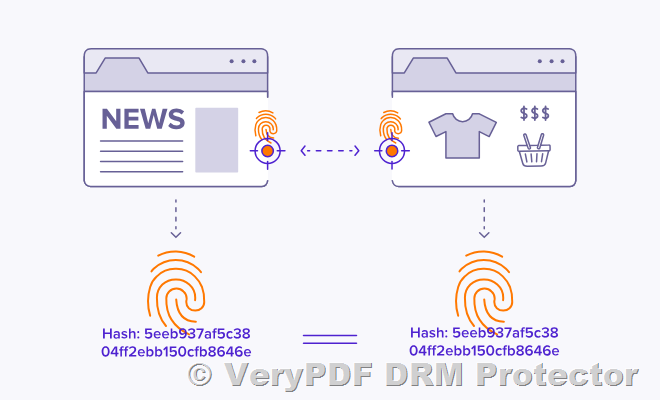
In the digital security landscape, hardware fingerprint, browser fingerprint, and device fingerprint are powerful technologies used to uniquely identify and authenticate a user’s device. These identifiers help enforce strict access control, preventing unauthorized users from opening protected files on unregistered systems. VeryPDF DRM Protector leverages these advanced fingerprinting techniques to ensure that only approved devices and browsers can access DRM-protected PDFs, significantly reducing the risk of unauthorized sharing and content leakage.

What is Hardware Fingerprint?

A hardware fingerprint is a unique identifier generated based on the physical components of a device. This can include:

  • CPU ID
  • Motherboard serial number
  • Hard drive ID
  • Network adapter MAC address

When a PDF is protected using hardware fingerprinting, it is locked to a specific machine. Even if the file is copied to another computer, it cannot be opened unless the hardware matches the registered fingerprint.

What is Browser Fingerprint?

Understanding Hardware Fingerprint, Browser Fingerprint, and Device Fingerprint in DRM Protection. Lock PDF to a specific device

A browser fingerprint is a set of characteristics that uniquely identify a web browser. This includes:

  • Installed plugins
  • Browser version and settings
  • Screen resolution
  • User agent information

VeryPDF DRM Protector can use browser fingerprinting to restrict access based on the specific browser being used. This prevents users from bypassing security restrictions by switching browsers or using private/incognito modes.

What is Device Fingerprint?

A device fingerprint is a broader identifier that combines hardware and browser fingerprints along with other system parameters like:

  • Operating system details
  • Time zone settings
  • Installed software configurations

By using device fingerprinting, VeryPDF DRM Protector ensures that a PDF file can only be opened on the exact registered device, whether it is a Windows PC, Mac, iPhone, iPad, or Android device.

How VeryPDF DRM Protector Uses These Fingerprints to Secure PDFs
  1. Fingerprint Collection – When a user first accesses a DRM-protected PDF, VeryPDF DRM Protector collects unique hardware, browser, and device fingerprints.
  2. Authentication and Registration – The software registers the user’s device and stores its fingerprint in a secure system.
  3. Access Control – Each time the user attempts to open the file, VeryPDF DRM Protector verifies the current device fingerprint against the stored data.
  4. Access Denial for Unrecognized Devices – If the fingerprint does not match (e.g., the file is copied to another device or accessed from an unauthorized browser), access is denied.

By combining hardware, browser, and device fingerprinting, VeryPDF DRM Protector provides a highly secure and flexible solution for businesses, educational institutions, and publishers looking to prevent unauthorized sharing, copying, and distribution of their confidential PDFs.

Custom-Built DRM Protection: Tailored Security with Fingerprint Technology

VeryPDF DRM Protector not only offers powerful built-in DRM protection features but also provides a custom-built version that allows businesses and organizations to implement hardware, browser, and device fingerprinting according to their specific security needs. This customization ensures that PDF protection aligns with unique operational requirements, whether for corporate document control, educational content security, or confidential data protection.

What is the Custom-Built DRM Service?

The custom-built version of VeryPDF DRM Protector is a fully customizable DRM solution that extends the standard security features by allowing users to:

  • Define Advanced Fingerprint Rules – Specify which hardware components, browser settings, or device identifiers should be used for authentication.
  • Set Custom Access Policies – Restrict access based on company-specific security guidelines, ensuring PDFs are only accessible in designated environments.
  • Integrate with Existing Systems – Seamlessly incorporate DRM protection into existing document management, learning management, or enterprise security systems.
  • Enable Regional or Device-Based Restrictions – Prevent file access from unauthorized locations, networks, or devices.
How the Custom DRM Solution Works
  1. Requirement Analysis – VeryPDF’s development team works closely with customers to understand their specific security needs.
  2. Custom Implementation – Unique fingerprinting rules and access control mechanisms are integrated into the DRM system.
  3. Testing & Deployment – The tailored DRM protection is tested to ensure it meets security expectations before final deployment.
  4. Ongoing Support & Upgrades – Customers receive continuous support and updates to keep their DRM system secure and up to date.
Who Can Benefit from the Custom-Built DRM Version?
  • Enterprises handling confidential reports that require strict device-based access control.
  • Educational institutions protecting online learning materials from unauthorized distribution.
  • Publishers and content creators securing digital publications from piracy.
  • Government agencies managing sensitive documents that must remain restricted to authorized devices only.

For businesses and organizations that need tailored DRM solutions with advanced fingerprint protection, VeryPDF offers free custom development services. Contact their support team at http://support.verypdf.com/ to discuss your requirements and get a solution designed specifically for your needs.

Popular Keywords for Device-Based PDF Security Solutions,

  • Lock PDF to a specific device
  • Restrict PDF access to authorized devices only
  • Bind PDF to a single registered device
  • Prevent PDF access from unregistered devices
  • Secure PDF with device-based restrictions
  • Allow PDF viewing only on designated devices
  • Protect PDF with hardware-based authentication
  • Limit PDF access to predefined devices
  • Enforce device-specific PDF security
  • Ensure PDFs can only be opened on approved devices
  • Implement device-level access control for PDFs
  • Restrict PDF usage to company-approved devices
  • Prevent unauthorized device access to PDFs
  • Secure PDF files with custom device binding
  • Enable strict device authentication for PDFs
  • Assign PDF access permissions based on device ID
  • Lock PDF files to unique device fingerprints
  • Set device-specific restrictions for PDF viewing
  • Ensure PDF documents remain restricted to intended users
  • Use device binding to prevent unauthorized PDF sharing
  • Lock PDFs to Specific Devices for Maximum Security
  • Restrict PDF Access to Authorized Devices Only
  • Bind PDFs to a Single Registered Device
  • Prevent Unauthorized Devices from Opening PDFs
  • Secure PDF Access with Hardware-Based Authentication
  • Limit PDF Viewing to Predefined Devices
  • Enforce Device-Specific PDF Security Controls
  • Ensure PDFs Are Only Accessible on Approved Devices
  • Implement Device-Level Access Control for PDFs
  • Enable Custom Device Restrictions for Secure PDF Viewing

Secure PDFs with DRM: Protect Documents Using Hardware, Browser, and Device Fingerprint Authentication. Encryption, Access Control, and Custom Device Restrictions

In today’s digital landscape, securing sensitive PDFs from unauthorized access and distribution is crucial for businesses, educators, and content creators. Traditional security measures like passwords and basic encryption are no longer sufficient. VeryPDF DRM Protector provides an advanced solution to safeguard PDFs with powerful DRM technology, ensuring access is restricted to only authorized devices such as specific Windows PCs, iPhones, iPads, and Android systems. Try it for free online at https://drm.verypdf.com/.

Secure PDFs with DRM: Protect Documents Using Hardware, Browser, and Device Fingerprint Authentication. Encryption, Access Control, and Custom Device Restrictions

Why Choose VeryPDF DRM Protector?

VeryPDF DRM Protector offers several advantages over conventional PDF security solutions:

  1. 256-bit AES Encryption – Provides industry-leading security to protect sensitive data from unauthorized decryption.

  2. Device-Specific Access Control – Restrict PDF access to designated devices, ensuring only approved Windows PCs, iPhones, iPads, or Android systems can open the file.

  3. Dynamic Watermarking – Automatically embeds user-specific watermarks to deter illegal sharing and copying.

  4. Time-Based Access Restrictions – Set expiration dates for documents, allowing time-limited viewing permissions.

  5. Cloud Integration – Seamlessly integrates with cloud storage for streamlined document management.

  6. Offline Access Management – Control whether PDFs can be accessed offline or require continuous online authentication.

  7. Hardware Fingerprint Protection – Uses unique device hardware identifiers to bind PDFs to specific machines, preventing unauthorized transfers.

  8. Custom DRM Features Available – If you need device-specific restrictions or other customized DRM solutions, contact VeryPDF for free custom development at http://support.verypdf.com/.

The Importance of Hardware Fingerprint Protection in PDF DRM

VeryPDF DRM Protector incorporates hardware fingerprint protection, a highly secure method of binding PDFs to specific devices. This technology works by identifying unique hardware characteristics of a user’s device, such as CPU ID, motherboard serial number, or hard drive information. When a PDF is protected using hardware fingerprinting, it can only be opened on the registered device, making it impossible to copy or transfer the file to another computer or mobile device.

How Does Hardware Fingerprint Protection Work?

  1. Device Registration – When a user attempts to access a DRM-protected PDF, the software captures unique hardware identifiers from their device.

  2. Verification Process – The system checks if the document is being opened on an authorized device.

  3. Access Grant or Denial – If the device matches the registered hardware fingerprint, access is granted; otherwise, it is denied.

This method significantly enhances security by ensuring that PDFs remain protected even if they are copied, shared, or stolen.

If you require custom DRM features such as hardware-based access control, VeryPDF offers free custom development services. Contact their support team at http://support.verypdf.com/ for more details.

Frequently Asked Questions (FAQs)

1. What is DRM protection for PDFs?
DRM (Digital Rights Management) protection for PDFs prevents unauthorized access, sharing, and modification of digital documents.

2. How does VeryPDF DRM Protector enhance document security?
It applies 256-bit AES encryption, device-specific access control, hardware fingerprint protection, and dynamic watermarking to ensure only authorized users can access protected PDFs.

3. Can I restrict PDF access to specific devices?
Yes. VeryPDF DRM Protector allows you to specify which Windows PCs, iPhones, iPads, and Android devices can open the file.

4. What is hardware fingerprint protection, and how does it work?
Hardware fingerprint protection binds PDFs to specific devices by using unique hardware identifiers, ensuring that only registered devices can open the file.

5. How can I try VeryPDF DRM Protector?
You can test it for free at https://drm.verypdf.com/ to explore its capabilities without time restrictions.

6. Can I set an expiration date for a protected PDF?
Yes, you can configure PDFs to expire after a specified period, preventing further access.

7. Is VeryPDF DRM Protector suitable for businesses and educational institutions?
Yes, it is ideal for protecting sensitive business reports, educational materials, and digital publications.

8. Can I prevent offline access to protected PDFs?
Yes, you can require online authentication each time a document is opened or allow offline access under specific conditions.

9. Does the software work with cloud storage?
Yes, it integrates with cloud services for seamless document security management.

10. Can I request custom DRM development for my business needs?
Yes, VeryPDF offers free customization for special DRM requirements. Contact their support team at http://support.verypdf.com/.

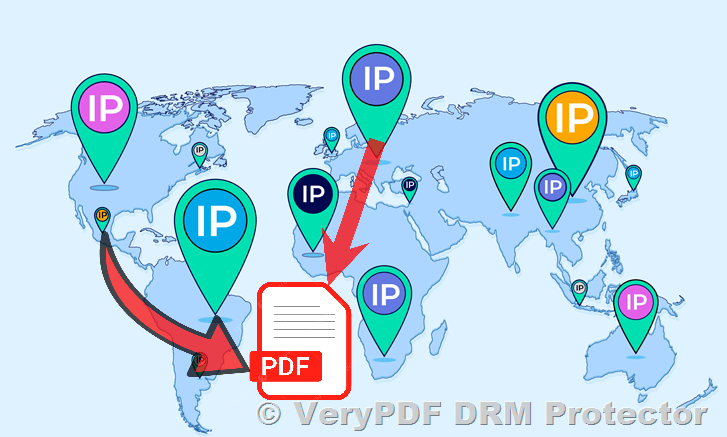
Secure PDFs with Geographic DRM Controls: Enhance PDF Security with DRM Protection, Regional & Location Access Control and Custom Geographic Restrictions. Limit PDF access to specific countries, cities, schools, office buildings, etc.

In an era where digital document security is paramount, businesses, educators, and content creators need reliable tools to prevent unauthorized access and distribution of sensitive files. Uncontrolled sharing, leaks, or geographic breaches can lead to significant financial and reputational damage. VeryPDF DRM Protector offers a versatile solution to safeguard PDFs and other documents through encryption, access controls, and advanced permissions. For users requiring location-based restrictions—such as limiting file access to specific countries, cities, streets, or institutions—the platform provides free custom development to meet these specialized needs.

Explore the tool’s capabilities and start a free trial at https://drm.verypdf.com/.

Secure PDFs with Geographic DRM Controls: Enhance PDF Security with DRM Protection, Regional & Location Access Control and Custom Geographic Restrictions. Limit PDF access to specific countries, cities, schools, office buildings, etc.


Key Advantages of VeryPDF DRM Protector
  1. Geographic Access Control (Customizable): While the default version focuses on standard DRM features, VeryPDF offers tailored solutions to restrict file access to precise geographic areas, such as specific countries, cities, or even institutions like schools or offices.

  2. Military-Grade Encryption: Files are protected with AES-256 encryption, ensuring data remains unreadable to unauthorized users.

  3. Dynamic Watermarking: Automatically apply watermarks with user-specific details (email, IP address, or timestamps) to deter leaks.

  4. Revocable Access: Instantly revoke permissions for shared files, even after distribution.

  5. Cross-Platform Compatibility: Securely view files on Windows, macOS, Android, iOS, and Linux without additional software.

  6. Offline Access: Authorized users can access files offline after initial authentication.

  7. Real-Time Analytics: Track document views, locations, durations, and download attempts.

  8. Cloud Integration: Import files directly from Dropbox, Google Drive, OneDrive, or Box.

  9. Screen Shield: Prevent screenshots by masking portions of the screen during viewing.

  10. Cost-Effective Plans: Affordable pricing with a permanent free trial for basic features.


Custom Geographic Restrictions: How It Works

VeryPDF DRM Protector’s default version includes robust DRM features like password protection, expiry dates, and print controls. However, for organizations needing location-based access, the platform offers free custom development to integrate GPS or IP-based restrictions. For example:

  • A university can limit access to course materials to students on campus.

  • A corporation can restrict confidential files to employees within designated office locations.

  • Governments can ensure sensitive documents are only viewable within specific regions.

This tailored approach ensures compliance with regional data laws and minimizes leakage risks.


The Need for Regional Access Control in PDF DRM

One of the unique features that VeryPDF DRM Protector offers is the ability to restrict PDF viewing based on geographical location. This means that a document can be configured to be accessible only within a predefined region. For instance, a university may wish to allow access to digital course materials only within its campus, or a business may want to ensure that internal reports are only accessible within its office premises.

Although this function is not available in the standard version, VeryPDF provides free custom development for clients who need regional access control for their DRM-protected PDFs.


Frequently Asked Questions (FAQs)
  1. Can I restrict PDF access to a specific geographic area?
    Yes, through custom development. Contact VeryPDF’s team to discuss GPS or IP-based restrictions for your files.

  2. Is the custom geographic feature free?
    Yes, VeryPDF provides free customization for clients requiring location-based controls.

  3. How long does custom development take?
    Timelines vary based on complexity, but basic geographic restrictions can often be implemented within days.

  4. Can I combine location controls with other DRM features?
    Absolutely. Geographic limits can work alongside encryption, watermarking, and expiry dates.

  5. Do recipients need software to view protected files?
    No. Files are accessed via a secure browser, requiring no installations.

  6. How does offline access work with geographic restrictions?
    Offline access is blocked if the user’s device leaves the permitted geographic zone.

  7. Can I track who accessed my files and from where?
    Yes. The analytics dashboard shows viewer locations, durations, and activities.

  8. Are mobile devices supported for location-based access?
    Yes. GPS-enabled smartphones and tablets can enforce geographic restrictions.

  9. What file formats are supported?
    PDFs, Word, Excel, images, and videos are all compatible.

  10. Is there a limit to the number of files I can protect?
    No. VeryPDF supports bulk uploads and protection for unlimited files.

  11. Can I revoke access after granting it?
    Yes. Permissions can be revoked instantly via the dashboard.

  12. Does the free trial include geographic restrictions?
    The default trial includes standard features. Contact the team to test custom geographic controls.

  13. How secure are watermarks?
    Watermarks are dynamically applied and cannot be removed without authorization.

  14. Can I set expiration dates for files?
    Yes. Files can self-destruct after a set time or number of views.

  15. Is screen capture prevention included?
    Yes. The screen shield blocks partial or full screenshots during viewing.


Conclusion

VeryPDF DRM Protector stands out as a flexible and powerful tool for securing digital documents. While its default features cover essential DRM needs, the platform’s commitment to free custom development makes it ideal for organizations requiring advanced geographic or institutional restrictions. Whether you’re protecting academic materials, corporate data, or government files, VeryPDF ensures your content remains secure, traceable, and compliant.

Start your free trial today at https://drm.verypdf.com/ and explore how custom DRM solutions can elevate your document security.