 Why DRM Is Crucial for Educational Content
As a university professor, you've likely faced the frustration of students sharing your lecture notes or homework PDFs online without your consent. It's an issue that seems to escalate every semester: once your course materials are out there, they're impossible to retrieve. What's worse is the potential for your carefully crafted lectures, assignments, and research papers to be altered, shared with unauthorized users, or even repurposed without your permission.
As much as we'd love to trust our students, the reality is that unauthorized sharing and piracy are rampant in the digital world. This brings up an important question: How can we, as educators, maintain control over our PDFs and ensure that the integrity of our academic content is upheld?
The answer lies in implementing digital rights management (DRM) to secure your documents. But, let's be real: DRM sounds complicated, right? In fact, many professors shy away from it due to the perceived complexity. However, tools like VeryPDF DRM Protector are changing the game, offering a simple, effective way to protect your PDFs, stop unauthorized distribution, and maintain control over your course materials.
Why DRM Is Crucial for Educational Content
Imagine you've just spent hours creating a detailed and engaging lecture PDF for your class, only to find out later that it's been circulated across the internet or even modified. If you're like most professors, you'd be upset not only about the loss of control but also about the potential consequences for your reputation and intellectual property.
The issues professors face when distributing PDFs aren't limited to unauthorized sharing. Here are some common pain points:
-
Unauthorized Copying and Printing: Students might print your PDF, then scan it, or convert it to a Word document, which could be shared or altered.
-
Loss of Control Over Paid or Restricted Content: If you're selling lecture notes or specialized course materials, a lack of protection can lead to your intellectual property being stolen or misused.
-
Excessive Sharing and Conversion: With the ease of sharing links and file-sharing platforms, it's hard to keep track of who is accessing your materials. What's worse, students may convert your PDF into other formats, making it even harder to track and control.
This is where DRM becomes invaluable. With VeryPDF DRM Protector, you can secure your PDFs in a way that stops these issues before they even arise.
How VeryPDF DRM Protector Solves These Problems
So, how does VeryPDF DRM Protector actually work? It's a simple-to-use tool that offers several features designed specifically for educators to protect their digital course materials. Let's break it down:
-
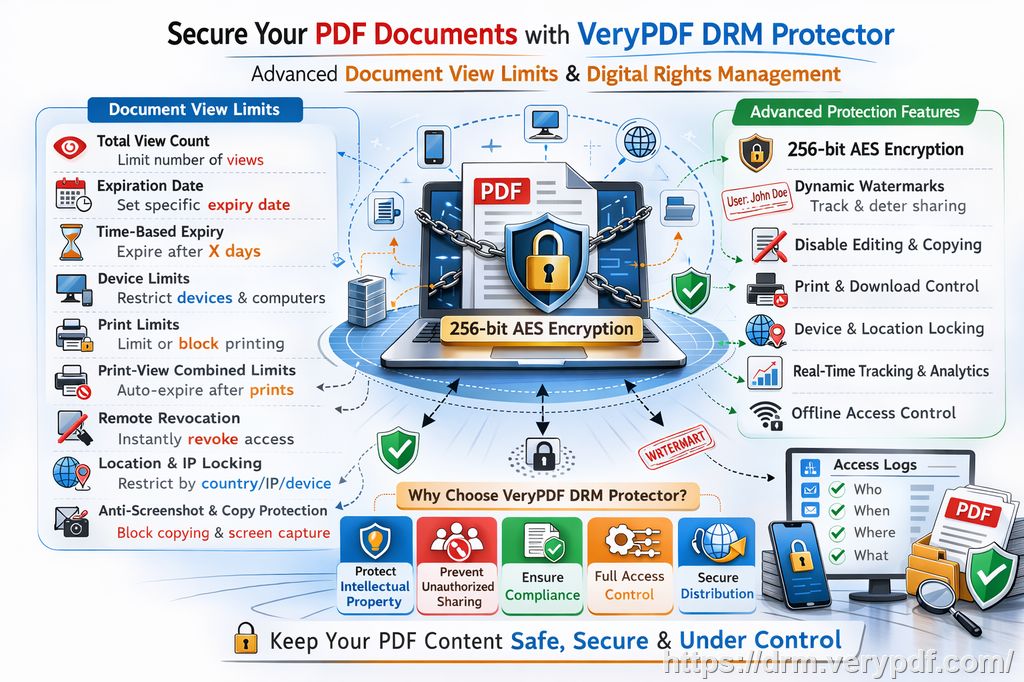
Restricting Access to Specific Users: One of the most powerful features of DRM is the ability to restrict access to your PDFs based on specific criteria, such as student enrollment. You can lock your PDFs to specific users or devices, ensuring that only those who should have access can view the content.
-
Preventing Printing, Copying, or Conversion: Once your PDF is protected, students won't be able to copy, print, or convert it to other formats like Word or Excel. This is critical when you want to keep your content secure and prevent piracy. After all, if the document can't be printed or copied, there's little chance it'll end up circulating on unauthorized websites.
-
Expiry Controls: With VeryPDF DRM Protector, you can set expiration dates on your PDFs. You can choose to have the document expire after a set number of views or prints, or on a specific date. This is especially useful for time-sensitive materials like exam papers or homework assignments, ensuring that once the deadline has passed, students no longer have access to the content.
-
Dynamic Watermarks: Adding watermarks to your PDFs not only makes them more secure but also acts as a deterrent. With dynamic watermarks that display user information (like a student's name or email address), you can track exactly who is accessing or sharing the document. If someone shares a screenshot or printed copy, the watermark is there as a clear identifier.
-
Preventing Screen Sharing and Screenshots: This might sound like a futuristic feature, but it's a game-changer in online classrooms. VeryPDF DRM Protector blocks screen sharing and screen recording tools like Zoom or WebEx, preventing students from capturing and distributing screenshots of your protected content.
-
Instant Revocation: One of the best things about DRM protection is that you can revoke access at any time. If you find that your content has been compromised or shared without permission, you can immediately revoke access to all users, even if the document has already been distributed.
Real-World Example: How DRM Saved My Lecture Slides
Let me tell you about a time when DRM protection made a huge difference. Last semester, I uploaded my lecture slides to the university's platform. Shortly after, I noticed that some of the students had shared the slides with others outside of the class. I had no idea how it happened, but I quickly realized that they could have simply downloaded the slides, saved them as a Word document, and sent them to their friends.
I immediately turned to VeryPDF DRM Protector to lock my slides. I set it so that only enrolled students could access the PDF, and I prevented any copying, printing, or conversion. The watermark feature displayed each user's email address, so I knew exactly who was accessing the content. Plus, I set the document to expire after the course ended. After that, no one could open the slides anymore.
Not only did this give me peace of mind, but it also reinforced the value of securing my work.
Why Not Just Use Secure Data Rooms?
Some professors turn to secure data rooms, believing they're a foolproof way to share documents securely. However, data rooms have their limitations. For instance, users often have to enter login credentials, which can be shared among multiple people. Once someone has access, they can still distribute or share the documents, creating a loophole in the system.
What makes VeryPDF DRM Protector stand out is that users don't need to enter credentials, so there's no risk of sharing passwords or login details. Moreover, the content never leaves your device unprotected—there's no uploading to servers where it could be exposed.
Additionally, unlike data rooms, which rely on JavaScript and other vulnerable elements, VeryPDF's DRM protection is enforced by the viewer itself, which makes it harder for users to bypass the protection.
Why I Recommend VeryPDF DRM Protector
If you're like me and value the integrity of your academic materials, VeryPDF DRM Protector is a must-have tool. It's easy to use, offers robust protection, and allows you to maintain full control over how your PDFs are accessed and distributed. Whether you're teaching lecture slides, homework PDFs, or selling course materials, DRM protection ensures your content is secure from unauthorized sharing, piracy, and misuse.
Conclusion: Protect Your Course Materials Today
In the digital age, professors must protect their intellectual property, and DRM is the most effective way to do so. I highly recommend VeryPDF DRM Protector to any educator looking to safeguard their PDFs from piracy, unauthorized sharing, and content loss. It's time to stop worrying about whether your students will share your lecture notes or homework materials—take control now.
Start your free trial today and regain control over your PDFs: https://drm.verypdf.com
FAQ
How do I limit student access to PDFs?
You can restrict access to PDFs by locking them to specific users or devices. This ensures that only enrolled students or authorized users can view the materials.
Can students still read the PDFs without copying, printing, or converting?
Yes, students can still view the PDFs, but they won't be able to copy, print, or convert the content to other formats.
How can I track who accessed the files?
Dynamic watermarks display user information like names or email addresses. This helps identify who accessed or shared the document.
Does DRM Protector prevent PDF piracy and unauthorized sharing?
Absolutely. DRM Protector stops unauthorized distribution by restricting copying, printing, and conversion, and provides a secure environment for your documents.
How easy is it to distribute protected lecture slides and homework?
It's very easy. You can distribute your protected PDFs via email, web links, or USB drives without compromising security.
Tags: protect course PDFs, prevent PDF piracy, stop students sharing homework, secure lecture materials, prevent DRM removal, anti-conversion PDF DRM.