
Redact Sensitive Data in PDFs Before Sharing to Prevent Costly Breaches
Sharing documents seems simple until you realize that sensitive information can hide in plain sight, waiting to create problems. Last month, we sent a contract to a new partner, only to discover later that it still contained unredacted personal detailsemployee IDs, phone numbers, and financial info. That one oversight could have triggered a serious GDPR violation and exposed our company to legal action.
In today’s fast-paced business world, accidental data exposure isn’t just inconvenientit can be extremely costly. PDFs, while seemingly secure, often carry hidden data: metadata, form fields, or text layers that are easily overlooked. Manually blacking out text is no longer enough, and online tools can expose confidential files to third parties. For any business handling contracts, financial reports, or HR records, the risks are real: fines, reputational damage, and client mistrust.
Sensitive Data Leaks Are Closer Than You Think
Imagine sending a quarterly financial report to your stakeholders. It contains revenue numbers, client details, and employee compensation data. You highlight certain sections, thinking the sensitive data is safe. But a simple copy-paste or PDF extraction reveals everything you intended to hide. Suddenly, confidential information is floating where it shouldn’t, and your company’s compliance status is in jeopardy.
I’ve seen this happen more than once in real business scenarios:
-
A legal team accidentally shared a client contract with full social security numbers included.
-
An HR department used an online PDF redaction tool, unknowingly uploading employee records to a cloud server.
-
A finance manager assumed that visually redacted sections couldn’t be recovered, only to learn later that clever software could extract the hidden text.
These examples are more than minor mistakesthey show why relying on manual methods or online services is risky.
Manual Redaction Isn’t Enough
Traditional redaction often involves drawing black boxes over text. On the surface, it seems secure, but many PDFs store text behind those boxes. Tools can extract, copy, or even search the “hidden” text. This means sensitive information like bank account numbers, client IDs, or internal project details can be recovered by anyone with the right tools.
Even when you think you’ve double-checked every page, human error is inevitable. One missed field, one forgotten metadata tag, or one unredacted form field could be enough to trigger a compliance issue or leak confidential business information.
Enter VeryPDF AI PDF Redaction Tool Command Line
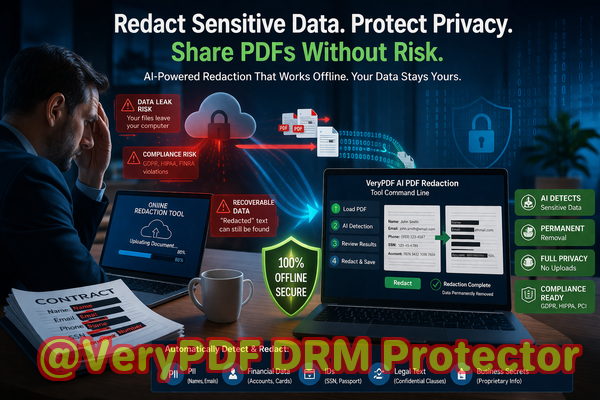
This is where a practical, business-oriented solution comes in. The VeryPDF AI PDF Redaction Tool Command Line automatically detects sensitive datanames, emails, phone numbers, IDs, financial data, and moreand permanently removes it from your PDFs. No visual masking, no partial redaction, no risk of recovery.
Key advantages include:
-
AI-powered detection Instantly identifies sensitive data you might overlook.
-
Permanent removal Redacted information cannot be recovered, unlike simple black boxes.
-
Offline processing Your documents never leave your computer, protecting your privacy completely.
A Scenario That Illustrates the Value
One of our clients, a mid-size legal firm, needed to send contracts containing client financial details to a partner firm. Previously, they used online redaction tools, risking exposure of sensitive client data. Switching to VeryPDF AI PDF Redaction Tool Command Line allowed them to:
-
Load their PDF contracts locally.
-
Automatically detect personal and financial information.
-
Review and confirm the redactions suggested by the AI.
-
Apply redaction, creating a clean PDF safe to share.
This process eliminated any chance of confidential information leaking, ensured full compliance with GDPR, and saved their legal team hours of manual checking.
Practical Steps for Businesses
For anyone handling sensitive documents, here’s a straightforward workflow:
-
Load the PDF in the VeryPDF tool.
-
Run AI detection for PII, financial information, and confidential clauses.
-
Review detected content to ensure accuracy.
-
Apply redaction.
-
Export the clean PDF ready for sharing.
Common types of data to redact:
-
Personal identifiable information (PII) names, addresses, emails, phone numbers
-
Financial data bank account numbers, salaries, invoices
-
Business secrets internal strategies, project plans, intellectual property
-
Legal and confidential clauses contract terms, sensitive agreements
Avoiding Online Tools for Confidential Documents
Many businesses still rely on free online PDF redaction websites. The danger is that your confidential files are uploaded to third-party servers, often without explicit knowledge of where they’re stored or how long they remain accessible. This can create massive liability if the files are leaked, intentionally or accidentally.
Using an offline solution like VeryPDF ensures that all sensitive data is handled locally. You maintain full control over your documents, protecting client information, trade secrets, and internal business data.
Real Business Benefits
Implementing AI-powered PDF redaction can prevent fines, protect reputation, and safeguard relationships. Some tangible outcomes we’ve seen include:
-
A healthcare provider avoided accidentally disclosing patient data when sharing research reports.
-
An HR department mitigated compliance risks by permanently removing employee social security numbers from internal training PDFs.
-
A finance team prevented exposure of confidential accounting details to auditors by redacting internal notes.
This is more than a security toolit’s a business risk management strategy.
Conclusion
Sensitive data hiding in PDFs is a silent risk many businesses underestimate. Manual redaction and online tools are no longer enough. VeryPDF AI PDF Redaction Tool Command Line provides a practical, AI-powered, offline solution that permanently removes sensitive information, protecting your company from data leaks, compliance violations, and legal exposure.
I highly recommend this to anyone who needs to share documents safely without risking data leaks or compliance issues. Try it now and securely redact your PDFs: https://veryutils.com/smart-redact-server-ai-powered-pdf-redaction-software
Start your free trial today and ensure your sensitive data is permanently removed before sharing.
Frequently Asked Questions
How can I permanently remove sensitive data from a PDF instead of just hiding it?
Use a tool that fully removes the underlying text and metadata, not just visual overlays. VeryPDF AI PDF Redaction Tool Command Line does this automatically.
Can others recover redacted information from my PDF?
No. Redactions applied with this tool permanently remove sensitive information, making recovery impossible.
Is it safe to use online PDF redaction tools?
Online tools can expose your documents to third-party servers. For confidential business files, offline solutions are safer.
Does this tool work completely offline?
Yes. All processing happens on your local computer, ensuring total privacy.
What types of sensitive data can be automatically detected and removed?
Names, emails, phone numbers, social security numbers, financial info, legal clauses, and business secrets.
Can I review redactions before applying them?
Absolutely. The AI suggests content for redaction, and you can confirm before finalizing.
Does this help with GDPR compliance?
Yes. Proper redaction of personal data before sharing ensures compliance with GDPR and other data protection regulations.
Can I use it for multiple PDFs at once?
Yes, batch processing is supported for efficient workflow.
Is technical expertise required to use this tool?
No. It’s designed for business professionals, with a straightforward command-line interface and clear workflow.
Will this impact the original formatting of my PDF?
No. Redacted PDFs retain their original layout, fonts, and design.
Can it detect hidden text in scanned PDFs?
Yes. OCR and AI-powered detection allow redaction of hidden text in scanned or image-based PDFs.
Tags/Keywords
redact sensitive data, remove confidential information, PDF redaction tool, protect privacy in PDFs, prevent data leaks, offline PDF redaction, secure document sharing, GDPR compliance, AI PDF redaction, confidential data protection