
Securely Redact Sensitive PDFs Before Sharing to Prevent Data Leaks
Last month, we shared a PDF containing financial contracts with a partner, only to realize later that unredacted employee salaries and client information were still visible. The thought of potentially violating GDPR or exposing confidential data to competitors was alarmingand unfortunately, far too common in many businesses. Handling sensitive documents without the right tools can leave your organization exposed to legal risks, compliance failures, and costly reputational damage.
Many businesses face this exact challenge. Human error, inadequate software, and unsafe online redaction tools often lead to sensitive information slipping through. For auditors, legal teams, HR departments, and managers dealing with contracts, invoices, or internal reports, a single oversight can result in major consequencesfrom fines to leaked business secrets.
One frequent pain point is accidental exposure of sensitive data. PDFs may contain personal identifiable information (PII) such as names, emails, phone numbers, or financial information like bank accounts and salaries. Even when text appears “blacked out” in traditional redaction tools, data can often be copied or recovered if the redaction isn’t permanent. This creates enormous compliance risks under regulations like GDPR, HIPAA, or internal corporate policies.
Another challenge comes from reliance on online tools for PDF redaction. Employees may upload confidential documents to third-party websites, thinking the process is secure. In reality, these documents could be stored, scanned, or even indexed by external servers, creating a hidden data breach risk.
Manual redaction processes also consume time and are prone to mistakes. Highlighting sensitive sections in PDFs and covering them with black boxes may leave fragments of critical information behind. In high-volume environments like accounting firms or legal departments, these errors multiply, exposing companies to severe penalties or litigation.
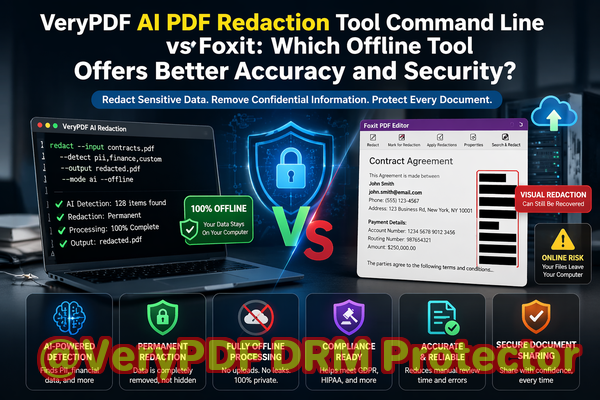
This is where the VeryPDF AI PDF Redaction Tool Command Line comes in as a practical solution for businesses that cannot compromise on privacy. Unlike traditional methods, it uses AI to automatically detect and permanently remove sensitive information from PDF documents. Whether it’s personal data, financial records, or proprietary business secrets, the tool ensures nothing is left behind.
Processing occurs completely offline, meaning your documents never leave your computer. There’s no risk of accidental uploads to unknown servers, making it ideal for compliance-heavy industries. The tool identifies sensitive data such as names, email addresses, phone numbers, social security numbers, bank details, and even confidential clauses in contracts. After reviewing and confirming the detections, you can apply redaction with a single command and export a clean, fully protected PDF.
Consider a recent example from a mid-sized consulting firm. They regularly shared project reports with clients and subcontractors, including sensitive financial information and employee compensation details. Using traditional redaction methods, a few PDFs accidentally exposed client account numbers, risking both legal consequences and client trust. After switching to VeryPDF AI PDF Redaction Tool Command Line, the firm automated detection and ensured permanent removal of all sensitive data before sharing any document. The result: zero data leaks, simplified compliance, and enhanced confidence among clients.
The workflow is straightforward:
-
Load the PDF into the tool
-
AI detects sensitive information automatically
-
Review the highlighted sections for accuracy
-
Apply redaction
-
Export a clean PDF ready for secure sharing
Common data types you’ll want to redact include:
-
Personal identifiable information (PII) names, addresses, IDs, emails
-
Financial data salaries, bank account numbers, invoices
-
Business secrets project plans, pricing strategies, product designs
-
Legal and confidential clauses nondisclosure sections, contract terms
With this approach, your team avoids accidental data leaks, meets compliance obligations, and eliminates the risk of exposing sensitive files to clients or competitors. Switching from online redaction tools to a fully offline AI-powered solution drastically reduces exposure and gives business leaders peace of mind.
I highly recommend this to anyone who needs to share documents safely without risking data leaks or compliance issues. It’s not just about covering sensitive datait’s about permanently removing it and ensuring it never resurfaces.
Try it now and securely redact your PDFs: https://veryutils.com/smart-redact-server-ai-powered-pdf-redaction-software
Start your free trial today and ensure your sensitive data is permanently removed before sharing.
FAQs
How can I permanently remove sensitive data from a PDF instead of just hiding it?
VeryPDF AI PDF Redaction Tool Command Line removes sensitive information permanently at the data level, ensuring it cannot be recovered or copied.
Can others recover redacted information from my PDF?
No. Unlike traditional “black box” redactions, this tool fully removes the underlying text and metadata.
Is it safe to use online PDF redaction tools?
Online tools risk uploading your sensitive documents to third-party servers, which may store or index your data. Offline tools like VeryPDF eliminate this risk entirely.
Does this tool work completely offline?
Yes. All processing is done on your local machine. No data leaves your system, ensuring complete privacy.
What types of sensitive data can be automatically detected and removed?
AI can detect names, emails, phone numbers, IDs, bank information, financial records, business secrets, and confidential legal clauses.
Can I review detected information before applying redaction?
Yes. The tool highlights detected data, allowing you to review and confirm before finalizing redaction.
Will this help me stay compliant with GDPR?
Absolutely. Permanent removal of personal data ensures compliance with GDPR, HIPAA, and other data protection regulations.
Can I use it for bulk PDF documents?
Yes. The command-line interface allows batch processing for multiple PDFs, saving time and reducing human error.
Does it maintain the original PDF layout after redaction?
Yes. Redaction preserves the formatting and layout of your original document while ensuring sensitive data is completely removed.
Is technical expertise required to use the tool?
Minimal technical knowledge is needed. The command-line interface is user-friendly, and instructions guide you step by step.
Tags/Keywords
redact sensitive data, remove confidential information, PDF redaction tool, protect privacy in PDFs, prevent data leaks, offline PDF redaction, secure document sharing, compliance-friendly PDF tool, AI PDF redaction, permanent data removal