PDF Anti-Copy – Protect PDF from Being Copied and Converted – No Download, No Print, No Copy

In the digital era, protecting your valuable content from unauthorized access, copying, and distribution is critical.
If you’re looking for a powerful solution to safeguard your documents, VeryPDF DRM Protector is the ultimate
tool for ensuring comprehensive PDF anti-copy protection. With features like “No Download, No Print, No Copy,” this
solution offers unparalleled security for your sensitive information.

PDF Anti-Copy - Protect PDF from Being Copied and Converted - No Download, No Print, No Copy


Why PDF Anti-Copy Protection is Crucial?

Many traditional methods of securing PDFs, such as passwords or basic encryption, fall short when it comes to preventing
unauthorized copying or conversion. Here are some common challenges:

  • Easy Password Sharing: Password-protected PDFs can be unlocked and distributed freely.
  • Bypassable Permissions: Restrictions on copying or printing can often be removed with readily available tools.
  • Conversion Risks: PDFs can be converted into editable formats like Word, exposing their content.

For organizations, educators, and publishers, such vulnerabilities can result in intellectual property theft, revenue loss,
or legal risks. That’s where VeryPDF DRM Protector comes in—it’s a robust, cloud-based solution designed to
eliminate these risks effectively.


What Sets VeryPDF DRM Protector Apart?

With its advanced DRM (Digital Rights Management) technology, VeryPDF DRM Protector ensures that your PDF files
are not just encrypted but also equipped with powerful anti-copy controls. Here’s how it helps:

  1. No Copying Allowed: Prevent text and images from being selected, copied, or pasted.
    • Unlike Adobe permissions, this feature cannot be bypassed using online tools or alternative viewers.
  2. No Printing: Disable printing entirely to prevent hard copies from being made.
    • Restrict printing by enforcing strict controls like grayscale-only prints or limiting the number of allowed prints.
  3. No Downloads: Restrict users from downloading or saving files in unprotected formats.
    • This ensures the document stays secure, even during viewing.
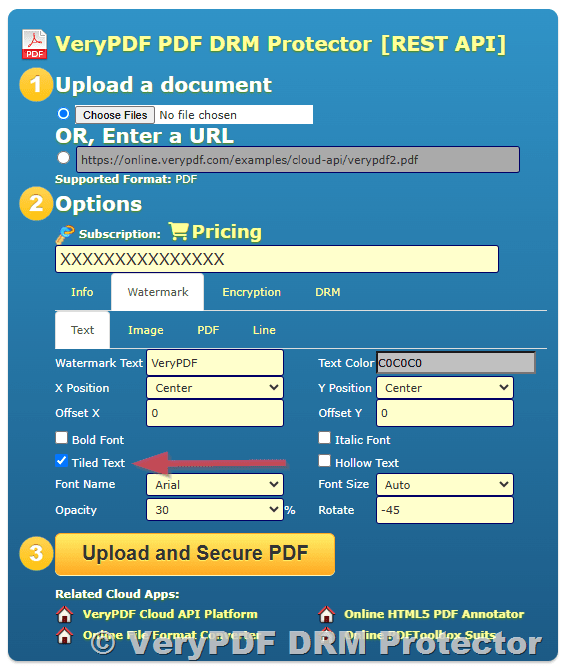
  4. Dynamic Watermarking: Embed user-specific details, such as names or email addresses, into visible watermarks on each page.
  5. Access Control: Lock PDF files to specific devices or users, ensuring they cannot be accessed or shared by unauthorized parties.
  6. Encryption Without Passwords: Unlike traditional methods, VeryPDF uses secure key-based authentication, eliminating the need for easily shared passwords.

Benefits of VeryPDF DRM Protector

Whether you’re a business owner, educator, or content creator, VeryPDF DRM Protector offers a range of benefits:

  • Prevent Intellectual Property Theft: Ensure your content remains in your control by blocking unauthorized access or copying.
  • Maintain Revenue Streams: Protect premium content from piracy or unauthorized distribution.
  • Simplify Security: The platform is user-friendly, allowing you to secure your files without technical expertise.
  • Flexible Usage: Tailor restrictions based on your specific needs, such as time-limited access or view counts.
  • Seamless User Experience: Authorized users can access your documents smoothly, without cumbersome password management.

How to Use VeryPDF DRM Protector?

Securing your PDF files with VeryPDF DRM Protector is quick and straightforward:

  1. Upload Your PDF Files: Visit the platform at drm.verypdf.com and upload your documents.
  2. Apply Security Settings: Choose anti-copy, no-print, and no-download restrictions as needed.
  3. Distribute Secure Files: Share protected PDFs confidently, knowing they’re secure against unauthorized actions.

Why Choose VeryPDF DRM Protector?

Compared to other PDF anti-copy tools, VeryPDF DRM Protector offers superior protection with zero compromise on usability.
Its advanced features, coupled with the convenience of a cloud-based platform, make it a top choice for securing PDFs from being
copied and converted.

Don’t let your hard work go unprotected. Start your free trial of VeryPDF DRM Protector today and experience the ultimate
solution for PDF anti-copy security. Visit drm.verypdf.com to learn more.

PDF Copy Protection: Protect PDF Files from copying without passwords

In today’s digital age, securing your PDF documents is more crucial than ever. Protecting sensitive or valuable information from unauthorized access, copying, and distribution is not just a priority—it’s a necessity. With VeryPDF DRM Protector Online, you can confidently safeguard your PDF files with advanced digital rights management (DRM) tools. Try it for free today at
drm.verypdf.com.

PDF Copy Protection: Protect PDF Files from copying without passwords


Why PDF Copy Protection Matters?

Traditional methods of securing PDFs, such as passwords and Adobe permissions, have proven to be ineffective:

  • Passwords are easily shared or removed: Once a user knows the password, they can unlock the PDF and distribute it freely.
  • Adobe permissions can be bypassed: Restrictions on copying, editing, or printing can be removed using free online tools or ignored by alternative PDF viewers.
  • Browser-based solutions rely on JavaScript, which is weak and can be circumvented.
  • Plugins to Adobe Acrobat are vulnerable to updates and other plugin conflicts, often rendering them ineffective.

For truly secure PDF copy protection, you need a robust solution that goes beyond basic encryption and passwords.


What Makes VeryPDF DRM Protector Stand Out?

VeryPDF DRM Protector Online offers unparalleled protection for your PDF files. With its powerful DRM security features, you can:

  • Prevent Copying and Pasting: Text and images cannot be selected, copied, or pasted into other applications. Unlike Adobe permissions, these controls cannot be easily bypassed.
  • Prevent Editing and Saving: Block users from editing your documents or saving them in unprotected formats.
  • Prevent Screenshots: Stop print-screen functionality and screen-grabbing tools. Dynamic watermarks further discourage users from distributing screen captures by embedding user-specific data.
  • Restrict Printing: Disable printing entirely or enforce strict controls on printed documents, such as limiting the number of prints, allowing only grayscale output, and logging print activities.
  • Dynamic Watermarking: Add watermarks with user details (e.g., name, email, or timestamp) to viewed and printed pages. These watermarks are permanent and cannot be removed by PDF editors.
  • Control Access: Lock PDFs to specific devices or locations, ensuring they cannot be shared. Revoke access instantly, even for distributed documents.
  • Set Expiration Dates: Make PDFs expire after a specific date, a set number of views, or a fixed period after the first access.
  • Monitor Usage: Track document views, prints, and device information to identify and respond to unauthorized usage.

How Does VeryPDF DRM Protector Work?

VeryPDF DRM Protector Online secures your PDF files with government-grade encryption and advanced DRM controls. Here’s how it ensures maximum protection:

  • Encryption: Files are encrypted, making them unreadable without authorization.
  • Device Locking: PDFs are locked to specific devices, preventing unauthorized sharing.
  • No Passwords: Users don’t need to enter or manage passwords, eliminating a common security vulnerability.
  • On-the-Fly Decryption: Protected content is only decrypted in memory during use, leaving no unprotected temporary files.

Common Issues with Traditional Copy Protection and How VeryPDF Solves Them

  1. Passwords: Users often share passwords, undermining security. VeryPDF DRM Protector eliminates passwords by using secure key-based authorization.
  2. Editing and Sharing: Adobe permissions can be easily bypassed. VeryPDF’s DRM controls ensure that even if files are copied, they remain inaccessible without proper authorization.
  3. Screenshots: While no solution can stop users from photographing screens, VeryPDF DRM Protector prevents high-quality digital screenshots and deters misuse with dynamic watermarks.

Benefits of Using VeryPDF DRM Protector

  • Secure Your Revenue: Protect intellectual property from piracy and unauthorized distribution.
  • Ease of Use: The intuitive platform allows you to apply protection settings quickly and efficiently.
  • Cost-Effective: A one-time investment protects unlimited documents without ongoing costs per file.
  • Seamless Access: Authorized users enjoy a frictionless experience, while unauthorized users are blocked entirely.

Get Started with VeryPDF DRM Protector Today

Protecting your PDF files from copying, printing, and unauthorized access has never been easier. Here’s how to get started:

  1. Visit drm.verypdf.com.
  2. Upload your PDF files to the platform.
  3. Apply desired protections, such as copy restrictions, expiration dates, and dynamic watermarks.
  4. Share your secure files with confidence.

Don’t leave your valuable content vulnerable. Start your free trial of VeryPDF DRM Protector Online today and experience the ultimate PDF protection solution.

Protect Training Courses from IPR Theft, Piracy & Sharing with VeryPDF DRM Protector

In today’s digital era, protecting your training courses from unauthorized access, piracy, and misuse is not just essential—it’s critical. Training materials often represent significant investments of time, expertise, and resources, making them prime targets for intellectual property theft. VeryPDF DRM Protector provides a powerful, comprehensive solution to safeguard your content while ensuring seamless access for authorized users.

With a combination of advanced encryption, DRM (Digital Rights Management) controls, and user-friendly administration features, VeryPDF DRM Protector allows course providers to focus on delivering high-quality education without worrying about unauthorized distribution or revenue loss.

Protect Training Courses from IPR Theft, Piracy & Sharing with VeryPDF DRM Protector


The Importance of Training Course Protection

Training courses are valuable assets, often containing proprietary methods, expertise from experienced instructors, or specialized knowledge. Unauthorized sharing or piracy can undermine these investments, resulting in:

  • Revenue loss.
  • Breaches of intellectual property rights.
  • Compromised value of your content in the market.

VeryPDF DRM Protector offers an easy-to-implement, yet highly secure system to prevent such risks, protecting both your intellectual property and business growth.


Key Features of VeryPDF DRM Protector

1. Prevent Unauthorized Access and Sharing

  • Secure Content Delivery: Lock access to authorized users only. Unauthorized users cannot open or distribute your content.
  • Device and Location Locking: Ensure your courses can only be accessed on specific devices or from approved locations. This is ideal for institutions or companies that require on-site usage.
  • Prevent Copying and Sharing:
    • Disable editing and copying of content.
    • Block screen grabbing tools, screen recording, and screen sharing to stop unauthorized duplication of your training materials.

2. Control How Your Content Is Used

  • Printing Restrictions:
    • Disallow printing entirely, or allow a limited number of prints.
    • Dynamically apply watermarks with user details (e.g., name, email, or company) to printed copies to track and discourage unauthorized sharing.
    • Prevent printing to unprotected file formats (e.g., PDF or XPS).
  • Customizable Usage Controls:
    • Limit the number of views or prints.
    • Set courses to expire after a specified date, a certain number of days, or usage limits.

3. Set Expiry Dates and Revoke Access

  • Expiration Options: Automatically revoke access to outdated content. You can:
    • Set expiration dates for individual users or groups.
    • Allow usage for a specific number of days after the course is first accessed.
  • Instant Revocation: Instantly revoke access for all users or specific individuals if misuse is suspected. This ensures your content remains secure even if it has already been distributed.

4. Add Dynamic Watermarks

Dynamic watermarks provide an extra layer of security. When content is viewed or printed, user and system data (e.g., name, email, date/time) are dynamically embedded into the document. This discourages unauthorized sharing by linking the content to the individual user.


5. Monitor and Track Usage

Stay informed about how your content is being used:

  • Track when and where users access your courses.
  • Monitor device and operating system usage.
  • Log viewing and printing activities to detect potential misuse and address issues proactively.

6. Streamlined Administration

  • Publications: Bundle multiple documents into a single package, simplifying access for users.
  • Automated Access Management: Integrate with Learning Management Systems (LMS) or e-commerce platforms to automate user creation and document access assignment.
  • Customizable Access Levels: Allow different controls for different types of documents within a course, such as enabling printing for notes while restricting slides.

7. Secure and Flexible Distribution

  • Distribute your protected courses via email, cloud platforms, USB devices, or physical media without compromising security.
  • Use zero-installation options like the web-based viewer for convenient access without additional software.
  • Offer fully portable offline access through USB security solutions that work without an internet connection.

Benefits of Using VeryPDF DRM Protector

  1. Protect Revenue and ROI: Safeguard your content to prevent piracy and unauthorized distribution, maximizing revenue potential.
  2. Cost-Effective: With a one-time license fee, you can secure unlimited users and courses without per-document costs.
  3. Ensure Compliance: Maintain control over sensitive information and meet industry standards for data protection.
  4. Improve Efficiency: Simplify content management with robust administration tools and LMS integration.

Why Go Digital with VeryPDF DRM Protector?

Transitioning to digital delivery of training courses brings numerous advantages, including reduced printing costs, faster updates, and wider accessibility. However, going digital also increases the risk of unauthorized sharing. VeryPDF DRM Protector bridges the gap by offering:

  • Strong US Government-grade encryption.
  • Robust DRM controls to lock content to specific users, devices, and locations.
  • Advanced tracking and dynamic watermarks to deter misuse.

How to Get Started?

Protecting your training courses is easy with VeryPDF DRM Protector. Simply:

  1. Upload your documents to the platform.
  2. Apply the desired security settings (e.g., usage limits, watermarks, expiration dates).
  3. Distribute the protected content to your users with peace of mind.

Try VeryPDF DRM Protector for Free

Don’t leave your valuable training content vulnerable to theft or misuse. Take control of your intellectual property with VeryPDF DRM Protector. Start your free trial today at drm.verypdf.com and experience the ultimate solution for protecting your training courses.

Ensure the security of your content, safeguard your revenue, and provide your users with a seamless, secure learning experience—all with VeryPDF DRM Protector.

How to Use VeryPDF DRM Protector to Lock PDF Files to Specific IP Addresses?

In today’s digital age, protecting the content of your PDF documents is crucial, especially when it comes to sensitive material such as eBooks, reports, or confidential business documents. If you want to ensure that your exclusive content is only accessible to authorized users, you may consider restricting access based on the IP address of the device attempting to open the document. This adds an extra layer of security to prevent unauthorized sharing and distribution, ensuring that the content stays protected.

How to Use VeryPDF DRM Protector to Lock PDF Files to Specific IP Addresses?

One powerful tool that offers this feature is VeryPDF DRM Protector, an advanced Digital Rights Management (DRM) solution. With VeryPDF DRM Protector, you can lock your PDF files to specific IP addresses or IP address ranges, making sure that only users within those defined locations can view or open the document.

What is VeryPDF DRM Protector?

VeryPDF DRM Protector is an online application designed to provide comprehensive protection for PDF documents. It enables individuals and businesses to set various access controls, such as locking PDFs to specific users, devices, operating systems, and geographical locations. One of its standout features is the ability to lock PDFs to specific IP addresses or IP address ranges, offering tight control over where and how the document is accessed.

Why Lock PDF Files to Specific IP Addresses?

Restricting access to your PDF files based on IP addresses offers several key benefits, particularly when you need to protect content that should only be available to a specific audience, such as paying customers or internal users. Some of the reasons to lock PDFs to specific IP addresses include:

  • Prevent Unauthorized Sharing: By locking a PDF to specific IP addresses, you ensure that only authorized users can access the document, even if it is shared. This makes it much harder for unauthorized individuals to distribute the content freely.
  • Exclusive Access for Paid Users: If you are selling eBooks or reports, you can ensure that only paying customers within a certain IP range can open and view the document. This guarantees that your content remains exclusive and is not freely distributed.
  • Enhanced Control and Security: Locking your document to an IP address or range enhances the security of your content. It prevents it from being accessed from outside your specified network or location, giving you more control over who can view it.

How to Lock Your PDF to Specific IP Addresses Using VeryPDF DRM Protector?

Follow these simple steps to lock your PDF file to a specific IP address or IP address range using VeryPDF DRM Protector:

Step 1: Upload Your PDF to VeryPDF DRM Protector

The first step is to upload your PDF document to the VeryPDF DRM Protector platform. Once uploaded, you will be able to configure access restrictions for the document.

  1. Log in to your VeryPDF DRM Protector account.
  2. Go to the “Upload” section and select the PDF file you want to protect.
  3. Click on “Upload” to proceed with the process.

Step 2: Set IP Address Restrictions

Once your PDF is uploaded, you can configure the access restrictions based on IP address or IP address range.

  1. Navigate to the “Settings” tab in the VeryPDF DRM Protector admin panel.
  2. Select the “Restrict Location” option, where you will find the IP address restriction settings.
  3. Choose the option to lock the document to specific IP addresses or a range of IP addresses.
  4. Enter the IP address or range of IP addresses that you want to allow access. You can specify individual IP addresses or a range to accommodate users in certain networks.
  5. After setting the restrictions, the document will only be accessible to users whose IP addresses match the specified ones.

Step 3: Apply DRM Protection

Once you’ve set the IP address restrictions, the next step is to apply DRM protection to your document. This will lock the document according to the IP address restrictions you’ve defined.

  1. Go to the “Apply DRM” tab.
  2. Select the desired encryption level and additional security measures, such as preventing printing, copying, or editing of the document.
  3. Click on “Apply DRM” to activate the protection.

Step 4: Distribute the Protected PDF

After the DRM protection is applied, your PDF is ready to be shared. When distributing the document, ensure the recipients understand they can only access it from the allowed IP addresses or IP address ranges. If a user attempts to open the document from an unauthorized IP address, access will be denied, and they will be unable to view the content.

Why Choose VeryPDF DRM Protector for IP Address-Based Restrictions?

VeryPDF DRM Protector provides a range of powerful features to protect your documents and ensure that they are only accessed by authorized users. Here are some reasons why you should choose it for locking PDFs to specific IP addresses:

  • User-Friendly Interface: The platform is easy to use, with simple steps to upload documents and configure access restrictions.
  • Comprehensive Protection: In addition to IP address restrictions, VeryPDF DRM Protector allows you to set a variety of access controls, including user, device, and geographic location-based restrictions.
  • Customizable Security Features: You can customize the level of protection for your PDF files, including encryption, watermarks, and restrictions on printing, copying, and editing.
  • Prevent Unauthorized Distribution: By locking PDFs to specific IP addresses, you can prevent your content from being shared or accessed by unauthorized individuals, ensuring it stays exclusive to your intended audience.

Conclusion

If you are looking for an effective way to protect your PDF content and ensure that it is only accessible by authorized users, VeryPDF DRM Protector is the ideal solution. Locking your PDF to specific IP addresses adds an extra layer of security, preventing unauthorized distribution and guaranteeing that your exclusive content is only available to those within your specified network or range.

Whether you are an eBook author, a business protecting sensitive documents, or a publisher controlling access to your content, VeryPDF DRM Protector offers the tools you need to secure your PDFs and maintain full control over how they are accessed and shared.

Get started today and take advantage of VeryPDF DRM Protector to protect your valuable PDF documents from unauthorized access and distribution.

How to Use VeryPDF DRM Protector to Lock PDF Files to Selected Countries or Cities?

In today’s digital world, protecting sensitive information in PDF documents is critical. Whether you are a business safeguarding intellectual property, a publisher controlling access to content, or an educator ensuring the security of study materials, you need a reliable solution to protect your PDFs from unauthorized access. VeryPDF DRM Protector provides powerful tools that allow you to lock your PDF files to specific countries or cities, ensuring that only visitors in those locations can view your protected documents.

How to Use VeryPDF DRM Protector to Lock PDF Files to Selected Countries or Cities?

Here’s a step-by-step guide on how to use VeryPDF DRM Protector to restrict access to PDF files by location, specifically to certain countries or cities.

What is VeryPDF DRM Protector?

VeryPDF DRM Protector is an advanced Digital Rights Management (DRM) solution designed to help individuals and businesses protect their PDF files. With this tool, you can set various restrictions on your documents, such as limiting access by user, device, location, or operating system. Among its many features, one of the most valuable is the ability to lock PDFs to specific countries or cities, giving you greater control over who can access your content.

Why Lock PDFs to Specific Countries or Cities?

Locking PDF files to a specific country or city offers several advantages, particularly for businesses and organizations that deal with international audiences. Some key reasons include:

  • Regional Licensing: You can ensure that your PDF documents are only available to users in regions where you have licenses or distribution rights.
  • Confidentiality: Protect sensitive data from being accessed in unauthorized locations, especially in cases of competitive advantage or legal requirements.
  • Location-based Control: Restrict access based on geographic locations, which helps prevent unauthorized distribution and ensures compliance with regional regulations.

How to Lock PDF Files to Selected Countries or Cities Using VeryPDF DRM Protector?

Follow these steps to restrict your PDF documents to selected countries or cities:

Step 1: Upload Your PDF to VeryPDF DRM Protector

The first step is to upload your PDF document to the VeryPDF DRM Protector platform. Once your document is uploaded, you can configure access restrictions for it.

  1. Log in to your VeryPDF DRM Protector account.
  2. Navigate to the “Upload” section and select the PDF file that you want to protect.
  3. Click “Upload” to begin the process.

Step 2: Set Location-Based Restrictions

Once your PDF is uploaded, it’s time to configure the location-based restrictions. You can lock the file to specific countries or cities based on the visitor’s IP address.

  1. Go to the “Settings” tab within the VeryPDF DRM Protector admin panel.
  2. Select the “Restrict Location” option. Here, you will find the option to set geographic restrictions.
    • Restrict by Country: You can choose to allow access only to visitors from certain countries. Select the countries where you want to permit access.
    • Restrict by City: For even more granular control, you can restrict access to specific cities. Simply enter the cities where you want the document to be available.
  3. Select the countries and/or cities where you want to allow access. Once selected, only users within these locations will be able to view the protected document.
  4. The system will automatically detect the user’s IP address and check if it matches the restricted country or city.
  5. If the user is accessing from an approved location, they will be granted access to the document. If they are outside the allowed area, access will be denied.

Step 3: Apply DRM Protection

After setting the location-based restrictions, you need to apply the DRM protection to your PDF file. This will lock the document according to the conditions you set, ensuring that only authorized users from the selected countries or cities can view it.

  1. Once the location restrictions are set, go to the “Apply DRM” tab.
  2. Choose the encryption level and apply any other desired security measures, such as disabling copying, printing, or editing.
  3. Click “Apply DRM” to finalize the protection.

Step 4: Distribute the Protected PDF

After applying the DRM protection, your PDF file is ready for distribution. When you share the document, ensure that the recipients know they must be in the designated countries or cities to access it.

If a user attempts to access the PDF from a restricted location, they will receive a notification stating that the document is not accessible in their region.

Advantages of Using Location-Based Restrictions

By using VeryPDF DRM Protector to lock PDF files to specific countries or cities, you can:

  • Enforce Regional Access Control: Ensure that only authorized users in specific locations can access your sensitive PDFs.
  • Increase Security: Prevent unauthorized access or distribution from regions outside your control.
  • Comply with Legal and Licensing Agreements: Meet regional compliance requirements and enforce geographic licensing restrictions.
  • Minimize Data Leakage: Prevent document sharing or leakage in regions where it’s not authorized.

Conclusion

VeryPDF DRM Protector offers an effective solution for locking PDF files to specific countries or cities, providing a robust way to control who can access your content based on geographic location. Whether you are a business safeguarding intellectual property or an educator managing exam papers, using location-based restrictions ensures that only authorized users in selected regions can view your PDFs.

With features like strong encryption, location-based access controls, and customizable licensing options, VeryPDF DRM Protector is an ideal tool for anyone looking to protect their documents from unauthorized access, sharing, or distribution.

Start using VeryPDF DRM Protector today to secure your PDFs and take control over who can access your sensitive documents!