How to Automate PDF Upload and DRM Protection with VeryPDF DRM Protector using PHP and cURL

In today’s digital world, protecting sensitive documents is more important than ever. VeryPDF DRM Protector offers a powerful solution to ensure that PDFs are securely protected with DRM encryption. With the ability to automate PDF uploads and DRM protection via the command line, you can integrate this functionality into your existing system. Below, we’ll show you how to set up a PHP script that uses cURL to upload a PDF file and apply DRM protection settings automatically.

What You Need

  • VeryPDF DRM Protector: Make sure you have access to the VeryPDF DRM Protector service.
  • PHP: You’ll need PHP installed on your system to run the script.
  • cURL: Ensure that you have curl.exe installed and configured on your system.

Complete examples (include curl.exe, php.exe, etc.) can be downloaded from download web page,

https://drm.verypdf.com/downloads/
How to Automate PDF Upload and DRM Protection with VeryPDF DRM Protector using PHP and cURL

The PHP Script for Uploading and Protecting PDFs

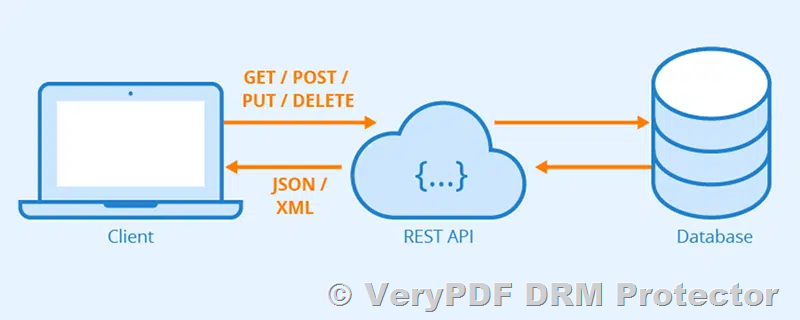
The PHP script provided below is designed to automatically upload a PDF file and apply DRM protection via the VeryPDF DRM Protector API. It includes parameters for encryption, watermarks, password protection, expiration dates, and more.

<?php
// Check if a PDF file is provided via command line
if ($argc < 2) {
     die(“Error: No PDF file specified. Usage: php drm-protector.php <PDF file path>\n”);
}

// Get the PDF file path from the command line argument
$pdfFilePath = $argv[1];

// Check if the file exists
if (!file_exists($pdfFilePath)) {
     die(“Error: The file ‘$pdfFilePath’ does not exist. Please provide a valid file path.\n”);
}

// Define the curl command path
$curl_path = dirname(__FILE__) . ‘/curl/curl.exe’;

// Check if curl.exe exists
echo(“Checking curl path: $curl_path\n”);
if (!file_exists($curl_path)) {
     die(“Error: curl.exe not found. Please ensure curl is installed and the path is correct.\n”);
}

// Build the curl command
$curl_command = “\”$curl_path\” ” .
     ‘-X POST “https://online.verypdf.com/app/pdfdrm/web/upload.php” ‘ .
     ‘-F “InputFileType=LocalFile” ‘ .
     ‘-F “Email=support@verypdf.com” ‘ .
     ‘-F “EnablePDFEncryption=on” ‘ .
     ‘-F “PasswordForInputPDFFile=” ‘ .
     ‘-F “UserPassword=d58mG8bX0r8AsgiH” ‘ .
     ‘-F “OwnerPassword=Z88hgBQ5esfP5eC7” ‘ .
     ‘-F “PDFCompatibility=6” ‘ .
     ‘-F “EnableDRMProtection=on” ‘ .
     ‘-F “VeryPDFDRM_IsNeedInternet=ON” ‘ .
     ‘-F “VeryPDFDRM_ClientTimeZone=1” ‘ .
     ‘-F “Check_VeryPDFDRM_LogonID_01=ON” ‘ .
     ‘-F “VeryPDFDRM_LogonID_01=Demo” ‘ .
     ‘-F “Check_VeryPDFDRM_Password_01=ON” ‘ .
     ‘-F “VeryPDFDRM_Password_01=Demo” ‘ .
     ‘-F “Check_VeryPDFDRM_ExpireAfterDate=ON” ‘ .
     ‘-F “VeryPDFDRM_ExpireAfterDate=2025/04/10 11:39” ‘ .
     ‘-F “VeryPDFDRM_DenyPrint=ON” ‘ .
     ‘-F “VeryPDFDRM_DenyClipCopy=ON” ‘ .
     ‘-F “VeryPDFDRM_DenySave=ON” ‘ .
     ‘-F “VeryPDFDRM_DenySaveAs=ON” ‘ .
     ‘-F “Check_VeryPDFDRM_SetIdleTime=ON” ‘ .
     ‘-F “VeryPDFDRM_SetIdleTime=300” ‘ .
     ‘-F “Check_VeryPDFDRM_CloseAfterSeconds=ON” ‘ .
     ‘-F “VeryPDFDRM_CloseAfterSeconds=300” ‘ .
     ‘-F “Check_VeryPDFDRM_TitleOfMessage=ON” ‘ .
     ‘-F “VeryPDFDRM_TitleOfMessage=VeryPDF DRM Reader” ‘ .
     ‘-F “Check_VeryPDFDRM_DescriptionOfMessage=ON” ‘ .
     ‘-F “VeryPDFDRM_DescriptionOfMessage=Welcome to use VeryPDF DRM Reader…” ‘ .
     ‘-F “Check_VeryPDFDRM_ExpireAfterViews=ON” ‘ .
     ‘-F “VeryPDFDRM_ExpireAfterViews=10” ‘ .
     ‘-F “Check_VeryPDFDRM_ExpirePrintCount=ON” ‘ .
     ‘-F “VeryPDFDRM_ExpirePrintCount=10” ‘ .
     ‘-F “Check_VeryPDFDRM_SetInvalidPWCount=ON” ‘ .
     ‘-F “VeryPDFDRM_SetInvalidPWCount=10” ‘ .
     ‘-F “Check_VeryPDFDRM_PDFExpiryDelete=ON” ‘ .
     ‘-F “VeryPDFDRM_LimitIP=78.137.214.118” ‘ .
     ‘-F “TextWatermark_Text=VeryPDF” ‘ .
     ‘-F “TextWatermark_Color=C0C0C0” ‘ .
     ‘-F “TextWatermark_X=1” ‘ .
     ‘-F “TextWatermark_Y=1” ‘ .
     ‘-F “TextWatermark_OffsetX=0” ‘ .
     ‘-F “TextWatermark_OffsetY=0” ‘ .
     ‘-F “TextWatermark_IsTiledText=ON” ‘ .
     ‘-F “TextWatermark_FontName=Arial” ‘ .
     ‘-F “TextWatermark_FontSize=0” ‘ .
     ‘-F “TextWatermark_Opacity=30” ‘ .
     ‘-F “TextWatermark_Rotate=-45” ‘ .
     ‘-F “ImageWatermark_File=http://www.verypdf.com/images/coffee.jpg” ‘ .
     ‘-F “ImageWatermark_X=1” ‘ .
     ‘-F “ImageWatermark_Y=1” ‘ .
     ‘-F “ImageWatermark_OffsetX=0” ‘ .
     ‘-F “ImageWatermark_OffsetY=0” ‘ .
     ‘-F “ImageWatermark_Width=0” ‘ .
     ‘-F “ImageWatermark_Height=0” ‘ .
     ‘-F “ImageWatermark_Scale=100” ‘ .
     ‘-F “ImageWatermark_Opacity=10” ‘ .
     ‘-F “ImageWatermark_Rotate=0” ‘ .
     ‘-F “PDFWatermark_File=http://www.verypdf.com/images/pdf/StandardBusiness.pdf” ‘ .
     ‘-F “PDFWatermark_PDFPage=1” ‘ .
     ‘-F “PDFWatermark_X=1” ‘ .
     ‘-F “PDFWatermark_Y=1” ‘ .
     ‘-F “PDFWatermark_OffsetX=0” ‘ .
     ‘-F “PDFWatermark_OffsetY=0” ‘ .
     ‘-F “PDFWatermark_Width=100” ‘ .
     ‘-F “PDFWatermark_Height=100” ‘ .
     ‘-F “PDFWatermark_Scale=100” ‘ .
     ‘-F “PDFWatermark_Opacity=50” ‘ .
     ‘-F “PDFWatermark_Rotate=0” ‘ .
     ‘-F “LineWatermark_X1=0” ‘ .
     ‘-F “LineWatermark_Y1=100” ‘ .
     ‘-F “LineWatermark_X2=1000” ‘ .
     ‘-F “LineWatermark_Y2=100” ‘ .
     ‘-F “LineWatermark_Opacity=50” ‘ .
     ‘-F “LineWatermark_Rotate=0” ‘ .
     ‘-F “LineWatermark_Width=1” ‘ .
     ‘-F “LineWatermark_Color=FF0000” ‘ .
     ‘-F “LocalFile[]=@‘ . realpath($pdfFilePath) . ‘”‘;

// Execute the curl command
echo(“Executing the following command:\n$curl_command\n”);
$output = shell_exec($curl_command);

// Save the output to output.html in the current directory
echo($output);
file_put_contents(‘output.html’, $output);

// Inform the user
echo “Output has been saved to ‘output.html’.\n”;

?>

How It Works

  1. PDF File Upload: The script takes the PDF file path as a command-line argument and checks if the file exists.
  2. cURL Command: It then constructs a cURL command to send the PDF file to the VeryPDF DRM Protector API, applying various DRM protection options such as encryption, watermarking, password protection, and more.
  3. DRM Settings: The DRM settings are customizable through the cURL command, including options for restricting print, copy, save, and adding watermarks or expiration dates.
  4. Automated Processing: Once the cURL command is executed, the response from the API is saved to output.html, allowing you to verify the success of the operation.

Benefits of Integrating This into Your System

  • Automation: Automatically protect PDFs as they are generated or uploaded.
  • Customization: Tailor DRM protection settings to meet your needs, such as setting password requirements, expiry dates, and watermarking.
  • Time-Saving: Eliminates the need for manual intervention when applying DRM protection to multiple documents.

Conclusion

Integrating VeryPDF DRM Protector’s command-line PDF upload and protection functionality into your system provides a seamless way to ensure your documents are securely protected. Whether you’re managing large volumes of sensitive data or simply want to automate the document protection process, this solution offers a powerful and flexible method to safeguard your PDFs.
Choosing the Right DRM Solution for PDF Protection: A Customer Inquiry and Response

As digital document security becomes increasingly important, businesses and organizations are searching for reliable Digital Rights Management (DRM) solutions to protect their sensitive PDF documents. In this article, we address common concerns about implementing a DRM system, based on a real customer inquiry and response regarding the VeryPDF DRM Protector.

Choosing the Right DRM Solution for PDF Protection: A Customer Inquiry and Response

Customer Inquiry: Evaluating DRM Security for PDF Documents

A prospective customer reached out to VeryPDF with the following concerns:

“We are looking for a suitable system for DRM security of PDF documents. We like your system, but we can’t get it to work. That is why I am contacting you for help. In the attachment, I have sent three documents according to the method we used for testing (Command Line, API, and Online). For testing, I would like to use all three methods. I would be very glad if you could advise us on what we are doing wrong. We would like to decide this week which system will be the most suitable for us.”

The customer also noted specific issues encountered during their testing:

  • The system did not offer to download the .vpdf file if the source PDF was over 1MB, but allowed downloads for a 237KB file.

  • The “lock the file for HDD/SSD” feature did not seem to work as expected.

VeryPDF’s Response and Clarifications

In response to the customer’s inquiry, VeryPDF provided the following explanations:

1. Testing Limitations in Evaluation Mode

During the free trial period, customers can only test the Online version of VeryPDF DRM Protector. The Command Line and Cloud API methods require a paid subscription. If a customer is interested in these methods, they will need to subscribe to a business plan.

2. File Size Limitations

The evaluation mode has a maximum file size limit of 10MB. If a PDF file exceeds this size, the system will not generate a .vpdf file for download. In this particular case, the customer reported that a 1MB file was not processed, which could indicate a temporary issue or a stricter limitation in the demo environment. Customers are advised to test with smaller files to ensure proper functionality.

3. HDD/SSD Locking Feature

The “lock the file for HDD/SSD” feature is only available for Offline .vpdf files and is not supported in the Online version. Since the customer was testing using the Online version, this feature was not expected to work. After subscribing to a paid plan, customers receive engineering support to correctly configure this feature.

Final Thoughts: Choosing the Right DRM Solution

Choosing the right DRM solution depends on the level of security and access control a business requires. VeryPDF DRM Protector offers robust document security features, but understanding the limitations of the evaluation mode is crucial for a successful trial. For full access to advanced features like API integration, command-line processing, and offline protection, businesses should consider upgrading to a paid subscription.

For more information on VeryPDF DRM Protector, visit https://drm.verypdf.com or contact us for a personalized consultation.

Looking for secure PDF hosting web site? Best Secure PDF Hosting Service – Prevent Downloads, Printing & Screenshots

Many businesses and educators need to share sensitive or copyrighted PDF documents online while preventing unauthorized access, downloads, printing, or even screenshots. If you are searching for a secure PDF hosting solution that doesn’t require users to install additional applications, you are not alone.

Challenges of Secure PDF Hosting and Secure PDF Sharing

Most conventional PDF hosting services allow users to view documents online, but they often lack sufficient security controls. Here are common concerns:

  • Users can download and share the PDF file without permission, leading to intellectual property theft.

  • Many services don’t restrict printing, allowing unauthorized physical copies.

  • Screenshots can be taken, making it easy to bypass security controls and leak confidential information.

  • Some platforms require users to install software, which is inconvenient and limits accessibility.

  • Cloud storage services offer basic password protection but do not prevent screen capture or re-sharing.

  • Lack of detailed analytics makes it hard to track who accessed the document and when.

Looking for secure PDF hosting web site? Best Secure PDF Hosting Service – Prevent Downloads, Printing & Screenshots

Best Solution: VeryPDF DRM Protector

To address these issues, VeryPDF DRM Protector offers a fully online secure PDF hosting solution that ensures document safety without requiring users to install any software. Here’s why it stands out:

1. No Downloads Allowed

With VeryPDF DRM Protector, users can only view the document within a secure environment. They cannot download, save, or share the PDF file outside the platform.

  • Administrators can define viewing permissions for specific users.

  • The document remains protected even if shared via a link.

2. Print Restriction

VeryPDF DRM Protector allows you to completely disable printing to prevent unauthorized copies.

  • If printing is necessary, administrators can enable watermarked prints with user details embedded, ensuring accountability.

3. Screenshot Protection

To prevent screen capture, VeryPDF DRM Protector applies multiple layers of security:

  • Screen overlay protection prevents direct screenshots.

  • Dynamic watermarking displays user information, deterring screen recording.

  • The platform can detect and block common screen capture tools.

4. No Software Installation Required

Unlike traditional DRM solutions that require additional software, VeryPDF DRM Protector is entirely web-based and works across all modern browsers.

  • No need to install plugins, browser extensions, or third-party apps.

  • Works seamlessly on desktops, tablets, and mobile devices.

5. Access Control and Expiry Settings

With advanced user authentication, VeryPDF DRM Protector lets you:

  • Restrict access to specific users, groups, or IP addresses.

  • Set expiration dates for documents to prevent indefinite access.

  • Implement multi-device limitations, allowing documents to be opened only on authorized devices.

  • Integrate with Single Sign-On (SSO) solutions for enterprise-level security.

6. Detailed Usage Analytics

Track how your documents are accessed with real-time analytics:

  • See who viewed the document, when, and for how long.

  • Identify suspicious activity, such as multiple login attempts from different locations.

  • Monitor failed access attempts and security alerts.

How to Get Started?

You can try VeryPDF DRM Protector for free and explore its advanced security features.

  • Visit https://drm.verypdf.com to secure your PDFs today!

  • Contact us for a live demo and personalized consultation.

For businesses, educators, and professionals looking for a highly secure way to share PDFs without risking unauthorized distribution, VeryPDF DRM Protector is the ultimate solution. Whether you are protecting financial reports, research papers, training materials, or confidential contracts, our platform ensures complete document security and peace of mind.

Secure Ways to Share a Sensitive PDF File

Sharing sensitive files can be challenging, especially when you need to ensure that only the intended recipient can access the document and prevent unauthorized sharing. Traditional file-sharing methods, such as email attachments or cloud storage links, are vulnerable to leaks and unauthorized redistribution. However, there are more secure alternatives that provide better control over file access and protection.

Secure Ways to Share a Sensitive PDF File

What Are Sensitive Files?

Sensitive files contain confidential, personal, or proprietary information that should not be accessed by unauthorized individuals. Common types of sensitive files include:

  • Financial Documents (bank statements, tax records, invoices)

  • Legal Contracts (NDAs, agreements, court documents)

  • Personal Identifiable Information (PII) (passports, IDs, medical records)

  • Business Confidential Information (trade secrets, internal reports, business plans)

  • Educational Materials (copyrighted lecture notes, exam papers)

Who Needs VeryPDF DRM Protector?

Certain industries and professionals must ensure the highest level of security when sharing sensitive documents. VeryPDF DRM Protector is particularly essential for:

  • Legal Professionals – Lawyers and law firms handling confidential contracts, NDAs, and case files.

  • Financial Institutions – Banks, accountants, and auditors securing financial reports, tax documents, and investment data.

  • Healthcare Providers – Doctors, hospitals, and insurance companies protecting patient records and medical documents.

  • Corporations and Startups – Businesses sharing trade secrets, business plans, and internal strategy documents.

  • Educational Institutions – Universities and educators protecting copyrighted study materials, research papers, and exam content.

  • Government Agencies – Secure transmission of classified and regulatory information.

1. One-Time Download Links

One effective way to share a sensitive file securely is through a one-time download link. Some services allow you to generate a unique link that expires after a single download. Once the recipient accesses the file, the link becomes invalid, preventing further distribution.

Recommended services for one-time download links:

  • Firefox Send (discontinued but similar alternatives exist)

  • WeTransfer Pro (password protection & expiration links)

  • File.io (auto-deletes after one download)

2. Encrypted File Sharing Services

Using an encrypted file-sharing service ensures that only the intended recipient can open the document. These services often include password protection, time-limited access, and user authentication.

Popular choices:

  • Proton Drive (end-to-end encryption)

  • Tresorit Send (zero-knowledge encryption)

  • SendSafely (client-side encryption)

3. PDF DRM Protection with VeryPDF DRM Protector

For maximum security, using VeryPDF DRM Protector is an excellent option. Unlike traditional encryption, DRM (Digital Rights Management) ensures that the recipient can only view the document under strict conditions. With VeryPDF DRM Protector, you can:

  • Restrict access to only authorized users.

  • Prevent copying, printing, and screen capturing.

  • Apply dynamic watermarking to track leaks.

  • Set an expiration date for document access.

  • Control access remotely (revoke permissions anytime).

4. Self-Destructing PDFs

Some DRM and secure document-sharing platforms allow you to create self-destructing PDFs. These files become inaccessible after a specific time or after a certain number of views.

5. Secure Cloud-Based View-Only Access

Instead of sharing the actual file, you can provide view-only access through a secure cloud-based platform. This prevents downloads and copying, ensuring the file stays protected.

Recommended platforms:

  • Google Drive (View-Only with Expiry Date)

  • OneDrive Secure Links

  • Dropbox File Requests with Restrictions

Conclusion

If you need to securely share a highly sensitive PDF file, avoid traditional sharing methods and opt for one-time links, encrypted file-sharing services, or advanced DRM protection. For complete security and control, VeryPDF DRM Protector is the best solution, ensuring your sensitive document remains protected even after sharing. You can try it at VeryPDF DRM Protector and safeguard your files today!

Affordable Alternatives to Apryse/PDFTron DRM: Why VeryPDF DRM Protector is the Best Choice

In today’s digital age, protecting sensitive information in documents is more important than ever. Whether for educational materials, financial reports, legal documents, or government records, securing digital files with the right Digital Rights Management (DRM) solution is essential. While solutions like Apryse (formerly known as PDFTron DRM) offer powerful features, their costs can be a barrier for smaller businesses, educational institutions, and government entities.

Affordable Alternatives to Apryse/PDFTron DRM: Why VeryPDF DRM Protector is the Best Choice

In this article, we will introduce VeryPDF DRM Protector as a highly cost-effective alternative to Apryse/PDFTron DRM, offering top-tier security features without the hefty price tag. We will explore the key advantages of VeryPDF DRM Protector and explain why it is the ideal DRM solution for various industries.

Why Consider an Affordable DRM Solution?

Large organizations often use high-end DRM solutions like Apryse/PDFTron for their document protection needs. However, these solutions are typically priced for enterprises and can be too costly for small businesses or sectors with limited budgets, such as education, government, or small financial institutions.

For those looking for an affordable, yet highly effective DRM solution, VeryPDF DRM Protector offers a compelling choice. With a robust feature set and cost-effective pricing, it allows businesses and organizations of all sizes to protect their documents without breaking the bank.

Why VeryPDF DRM Protector is the Best Affordable Alternative

VeryPDF DRM Protector offers an ideal alternative to Apryse/PDFTron DRM for many reasons, combining powerful DRM features with an easy-to-use platform. Below are the key benefits that make VeryPDF DRM Protector a superior solution:

1. No Registration Required for Trial Use

Unlike Apryse/PDFTron DRM, which often requires users to register or provide personal information before accessing the trial version, VeryPDF DRM Protector allows users to try the software without any registration. You can start using the software immediately to protect your documents without needing to create an account or enter any personal details.

2. No Software Downloads Needed

Another significant advantage of VeryPDF DRM Protector is that it is a web-based solution, meaning there is no need to download or install any software. This is a major convenience factor compared to Apryse/PDFTron DRM, which typically requires downloading and installing proprietary software. By eliminating the need for software installation, VeryPDF DRM Protector also removes the risk of software incompatibility and maintenance issues. Everything you need is accessible through your browser.

3. Full Compatibility with All Major Browsers

VeryPDF DRM Protector works seamlessly across all major browsers, including Google Chrome, Mozilla Firefox, Microsoft Edge, and Safari. This universal compatibility ensures that no matter what operating system or device you’re using (Windows, macOS, Linux, etc.), you can protect your documents with ease. This is in contrast to Apryse/PDFTron DRM, which may have browser or system compatibility limitations, adding complexity to its implementation.

4. No Credit Card Required for Free Trial

When exploring DRM solutions like Apryse/PDFTron DRM, many providers require you to enter credit card details to access even the trial version. This often leads to unnecessary financial commitment before you’ve even fully evaluated the product. VeryPDF DRM Protector, however, offers a free trial with no credit card required, allowing users to fully experience its features without any obligation. This makes it easier for businesses or individuals to test the software before deciding whether to purchase it.

5. No Dependence on Third-Party Software

VeryPDF DRM Protector is a self-contained solution that does not rely on third-party software or plugins to function. Unlike Apryse/PDFTron DRM, which may require integration with other systems or tools, VeryPDF DRM Protector works independently, ensuring a simpler and more reliable experience. This means you won’t need to worry about compatibility with third-party applications, and your documents will remain secure without external dependencies.

6. Strong DRM Features for Key Industries

VeryPDF DRM Protector is tailored to meet the security needs of a variety of industries, including education, finance, insurance, and government. Here’s how it provides robust protection for these sectors:

  • Education: Schools, universities, and other educational institutions can use VeryPDF DRM Protector to safeguard their valuable intellectual property, such as research papers, e-books, and exam papers. By applying strong encryption and dynamic watermarking, educational content is protected from unauthorized sharing and access.

  • Finance: Financial institutions handle sensitive information daily, from customer data to financial reports and contracts. VeryPDF DRM Protector offers encrypted PDF documents, restricted access, and detailed user controls, ensuring that only authorized personnel can view, edit, or distribute these critical files.

  • Insurance: Insurance companies need to protect confidential client data, policy documents, and contracts. With VeryPDF DRM Protector, documents can be encrypted, and access can be restricted to authorized users, ensuring compliance with privacy regulations and minimizing the risk of data leaks.

  • Government: Government entities often manage highly sensitive information, including regulatory documents, public records, and classified materials. VeryPDF DRM Protector helps government organizations enforce strict access controls, ensuring that confidential documents are protected from unauthorized distribution or exposure.

7. Cost-Effective Solution

While Apryse/PDFTron DRM can be an expensive solution, especially for smaller organizations, VeryPDF DRM Protector is an affordable alternative that offers many of the same powerful DRM features at a fraction of the cost. This makes VeryPDF DRM Protector an attractive choice for businesses, educational institutions, and government agencies looking for strong document protection without the high price tag.

8. Simple and User-Friendly Interface

Even though VeryPDF DRM Protector offers advanced security features, it remains incredibly user-friendly. The interface is intuitive and easy to navigate, meaning you don’t need extensive technical expertise to use the software. Whether you’re uploading documents, applying watermarks, or setting access permissions, everything is simple and straightforward.


Conclusion: Why VeryPDF DRM Protector is the Best Affordable Choice

If you are looking for a budget-friendly alternative to Apryse/PDFTron DRM that doesn’t compromise on features or security, VeryPDF DRM Protector is the solution for you. Offering powerful DRM features such as 256-bit AES encryption, dynamic watermarking, and user access control, it is a top choice for a wide range of industries, including education, finance, insurance, and government.

With the added benefits of a no-registration-required trial, no software downloads, browser compatibility, no credit card requirements, and the absence of third-party software dependencies, VeryPDF DRM Protector provides the most comprehensive, easy-to-use, and affordable DRM solution available today.

Protect your sensitive documents and intellectual property with VeryPDF DRM Protector, and experience the peace of mind that comes with knowing your files are secure from unauthorized access and distribution.

https://drm.verypdf.com/online/