
Secure Your PDFs: AI-Powered Redaction to Permanently Remove Sensitive Data
Protect confidential information in PDFs with AI redaction, preventing data leaks and ensuring compliance before sharing.
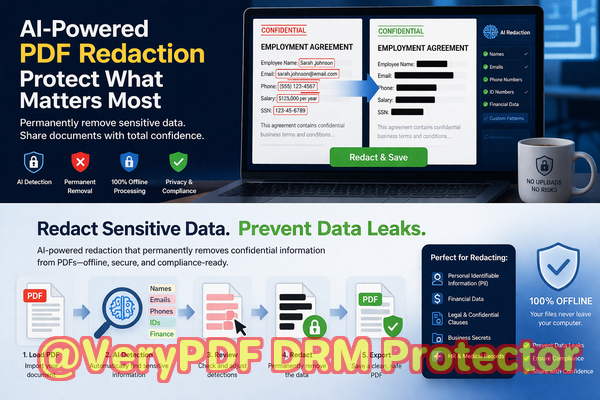
Last month, our finance team sent a quarterly report to a partner, only to realize later that it still contained unredacted employee Social Security numbers and client financial details. The moment we discovered it, panic set inthis was more than a minor oversight. One accidental leak like this could trigger serious GDPR fines, damage trust, and put our company at legal risk. For businesses handling sensitive information daily, such oversights are all too common, and the consequences are tangible.
Accidental exposure of sensitive data in PDFs is a widespread problem. From HR records to financial reports, legal contracts to client agreements, PDFs often carry critical personal, financial, or corporate information. Three key challenges make secure sharing difficult:
-
Manual Redaction Errors: Many employees still rely on traditional “blackout” techniques. Highlighting text and filling it with black ink may seem secure, but the underlying text can often be copied, extracted, or recoveredmeaning confidential data isn’t truly removed.
-
Unsafe Online Tools: It’s tempting to use free online redaction services, but uploading sensitive documents exposes them to third-party servers. Files containing client information, trade secrets, or employee records may be stored or cached without your knowledge, creating compliance and privacy risks.
-
Human Oversight: Even meticulous teams can overlook a phone number, email address, or internal comment in a PDF. In high-volume workflows, missing a single piece of sensitive information can lead to breaches and regulatory penalties.
To address these challenges, we turned to VeryPDF AI PDF Redaction Tool Command Linean AI-powered solution designed to permanently remove sensitive data from PDFs while keeping your documents fully offline and private.
Unlike traditional methods, this tool automatically identifies a wide range of sensitive information, including names, emails, phone numbers, IDs, financial data, and confidential clauses. Its AI engine understands context, reducing the risk of human oversight. For example, it can detect that “SSN: 123-45-6789” in a financial report is sensitive, even if it appears in a comment or footer.
Once detected, the tool permanently removes the data rather than merely obscuring it. The text isn’t just blacked outit’s irretrievably deleted. This approach ensures that no one, including malicious actors or accidental recipients, can recover confidential information from your PDFs.
Processing is entirely offline. Your documents never leave your computer, meaning sensitive files are never uploaded to the cloud, and compliance with data protection regulations like GDPR is fully supported. For legal teams or HR departments handling high-risk information, this is a critical safeguard.
Consider this real-world scenario: A multinational law firm routinely shared contracts with outside counsel. Previously, junior associates manually redacted documents, but sensitive client clauses occasionally slipped through. After integrating VeryPDF AI PDF Redaction into their workflow, the firm automated detection and removal, eliminating the risk of exposing confidential terms. Not only did this protect client data, but it also saved staff hours on manual reviews.
A practical workflow looks like this:
-
Load PDF Select one or multiple PDFs for processing.
-
Detect Sensitive Data AI automatically scans for PII, financial information, business secrets, or legal clauses.
-
Review Redactions Optionally review what the AI has flagged for accuracy.
-
Apply Redaction Sensitive data is permanently removed.
-
Export Clean PDF Share safely, confident that the information cannot be recovered.
Common data types to redact include:
-
Personal identifiable information (PII) such as names, emails, addresses, and social security numbers
-
Financial data like bank account numbers, credit card details, and payroll information
-
Business secrets including strategic plans, product specs, and confidential agreements
-
Legal clauses that must remain private or sensitive contractual terms
Switching from online tools to an offline, AI-powered solution also improves operational security. For example, one HR department avoided a potential data leak when they realized that an online redaction tool they previously used had temporarily stored documents on a third-party server. With VeryPDF AI PDF Redaction, they no longer face that exposure risk.
The benefits extend beyond just security. By automating redaction, teams save time, reduce human error, and ensure every document complies with privacy standards before sharing. Compliance officers no longer need to double-check every PDF manually; they can trust that sensitive information is fully removed.
In conclusion, integrating VeryPDF AI PDF Redaction Tool Command Line into your document workflow directly addresses critical business risks. It prevents accidental leaks, ensures compliance, and keeps confidential data permanently safe. I highly recommend this to anyone who needs to share documents securely without risking data breaches or regulatory penalties.
Try it now and securely redact your PDFs: https://veryutils.com/smart-redact-server-ai-powered-pdf-redaction-software
Start your free trial today and ensure your sensitive data is permanently removed before sharing.
Frequently Asked Questions
Q: How can I permanently remove sensitive data from a PDF instead of just hiding it?
A: VeryPDF AI PDF Redaction removes the underlying text and data completely, making it unrecoverable. Blacking out text visually is not sufficientthis tool ensures permanent removal.
Q: Can others recover redacted information from my PDF?
A: No. Once redacted with VeryPDF AI PDF Redaction, sensitive information cannot be restored or copied.
Q: Is it safe to use online PDF redaction tools?
A: Uploading confidential PDFs to online tools risks exposing sensitive data. Files may be stored on third-party servers, creating compliance and security vulnerabilities.
Q: Does this tool work completely offline?
A: Yes. All processing happens locally on your machine, ensuring your documents never leave your secure environment.
Q: What types of sensitive data can be automatically detected and removed?
A: Names, emails, phone numbers, social security numbers, financial information, legal clauses, business secrets, and other PII.
Q: How does AI improve redaction accuracy?
A: AI understands context and patterns in text, so it can detect sensitive data that may be missed by manual review or simple search-based methods.
Q: Can this tool handle multiple PDFs in one workflow?
A: Yes. You can batch process PDFs, saving time and ensuring consistent redaction across documents.
Q: How can I ensure compliance with GDPR when sharing documents?
A: By permanently removing all sensitive data from PDFs before sharing, you prevent accidental leaks and adhere to GDPR privacy standards.
Q: Does redaction affect the readability of non-sensitive content?
A: No. Only flagged sensitive information is removed. The rest of the PDF remains intact and readable.
Q: Can this be integrated into automated workflows or CI pipelines?
A: Yes. The command line tool can be integrated into business workflows, enabling automated, consistent, and secure redaction across your document processes.
Q: How quickly can sensitive data be detected and removed?
A: AI-powered detection is fast, allowing for real-time or batch processing depending on workflow needs.
Q: Is there a way to review what the AI redacted before finalizing?
A: Yes. You can review and approve suggested redactions, providing full control over your documents before exporting.
Keywords/Tags
redact sensitive data, remove confidential information, PDF redaction tool, protect privacy in PDFs, prevent data leaks, offline PDF redaction, secure document sharing, AI-powered PDF redaction, GDPR compliance, permanent PDF redaction