
When our legal team shared a PDF contract with a potential partner last month, we thought everything was safeuntil we realized the file still contained employee emails and client IDs. That oversight could have resulted in a serious GDPR violation and, potentially, a costly reputational hit. Situations like this are more common than most business professionals realize. Accidental exposure of confidential data is a silent risk that can turn routine document sharing into a legal nightmare.
Businesses today handle sensitive information constantlycontracts, financial statements, HR records, medical reports, and internal communications. Each PDF we share carries the potential for accidental leaks if proper redaction isn’t applied. While many rely on Adobe Acrobat or online tools for redacting, these methods often fail to remove confidential information permanently, leaving critical data vulnerable to recovery or unauthorized access.
The consequences are real: fines for compliance violations, exposure of trade secrets, identity theft, and erosion of client trust. To prevent these risks, a robust, reliable, and privacy-focused solution is essential. That’s where VeryPDF AI PDF Redaction Tool Command Line comes into play, helping businesses permanently remove sensitive information before sharing documents.
Sensitive data leaks are often unintentional but highly damaging. Imagine a finance team sending an invoice PDF to a vendor, only for internal account numbers or customer data to remain visible in the file’s underlying text. Even if text appears blacked out visually, it can often be copied or extracted. Similarly, HR teams sharing employee performance reviews or medical information face the risk of inadvertently exposing personal identifiable information (PII) like social security numbers or addresses.
Manual redaction methods exacerbate these risks. Drawing black boxes over text is tedious and error-prone, and missteps can leave recoverable data behind. Many employees also resort to online redaction tools for convenience, unknowingly uploading sensitive documents to third-party serversintroducing potential breaches and compliance violations.
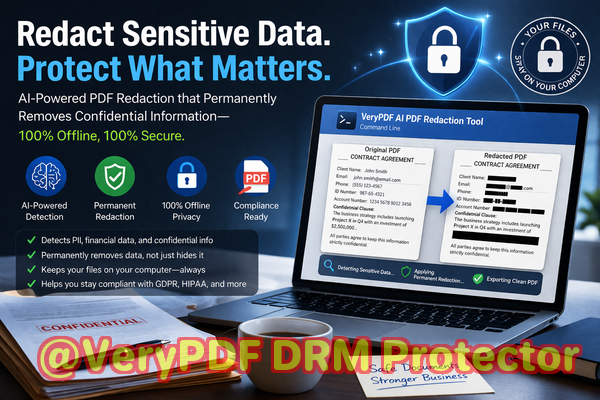
The VeryPDF AI PDF Redaction Tool Command Line addresses these business pain points effectively. Unlike traditional redaction methods, this tool uses AI to detect sensitive data automatically, including names, emails, phone numbers, identification numbers, and financial information. Once identified, the information is permanently removed from the document, not just visually obscured.
One of the biggest advantages is offline processing. All document redaction occurs locally on your computer, meaning your confidential files never leave your secure environment. For legal teams, compliance officers, and HR professionals, this offline capability is a game-changer. No more worrying about confidential files being stored or intercepted on third-party servers.
Here’s how it works in practice:
-
Load your PDF document into the VeryPDF AI PDF Redaction Tool.
-
The AI scans the file for sensitive informationPII, financial data, legal clauses, or any designated confidential content.
-
You review the detected items to ensure accuracy.
-
Apply the redaction with a single command.
-
Export a fully sanitized PDF ready for safe sharing.
Consider the example of a mid-sized law firm that handles hundreds of client agreements each month. Previously, staff manually redacted sensitive clauses using a basic PDF editor, often missing embedded identifiers in footnotes or metadata. By switching to VeryPDF’s AI-powered solution, the firm automated detection, ensuring every PDF shared externally contained no recoverable client information. This simple change not only prevented potential compliance issues but also saved hours of manual labor each week.
Similarly, a healthcare provider needed to share patient records with external auditors. Traditional redaction methods left metadata traces, posing a privacy risk. Using the VeryPDF tool, sensitive patient data was permanently removed, all processed offline, and the PDFs were safely distributed without any exposure risk.
Some common examples of sensitive data you might need to redact include:
-
Personal identifiable information (PII): names, addresses, phone numbers, emails
-
Financial information: account numbers, payment details, credit information
-
Business secrets: internal strategies, project plans, client lists
-
Legal or confidential clauses: non-disclosure agreements, contract-specific terms
By automating this process, businesses reduce human error, ensure compliance with GDPR, HIPAA, and other regulations, and prevent accidental data leaks that could result in financial or reputational damage.
The real beauty of VeryPDF AI PDF Redaction Tool Command Line is its simplicity combined with powerful security. Even employees unfamiliar with complex software can follow a straightforward workflow: detect, review, redact, export. The AI ensures nothing is missed, and the offline operation guarantees 100% privacy. No sensitive data ever touches an external server.
Moreover, this tool adapts to multiple use cases: legal departments sharing contracts, HR teams handling employee records, finance departments distributing reports, and medical organizations sending confidential documentation. The flexibility ensures every professional working with sensitive PDFs can mitigate privacy risks effectively.
In practice, here’s a step-by-step workflow for a typical scenario:
-
Load PDF Open your document in the AI redaction tool.
-
Detect Sensitive Data Let the AI scan for PII, financial information, or business secrets.
-
Review Findings Confirm that all sensitive items have been correctly identified.
-
Apply Redaction Permanently remove sensitive data with a single command.
-
Export Clean PDF Generate a sanitized document ready for safe distribution.
Implementing this workflow ensures documents are compliant with regulations and reduces the risk of costly data breaches. Companies that previously relied on manual redaction or online tools report fewer errors, faster processing, and greater peace of mind.
In summary, VeryPDF AI PDF Redaction Tool Command Line offers tangible business benefits. It:
-
Automatically detects and permanently removes sensitive information.
-
Operates fully offline, keeping documents private and secure.
-
Reduces the risk of compliance violations and accidental leaks.
-
Saves time and effort compared to manual redaction methods.
-
Supports multiple types of sensitive data across legal, financial, HR, and healthcare documents.
I highly recommend this to anyone who needs to share documents safely without risking data leaks or compliance issues. Try it now and securely redact your PDFs: https://veryutils.com/smart-redact-server-ai-powered-pdf-redaction-software. Start your free trial today and ensure your sensitive data is permanently removed before sharing.
Frequently Asked Questions (FAQs)
1. How can I permanently remove sensitive data from a PDF instead of just hiding it?
The VeryPDF AI PDF Redaction Tool Command Line completely deletes sensitive information from the document’s content and metadata, ensuring it cannot be recovered.
2. Can others recover redacted information from my PDF?
No. Unlike visual blackouts in standard editors, this tool removes data entirely, preventing any form of recovery.
3. Is it safe to use online PDF redaction tools?
Using online tools involves uploading documents to external servers, which introduces privacy risks and potential compliance violations. Offline solutions are safer for sensitive data.
4. Does this tool work completely offline?
Yes. All processing is local, so your confidential files never leave your computer.
5. What types of sensitive data can be automatically detected and removed?
Names, emails, phone numbers, IDs, financial information, business secrets, legal clauses, and any other confidential content you specify.
6. How can I ensure compliance with GDPR when sharing documents?
By permanently removing all PII and sensitive data from PDFs before sharing, your organization reduces exposure and aligns with GDPR requirements.
7. Can I batch redact multiple PDFs at once?
Yes. The command-line interface supports batch processing, streamlining workflows for large volumes of documents.
8. Do I need technical expertise to use this tool?
Basic familiarity with PDF handling is sufficient. The tool offers clear commands, automated detection, and a simple review process.
9. How does AI detection improve accuracy compared to manual redaction?
AI identifies patterns and sensitive data that humans may miss, including hidden or embedded content, ensuring comprehensive protection.
10. Will the redacted PDF maintain its formatting?
Yes. The tool preserves document layout, images, and formatting while removing sensitive content.
11. Can this tool help prevent insider leaks?
Absolutely. By ensuring sensitive information is permanently removed before sharing, it limits opportunities for accidental or intentional data exposure.
12. Is this solution suitable for legal, HR, and healthcare documents?
Yes. Its flexibility makes it ideal for any profession handling confidential PDFs.
Tags / Keywords:
redact sensitive data, remove confidential information, PDF redaction tool, protect privacy in PDFs, prevent data leaks, offline PDF redaction, secure document sharing, AI PDF redaction, GDPR compliance, permanent data removal