
How to Redact Sensitive Data and Protect PDFs in Legal, Financial, and Healthcare Workflows
Last month, our team prepared a set of financial reports to share with a new partner, only to realize later that the PDFs still contained unredacted client informationemails, account numbers, and even internal notes. The thought of that data falling into the wrong hands was nerve-wracking, and I immediately imagined the potential fines and reputational damage from a compliance violation. This scenario isn’t uniquebusinesses across industries face the same challenge every day: how to safely share sensitive documents without risking data leaks or violating privacy regulations.
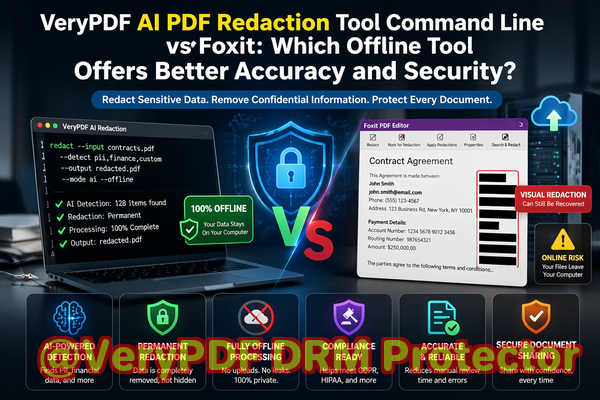
For companies in legal, financial, and healthcare sectors, every PDF sent externally carries risk. Contracts, HR records, financial statements, or medical forms often contain personal identifiable information (PII) and confidential business details. When these PDFs are shared without proper protection, the consequences are real: GDPR penalties, HIPAA breaches, lost client trust, and exposure of strategic business information.
Manual redaction has long been the default approach, but it comes with limitations. Simply blacking out text on a PDF doesn’t remove the underlying datatext can still be copied or recovered with basic tools. Employees sometimes resort to online redaction services, unknowingly uploading sensitive information to third-party servers, exposing the organization to additional risk.
This is where VeryPDF AI PDF Redaction Tool Command Line becomes a game-changer. By combining AI-powered detection with fully offline processing, it ensures sensitive information is permanently removed from PDFs before they leave your computer.
Why Businesses Struggle With PDF Security
One of the biggest pain points is accidental exposure of sensitive data. Consider these real scenarios:
-
A legal team shared a draft contract with a client, only to later realize that the document contained personal details of other clients. The oversight could have led to serious confidentiality violations.
-
A finance department tried to redact a report manually, but hidden text layers allowed a competitor to access account numbers through simple copy-paste.
-
HR employees used an online redaction tool to remove employee information from salary sheets, unknowingly uploading confidential files to an external server.
In each case, the organization faced potential legal, financial, and reputational consequences.
How AI PDF Redaction Solves These Problems
VeryPDF AI PDF Redaction Tool Command Line addresses these challenges by:
-
Automatically detecting sensitive information such as names, emails, phone numbers, IDs, financial data, and confidential clauses.
-
Permanently removing data rather than merely covering it visually, preventing recovery by any means.
-
Operating fully offline, ensuring sensitive files never leave your organization’s secure environment.
For instance, when our team switched from manual redaction to VeryPDF AI PDF Redaction Tool, we were able to:
-
Load a PDF containing client contracts.
-
Let the AI scan and detect all personal and financial identifiers.
-
Review the suggested redactions for accuracy.
-
Apply permanent redactions with one command.
-
Export a clean, safe PDF ready for sharing.
This workflow significantly reduces the risk of accidental exposure while saving time.
Protecting Privacy and Ensuring Compliance
Using AI-powered redaction has tangible compliance and security benefits. A few key advantages include:
-
Preventing data leaks that could result in fines or legal action.
-
Eliminating the risk of uploading sensitive documents to unknown servers.
-
Ensuring adherence to GDPR, HIPAA, and other data protection regulations, as all redacted data is permanently removed.
Real business examples demonstrate these benefits. A healthcare provider used AI redaction to prepare patient data for external auditing. By automating detection of names, social security numbers, and medical record details, they avoided potential HIPAA violations and streamlined their audit process. A financial services firm switched from online redaction tools to the offline VeryPDF solution, safeguarding client account details and preserving confidentiality when sharing reports with auditors.
Step-by-Step Workflow for Redacting PDFs
To make the process concrete, here’s a typical workflow for business teams:
-
Step 1: Load PDF Open your document in VeryPDF AI PDF Redaction Tool.
-
Step 2: Detect sensitive data The AI scans for PII, financial information, legal clauses, and other confidential details.
-
Step 3: Review redactions Ensure the suggested redactions align with your privacy requirements.
-
Step 4: Apply permanent redactions One click permanently removes sensitive data.
-
Step 5: Export clean PDF Share safely with partners, clients, or regulators.
Common types of data to redact include:
-
Personal Identifiable Information (PII): Names, addresses, emails, phone numbers, social security numbers.
-
Financial Data: Bank accounts, credit card numbers, salaries, invoices.
-
Business Secrets: Product plans, internal strategies, intellectual property.
-
Legal/Confidential Clauses: Contract terms, arbitration agreements, settlement details.
Practical Benefits for Your Organization
-
Time Savings: Automated detection reduces hours spent manually reviewing documents.
-
Error Reduction: AI accuracy ensures no sensitive data is overlooked.
-
Enhanced Security: Offline processing prevents unauthorized access or accidental uploads.
-
Compliance Assurance: Redactions are permanent and defensible during audits.
By integrating AI PDF redaction into your document workflow, your team can confidently share PDFs without worrying about accidental leaks or regulatory breaches.
Conclusion
In today’s business environment, one unredacted PDF can lead to serious consequences. VeryPDF AI PDF Redaction Tool Command Line provides a practical, reliable solution to permanently remove sensitive information while keeping files fully offline. I highly recommend this to anyone who needs to share documents safely without risking data leaks or compliance issues.
Try it now and securely redact your PDFs: https://veryutils.com/smart-redact-server-ai-powered-pdf-redaction-software
Start your free trial today and ensure your sensitive data is permanently removed before sharing.
Frequently Asked Questions (FAQs)
-
How can I permanently remove sensitive data from a PDF instead of just hiding it?
Use AI-powered redaction tools that remove underlying data layers, not just visually cover them.
-
Can others recover redacted information from my PDF?
With permanent AI redaction, underlying data is completely removed, making recovery impossible.
-
Is it safe to use online PDF redaction tools?
Online tools may upload sensitive data to external servers, which poses a privacy risk.
-
Does this tool work completely offline?
Yes, VeryPDF AI PDF Redaction Tool Command Line processes files entirely offline for 100% security.
-
What types of sensitive data can be automatically detected and removed?
Personal data (PII), financial info, legal clauses, business secrets, and other confidential content.
-
Can AI redaction help with GDPR compliance?
Absolutelypermanent removal of personal data ensures documents meet GDPR and similar regulations.
-
How long does it take to redact a PDF?
Automated AI detection is fast; processing time depends on document size and complexity.
-
Can I review redactions before applying them?
Yes, you can review and approve suggested redactions to ensure accuracy.
-
Will the formatting of my PDF remain intact after redaction?
Yes, the tool preserves layout, graphics, and text formatting while removing sensitive content.
-
Is it suitable for legal, financial, and healthcare documents?
Yes, it’s designed for industries handling high volumes of confidential information.
-
Can it handle multiple PDFs in batch mode?
Yes, batch processing allows efficient redaction of multiple files at once.
Tags/Keywords
redact sensitive data, remove confidential information, PDF redaction tool, protect privacy in PDFs, prevent data leaks, offline PDF redaction, secure document sharing, AI PDF redaction, GDPR compliance, permanent data removal