What is DRM and How Does it Work For You? Who benefits from DRM?

In the age of digital distribution, ensuring your intellectual property (IP) remains secure is more critical than ever. Whether you’re an educator, publisher, or content creator, the risk of unauthorized sharing, copying, or misuse of your materials can compromise both your revenue and your reputation. VeryPDF DRM Protector offers a comprehensive solution to safeguard your digital assets with advanced Digital Rights Management (DRM) technology.
What is DRM and How Does it Work For You? Who benefits from DRM?

What Is DRM?

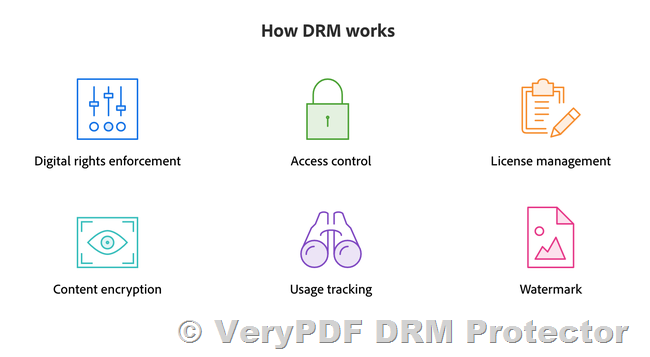
Digital Rights Management (DRM) is the process of protecting digital content through encryption and access controls. DRM software ensures that only authorized users can access your materials and enforces rules to prevent unauthorized usage.

Key DRM Features with VeryPDF:

  • Device and Account Limits: Control how many devices or accounts can access your content.
  • Expiry Controls: Set access to expire after specific dates or usage limits.
  • Dynamic Watermarks: Add user-identifying watermarks to discourage sharing.
  • Printing and Copy Controls: Restrict or allow limited printing and copying.
  • Screen Sharing Controls: Block screen sharing and screenshots.
  • Offline Access Controls: Determine how content can be accessed offline.
  • IP Address and Location Restrictions: Limit access to specific IPs or block certain countries.

Why Choose DRM?

As a digital content provider, your intellectual property is your most valuable asset. DRM helps you:

  • Protect Your Content: Safeguard against unauthorized access, copying, and sharing.
  • Maintain Full Control: Decide who, how, and where your content is accessed.
  • Secure Your Revenue: Prevent piracy to protect your bottom line.
  • Preserve Confidentiality: Keep sensitive or proprietary information secure.

Who Benefits from VeryPDF DRM Protector?

VeryPDF DRM Protector is ideal for any organization or individual that needs to protect their digital assets. Beneficiaries include:

  • Content creators and providers
  • Publishers and writers
  • Educational institutions and training organizations
  • Film and entertainment companies
  • Associations, standards organizations, and research institutions

Key Features of VeryPDF DRM Protector

Comprehensive Content Protection

With VeryPDF Security Enterprise DRM, you can ensure your digital assets are secure at every step:

  • Encrypt content with AES encryption to prevent unauthorized access.
  • Block printing, downloading, copying, or sharing.
  • Add dynamic watermarks with user details to trace unauthorized distribution.
  • Organize content into folders with customized permissions.
  • Automate protection processes for efficiency.

Powerful DRM Controls

VeryPDF DRM Protector offers over 20 DRM controls, enabling you to:

  • Set device and user limits.
  • Apply expiry dates and control offline access.
  • Restrict IP addresses or block access from specific countries.
  • Customize permissions for different users or groups.

Flexible User Access

Providing secure yet seamless access to your end-users is easy with VeryPDF DRM:

  • Allow access directly via a browser without requiring plug-ins or downloads.
  • Use a secure, customized portal for authorized access.
  • Integrate DRM protection into your website or business system.

Insightful Tracking and Analytics

Track how your content is being used and identify trends to improve performance:

  • See who accessed your content, when, and from where.
  • Identify your top-performing content and most active users.
  • Troubleshoot user errors effectively.
  • Export data for deeper analysis.

Why VeryPDF DRM Protector?

VeryPDF DRM Protector combines ease of use with robust security features, making it a trusted choice for protecting digital assets. With VeryPDF, you get:

  • Comprehensive Control: Choose from a wide range of DRM settings to meet your unique needs.
  • Enhanced User Experience: Secure access without the need for cumbersome plug-ins or downloads.
  • Reliable Analytics: Gain insights to optimize your content strategy.
  • Global Reach with Local Restrictions: Securely distribute content worldwide while blocking unauthorized regions.

Empower Your Content with VeryPDF DRM Protector

Digital content distribution is an opportunity, but it comes with risks. With VeryPDF DRM Protector, you can confidently share your work, knowing your intellectual property is secure. Whether you’re publishing eBooks, delivering online courses, or distributing proprietary business materials, VeryPDF DRM Protector has the tools you need to protect your content and maintain full control.

Learn more about VeryPDF DRM Protector today and take the next step in securing your digital future.
Use VeryPDF Self-Hosted PDF DRM Protector to Secure Your Educational Content. DRM for Education Content Providers!

In today’s digital age, protecting sensitive educational materials—such as exam papers, training courses, and proprietary learning resources — is more critical than ever. Educational institutions like schools, universities, and colleges face the dual challenge of sharing resources efficiently while safeguarding them against unauthorized access, sharing, and misuse. Enter Self-Hosted PDF DRM Protector, a robust solution designed to protect PDF documents no matter where they reside.

Use VeryPDF Self-Hosted PDF DRM Protector to Secure Your Educational Content. DRM for Education Content Providers!

Key Features of Self-Hosted PDF DRM Protector

  1. Stop Unauthorized Access
    • Employ US Government-strength encryption to ensure only authorized users can access your documents.
    • Lock content to specific devices or locations to prevent unauthorized usage.
  2. Prevent Sharing and Distribution
    • Restrict copying, printing, and screen grabbing of PDF content.
    • Dynamic watermarks display user information to discourage piracy and trace unauthorized distribution.
  3. Control Access and Usage
    • Set expiry dates or usage limits for documents.
    • Instantly revoke access to users in case of policy violations.

Protecting Exam Papers and Educational Resources

For teachers, administrators, and educators, protecting the integrity of exam papers is paramount. With Self-Hosted PDF DRM Protector, institutions can:

  • Prevent students from sharing or leaking exam content.
  • Lock exam papers to designated devices or physical locations.
  • Track access to ensure that only authorized individuals view or print the materials.

Securing Training Courses and Learning Content

Educational institutions often invest significant resources in creating proprietary training courses, making them a prime target for theft and unauthorized distribution. Self-Hosted PDF DRM Protector ensures that your intellectual property remains protected by:

  • Preventing unauthorized sharing of training content.
  • Allowing printing only under controlled conditions, with dynamic watermarks to trace copies.
  • Providing flexible access controls for diverse educational formats, from in-person sessions to remote learning environments.

Simplified Administration for Educators

Managing secure access to educational materials can be complex. Self-Hosted PDF DRM Protector simplifies this process through:

  • Publications: Group multiple documents into a single “publication” (e.g., a complete course) for streamlined access management.
  • User Tracking: Monitor document usage to identify potential misuse and improve content delivery.
  • Zero-Installation Viewers: Allow students to access content seamlessly via web browsers, USB devices, or secure viewers.

Why Choose Self-Hosted PDF DRM Protector?

  • Cost-Effective: Protect unlimited courses and users with a one-time fee.
  • No Password Hassles: Secure your PDFs without relying on easily shareable passwords.
  • Cross-Platform Compatibility: Supports all major operating systems and devices.
  • Offline Security: Protect content distributed via USB sticks or other offline media.

Unlock the Benefits of Going Digital

Digitalizing your training courses and educational materials not only saves costs but also enhances accessibility and scalability. Self-Hosted PDF DRM Protector ensures your transition to digital is secure and efficient, allowing you to:

  • Safeguard proprietary teaching methods and intellectual property.
  • Provide controlled access to course content for students and instructors.
  • Quickly adapt to the growing demands of online and hybrid learning.

A Proven Solution for Education Professionals

Join thousands of educational organizations that trust Self-Hosted PDF DRM Protector to secure their training courses, exam papers, and educational materials. Protect your intellectual property, maintain academic integrity, and secure your revenue streams—no matter where your content resides.

Explore Self-Hosted PDF DRM Protector today and ensure the future of secure education.

Self-Hosted Solution for VeryPDF Cloud PDF DRM Protector

At VeryPDF, we understand the growing demand for enhanced digital document protection, especially within educational institutions. Our self-hosted solution for the VeryPDF Cloud PDF DRM Protector provides a secure, private, and customizable platform that guarantees your digital content is safe from unauthorized access and distribution.

Self-Hosted Solution for VeryPDF Cloud PDF DRM Protector

— Why Choose a Self-Hosted Solution?

A self-hosted solution offers a range of advantages that make it the ideal choice for educational institutions, enterprises, or any organization looking for greater control and flexibility over their document protection infrastructure. With this solution, you host the VeryPDF Cloud PDF DRM Protector on your own servers, providing you with the ability to tailor the solution to your specific needs.

— Key Advantages of a Self-Hosted Solution

1. Full Control and Customization 
    Hosting the VeryPDF Cloud PDF DRM Protector on your own infrastructure gives you complete control over how the system is set up, configured, and maintained. You can customize security settings, permissions, and user access based on your specific requirements, ensuring that your content protection aligns perfectly with your internal policies.

2. Data Security and Privacy 
    With the self-hosted option, your sensitive educational materials and documents stay within your own network, reducing the risk of data exposure or breaches that can occur with cloud-based solutions. You have full control over who accesses your data and can ensure that it is stored in compliance with your institution’s privacy policies.

3. No Ongoing Subscription Fees 
    Unlike subscription-based cloud services, the self-hosted solution comes with a one-time fee, which can be more cost-effective over time. This means you won’t need to worry about recurring costs and can rely on a fixed, predictable budget for document protection.

4. Seamless Integration with Existing Systems 
    Our self-hosted solution can be easily integrated with your existing server infrastructure, creating a seamless experience for your users. Whether you’re using a Learning Management System (LMS), digital libraries, or other internal tools, our solution works in harmony with the systems you already have in place.

5. Advanced Customization Options 
    You can modify the system to fit your unique needs. For example, if your institution requires specific access controls, advanced encryption, or watermarking, our self-hosted solution provides the flexibility to make these customizations and ensure that your documents are fully protected.

6. Scalability 
    As your institution grows, the self-hosted solution can scale with you. You can easily add new users, expand document storage, and adjust permissions without worrying about running out of space or bandwidth. The solution is built to grow with your organization, making it a long-term investment.

7. No Dependency on Third-Party Services 
    With a self-hosted solution, you’re not dependent on third-party service providers or the potential risks associated with external services. You manage the environment, meaning you can ensure the stability and availability of the system without worrying about interruptions from cloud service outages.

8. Compliance and Regulatory Control 
    For educational institutions that must adhere to strict data protection regulations (such as FERPA in the U.S. or GDPR in Europe), the self-hosted solution offers a way to maintain compliance while controlling how and where data is stored. This gives you peace of mind that your content is being handled according to local laws and regulations.

— One-Time Fee with Comprehensive Support

Our self-hosted solution is available for a one-time fee, which includes one month of Gold Support. During this time, our expert team will assist you in setting up the software on your server, ensuring that everything is configured properly for smooth operation. We’ll guide you through the installation process, helping to resolve any issues quickly so that you can start protecting your documents right away.

— Why Educational Institutions Should Choose This Solution

For educational institutions, the self-hosted solution for VeryPDF Cloud PDF DRM Protector is the ideal choice when you need:

Complete control over how documents are managed and shared
Advanced document security features such as encryption, watermarking, and copy protection
Peace of mind knowing that your data is securely stored and protected on your own servers
Cost-effective protection with a one-time fee and no ongoing subscription costs
Scalability to grow with your institution’s needs

— Get a Quote Today

If you’re interested in the self-hosted solution for VeryPDF Cloud PDF DRM Protector and would like to receive a personalized quote, please feel free to contact us. Our team is ready to discuss your specific requirements and provide you with a tailored solution that fits your institution’s needs.

Contact Us: 

http://support.verypdf.com/open.php

How to Prevent the Download of PDF Files from Web Pages Using VeryPDF DRM Protector?

Introduction

PDF files are one of the most commonly used formats for sharing documents online. However, when sensitive or proprietary content is involved, the risk of unauthorized downloading, printing, or redistribution becomes a concern. In this article, we’ll explore how to prevent PDF downloads from web pages, why it’s difficult to completely block downloads, and how you can protect your PDF files using VeryPDF DRM Protector.

How to Prevent the Download of PDF Files from Web Pages Using VeryPDF DRM Protector?

Why Preventing PDF Downloads?

When you host a PDF on a website or cloud service, the most common concern is that anyone with access to the document can download it, share it, or use it without restrictions. Allowing unlimited downloads makes the document vulnerable to unauthorized distribution. This is especially true when there are no controls to restrict actions like editing, printing, or copying. While it might seem easy to prevent downloads, there are numerous challenges in actually achieving this.

The Challenges of Preventing PDF Downloads

PDFs can be downloaded in multiple ways, and many users will find creative methods to obtain them, such as:

  • Pressing a download button.
  • Using “Print to File” functionality.
  • Extracting the file directly from the webpage’s source code.
  • Copying and pasting the document’s contents into a new file.
  • Taking screenshots of the document’s pages.
  • Sharing login credentials with unauthorized users.
  • Using automated scraping tools or AI to download content.

Even though some of these methods can be controlled to an extent, preventing every possible form of download is far more difficult than it seems.

Can You Prevent a PDF on a Website from Being Downloaded?

While many solutions attempt to control PDF downloads, most are easily bypassed. The following methods are commonly used but have limitations:

1. Web Page Password Protection

By restricting access to the webpage where the PDF is hosted, you can prevent unauthorized users from downloading it. This method requires users to log in or enter a password. However, the issue lies in the fact that once someone with access shares the password, others can still download or share the document.

2. Download Links

Another method is to provide unique download links that expire after a certain period or after being used a set number of times. While this can limit unauthorized access, anyone with the link can still download the PDF and share it freely.

3. JavaScript Protection

Some websites use JavaScript to disable the download button or other functions like printing and copying. However, since JavaScript runs on the client-side, it can be easily bypassed using browser developer tools or by disabling JavaScript altogether.

4. CMS Plugins and Access Control Lists (ACL)

WordPress and other content management systems offer plugins that claim to disable PDF downloads. These plugins often embed the PDF directly in blog posts and remove the download button. However, just like JavaScript-based methods, these can be circumvented by savvy users.

How to Secure a Downloadable PDF on a Website

While traditional methods may not provide adequate protection, there are more secure solutions available, particularly through DRM (Digital Rights Management) technology.

Using VeryPDF DRM Protector to Prevent PDF Downloads

VeryPDF DRM Protector is designed to prevent unauthorized access and misuse of PDF files. It goes beyond simple web page restrictions by securing the file itself and controlling how users interact with it. The software uses a combination of encryption, DRM restrictions, and secure viewer applications to ensure that only authorized users can open, view, or download your PDFs.

Here are the key features of VeryPDF DRM Protector:

1. Encryption and Licensing

VeryPDF DRM Protector encrypts PDF files and ties them to specific user licenses, ensuring that only authorized individuals can access them. This approach prevents unauthorized sharing or redistribution of the document, even if someone tries to download it.

2. Control Over Actions

You can set detailed restrictions on your PDF files, including disabling copying, editing, and saving. You can also control whether users are allowed to print the document, further enhancing security.

3. Expiry Date and Dynamic Watermarks

You can set an expiry date for your PDFs, rendering them inaccessible after a certain period. Additionally, dynamic watermarks that include the user’s name and company can be added, preventing unauthorized distribution via screenshots or printouts.

4. Device and Location Locking

VeryPDF DRM Protector allows you to lock the document to specific devices or locations. This ensures that even if the document is downloaded, it cannot be opened on unauthorized devices.

5. Revoke Access Anytime

If you suspect that a document has been shared or is being misused, you can manually revoke access to the PDF at any time, regardless of where it’s stored.

6. Tracking

You can track who is opening and printing your documents, including when and from where they are accessing them. This level of tracking provides detailed insights into how your documents are being used.

How to Prevent Adobe PDFs from Opening After Download Using DRM?

Once a PDF is downloaded, controlling how it’s accessed is crucial. VeryPDF DRM Protector offers a powerful solution for this by restricting the opening of PDFs once they have been downloaded. Even if the document is saved to a local machine, only authorized users can open it, ensuring the PDF remains protected.

Conclusion: The Best Way to Protect PDF Files from Unauthorized Downloads

The reality is that it’s nearly impossible to completely prevent PDF downloads from web pages. However, by using DRM software like VeryPDF DRM Protector, you can significantly reduce the chances of unauthorized access and misuse. With features like encryption, licensing, device locking, and revocation, you gain complete control over how your PDF files are distributed, accessed, and shared.

For organizations and individuals looking to secure sensitive information in PDF format, DRM protection is the most effective and comprehensive solution. Don’t rely on ineffective methods like JavaScript or password protection – secure your documents with VeryPDF DRM Protector and ensure that only the right users can access your content.

How to Sell Study Notes Online & Prevent Piracy Using VeryPDF DRM Protector?

In the digital age, selling study notes online has become a popular way for students to earn money while sharing their academic resources. However, with this opportunity comes the challenge of piracy and unauthorized sharing. Protecting your valuable study materials is crucial to ensure that your hard work is not exploited. This is where VeryPDF DRM Protector comes in. This tool offers a powerful way to safeguard your PDF study notes and prevent them from being misused.

https://drm.verypdf.com/online/

How to Sell Study Notes Online & Prevent Piracy Using VeryPDF DRM Protector?

Why DRM is Important for Selling Study Notes

Selling study materials online can be a rewarding endeavor, but it also presents several risks. Piracy is a common issue, with unauthorized users sharing and distributing your study notes for free, cutting into your potential income. Additionally, some platforms may not offer sufficient protection for digital products, leaving you vulnerable to losses. This is why Digital Rights Management (DRM) is essential.

DRM technology, such as that provided by VeryPDF DRM Protector, helps to secure your PDFs by restricting access and controlling how your materials are used. This ensures that only authorized users can view, edit, or share your study notes. By adding layers of protection, DRM helps prevent piracy and safeguards your intellectual property.

Key Features of VeryPDF DRM Protector

VeryPDF DRM Protector offers a range of features that can help you protect your study notes from unauthorized distribution:

  • Protect PDF Files: Encrypt your PDF files, ensuring that only authorized users can open and access the content.
  • Stop PDF Sharing: Prevent unauthorized sharing of your files by restricting how they are distributed.
  • Stop PDF Copying: Disable the ability to copy text and images from your study materials.
  • Restrict PDF Editing: Control whether users can make edits to your files, preventing them from altering your content.
  • Add PDF Watermarks: Add visible or invisible watermarks to your study materials, making it easier to trace if they are shared without permission.
  • Disable PDF Printing: Prevent users from printing your study notes, ensuring they cannot create physical copies.
  • Stop Screenshots: Block the ability to take screenshots of your PDFs, further securing your content.
  • Expire PDF Files: Set an expiration date for your files, ensuring they become inaccessible after a certain period.
  • Revoke PDF Files: You can revoke access to a PDF even after it has been downloaded, taking back control if necessary.
  • Lock PDF to Devices: Bind your PDFs to specific devices, preventing unauthorized access from other devices.
  • Lock PDF to IP: Restrict access to your PDFs based on the user’s IP address, limiting unauthorized access from different locations.
  • Track PDF Opens: Monitor how many times your study notes are accessed and track who is opening them.

These features combine to provide a robust solution for anyone selling digital study materials online. Now, let’s dive into how you can start selling your study notes while ensuring they are well protected from piracy.

How to Sell Study Notes Online

Selling study materials can be a great way to monetize your academic work. Here’s what you need to know about the process:

1. The Legality of Selling Study Notes

Before you start selling study notes, it’s important to understand the legal considerations. Generally, it is legal to sell your own notes, provided they are original, do not contain copyrighted material, and are for educational purposes. Some things to keep in mind:

  • The notes must be your own work.
  • You should avoid including any copyrighted material (such as images or text from copyrighted textbooks or lectures) unless you have permission.
  • Your institution’s policies may prohibit selling study notes, so be sure to check before proceeding.
  • Ensure that you are not violating any local laws (e.g., California has some restrictions on sharing educational materials).

2. What Study Materials Can You Sell?

You can sell various types of study materials, including:

  • Lecture Notes: Notes from your personal classes or seminars.
  • Study Guides: Materials you’ve crafted that summarize key concepts.
  • Practice Tests: Your own quizzes or practice exams.
  • Textbook Summaries: Summaries of textbooks or chapters (if you have the rights or the book is in the public domain).
  • Flashcards and Cheat Sheets: Helpful resources for quick review.

3. Where to Sell Study Notes

There are several online platforms where you can sell your study materials. Some popular options include:

  • Studocu
  • Course Hero
  • NoteXchange
  • Sellfy
  • Gumroad

These platforms allow you to upload your notes and set prices for your materials. However, they may charge fees for hosting or transactions, so it’s important to factor this into your pricing strategy.

4. How Much to Sell Study Notes For

Pricing your study notes depends on several factors, including the quality and uniqueness of your materials, the platform you use, and market demand. Typically, study notes can be sold for anywhere from $1 to $50 or more, depending on the depth of the material.

5. How to Protect Study Materials from Piracy

The most critical step when selling study notes online is protecting them from piracy. Unfortunately, once your notes are uploaded to the internet, they can be easily shared or stolen. Using DRM technology like VeryPDF DRM Protector can help ensure your materials remain secure.

By using DRM features such as file encryption, watermarking, and restricting the ability to copy or print your materials, you significantly reduce the risk of unauthorized distribution. Additionally, setting expiration dates and tracking file usage helps you maintain control over who is accessing your materials.

Key Takeaways

Selling study notes online can be a lucrative side hustle or even a full-time business. However, the threat of piracy is a real concern. To succeed, you must:

  • Understand the legalities of selling study notes.
  • Choose the right platform for selling your materials.
  • Set competitive prices while factoring in platform fees.
  • Use DRM technology, like VeryPDF DRM Protector, to protect your PDFs from piracy and unauthorized use.

By following these steps, you can successfully sell study notes online and ensure that your hard work is protected.