
How to Stop Contractors from Reusing Your CAD Drawings and Protect Confidential Data
Last month, I discovered that a contractor we hired had reused one of our CAD designs for another client without permission. The design wasn’t just a blueprintit represented months of research, engineering effort, and intellectual property. Seeing it appear in a competitor’s project wasn’t just frustratingit posed a direct financial risk and threatened our client relationships. For any business that creates proprietary designs, reports, or strategy documents, unauthorized sharing can quickly translate into lost revenue and damaged credibility.
Many companies don’t realize how easily confidential materials can be copied, forwarded, or converted into editable formats. A single leaked CAD file or market research report can undermine months of hard work and cost tens of thousands of dollarsor moreif it falls into the wrong hands. That’s why protecting sensitive files with strong digital rights management (DRM) is no longer optional; it’s essential.
One of the biggest risks I’ve seen involves contractors or partners who have access to files but aren’t properly restricted. Even well-meaning collaborators can inadvertently copy or share documents. For instance, a designer may export a PDF to Word or Excel to make notes, then store it on an unsecured cloud drive. Once that file is out there, it’s nearly impossible to retract.
Another common issue is internal leaks. Employees may forward market research or strategy reports to colleagues outside the intended team, or even external consultants, without realizing the impact. In one case, a competitor obtained our pricing analysis because a team member had emailed it to a vendor for feedback. That single action led to renegotiations and lost contracts.
Then there’s the risk of piracy. CAD drawings, PDF reports, and proprietary documents can be converted, shared, and even sold without your knowledge. For businesses relying on intellectual property as a revenue stream, this creates immediate financial loss and long-term brand risk.
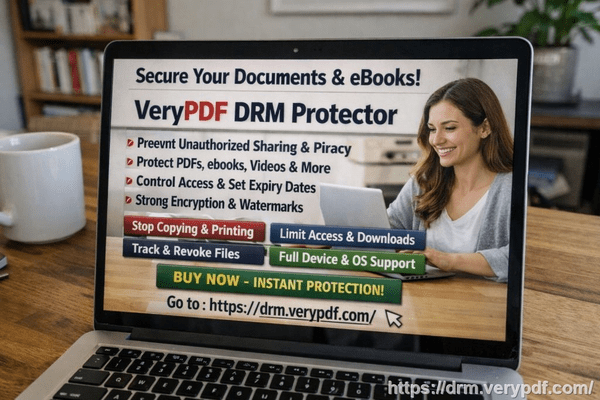
After experiencing these challenges firsthand, I turned to VeryPDF DRM Protector. This tool isn’t just a standard PDF lockit gives you real operational control over how your files are accessed, shared, and used.
With DRM Protector, I could:
-
Restrict access to authorized users or teams. No more wondering if someone outside the intended circle could open sensitive files.
-
Prevent printing, copying, forwarding, or conversion to Word, Excel, or image formats. This blocked any chance of our CAD designs being repurposed without permission.
-
Maintain control over every business report, market research document, and proprietary material, even after distribution.
For example, when we sent a strategic market analysis to a client for review, we applied DRM restrictions. The client could view it, but couldn’t download, print, or share the document. This simple step prevented potential leaks and gave us confidence that our proprietary insights remained secure.
The anti-piracy benefits are particularly tangible. DRM Protector stops unauthorized users from bypassing PDF security, preventing potential revenue loss. It eliminates the possibility of sensitive files being converted into editable formats and resold or shared without oversight. I’ve personally seen how maintaining strict distribution control prevents competitor access and keeps our business intelligence safe.
Implementing the system is straightforward. You can assign user permissions, expiration dates, and access levels for each document. This means that even contractors with temporary access cannot retain or repurpose files after their engagement ends. For example:
-
Step 1: Upload your CAD or PDF files to the DRM Protector system.
-
Step 2: Set access permissionsdefine which employees, contractors, or clients can open the file.
-
Step 3: Apply restrictionsdisable printing, copying, forwarding, or conversion.
-
Step 4: Distribute the protected document with confidence, knowing that every action is controlled.
The peace of mind is noticeable. In our workflow, we no longer worry about files being misused. Contractors understand that they can view and work with documents, but unauthorized distribution is impossible. This clarity has saved us significant time, legal headaches, and potential revenue loss.
It’s also effective for internal distribution. We send weekly project updates and sensitive reports to different departments. DRM Protector ensures that each department can access only what’s relevant, reducing the chance of accidental leaks or inappropriate sharing.
I’ve seen the tool prevent direct financial harm as well. Once, a contractor attempted to forward a CAD package to a third-party vendor. DRM restrictions blocked the action, and we were alerted immediately. Had the file gone through, it could have been used in another project without compensation, costing us thousands. Instead, we stopped it before any damage occurred.
I highly recommend VeryPDF DRM Protector to anyone distributing confidential business documents. Whether it’s CAD drawings, market research, strategy reports, or any proprietary file, maintaining control over distribution prevents costly leaks, preserves revenue, and safeguards your intellectual property.
Try it now and protect your business reports: https://drm.verypdf.com
Start your free trial today and keep your market research secure from leaks or misuse.
FAQs
Q: How can I limit access to confidential business documents to prevent revenue loss?
A: Use DRM Protector to assign specific permissions, restrict users, and set expiration dates for access, ensuring only authorized personnel can open sensitive files.
Q: Can I stop others from copying, printing, or converting my reports into editable formats?
A: Yes. DRM restrictions prevent printing, copying, forwarding, and converting PDFs to Word, Excel, or images.
Q: How do I track who accessed my business reports and when?
A: DRM Protector logs every access attempt, providing full visibility into who opened files and when, helping maintain accountability.
Q: Does DRM technology prevent unauthorized sharing of PDFs outside my organization?
A: Absolutely. Even if a file is forwarded, DRM restrictions block unauthorized users from opening or using it.
Q: How easy is it to securely distribute protected business reports to clients or colleagues without risk?
A: Very easy. Upload your files, assign permissions, set restrictions, and distribute. Recipients can view only what you allow.
Q: Can I protect CAD drawings and design files as well as text reports?
A: Yes. DRM Protector secures any PDF or design files, ensuring that proprietary intellectual property remains under your control.
Q: Will this system help prevent client disputes over document misuse?
A: Yes. By controlling access and usage, you can demonstrate that files were protected and track any attempted unauthorized actions, minimizing legal exposure.
Tags/Keywords:
protect business reports, secure market research, prevent PDF piracy, stop unauthorized access, protect confidential PDFs, prevent PDF conversion, protect CAD drawings, secure proprietary documents, prevent intellectual property leaks, control document distribution