
Redact Sensitive Data in PDFs Without Cloud Risk: AI-Powered Command Line Solution
Last month, our legal team shared a PDF contract with a partner, only to realize later that it still contained unredacted client emails and financial details. The mistake could have triggered a serious GDPR violation and exposed confidential business information. For many businesses, this scenario isn’t raremanual redaction or reliance on online tools often leaves sensitive data at risk, putting organizations in a vulnerable position.
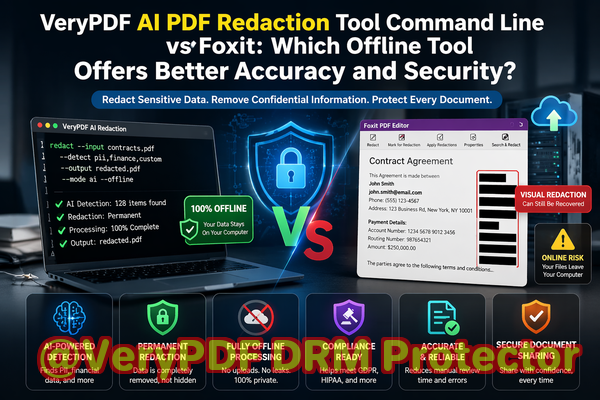
Accidentally exposing confidential information is more common than most companies realize. Employees frequently share PDFs containing personal identifiable information (PII), financial records, or internal business strategies without fully removing sensitive details. Even when text appears “blacked out,” poorly applied redactions can still be copied, recovered, or revealed with basic software tools. The consequences range from regulatory fines and legal liabilities to reputational damage and competitive disadvantage.
Another critical risk emerges when staff use online PDF redaction services. While these tools may seem convenient, uploading sensitive documents to third-party servers introduces a severe privacy risk. Confidential data could be stored, logged, or interceptedcreating a compliance headache for organizations bound by GDPR, HIPAA, or other data protection regulations.
This is where VeryPDF AI PDF Redaction Tool Command Line offers a practical, secure solution. Designed for high-volume document processing, this offline AI-powered software permanently removes sensitive data from PDFs without sending files to the cloud. Using intelligent detection algorithms, it automatically identifies PII, financial data, legal clauses, and other confidential content, ensuring your documents are safe to share.
The benefits of using a fully offline solution are substantial. By keeping your PDFs on your local system throughout the redaction process, you eliminate the risk of third-party exposure. AI-powered detection reduces human error, catching sensitive information that manual reviews might miss. Unlike basic “blackout” tools, VeryPDF ensures the data is permanently removed, not just hidden from view.
Consider a mid-sized law firm handling dozens of contracts weekly. Before switching to an offline AI redaction tool, paralegals manually redacted client names and social security numbers. Despite careful work, a few PDFs still contained recoverable information. After implementing VeryPDF AI PDF Redaction Tool Command Line, the firm could process hundreds of contracts efficiently, automatically identifying and permanently removing sensitive content. This transition not only ensured compliance but also freed staff to focus on higher-value tasks.
The tool’s workflow is straightforward and business-friendly. A typical process includes:
-
Load the PDF document into the command line interface.
-
AI scans the document for sensitive information such as names, emails, phone numbers, financial details, and legal clauses.
-
Review flagged items for accuracy if necessary.
-
Apply redaction to permanently remove the sensitive data.
-
Export a clean PDF ready for secure sharing.
Types of data that can be automatically detected and removed include:
-
Personal identifiable information (PII) like names, addresses, and social security numbers.
-
Financial data including bank accounts, invoices, and transaction records.
-
Business secrets and proprietary information.
-
Legal clauses or confidential notes within contracts.
Using an AI-powered, offline solution brings visible business benefits. For instance, one HR department avoided accidentally sharing employee salary records by redacting PDFs with VeryPDF before distributing reports. Another financial services firm eliminated the risk of exposing client account numbers when collaborating with auditors. In each case, the offline process prevented sensitive information from ever leaving the company’s secure environment.
The privacy and security advantages are clear:
-
Prevent accidental data leaks that could lead to fines or legal exposure.
-
Ensure compliance with GDPR, HIPAA, and other regulations.
-
Reduce human error with AI-assisted detection.
-
Maintain full control over sensitive documents without relying on cloud services.
I highly recommend this tool to any business that handles confidential PDFs and needs to share them safely. Whether you manage contracts, HR files, or financial reports, ensuring that sensitive data is fully removed before distribution is critical for compliance and peace of mind.
Try it now and securely redact your PDFs: https://veryutils.com/smart-redact-server-ai-powered-pdf-redaction-software
Start your free trial today and ensure your sensitive data is permanently removed before sharing.
Frequently Asked Questions
How can I permanently remove sensitive data from a PDF instead of just hiding it?
VeryPDF AI PDF Redaction Tool Command Line uses AI to detect and permanently delete sensitive information, not just obscure it visually.
Can others recover redacted information from my PDF?
No. Unlike manual blackouts or simple annotations, this tool removes the underlying data completely, making recovery impossible.
Is it safe to use online PDF redaction tools?
Online tools carry risks since your files are uploaded to third-party servers, potentially exposing sensitive data. Offline tools like VeryPDF eliminate this risk.
Does this tool work completely offline?
Yes. All processing occurs locally, so your confidential documents never leave your computer.
What types of sensitive data can be automatically detected and removed?
AI detection covers PII, financial data, business secrets, legal clauses, emails, phone numbers, and more.
Can this handle high-volume document processing?
Absolutely. The command line interface supports batch processing, making it ideal for firms handling hundreds of PDFs regularly.
How does AI detect sensitive information accurately?
The tool uses pattern recognition and context analysis to identify sensitive content across varied document types.
Will this help me comply with GDPR or HIPAA?
Yes. By permanently removing sensitive data, you reduce the risk of non-compliance and ensure documents shared externally meet privacy regulations.
Can I review what will be redacted before finalizing?
Yes. The workflow allows a review step to verify AI-detected items before applying permanent redaction.
What file types are supported?
The tool primarily works with PDFs, including scanned and text-based documents.
How easy is it to integrate into existing workflows?
VeryPDF’s command line interface allows seamless integration into automated document processing pipelines.
Tags/Keywords
redact sensitive data, remove confidential information, PDF redaction tool, protect privacy in PDFs, prevent data leaks, offline PDF redaction, secure document sharing, AI PDF redaction, GDPR compliance, permanent redaction