
In industries where printed documents carry high commercial, legal, or intellectual property value, controlling and monitoring printing behavior is just as important as preventing copying or forwarding. Organizations distributing sensitive PDF documents, such as training materials, financial reports, engineering drawings, legal contracts, examination papers, or confidential research, must enforce strict document print limits and maintain detailed printing statistics for auditing and compliance.
VeryPDF DRM Protector provides a powerful and flexible solution for enforcing document print limits and generating comprehensive printing statistics, helping organizations maintain full control over how, when, and how often documents are printed.
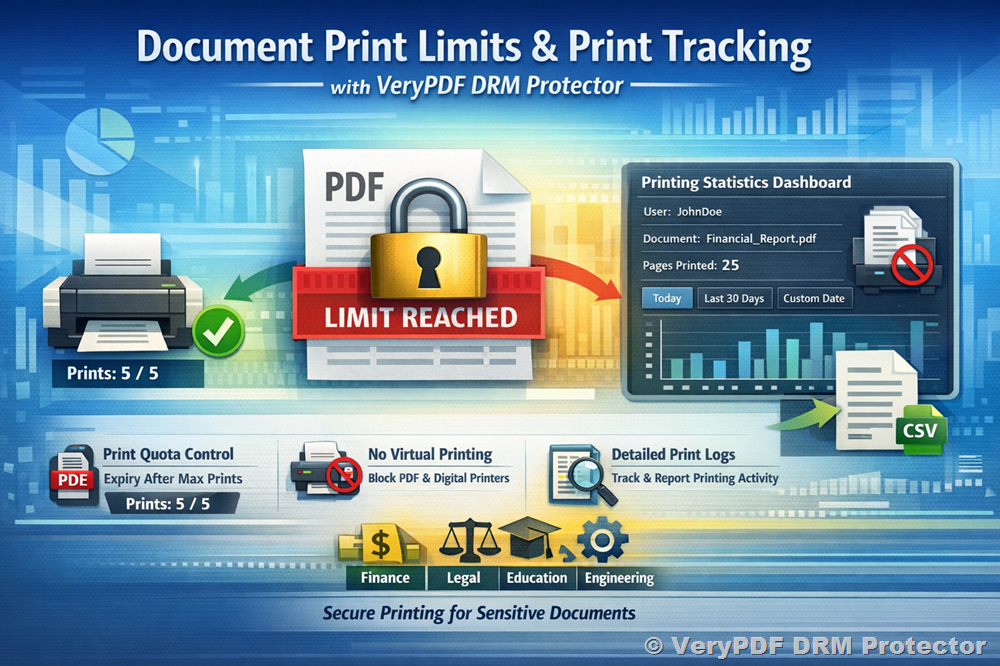
Key Features for Document Print Limits
1. PDF Expiry After XXX Prints
VeryPDF DRM Protector allows administrators to set a maximum number of allowed prints per document. Once the predefined print limit is reached, the PDF will automatically expire for printing.
How it works:
- Set a fixed print limit (e.g., 1, 3, 5, 10, or any custom number).
- Each time the document is printed, the system records the event.
- After the allowed number of prints is reached:
- Further printing is automatically blocked.
- The user is notified that the print quota has been exhausted.
- The document can still be viewed (if allowed), but printing is disabled.
This feature is ideal for:
- Examination papers (print once only)
- Confidential financial statements
- Limited-use contracts
- Training manuals distributed under controlled conditions
- Technical drawings with restricted reproduction rights
Administrators can assign different print limits:
- Per user
- Per document
- Per group
- Per project
This ensures fine-grained control tailored to business needs.
2. Block Print to Virtual Printers (Windows Version)
When users print a protected PDF from the Windows version of VeryPDF DRM Protector application, the system can automatically block printing to virtual printers.
Virtual printers such as:
- PDF printers
- XPS writers
- Image printers
- Fax printers
- Other software-based printers
can be used to create digital copies of protected documents. VeryPDF DRM Protector prevents this security loophole.
Security control includes:
- Detecting virtual printer drivers.
- Allowing printing only to physical printers.
- Blocking print jobs directed to:
- PDF virtual printers
- Image-based printers
- File-based printers
This ensures that printed output remains in physical form and prevents users from generating unauthorized digital copies.
Comprehensive Print Statistics Tracking
VeryPDF DRM Protector provides advanced printing analytics, allowing organizations to monitor and audit printing behavior in real time.
Print Statistics Data Collected
The system records:
- Total Pages Printed per User
- Total Pages Printed per User per File
- Total Pages Printed per File by User
Each print event includes:
- Username
- Document name
- Date and time
- Pages printed
- Printer used
- IP address (if applicable)
This level of tracking ensures accountability and full transparency.
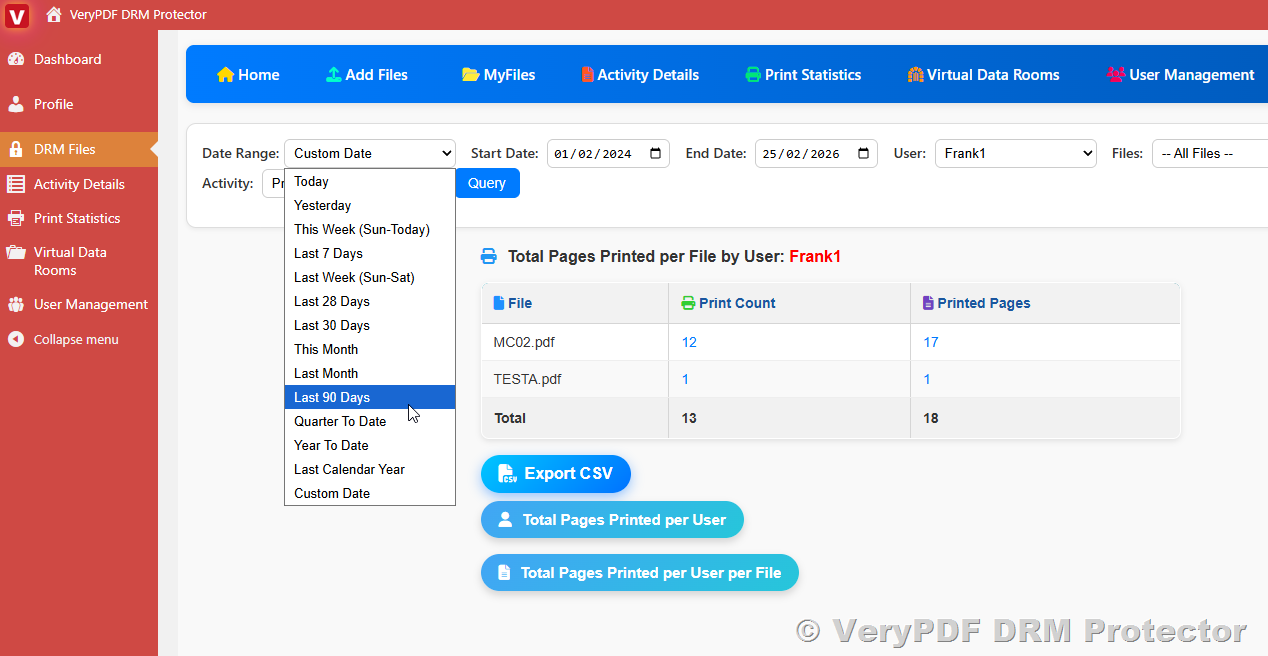
Advanced Date Range Queries for Printing Statistics
Administrators can filter and analyze printing statistics using multiple predefined and custom date ranges:
- Today
- Yesterday
- This Week (Sun–Today)
- Last 7 Days
- Last Week (Sun–Sat)
- Last 28 Days
- Last 30 Days
- This Month
- Last Month
- Last 90 Days
- Quarter To Date
- Year To Date
- Last Calendar Year
- Custom Date (user-defined start and end date)
These flexible filters allow organizations to:
- Monitor daily printing activity
- Analyze weekly or monthly usage trends
- Prepare quarterly compliance reports
- Review annual printing behavior
- Investigate specific time periods
This is especially useful for:
- Compliance departments
- Financial auditors
- Corporate IT security teams
- Educational institutions
- Legal organizations
Export Printing Statistics to CSV
VeryPDF DRM Protector allows administrators to export all printing statistics into CSV files.
Benefits of CSV export:
- Compatible with Microsoft Excel
- Importable into ERP systems
- Suitable for accounting systems
- Easy integration with BI tools
- Archivable for compliance purposes
Organizations can:
- Generate monthly reports
- Create billing reports based on printed pages
- Perform cost analysis
- Conduct internal audits
- Submit compliance documentation
Industry Applications
The Document Print Limits and Statistics solution is suitable for:
- Financial Services
- Legal and Contracts
- Healthcare & Life Sciences
- Associations & Standards
- Education and Training
- Technical Publishing
- Government Agencies
- Engineering & Manufacturing
- Controlled Digital Lending (Libraries)
- Research Institutions
Wherever print accountability matters, VeryPDF DRM Protector ensures complete control.
Benefits of Using VeryPDF DRM Protector for Print Control
- Prevent unauthorized mass printing
- Enforce limited print licenses
- Eliminate virtual printer abuse
- Maintain detailed audit trails
- Support regulatory compliance
- Enable usage-based billing
- Reduce information leakage risk
- Provide centralized control and reporting
Frequently Asked Questions (FAQ) for Document Print Limits and Statistics
Q1: Can I allow a document to be printed only once?
Yes. You can set the print limit to 1. After the first print, printing will be permanently disabled.
Q2: Can different users have different print limits for the same file?
Yes. Print limits can be assigned per user or per group.
Q3: Can I prevent users from printing to PDF printers?
Yes. The Windows version of VeryPDF DRM Protector can block printing to virtual printers, allowing only physical printers.
Q4: Can I see how many pages each user has printed?
Yes. You can view:
- Total pages printed per user
- Pages printed per file per user
- Pages printed per file by user
Q5: Can I generate reports for a specific date range?
Yes. You can select predefined date ranges (Today, This Month, Last 30 Days, etc.) or define a custom date range.
Q6: Can I export printing data?
Yes. All printing statistics can be exported to CSV files for reporting and analysis.
Q7: Does the system track partial printing (e.g., printing only selected pages)?
Yes. The system records the exact number of pages printed for every print job.
Q8: Can administrators monitor printing activity in real time?
Yes. Printing events are logged immediately and available in the administrative dashboard.
Q9: Is this solution suitable for compliance audits?
Absolutely. Detailed logs and exportable reports make it ideal for audit and regulatory requirements.
Q10: Can print limits be combined with document expiry dates?
Yes. You can combine:
- Time-based expiry (e.g., expire after 30 days)
- Print-count-based expiry
- Access restrictions
- Watermark controls
This provides multi-layered security.
VeryPDF DRM Protector delivers a complete Document Print Limits and Printing Statistics Management Solution that enables organizations to:
- Control how many times documents are printed
- Block printing to virtual printers
- Track and analyze printing behavior
- Export detailed statistics
- Maintain compliance and accountability
For organizations that require strict control over document printing and full transparency into user activity, VeryPDF DRM Protector provides a secure, scalable, and enterprise-ready DRM solution.