Secure Scientific Research PDFs with DRM That Requires Revalidation Every 30 Days

Secure Scientific Research PDFs with DRM That Requires Revalidation Every 30 Days

Protect research PDFs with DRM that locks to devices and requires revalidation every 30 days. Stop sharing, enforce access rules, and keep data secure.


Every time I shared a draft research paper with my collaborators, I worried about one thing: what if it got forwarded outside the circle?

If you’ve ever dealt with sensitive research, you’ll know the fear.

You spend months, maybe years, working on results only for a PDF to end up floating around email chains, or worse, published somewhere without permission.

Secure Scientific Research PDFs with DRM That Requires Revalidation Every 30 Days

I hit that exact wall last year.

We had an internal policy requiring that all confidential scientific reports be restricted to only authorised readers. But our regular password-protected PDFs were a joke. Passwords get shared. Screenshots get taken. And once someone copies it to another device, good luck stopping it from spreading.

That’s when I landed on VeryPDF DRM Protector.


Why I Needed DRM for Research PDFs

If you’ve ever tried controlling access with basic tools, you already know the flaws:

  • Passwords are weak.

  • Watermarks alone don’t stop sharing.

  • Standard encryption can’t stop someone forwarding a copy.

Research isn’t like sharing a casual eBook.

There’s compliance, intellectual property protection, and sometimes even grant funding rules that require proper access control.

When I looked into solutions, I found most DRM systems either too clunky or overkill for what I needed.

What caught my eye about VeryPDF DRM Protector was the mix of device binding and revalidation every 30 days.

That last feature was the clincher.


What Makes VeryPDF DRM Protector Different

Here’s the quick version:

  • Device Binding

    The PDF locks itself to the first device that opens it. If I set it to one device, that’s it. That document cannot be opened on another laptop, phone, or tablet. Even if someone copies it.

    I tested this by opening a protected file on my main laptop, then trying on my iPad. No luck. Totally locked out.

  • Revalidation Every 30 Days

    This one saved me from long-term leaks.

    Instead of granting permanent access, the PDF forces users to revalidate their license every 30 days.

    That means if someone leaves the research group or loses their access rights, I don’t have to chase them down. After 30 days, the file is useless unless their access is renewed.

  • Granular Controls

    I could decide whether someone could print, copy text, or even take screen grabs.

    For one particularly sensitive dataset, I switched off printing entirely. For another teaching document, I allowed one print only.

  • Expiry & Revocation

    Sometimes we share data that only makes sense in a specific timeframe, like before a journal submission.

    With DRM Protector, I could set files to auto-expire after 15 days.

    And if I needed to pull the plug fast, I could revoke a file instantlyeven if the PDF had already been sent out.


The Day-to-Day Experience

When I first set it up, I thought I’d need a whole IT team.

But honestly, protecting a document was straightforward.

I only had to apply the DRM once, and then I could adjust access for different users without touching the original file again.

Here’s what stood out in practice:

  • No more “leaked” drafts

    Before DRM, someone shared a half-baked draft outside the group. That never happened again.

    Even if they tried, the file wouldn’t open outside their authorised device.

  • Collaboration without fear

    I could still share work-in-progress with trusted colleagues, but now I controlled exactly how long they had access.

    That balance of security + collaboration was key.

  • Peace of mind

    Knowing that every 30 days, the system would naturally re-check access made me stop stressing about chasing down ex-members or contractors.

It was like automating trust.


Who Should Use This?

This isn’t just for researchers like me.

Here’s where it really fits:

  • Academic publishers who don’t want textbooks or journal articles getting freely shared.

  • Scientists protecting unpublished results, grant applications, or lab reports.

  • Corporations securing internal training manuals or product documentation.

  • Authors selling premium eBooks who want to make sure buyers don’t just forward copies to their friends.

  • Legal or healthcare teams needing strict compliance around sensitive documents.

If your work involves PDFs that must stay private, this is for you.


Where Other Tools Fall Short

I’d tried Adobe Acrobat’s built-in restrictions before.

But they were child’s playpeople could bypass them with free tools found online.

With password-protected PDFs, once the password is out, the whole system collapses.

I also tested another DRM system that required online-only access.

It slowed everyone down and caused chaos in meetings when someone’s Wi-Fi cut out.

VeryPDF DRM Protector nailed the balance. Offline access works, but revalidation keeps control alive.


The Core Advantages I’ve Seen

  • Ironclad device binding no more file forwarding.

  • Time-based revalidation access auto-expires unless renewed.

  • Revocation on demand pull back files instantly.

  • Flexible user permissions control printing, copying, screenshots.

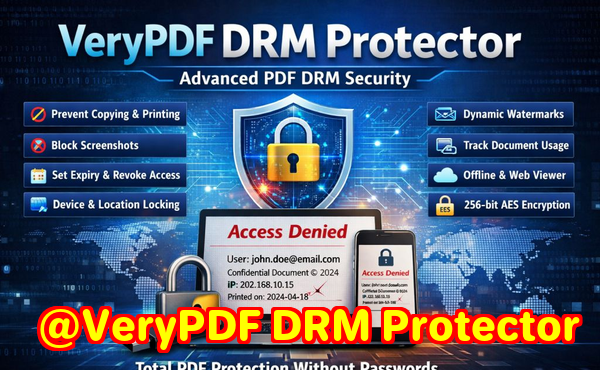
  • Dynamic watermarks every page shows the user’s name, email, or timestamp.

These aren’t gimmicks. They solve the exact problems that real-world researchers and publishers face every day.


My Recommendation

If you’re serious about protecting intellectual property, this is the most practical solution I’ve found.

It gave me back control over my research files without slowing down the actual work.

I’d recommend VeryPDF DRM Protector to anyone handling sensitive PDFs.

Especially if you want the extra layer of revalidation every 30 daysthat single feature alone makes it nearly impossible for files to “leak” permanently.

Click here to try it yourself


Custom Development Services by VeryPDF

Sometimes the out-of-the-box features aren’t enough.

VeryPDF also offers custom development services for teams that need tailored solutions.

They build everything from Linux-based PDF processors to Windows virtual printer drivers that capture and save print jobs in formats like PDF, TIFF, or Postscript.

Their developers work with Python, PHP, C/C++, .NET, iOS, Android, and morecovering pretty much every platform I’ve ever needed.

They also handle advanced needs like OCR recognition, barcode processing, font technology, cloud conversion services, and even custom DRM or security workflows.

If your organisation needs something more specific, you can reach them directly through their support centre.


FAQs

1. How does the 30-day revalidation work?

Every 30 days, the software forces the protected file to check back with the licensing server. If the user’s rights are still active, access continues. If not, the file stops opening.

2. Can I allow a user to open the same PDF on more than one device?

Yes. You can set N = 2 or 3 so they can use the same license across multiple personal devices.

3. What happens if someone copies the file?

It won’t open. The DRM binds the PDF to the authorised device fingerprint, so copies are useless on other systems.

4. Does it work offline?

Yes. Users can still open files offline. But after the revalidation period, they’ll need internet access to refresh their license.

5. Can I revoke access instantly?

Absolutely. You can pull back access for one person or multiple users at any time, even if the file has already been distributed.


Tags

  • DRM for scientific research PDFs

  • Protect research documents with device binding

  • Secure PDFs with 30-day revalidation

  • VeryPDF DRM Protector review

  • Restrict PDF access to authorised devices


End of the day, if you want secure scientific research PDFs with DRM that requires revalidation every 30 days, this tool does the job better than anything else I’ve tested.

Why Device Binding Prevents eBook Piracy Better Than Password-Protected PDFs

Why Device Binding Prevents eBook Piracy Better Than Password-Protected PDFs

Discover how device binding in VeryPDF DRM Protector outshines password-protected PDFs by stopping eBook piracy and safeguarding your content.


Every author, publisher, or business owner who’s sold digital content has faced the same nightmare.

You spend weekssometimes monthscreating an eBook, a training manual, or a company report.

You launch it, maybe even sell a few copies, and then boomsomeone leaks it.

Now your file is floating around on forums, Telegram groups, or shared over email.

And the worst part? The only “protection” you had was a password-protected PDF.

Why Device Binding Prevents eBook Piracy Better Than Password-Protected PDFs

I’ve been there.

I used to think setting a strong password was enough.

But here’s the harsh truth: once someone shares that password, you lose control.

Anyone can open your file, forward it, upload it, and your revenue takes a hit.

That’s when I started looking for something stronger.

That’s how I landed on VeryPDF DRM Protector.

And one feature in particular changed the game for me: device binding.


Why password-protected PDFs fall short

Passwords sound good in theory.

But in practice? They’re laughably easy to bypass.

Here’s what I learned:

  • Passwords are reusable. Once shared, they’re out in the wild.

  • No control after distribution. You can’t revoke access or stop someone from forwarding the file.

  • Limited deterrent. People can strip passwords using free tools.

I had a case where a 200-page internal training guideprotected by a passwordended up shared across multiple offices in different countries.

We couldn’t track who leaked it.

We couldn’t stop it from spreading.

The “protection” was basically worthless.


What device binding really means

When I first read about device binding in VeryPDF DRM Protector, I was sceptical.

But once I tried it, I saw how powerful it really is.

Here’s how it works:

  • First activation: The moment someone opens the protected PDF, the software records their device’s unique fingerprint.

  • Locked in place: If you set the license to N = 1, that file is locked to that exact machine. Copy it to another laptop, tablet, or phone? Won’t open.

  • Flexible setup: Want to let someone use it across a few personal devices? Set N = 2 or N = 3. That way they can open it on, say, a laptop and a tablet.

  • Zero tolerance for sharing: Forward the file by email, upload it to Dropbox, or stick it on a USB? Doesn’t matter. On unauthorised devices, the file is useless.

The result? The person who buys your eBook or document is the only one who can actually use it.

That was a lightbulb moment for me.


My first test with device binding

I tested it with an eBook I was selling through a small community.

Before DRM, I knew one copy was being shared between at least five people.

After I set device binding, the complaints rolled in:

  • “I can’t open this on my friend’s laptop.”

  • “The file isn’t working when I email it to myself.”

Exactly.

That was the whole point.

It wasn’t brokenit was finally secure.


Other features that stood out

Once I got past the device binding, I noticed a bunch of other tools baked into VeryPDF DRM Protector.

  • Dynamic watermarks. I could stamp each PDF with the buyer’s name, email, and date/time whenever they opened or printed it. That alone scared people away from leaking.

  • Expiry controls. I could set files to expire after 30 days, or limit them to 3 views. Perfect for limited-time access.

  • Revoke access anytime. Even if someone had already downloaded a file, I could cut off their access instantly. That was huge when someone left the company.

  • Prevent editing and screen grabs. Passwords can’t stop someone from hitting “print screen.” DRM did.

It wasn’t just about piracy prevention.

It gave me control over my documentssomething I never had with regular PDFs.


Who actually needs this

I’ll be blunt: not everyone needs DRM.

But if your work, your revenue, or your reputation depends on keeping files secure, it’s non-negotiable.

Here are some scenarios I’ve seen:

  • Authors selling premium eBooks who don’t want their work torrented within 24 hours.

  • Academic publishers stopping students from sharing one copy of a digital textbook across an entire class.

  • Corporate trainers delivering paid courses and not wanting slides or manuals leaked online.

  • Businesses handling sensitive documents, reports, or client files that absolutely cannot be shared.

If you’re in one of these groups, relying on passwords is like locking your front door but leaving the window wide open.


Core advantages of VeryPDF DRM Protector

Let’s cut through the fluff. Here’s what actually matters:

  • Unbreakable control. Device binding stops file sharing dead in its tracks.

  • Flexibility. You decide whether to allow 1, 2, or 3 devices.

  • Visibility. Track who opens and prints your files, when, and on what device.

  • Custom rules. Expiry dates, usage limits, print controlsit’s all in your hands.

  • Peace of mind. Once I set it up, I stopped worrying about leaks.

For me, that peace of mind alone made it worth it.


Final thoughts

Passwords don’t stop piracy.

They barely slow it down.

Device binding changes the game.

By locking PDFs to the first device they’re opened on, VeryPDF DRM Protector makes sure only paying customers or authorised users get access.

If you care about your content staying yours, this is the tool I’d recommend without hesitation.

I’d highly recommend it to anyone who deals with valuable eBooks, training files, or confidential PDFs.

It’s the only thing that’s given me control where passwords failed.

Click here to try it out for yourself: https://drm.verypdf.com/


Custom development services by VeryPDF

Sometimes off-the-shelf isn’t enough.

That’s where VeryPDF’s custom development comes in.

They don’t just sell ready-made tools.

They build tailored solutions for businesses with unique needs.

Here’s the kind of stuff they handle:

  • Cross-platform support. Linux, Windows, macOS, mobilewhatever your environment, they can make it work.

  • Custom utilities. Built in Python, PHP, C/C++, C#, .NET, JavaScript, and more.

  • Virtual printer drivers. Generate PDF, EMF, or image formats directly from print jobs.

  • Low-level hooks. Monitor and intercept system calls, file access, and print operations.

  • Advanced document processing. OCR, barcode recognition, layout analysis, and table extraction from scanned files.

  • Conversion and security tech. Image converters, cloud-based viewers, digital signatures, and DRM enforcement.

If you’ve got a tricky project or want to integrate PDF security into your workflow, you can reach out to them at https://support.verypdf.com/.


FAQ

Q1: Why is device binding better than a password-protected PDF?

Passwords can be shared. Device binding ties the file to specific hardware, making it useless anywhere else.

Q2: Can I allow my users to open files on more than one device?

Yes, you can set N = 2 or 3, letting them use the file across a few personal devices.

Q3: What happens if a user changes their computer?

You can issue a new license or allow licence transfer through admin approval.

Q4: Can I stop people from printing or screen grabbing my PDFs?

Yes, VeryPDF DRM Protector blocks printing or limits it, and prevents screen captures.

Q5: Does this work only for eBooks?

Not at all. It’s also perfect for training materials, confidential business documents, academic content, and corporate reports.


Tags or keywords

  • device binding PDF security

  • prevent eBook piracy

  • VeryPDF DRM Protector

  • lock PDF to device

  • DRM protection for PDFs


Why Device Binding Prevents eBook Piracy Better Than Password-Protected PDFs is something I’ve seen first-hand, and with VeryPDF DRM Protector, it’s no longer a question of “if” your files will leakit’s how fast you can stop it.

How to Control PDF Viewing Time with Automatic Expiration Dates Using DRM Software

How to Control PDF Viewing Time with Automatic Expiration Dates Using DRM Software

Discover how VeryPDF DRM Protector controls PDF access with device locking and expiration dates to protect sensitive files from misuse.


Every business owner I know has the same headache.

You send out a PDFmaybe it’s a client contract, a paid eBook, or internal training materialand then you lose control.

People forward it. They copy it. They keep it way longer than they should.

And suddenly, something that was meant for one person is floating around everywhere.

How to Control PDF Viewing Time with Automatic Expiration Dates Using DRM Software

I’ve been there.

I once shared a draft strategy report with a client, thinking they’d only use it for a couple of weeks. A year later, I stumbled upon a newer employee referencing that same report in a presentation. My jaw hit the floor. That was when I realised: sending a plain PDF is like leaving your house key under the doormat and hoping nobody else finds it.

That’s when I started digging into DRM software for PDFsspecifically, VeryPDF DRM Protector. And let me tell you, it completely changed how I think about document security.


Why I Needed More Than Just Password Protection

Passwords are weak.

Let’s be realonce someone has it, they can pass it around endlessly.

Plus, password-protected PDFs don’t give you any visibility or control.

I needed:

  • Expiry dates so files couldn’t live forever.

  • Device locking so a file couldn’t be copied to 10 other laptops.

  • Usage restrictions so I could decide if printing, copying, or screenshots were allowed.

  • Revocation so I could pull the plug instantly if something went wrong.

That’s exactly what I found with VeryPDF DRM Protector.


What VeryPDF DRM Protector Actually Does

Here’s the deal.

This tool isn’t just “another PDF password manager.” It’s a full-blown DRM system built to give you complete control over your files, no matter where they end up.

The core idea: you only have to protect your PDF once, then you can distribute it with confidence.

The software enforces your rules automatically, even offline.

A quick breakdown of the biggest features that made me a fan:

  1. Automatic Expiration Dates

    You can set PDFs to expire:

    • On a specific date.

    • After a set number of days from first open.

    • After a certain number of views or prints.

    Example: I had a training module that staff needed for 14 days. I set it to expire after 14 days of use. Once that clock ran out, access was goneno excuses, no loopholes.

  2. Device Binding

    This one’s a game changer.

    When someone first opens the PDF, the system locks the license to that specific device.

    You can choose whether to allow just one device, or maybe 23 if people use multiple (like laptop + tablet).

    That means even if the PDF is emailed around, nobody else can open it. I tested this myself by copying a protected file to a USB stick and opening it on another computer. Result? Dead on arrival.

  3. Usage Controls

    You get to decide:

    • Stop printing entirely, or limit the number of prints.

    • Stop copy-paste.

    • Stop screenshots.

    I once used it to send a proposal draft to a potential client, but I didn’t want them sharing it internally without approval. I disabled printing and copy-paste. They could read it, but they couldn’t pass it around.

  4. Revocation Anytime, Anywhere

    Let’s say you send a PDF to a client and then the deal falls through. Normally, they keep your file forever. With DRM, you just revoke their accesseven if the file is still on their laptop.

  5. Dynamic Watermarks

    Every time a user opens or prints the file, you can show their name, email, and timestamp.

    It’s a big deterrent against screenshots or leaks because it’s always clear who the file belongs to.


Who Actually Needs This

I thought DRM software was overkill until I saw how many industries rely on it:

  • Authors & Publishers Stop eBooks from being shared freely.

  • Law Firms Keep client contracts confidential and time-limited.

  • Consultants Share strategy documents without worrying they’ll get passed on.

  • Corporate Trainers Ensure course materials don’t leak outside the company.

  • Universities Control student access to textbooks and research papers.

If you deal with PDFs that carry any valuefinancial, intellectual, or competitivethen losing control of them costs you money and reputation.


My Experience Setting It Up

I’ll be honest, I expected DRM software to be a nightmare to configure.

I imagined endless menus and tech jargon.

But with VeryPDF DRM Protector, it took me about 20 minutes to secure my first batch of files.

Here’s how it went:

  • I uploaded my PDFs.

  • Chose my restrictions (expiry in 30 days, no copy-paste, watermarks on view).

  • Locked them to the first device they were opened on.

  • Sent the protected files out.

The first time a colleague opened one, I watched how the license tied itself to their laptop automatically. They couldn’t open it anywhere else. That’s when I knew this was bulletproof.

The best part? I didn’t need to “re-secure” the files for different clients. The system lets you customise permissions per user without re-encrypting the PDF itself. Huge time saver.


Why Not Just Use Free Alternatives?

I tried a couple before settling on VeryPDF. Here’s why they fell short:

  • Password-protected PDFs Easy to bypass and share.

  • Basic encryption tools Good for stopping edits, useless for expiry or tracking.

  • Cheap DRM knock-offs Sluggish, clunky, and didn’t offer revocation.

VeryPDF DRM Protector stood out because it gave me control, flexibility, and speed.

Plus, the encryption is US government-grade. That’s not marketing fluffit actually means even if someone tries to crack the file, they won’t get far.


Why Automatic Expiration Dates Matter

This is the feature that hooked me.

If you’ve ever sent out a document that should only live for a short time, you know the anxiety that comes with it.

With expiration dates, you’re not relying on trust.

You’re enforcing the rules automatically.

  • Training ends? File expires.

  • Contract negotiations done? File expires.

  • Trial access to an eBook? File expires.

No follow-up emails, no awkward reminders, no chasing people. The file simply stops working.


Final Thoughts

If you’re sending PDFs without protection, you’re giving away control.

Once it’s out there, it’s out of your hands.

But with VeryPDF DRM Protector, you stay in charge.

Automatic expiry dates. Device locking. Revocation. Watermarks. Usage controls.

Everything I wanted in one package.

I’d highly recommend this to anyone who deals with valuable PDFspublishers, lawyers, consultants, trainers, or business owners.

Stop losing sleep over file leaks. Take control instead.

Try it here: https://drm.verypdf.com/


Custom Development Services by VeryPDF

Sometimes you need more than off-the-shelf software. That’s where VeryPDF’s custom development services come in.

Their team builds tailored solutions across Windows, Linux, macOS, and mobile. Whether you need a virtual printer driver, file conversion tools, or system-level hooks to track and secure documents, they’ve done it before.

They work with languages like Python, PHP, C++, C#, .NET, JavaScript, and more. They also handle advanced areas like:

  • OCR and barcode recognition.

  • Layout analysis for complex PDFs.

  • Document-to-image conversion.

  • Cloud-based document viewing and signing.

  • Enterprise-level DRM and digital signature systems.

If you’ve got a unique requirementsay, intercepting print jobs, adding custom watermarks, or integrating DRM with your existing workflowthey can make it happen.

Reach out at https://support.verypdf.com/ to discuss your project.


FAQ

1. Can I set different expiration dates for different users?

Yes. You only secure the document once, but you can assign unique rules to each user.

2. What happens if someone copies the PDF to another computer?

It won’t open. The license is bound to the first authorised device.

3. Does this work offline?

Yes. Once the license is activated, the rules apply even without an internet connection.

4. Can I revoke access after sending a file?

Absolutely. You can instantly cut off access for a single user or for everyone.

5. Is the software complicated to use?

Not at all. You can protect your first file in under 30 minutes, even if you’re not technical.


Tags / Keywords

  • PDF DRM software

  • PDF automatic expiration

  • VeryPDF DRM Protector

  • Secure PDF sharing

  • Lock PDF to device


That’s how I learned the hard way that controlling PDFs isn’t optionalit’s essential. And now, with DRM, I never send an important document without an automatic expiration date in place.

Best DRM Solution for Law Firms to Secure Client PDF Contracts and Stop Redistribution

Best DRM Solution for Law Firms to Secure Client PDF Contracts and Stop Redistribution

Discover how law firms can lock down PDF contracts with VeryPDF DRM Protector to stop unauthorised sharing and protect client confidentiality.


Every lawyer I know has dealt with the same headache.

A client contract or sensitive PDF goes out.

Next thing you know, it’s floating around inboxes, copied to cloud drives, or even printed and left in the wrong hands.

Best DRM Solution for Law Firms to Secure Client PDF Contracts and Stop Redistribution

That’s a nightmare.

Not just because it looks sloppy, but because it could cost your firm its reputation, breach client trust, and in some cases, land you in legal trouble.

I’ve been there.

And honestly, most “basic” PDF password protection is useless.

Anyone with a bit of tech knowledge can crack it.

That’s why I started looking into DRM solutions built for real security, not just a speed bump.

That’s when I came across VeryPDF DRM Protector.

It’s not flashy. It’s not overcomplicated.

But it does one thing insanely well: it locks PDF files to the first device they’re opened on, making redistribution almost impossible.


Why law firms need more than a PDF password

Let’s get real.

Password-protecting a PDF is like locking your front door but leaving the key under the mat.

Sure, it looks like security. But anyone motivated enough can bypass it.

And when you’re handling contracts, NDAs, intellectual property, or sensitive case files, “good enough” security isn’t good enough.

What law firms need is:

  • Control over who opens a document

  • The ability to stop files being copied, printed, or forwarded

  • The option to revoke access instantly

  • Audit logs to track who’s viewed or printed documents

That’s exactly where VeryPDF DRM Protector comes in.


My first experience with VeryPDF DRM Protector

The first time I used it, I was sceptical.

I had a batch of PDF contracts that needed to be shared with outside counsel.

Normally, I’d send them over email with a half-hearted password.

But this time, I decided to lock them down with VeryPDF.

Here’s what happened:

  • I uploaded the PDF contracts into the DRM tool.

  • I set the rule: lock each PDF to the first device it was opened on.

  • I gave the outside counsel their access keys.

The first lawyer who opened the file got through smoothly.

But when he tried to forward the file to his assistant?

No luck. The DRM system blocked it because the assistant’s device wasn’t authorised.

That was the “aha” moment.

It didn’t matter how many times someone copied the fileoutside the authorised device list, the document was a brick.


Key features law firms will love

After using this tool on and off for months, here are the features that stand out the most for law practices:

1. Device binding for ironclad control

You can set the rule so a document is locked to the first device that opens it.

Want a bit of flexibility? Set it to allow two or three devices per user.

This is gold for partners who need access on both laptop and tablet, but don’t want the file spreading everywhere.

2. Granular usage restrictions

I can:

  • Stop users from printing.

  • Or allow a set number of prints.

  • Block copy/paste.

  • Disable screenshots.

This isn’t just about paranoia.

It’s about compliance and making sure sensitive casework doesn’t leave digital fingerprints everywhere.

3. Expiry and revocation

Sometimes documents should only exist temporarily.

With VeryPDF, I can make a PDF self-destruct after:

  • A set date

  • A set number of views

  • Or a limited number of days

And if I need to, I can revoke access instantlyeven if the file is already “out there.”

4. Dynamic watermarking

This one made me smile.

Every viewed or printed copy can be watermarked with details like:

  • User’s name

  • Company

  • Email

  • Date/time

That means if something leaks, you know exactly who let it slip.

That alone is enough to keep most people honest.

5. Audit logging for compliance

I can track:

  • When a PDF was opened

  • How many times it was printed

  • On what device it was accessed

That’s not just useful for control.

It’s a lifesaver when clients want proof of secure handling.


Who should actually use this

While this article is focused on law firms, the reality is this tool makes sense for:

  • Legal teams managing sensitive contracts and client files

  • Corporate counsel dealing with internal or external NDAs

  • Publishers and authors who want to prevent eBook piracy

  • Consultants who share high-value reports and don’t want them forwarded

If your work involves any confidential PDF that shouldn’t be shared freely, this software is a must-have.


Weak spots in other tools

I tested a bunch of other “secure PDF” tools before landing on VeryPDF.

Here’s what bugged me about them:

  • Passwords: Can be cracked or shared in seconds.

  • Cloud-only DRM: Requires every user to log into a platform, which slows down workflows and frustrates clients.

  • Limited revocation: Some tools can’t revoke access once a file is sent.

  • No offline access: Some DRM systems block offline use, which is a nightmare in courtrooms or client sites with no Wi-Fi.

VeryPDF DRM Protector sidesteps these issues.

It gives me the control I want, without adding unnecessary friction for users.


Why I’d recommend it

Look, I’m not in the business of recommending tools unless they’ve actually solved a real pain for me.

This one has.

If you’re running a law firmor really any business where sensitive PDFs are constantly in circulationyou need something better than a password.

With VeryPDF DRM Protector, I can:

  • Lock contracts to authorised devices

  • Stop redistribution cold

  • Track usage and revoke access at any time

I’d highly recommend it to any lawyer, legal team, or consultant who’s tired of worrying where their PDFs end up.

Try it for yourself here: https://drm.verypdf.com/


Custom development services by VeryPDF

Here’s something many people don’t realise: VeryPDF isn’t just about out-of-the-box tools.

They also build custom solutions.

If your firm needs a DRM setup that ties into existing systems, they can do it.

Their team works across a wide stackPython, PHP, C++, C#, .NET, JavaScript, Windows API, Linux, iOS, Androidyou name it.

They’ve built:

  • Virtual printer drivers that convert print jobs into secure PDF or image files.

  • Document monitoring tools that intercept and log system-level activity.

  • Barcode recognition and OCR solutions for scanned case files.

  • Report and form generators for custom legal documentation.

They even handle cloud-based document workflows, secure digital signatures, and advanced PDF security layers.

If you need something bespokewhether it’s deeper integration with your case management software, or stricter compliance loggingthey can tailor it.

Reach out through their support centre to discuss project requirements: https://support.verypdf.com/


FAQ

Q1: Can I allow clients to open a PDF on both laptop and tablet?

Yes. You can configure the DRM license to allow N devices (e.g., 2 or 3). By default, it’s locked to the first device only.

Q2: What happens if someone tries to copy the file to another device?

The file won’t open. The DRM licence is tied to the authorised device(s) only.

Q3: Does it work offline?

Yes. Once the PDF is activated on a device, it can be used offline under the DRM rules you set.

Q4: Can I revoke access after sending the file?

Absolutely. You can revoke individual user access or pull access across the board instantly.

Q5: Is it difficult for clients to use?

Not at all. They just open the file, the device gets registered, and from then on they can access it normallywithin the limits you’ve set.


Tags / Keywords

  • DRM for law firms

  • Secure client PDF contracts

  • Stop PDF redistribution

  • Lock PDF to device

  • VeryPDF DRM Protector


If you want the best DRM solution for law firms to secure client PDF contracts and stop redistribution, VeryPDF DRM Protector delivers exactly that.

How to Enforce Domain-Based Restrictions for Corporate PDF Files Using DRM Protector

How to Enforce Domain-Based Restrictions for Corporate PDF Files Using DRM Protector

Learn how to enforce domain-based restrictions for corporate PDF files with VeryPDF DRM Protector and keep your documents under strict control.


Every company has that moment.

You send out a confidential PDFmaybe it’s a proposal, a client contract, or a sensitive financial reportand a week later you find out it’s floating around in someone else’s inbox.

I’ve been there.

It feels like losing control of your own work.

How to Enforce Domain-Based Restrictions for Corporate PDF Files Using DRM Protector

For me, the turning point was when I realised that password-protecting PDFs just doesn’t cut it. People can share passwords. They can remove them. They can make copies.

That’s when I started looking for something toughersomething that locks down PDFs so hard they become useless outside of the people I actually want reading them.

That’s how I discovered VeryPDF DRM Protector.


Why corporate teams struggle with PDF control

If you’re in a corporate setting, PDFs are everywhere.

  • Legal contracts.

  • HR policies.

  • Internal training material.

  • Client presentations.

The problem isn’t creating themit’s controlling them once they leave your desktop.

People forward files.

They upload them to Dropbox.

They send them to personal emails.

And if you’re in an industry where compliance and confidentiality matter, that’s a nightmare waiting to happen.

Passwords and basic encryption sound good in theory. But in reality? They’re outdated. I’ve seen interns strip PDF passwords in less than two minutes with free tools.

So, if you care about security, you need something stronger.


Enter VeryPDF DRM Protector

When I tested VeryPDF DRM Protector, the feature that grabbed me instantly was domain-based restriction.

Here’s what that means in plain English:

You decide which corporate domain can open your files.

If the recipient isn’t inside that domain (like @mycompany.com), the file won’t openno matter how many times they try.

That’s next-level control.

And it doesn’t stop there. This tool goes deep:

  • Device binding: You can lock a PDF so it only opens on the first device it touches. If someone copies it to another laptop or phone, it’s useless.

  • Expiry dates: Want a training manual to vanish after 30 days? Done. Want a contract to lock itself after it’s been opened three times? Easy.

  • Printing control: Block printing completely or limit it to, say, one hard copy.

  • Dynamic watermarks: Every page viewed or printed can show the user’s name, email, company, and timestampso if it leaks, you know exactly who to call out.

  • Tracking and logs: You can literally see who opened the file, on what device, and when.

For me, this was game-changing. I wasn’t just protecting files. I was controlling how they were used.


Real-world scenarios where it shines

Let me share a few situations where I’ve used DRM Protector.

  1. Internal training manuals

    We had a batch of onboarding guides for new hires. Instead of giving them static PDFs they could upload to their personal Google Drive, we restricted access to the company domain. Only employees with @mycompany.com emails could open them. The moment someone tried to forward it outside, the file was dead weight.

  2. Client contracts

    A big concern was clients sharing our proposals with competitors. With DRM Protector, I locked the files to specific client domains. If the file left their organisation, it was useless.

  3. Board reports

    Board packs are sensitive. One leak, and you’ve got journalists knocking on your door. By locking reports to board members’ devices and setting a 7-day expiry, I made sure those files couldn’t live beyond the meeting week.


What sets DRM Protector apart

I’ve played with other tools. Adobe’s built-in protection, some free DRM scripts, even cloud services that claim to “lock” PDFs.

Here’s where they fall short:

  • Adobe password protection: Too easy to crack.

  • Free DRM tools: They work until someone copies the file into a VM or thin client.

  • Cloud-only solutions: Great until you lose internet access. Then you’re locked out yourself.

VeryPDF DRM Protector is different because:

  • It uses strong US Gov-level encryption.

  • It works offline once the license is activated.

  • It gives you flexibility: domain-based, device-based, time-based, or a mix of all three.

And the setup wasn’t complicated. I expected hours of configuration, but I had my first restricted PDF out the door in less than 15 minutes.


Who needs this tool most

From my experience, these groups get the most value:

  • Legal teams: Protect client files, evidence, and contracts.

  • HR departments: Secure sensitive employee documents and policies.

  • Finance teams: Control access to reports, forecasts, and investor documents.

  • Publishers and authors: Stop eBook piracy by tying files to devices and domains.

  • Corporate trainers: Keep training material from leaking online.

Basically, if your job involves PDFs that shouldn’t end up in the wild, this is for you.


My take after using it

The first time I saw DRM Protector stop someone from opening a forwarded PDF outside of their domain, I knew it was worth every penny.

It solved my biggest pain point: control after distribution.

That’s the part most tools miss. They let you protect files, but once they’re out there, they’re out of your hands.

With DRM Protector, I’ve got full confidence that:

  • Files won’t leak to competitors.

  • Staff can’t upload confidential PDFs to personal drives.

  • Expired documents are automatically unusable.

I’d highly recommend this to anyone dealing with corporate PDFs.

If you want to enforce domain-based restrictions for corporate PDF files, this is the way to do it.

Start your free trial now and see for yourself: https://drm.verypdf.com/


Custom development services by VeryPDF

Every company has unique security needs, and VeryPDF knows that.

Beyond DRM Protector, they also build custom PDF solutions.

  • Need a Windows Virtual Printer Driver that converts all prints into PDFs? They do that.

  • Want tools that monitor file access through Windows APIs? They’ve built those too.

  • Working with formats like PDF, Postscript, PCL, or Office docs? They can process, convert, or secure them.

  • OCR, barcode recognition, layout analysisif it involves document processing, they’ve probably got a solution.

  • And if you’re moving to the cloud, they can help with conversion, viewing, and digital signature platforms.

If you’ve got specific requirements, you can reach out to their support team here: https://support.verypdf.com/


FAQ

Q1: Can I stop users from printing my PDF files completely?

Yes. With DRM Protector, you can either block printing or limit the number of copies.

Q2: What happens if a user forwards a protected PDF to someone outside the domain?

The file won’t open. Domain-based restrictions ensure it only works for authorised users.

Q3: Can I revoke access after a file has already been distributed?

Absolutely. You can revoke access instantly, regardless of where the file is.

Q4: Does DRM Protector work offline?

Yes. Once the license is activated on a device, the user doesn’t need constant internet access.

Q5: Can I track who opened or printed the file?

Yes. The software logs all usage, including views, prints, devices, and timestamps.


Tags / Keywords

  • domain-based PDF restrictions

  • corporate PDF security

  • VeryPDF DRM Protector

  • lock PDF to domain

  • PDF DRM for businesses