[Solution] How to Securely Send, Protect, and Prevent Sharing of PDFs: Best Practices and Solutions with VeryPDF DRM Protector?

How to Securely Send, Protect, and Prevent Sharing of PDFs?

In today’s digital age, sending sensitive documents, especially PDFs, is a common yet challenging task. Whether you’re an individual, business, or content creator, ensuring that your PDFs are shared securely while also preventing unauthorized distribution is essential. Below, we’ve compiled a series of common questions and concerns about sharing, securing, and protecting PDFs, along with solutions provided by VeryPDF DRM Protector—a powerful tool to keep your documents safe and control access.

Try VeryPDF DRM Protector Online,

https://drm.verypdf.com/online/

[Solution] How to Securely Send, Protect, and Prevent Sharing of PDFs: Best Practices and Solutions with VeryPDF DRM Protector?

1. How to Securely Send Documents via Email

Sending sensitive documents over email can be risky, especially when dealing with confidential or personal information. While email encryption is a viable option, it’s often cumbersome for recipients who may not be tech-savvy. A simpler and more effective method is using VeryPDF DRM Protector, which allows you to secure PDFs by adding password protection, limiting printing and copying, and setting expiration dates. With DRM (Digital Rights Management) technology, you can control how recipients access and share your documents, ensuring they are viewed only by the intended recipient.

2. Is It Possible to Password Protect a PDF with a Time Limit?

If you’re concerned about someone having indefinite access to your sensitive PDF documents, setting a time limit on password protection is a great solution. VeryPDF DRM Protector allows you to not only password-protect your PDFs but also apply an expiration date, meaning the document will no longer be accessible after a set period (e.g., four weeks). This feature adds an extra layer of security to ensure that your sensitive files can’t be accessed long after they are intended to be viewed.

3. Why Use PDF Security Features?

Some people wonder why we still use PDF security features, given that PDF files can be easily printed, copied, or captured from the screen. While no security measure is 100% foolproof, VeryPDF DRM Protector significantly reduces the risk of unauthorized sharing by offering features like watermarking, disabling text copying, and restricting printing. These features help protect your intellectual property, personal information, and business documents, making it harder for unauthorized individuals to share your files without your permission.

4. How to Share Files with Customers Securely?

When sharing files with customers, especially in a business context, ensuring security is crucial. A simple email attachment may not suffice, particularly if your clients require extra authentication. VeryPDF DRM Protector offers a straightforward solution by allowing you to control how your PDF is accessed. With features like view-only mode, password protection, and file tracking, you can ensure that only the intended recipient can view and interact with the document, preventing unauthorized distribution.

5. How to Securely Send the Password of a Password-Protected PDF?

Sending the password to a password-protected PDF can be tricky, as it poses a risk if the password is intercepted. Instead of sending the password via email or text, a secure method would be to share the password over a separate communication channel (e.g., a phone call or secure messaging app). To avoid this hassle altogether, VeryPDF DRM Protector offers features that don’t require traditional passwords. You can control access by setting expiration dates, limiting views, or using a secure link, making it much easier to share documents securely without worrying about password distribution.

6. How to Lock PDFs to Avoid Sharing?

To prevent unauthorized sharing of a PDF, consider using digital rights management (DRM) protection. VeryPDF DRM Protector allows you to lock down PDFs with features like watermarking (which adds a personalized tag to each file), restricting copying or printing, and controlling which devices can open the file. For example, you can apply settings that allow a document to be viewed only on specific devices, making it significantly harder for recipients to share the document further.

7. How to Stop People from Sharing a PDF?

Even if you’re not keen on using passwords for protection, you can still discourage or prevent sharing by applying restrictions to your PDFs. VeryPDF DRM Protector offers a simple, no-fuss solution by allowing you to disable text copying, prevent printing, and add watermarking with personalized information like the purchaser’s name or email. These features help deter people from sharing the document with others, as they make it easier to trace unauthorized distribution.

8. How to Securely Send the Password for a Password-Protected PDF?

The best way to securely share the password for a protected PDF is by using a different channel from the one you use to send the document itself. However, this can be inconvenient and prone to error. A more efficient alternative is using a DRM solution like VeryPDF DRM Protector, which allows you to set expiration dates, limit the number of views, and even track who has accessed your document. These features eliminate the need for separate password sharing and offer a more streamlined, secure process.

Conclusion

As digital documents become more prevalent, securing your files has never been more important. Whether you’re sending personal documents, business contracts, or valuable content, VeryPDF DRM Protector offers a powerful, user-friendly solution for protecting and controlling your PDFs. From adding passwords and expiration dates to limiting access and preventing unauthorized sharing, VeryPDF DRM Protector helps ensure your documents remain safe throughout their lifecycle.

With DRM technology, you can finally have peace of mind knowing that your sensitive documents are protected from unauthorized access, tampering, and excessive sharing.

To learn more about how VeryPDF DRM Protector can help you secure your PDFs, visit https://drm.verypdf.com.

About VeryPDF

VeryPDF is a leading provider of document security solutions, specializing in protecting and managing your PDF files. Whether you’re a business, educator, or individual, we ensure your documents are safe and easy to manage.
How to Send Documents Securely via Email Using VeryPDF DRM Protector?

In today’s digital world, email is one of the most common ways to share documents. However, sending documents via email can sometimes pose security risks, especially when confidential or sensitive information is involved. Fortunately, there are several ways to ensure that your files are secure when sharing them through email.

If you frequently send documents to students, clients, or colleagues, it’s essential to protect your PDFs and ensure that they are only accessible to the intended recipient. In this article, we’ll explore how to send documents securely via email and introduce you to the VeryPDF DRM Protector Online Application—a tool designed to help you protect your PDFs and control access when sharing them.

How to Send Documents Securely via Email Using VeryPDF DRM Protector?

Why is Sending Documents Securely Important?

When you send a document via email, it’s essential to ensure that the recipient is the only person who can open and view it. Without proper security, sensitive information like contracts, invoices, personal details, or intellectual property may be exposed to unauthorized individuals. This can lead to privacy breaches, data theft, and legal consequences.

To protect your documents, consider the following common threats:

  • Unauthorized Access: Anyone with access to the email can open the attachment.
  • File Tampering: Unscrupulous recipients may alter the content of the document.
  • Sharing Beyond Intended Recipients: If the email is forwarded, others may gain access to the file.

How Can You Secure Your PDF Documents?

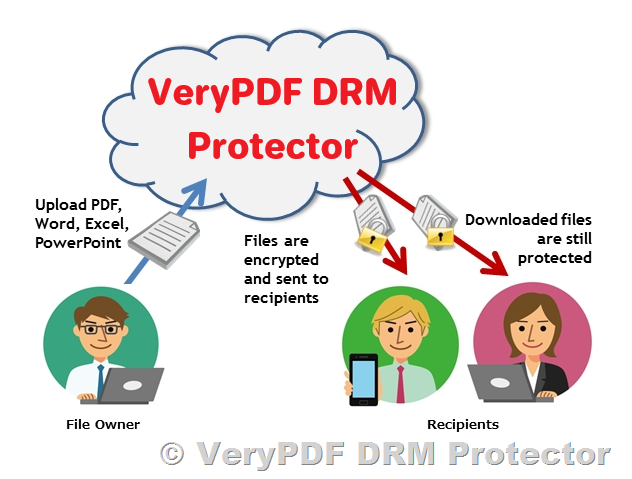
One of the most effective ways to secure your documents is by using Digital Rights Management (DRM) technology. DRM allows you to control how documents are viewed, shared, and printed. It also enables you to limit access to authorized users only.

VeryPDF DRM Protector Online Application is an excellent tool for anyone who needs to send PDFs securely via email. It offers powerful security features that ensure your documents are protected throughout their entire lifecycle.

Using VeryPDF DRM Protector to Secure Your PDFs

VeryPDF DRM Protector is an easy-to-use online tool that provides a simple yet effective way to secure your PDF documents before sending them via email. Below are some key features of the VeryPDF DRM Protector:

  1. Password Protection: You can apply a password to your PDF to restrict unauthorized access. Only the recipient with the correct password can open the document.
  2. View-Only Mode: You can set the PDF to be view-only, preventing the recipient from making any edits or changes to the document. This is perfect for contracts, reports, and other documents where content integrity is critical.
  3. Expiration Dates: You can set an expiration date for the document, ensuring that it can only be accessed within a specific timeframe. This is especially useful for time-sensitive documents.
  4. Disable Copying and Printing: The tool allows you to disable text copying and printing of your PDF, ensuring that the document remains secure and cannot be shared further.
  5. Control on Viewing: You can control how many times the document can be viewed, which is particularly helpful if you want to limit the exposure of your document to just a few instances.
  6. Track User Activity: The application also lets you monitor how the document is accessed, providing a record of who viewed it and when.

How to Use VeryPDF DRM Protector to Send Secure PDFs via Email

Using the VeryPDF DRM Protector is straightforward and quick. Follow these steps to secure your PDF before sending it via email:

  1. Upload Your PDF: Log in to the VeryPDF DRM Protector online application and upload the PDF document you wish to secure.
  2. Apply Security Settings: Choose the security options you wish to apply—such as password protection, expiration dates, and restrictions on printing or copying.
  3. Download the Secured PDF: Once the settings are applied, download the protected PDF to your computer.
  4. Send the PDF via Email: Now that your document is secured, you can confidently attach it to your email. Only authorized recipients will be able to access and view the document according to the restrictions you’ve set.
  5. Inform the Recipient: If necessary, share the password or any other required information with the recipient separately (e.g., via a phone call or secure messaging platform).

Why Choose VeryPDF DRM Protector?

There are many options for securing documents, but VeryPDF DRM Protector stands out due to its simplicity and powerful features. Unlike other tools that require complicated setups or expensive software, VeryPDF offers an affordable and straightforward online solution.

Here’s why you should consider using VeryPDF DRM Protector for your document security needs:

  • User-Friendly: The online interface is intuitive and easy to navigate, making it accessible for users at any skill level.
  • Comprehensive Protection: With a range of security features, you can control how your document is accessed, ensuring it remains secure.
  • No Software Installation Required: Since it’s an online tool, there’s no need to install any software on your computer.
  • Affordable Pricing: VeryPDF offers competitive pricing for its services, making it an ideal solution for businesses, educators, and freelancers alike.
  • Quick Setup: The entire process from uploading to securing your document takes just a few minutes.

Conclusion

Sending documents securely via email is crucial in protecting your sensitive information. With the help of VeryPDF DRM Protector, you can ensure that your PDFs are protected from unauthorized access, tampering, and excessive sharing. Whether you’re sending contracts to clients, assignments to students, or confidential business documents, VeryPDF DRM Protector offers a reliable and easy-to-use solution to secure your files.

Start protecting your documents today with VeryPDF DRM Protector and send your PDFs with confidence!

For more information about how VeryPDF can help you securely send documents, visit our website and explore our pricing plans.


About VeryPDF
VeryPDF is a trusted provider of document security solutions, offering tools to protect and manage your PDF files. Whether you’re a business, educator, or individual, we help ensure your documents are secure and easily managed.

For more information, visit VeryPDF DRM Protector.

How to Secure Your PDF for Download with Pay-as-You-Go and Subscription Models

If you’re looking to secure a single PDF file that can be downloaded from your website, you’re likely interested in finding a way to protect it while also managing the payment process efficiently. In this article, we address common questions about PDF security options, pricing models, and how to handle user access and document downloads.

How to Secure Your PDF for Download with Pay-as-You-Go and Subscription Models

Customer Inquiry: Pay-as-You-Go PDF Security

One of our recent customers, Sunny, reached out to us with an inquiry about securing a single PDF document for download and requested a pay-as-you-go model, where they would pay a percentage each time a client downloads the document. Here’s what they asked:


Customer’s Question:

“I would like to secure a single PDF which will be downloadable from my website. I would ideally like a pay-as-you-go option, i.e., when a client downloads my document, I pay you a percentage each time. Is this something which you offer?”

“I saw the free version available on your website, with all the security I’d need. I wasn’t quite sure what the “N” means, but I’ll go and research this to discover what it means.”

“I really hope I can use your company, and hope the pay-as-you-go is viable!”


Our Response

We truly appreciate a customer’s interest in our solutions, and we would like to clarify some points and offer further guidance regarding our services:

  1. Pay-as-You-Go Model

    Unfortunately, we currently do not offer a pay-as-you-go payment model for our PDF security service. We only provide monthly subscription plans to cover our PDF protection services. These plans are designed to offer flexible usage while ensuring complete security for your files.

    For more information on our pricing options, please refer to the following link: https://drm.verypdf.com/purchase/

    Our subscription-based plans are a cost-effective solution for businesses that need consistent access to document protection tools, and they ensure that you can securely distribute your PDF files without worrying about managing per-download payments.

  2. Understanding “N” – The Limits of Our Service

    Sunny mentioned uncertainty regarding the term “N” that appears on our website, especially in relation to security limits. To clarify, “N” refers to numerical limits set on certain aspects of the service. Here’s a breakdown of what “N” means in this context:

    • Upload User Limit: This refers to the maximum number of users allowed to upload files to our platform.
    • Document Upload Limit: This refers to the maximum number of documents that can be uploaded for protection.
    • Maximum Number of Viewers: This defines the maximum number of people who can view your protected document.
    • Maximum Number of Views: This limits how many times a document can be viewed.

    These limits ensure that you can control how your documents are accessed and by how many people, offering an added layer of security and preventing unauthorized distribution or excessive access.

Why Choose Subscription Over Pay-as-You-Go?

Although we don’t currently offer a pay-as-you-go model, our subscription plans provide several advantages for businesses that regularly need to secure documents. With a subscription, you can upload and manage a wide range of files, control access, and set limits on downloads, views, and more.

The subscription-based model also simplifies budgeting and cost management, as you know exactly what you will be paying each month. It’s perfect for companies that need consistent and reliable protection for a large number of files.

Conclusion

While a pay-as-you-go model may be appealing for some, our subscription plans are designed to provide a scalable and efficient solution for securing PDF documents. We believe that our service offers the flexibility and protection needed for businesses to securely distribute files while managing their costs effectively.

If you have further questions about our service or need assistance with setting up a plan, please don’t hesitate to reach out to us. We look forward to helping you protect your documents and ensure your clients’ information remains safe.


About VeryPDF

VeryPDF is a leading provider of document security solutions, offering tools to protect and manage your PDFs and other documents. With our easy-to-use platform, you can secure, encrypt, and control access to your files, ensuring that they are shared and downloaded securely.

For more information about our PDF security services and to explore our pricing plans, visit https://drm.verypdf.com/purchase/.

Use VeryPDF DRM Protector to Prevent Screenshots and Stop Screen Capture

Protecting intellectual property is more important than ever in today’s digital age, especially for PDF documents and other sensitive content. VeryPDF DRM Protector offers a robust solution to prevent screenshots and screen captures, ensuring your valuable data remains secure from unauthorized copying. Here’s how it works and why it stands out as a leader in document security.

https://drm.verypdf.com/online/

Use VeryPDF DRM Protector to Prevent Screenshots and Stop Screen Capture


Protect PDF Documents from Screen Capture

VeryPDF DRM Protector employs advanced screenshot security technology to block all known screen capture methods, ensuring that protected PDF documents are safe on Windows, Mac, and Android operating systems. This includes disabling the “Print Screen” (PrtScr) key and preventing screen capture applications like SnagIt and the Windows Snipping Tool from taking screenshots.

How It Works

The software uses cutting-edge techniques to block screen grabbing while maintaining system compatibility. Unlike many other tools, VeryPDF DRM Protector does not rely on invasive methods like monitoring keystrokes or blacklisting specific applications. Instead, it integrates seamlessly with secure PDF viewers to ensure minimal system resource usage and maximum security.


Why Disable Screen Capture?

Screen capturing is one of the simplest ways to steal intellectual property. A single screenshot or a series of automated screen grabs can quickly duplicate entire documents, which can then be shared or sold without authorization. For businesses selling PDFs, such as ebooks, CAD drawings, training materials, or images, stopping screen capture is a critical step in preventing piracy.

Many screen capture applications can automate this process, making it even easier for bad actors to extract high-quality document content and misuse it. VeryPDF DRM Protector effectively eliminates this risk by securing your content with powerful DRM (Digital Rights Management) controls.


Key Features of VeryPDF DRM Protector

1. Superior Screenshot Blocking

  • Blocks Print Screen (PrtScr): Disables the use of the Print Screen key across systems.
  • Stops Third-Party Tools: Prevents well-known screen grabbers, such as SnagIt and the Windows Snipping Tool, from capturing protected content.
  • Cross-Platform Protection: Works on Windows, Mac, and Android devices, safeguarding your content regardless of the user’s platform.

2. Advanced Watermarking for Extra Security

While it is difficult to prevent physical screen captures, such as taking photos of a screen with a phone, VeryPDF DRM Protector offers dynamic watermarking to deter unauthorized sharing. Watermarks can include user-specific details such as names, email addresses, and company information, making it easy to identify the source of leaks.

3. Seamless User Experience

Unlike other anti-screenshot solutions that affect system performance or interfere with unrelated applications, VeryPDF DRM Protector operates in a non-invasive manner. It only applies its security measures to the documents you protect, leaving other programs untouched.

4. Beyond Screen Capture Protection

In addition to preventing screenshots, VeryPDF DRM Protector provides robust DRM controls, including:

  • Disabling Copy-Paste: Prevents content copying and pasting into other applications.
  • Restricting Editing and Printing: Ensures documents cannot be altered or printed without permission.
  • Encryption: Safeguards the file with military-grade encryption to prevent unauthorized access.

What Makes VeryPDF DRM Protector Unique?

VeryPDF DRM Protector delivers print screen protection at a significantly higher level than competitors. Many online document viewing solutions or plugins fail to stop screen captures entirely, especially when operating within a browser environment. Unlike browser-based tools, VeryPDF DRM Protector provides direct control over the operating system, making it much harder for users to bypass its security measures.

Additionally, some competitors rely solely on disabling the Print Screen key, which can easily be circumvented with third-party tools or simple workarounds. VeryPDF DRM Protector goes further by stopping screen capture applications at their core, ensuring comprehensive protection against piracy.


Can Anti-Screenshot Software Be User-Friendly?

Yes! While protecting intellectual property is essential, it’s also important to avoid disrupting legitimate users. VeryPDF DRM Protector strikes the perfect balance by:

  • Protecting Only Targeted Documents: Ensuring that other system functions and programs are unaffected.
  • Offering Non-Intrusive Security: Avoiding invasive measures that monitor user activity or interfere with unrelated software.

This approach ensures that users can access and use protected documents without frustration while maintaining robust security.


Limitations and Complementary Measures

No software can prevent physical screen captures (e.g., using a camera) entirely. However, VeryPDF DRM Protector’s dynamic watermarking serves as a strong deterrent, making it clear who accessed and shared sensitive information. For additional security, consider using encryption and restricting document access to trusted environments.


Conclusion

For organizations and individuals looking to secure their intellectual property, VeryPDF DRM Protector provides an unparalleled solution. By preventing screen capture, disabling Print Screen, and offering advanced watermarking, this tool ensures that your PDF documents remain protected against unauthorized copying and piracy.

Whether you’re selling ebooks, publishing CAD designs, or sharing confidential training materials, VeryPDF DRM Protector gives you peace of mind and keeps your content safe.

Protect your work today with VeryPDF DRM Protector and experience the difference in secure PDF document management.


For more information, visit our website and explore the full range of document security solutions offered by VeryPDF.

https://drm.verypdf.com/online/

Protect your PDF content with VeryPDF Online DRM Protector: The best online anti-screenshot and anti-screen capture software to protect your PDF files

In the digital age, protecting intellectual property has never been more critical. VeryPDF Online DRM Protector offers an innovative solution to safeguard your PDF documents from unauthorized access and sharing. Among its many advanced features, the tool excels in preventing screenshots and other forms of unauthorized duplication. This article provides an in-depth look at how VeryPDF Online DRM Protector secures your content with cutting-edge technology and robust security measures.

https://drm.verypdf.com/online/

1. Active Window Focus Protection

VeryPDF DRM Protector ensures that your PDF document remains protected whenever it is not the active window. If the focus shifts away from the DRM Protector’s viewer, the tool automatically activates protective measures to shield the document. This ensures that users cannot capture the content using external screen-recording software or overlapping windows.

Protect your PDF content with VeryPDF Online DRM Protector: The best online anti-screenshot and anti-screen capture software to protect your PDF files

2. Screenshot Shortcut Detection

To prevent unauthorized screenshots, VeryPDF DRM Protector actively monitors common screenshot shortcuts. When a user attempts to take a screenshot, the software detects the action in real-time and immediately secures the PDF document, rendering it inaccessible during the attempt.

3. Mouse Movement Monitoring

The tool also protects content when the user’s mouse moves outside the browser window. By detecting mouse activity outside the viewing area, VeryPDF DRM Protector promptly secures the document, preventing screen captures from external devices or applications.

4. Mac-Specific Screenshot Prevention

For macOS users, VeryPDF DRM Protector extends its functionality to monitor keyboard inputs. When a screenshot shortcut is pressed, the tool reacts instantly to safeguard the document. This ensures that the content remains protected across different operating systems.

5. Export Restriction in Safari

On macOS, VeryPDF DRM Protector also prevents users from exporting the PDF as a separate file through Safari’s “Export as PDF” feature. By blocking such actions, it ensures that the content cannot be duplicated or distributed in unauthorized formats.

6. Printing Restrictions

The software blocks users from printing PDF documents, eliminating the risk of unauthorized physical copies. This adds an extra layer of protection for sensitive or proprietary content.

7. Tiled Watermark for Accountability

VeryPDF DRM Protector allows copyright owners to embed tiled watermarks, such as the recipient’s name, across the document. Even if a user attempts to photograph the content, the embedded watermark makes it possible to trace the source of any unauthorized distribution.

8. Document Expiry Dates

With VeryPDF DRM Protector, copyright owners can set an expiration date for their documents. Once the expiration date is reached, the document becomes inaccessible and is automatically destroyed. This feature is particularly useful for time-sensitive content.

9. View Limits

To further control access, owners can specify the maximum number of times a document can be opened. After exceeding this limit, the document becomes inaccessible and may automatically self-destruct, providing an additional safeguard against overuse.

10. Time-Limited Viewing Sessions

Owners can define the duration for which a document can be viewed in a single session. For example, a document can be set to close automatically after five minutes of viewing, ensuring controlled access and preventing prolonged exposure.

11. Unbreakable Encryption

VeryPDF DRM Protector uses 256-bit AES encryption to secure documents. This level of encryption ensures that the protected PDF files are virtually impossible to decrypt without proper authorization, providing unparalleled content security.

12. Other Noteworthy Features

  • Real-time analytics to monitor document usage.
  • Cross-platform compatibility for seamless performance on Windows, macOS, and mobile devices.
  • Integration capabilities with various content delivery systems.

Conclusion

VeryPDF Online DRM Protector is a powerful tool for safeguarding your PDF documents against unauthorized use, sharing, and duplication. Its robust screenshot prevention features, combined with additional protections like watermarks, viewing restrictions, and advanced encryption, make it an ideal solution for businesses, publishers, and individuals looking to protect their intellectual property.

If you’re looking for a comprehensive DRM solution, VeryPDF Online DRM Protector offers the security and flexibility you need to ensure your content remains protected in today’s fast-paced digital landscape.